Associate II
April 5, 2025
Question

Unable to View Output from STM32 Board via Serial Port

  • April 5, 2025
  • 5 replies
  • 2663 views

Greeting Everyone,

I am facing an issue with my STM32 board having STM32F103C8T6 as MCU, while trying to see a normal "Hello World" output. After debugging the board, I attempted to connect it to my PC via the serial port. To ensure proper communication, I installed the necessary Virtual COM Port drivers from the STM32 website.

However, my PC is not detecting the COM port to which the STM32 board is connected. Additionally, when I try to view the output on the Debugger Console within STM32CubeIDE, I encounter an error that prevents me from seeing the expected output.

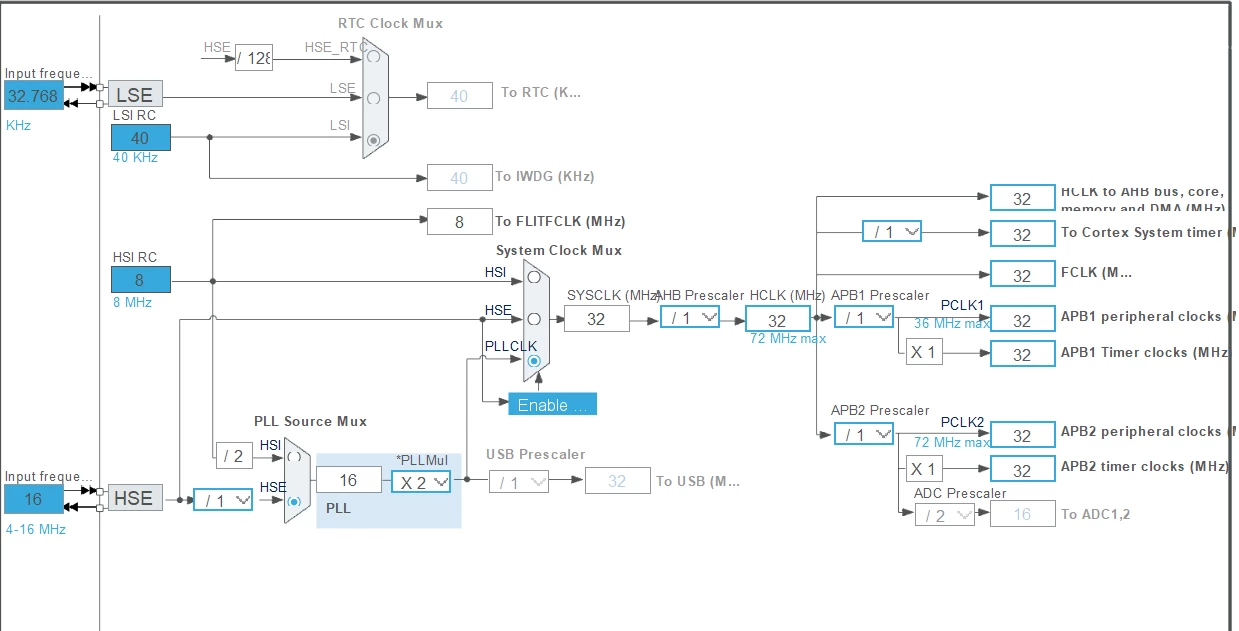
I have written the code below that I'm using to print the Hello World which I have found online. Also I do not know if their is any problem on the code. With this I have also attached the Pin Configuration and Clock configuration details below as images.


#include "main.h"
#include "usart.h"
#include "gpio.h"
#include <stdio.h>
#include <stdint.h>
#include <stm32f1xx_hal_conf.h>


void SystemClock_Config(void);
int _write(int file, char *ptr, int len)
{
int i=0;
for(i=0;i<len;i++)
ITM_SendChar((*ptr++));
return len;
}

uint8_t count = 0;
int main(void)
{
HAL_Init();
SystemClock_Config();
MX_GPIO_Init();
MX_USART2_UART_Init();
while (1)
{
 HAL_GPIO_TogglePin(GPIOA, GPIO_PIN_5);
 count ++;
 printf("Hello World count = %d \n",count);
 HAL_Delay(250);
}
}


void SystemClock_Config(void)
{
RCC_OscInitTypeDef RCC_OscInitStruct = {0};
RCC_ClkInitTypeDef RCC_ClkInitStruct = {0};
RCC_OscInitStruct.OscillatorType = RCC_OSCILLATORTYPE_HSE;
RCC_OscInitStruct.HSEState = RCC_HSE_ON;
RCC_OscInitStruct.HSEPredivValue = RCC_HSE_PREDIV_DIV1;
RCC_OscInitStruct.HSIState = RCC_HSI_ON;
RCC_OscInitStruct.PLL.PLLState = RCC_PLL_ON;
RCC_OscInitStruct.PLL.PLLSource = RCC_PLLSOURCE_HSE;
RCC_OscInitStruct.PLL.PLLMUL = RCC_PLL_MUL2;
if (HAL_RCC_OscConfig(&RCC_OscInitStruct) != HAL_OK)
{
Error_Handler();
}

RCC_ClkInitStruct.ClockType = RCC_CLOCKTYPE_HCLK|RCC_CLOCKTYPE_SYSCLK
 |RCC_CLOCKTYPE_PCLK1|RCC_CLOCKTYPE_PCLK2;
RCC_ClkInitStruct.SYSCLKSource = RCC_SYSCLKSOURCE_PLLCLK;
RCC_ClkInitStruct.AHBCLKDivider = RCC_SYSCLK_DIV1;
RCC_ClkInitStruct.APB1CLKDivider = RCC_HCLK_DIV1;
RCC_ClkInitStruct.APB2CLKDivider = RCC_HCLK_DIV1;
if (HAL_RCC_ClockConfig(&RCC_ClkInitStruct, FLASH_LATENCY_1) != HAL_OK)
{
Error_Handler();
}

}


void Error_Handler(void)

{


__disable_irq();

while (1)

{

}


}


#ifdef USE_FULL_ASSERT


void assert_failed(uint8_t *file, uint32_t line)

{


}

#endif

Could you please assist me in resolving this issue? I would appreciate any guidance or troubleshooting steps you can provide to help me get the serial communication working and view the output correctly.

Thank you for your support!

Best regards,
Ratul Kar
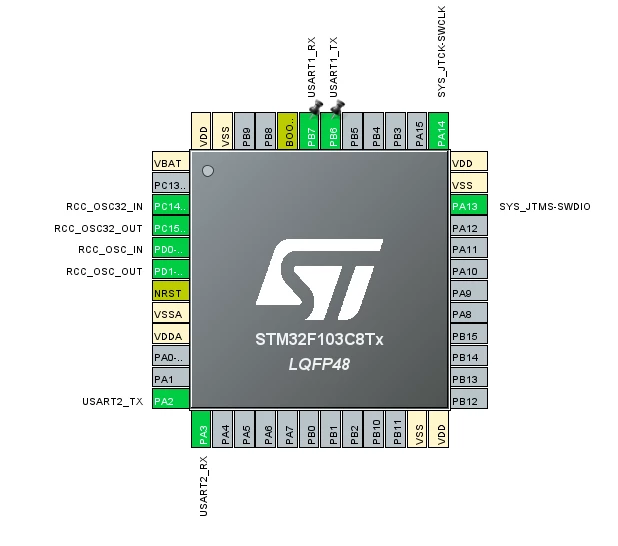

pin configuration.pngclock configuration.png

5 replies

mƎALLEm
ST Technical Moderator
April 5, 2025

Hello @Ratul99 and welcome to the ST Community,

What board are you using? ST board? Custom board? blue/black pill board? and how did you connect the board to a PC with a detailed hardware description.

Thank you

PS: please use </> button to paste your code: see this post. I'm editing your post.


To give better visibility on the answered topics, please click "Best answer" on the reply which solved your issue or answered your question.
Ratul99Author
Associate II
April 5, 2025

Hello @mƎALLEm 


Thank you for the response. As you have asked we are using a custom board and for the debugging part we have used ST Link V2. If anything more details needed please feel free to ask.

Regards

Ratul Kar

Andrew Neil
Super User
April 5, 2025

@Ratul99 wrote:

we are using a custom board


Then please post the schematic.


@Ratul99 wrote:

for the debugging part we have used ST Link V2.


Is it genuine ?

https://community.st.com/t5/stm32-mcus/how-to-recognize-a-genuine-st-link-v2-versus-a-cloned-one/ta-p/49471

In particular: https://community.st.com/t5/stm32-mcus/how-to-recognize-a-genuine-st-link-v2-versus-a-cloned-one/tac-p/703663/highlight/true#M965


@Ratul99 wrote:

I encounter an error that prevents me from seeing the expected output


What error, exactly?


@Ratul99 wrote:

If anything more details needed please feel free to ask.


Please see: How to write your question to maximize your chances to find a solution.

You haven't said what host system you're using, nor what IDE version.


PS:

This is a public forum, visible to anyone & everyone on the internet - so you might want to re-think publishing your email address ...

A complex system that works is invariably found to have evolved from a simple system that worked.A complex system designed from scratch never works and cannot be patched up to make it work.
mƎALLEm
ST Technical Moderator
April 5, 2025

+

You did the printf retarget to the ITM not to the serial port. 

ITM_SendChar((*ptr++));

Look at this example for STM32CubeF1 package:

https://github.com/STMicroelectronics/STM32CubeF1/tree/master/Projects/STM32F103RB-Nucleo/Examples/UART/UART_Printf

Look also at this thread: https://community.st.com/t5/stm32cubemx-mcus/how-to-retarget-printf-on-uart/td-p/380053

To give better visibility on the answered topics, please click "Best answer" on the reply which solved your issue or answered your question.
Ratul99Author
Associate II
April 5, 2025

Hi @mƎALLEm 

I will look into this and let you know if I can get any results out of it.

Thanks again

Ratul

Andrew Neil
Super User
April 5, 2025

Before adding the complexities of printf redirection, be sure that you can get basic direct UART IO working first.

https://community.st.com/t5/stm32-mcus/how-to-redirect-the-printf-function-to-a-uart-for-debug-messages/tac-p/733969/highlight/true#M1096


A complex system that works is invariably found to have evolved from a simple system that worked.A complex system designed from scratch never works and cannot be patched up to make it work.
Tesla DeLorean
Guru
April 5, 2025

The ITM would come out of PB3 SWO via the SWV Viewer in STM32 Cube Programmer or your debugger.

The standalone ST-LINK/V2 doesn't provide a USART via a VCP

For your F103 to provide a VCP you'd need to compile as a USB VCP Device and communicate with that and not the USART, but wouldn't really allow for the type of blocking in-line interaction you're attempting. 

Consider a cheap USB to CMOS Serial dongle for USART comms

Tips, Buy me a coffee, or three.. PayPal Venmo (See Profile) Up vote any posts that you find helpful, it shows what's working..
mƎALLEm
ST Technical Moderator
April 8, 2025

I think I was mistaken when I merged the threads:

mALLEm_0-1744123615369.png

Indeed the second thread is talking about USB_CDC.

I will split the threads then ..

@Ratul99 sorry I merged your threads I thought they contain the same subject/question. So let's keep this thread for USART usage and printf retarget ..

And this one for USB-CDC / Virtual comport implementation

To give better visibility on the answered topics, please click "Best answer" on the reply which solved your issue or answered your question.
Senior II
April 10, 2025

Are you trying to use messages over the VCP for diagnostic purposes or is this communication with the PC part of your actual application and function?