Associate III
April 11, 2024
Solved

FDCAN send a data en hexa

  • April 11, 2024
  • 3 replies
  • 1939 views

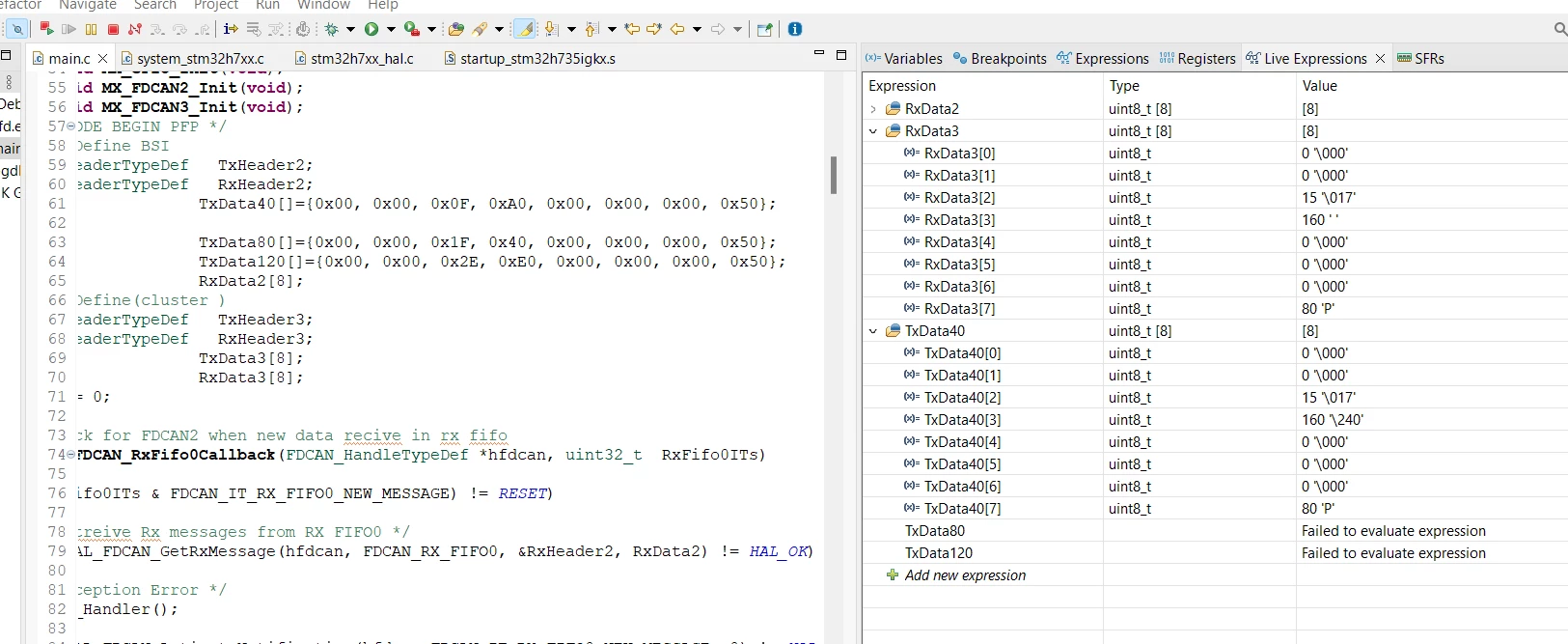
 Hello, I'm new to working with STM32 microcontrollers and coding in C. I'm trying to send data in hexadecimal format using the FDCAN bus. However, when I check my code during debugging, I notice that the transmitted data looks different from what I expected. The same thing seems to happen with the received data. Can you offer any advice or help on how to fix this?

sana1_0-1712850593104.png


This topic has been closed for replies.
Best answer by Andrew Neil

@sana1 wrote:

 Hello, I'm new to working with STM32 microcontrollers and coding in C.


Do you have any experience with any other microcontroller(s) and/or any other language(s) ?


@sana1 wrote:

  I'm trying to send data in hexadecimal format


Data is just sent as bytes.

The content of those bytes can be viewed as binary, or octal, or hex, or decimal, or whatever - but that doesn't make any difference to the content of the bytes.

0x0F (hex) is the same value as 15 (decimal) and 017 (octal) and 00001111 (binary).

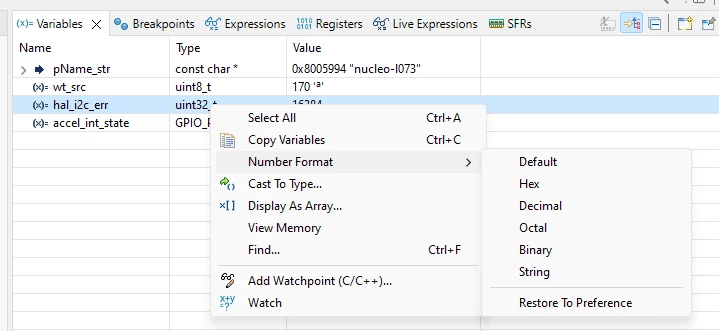
You can choose what format the debugger uses for display by right-clicking, then choosing 'Number Format', then the format you require:
AndrewNeil_0-1712851499671.png


EDIT

All of these are entirely equivalent:


// Hex
TxData40[]={ 0x00, 0x00, 0x0F, 0xA0, 0x00, 0x00, 0x00, 0x50 };

// Decimal
TxData40[]={ 0, 0, 15, 160, 0, 0, 0, 80 };

// Octal
TxData40[]={ 0, 0, 017, 0240, 0, 0, 0, 0120 };

// Binary
TxData40[]={ 0b00000000, 0b00000000, 0b00001111 0b10100000, 0b00000000, 0b00000000, 0b00000000, 0b01010000 };


They would all result in identical data being sent on the bus

Note that C treats any number beginning with a leading zero digit (not followed by 'x' or 'b') as octal.

 

3 replies

Andrew Neil
Andrew NeilBest answer
Super User
April 11, 2024

@sana1 wrote:

 Hello, I'm new to working with STM32 microcontrollers and coding in C.


Do you have any experience with any other microcontroller(s) and/or any other language(s) ?


@sana1 wrote:

  I'm trying to send data in hexadecimal format


Data is just sent as bytes.

The content of those bytes can be viewed as binary, or octal, or hex, or decimal, or whatever - but that doesn't make any difference to the content of the bytes.

0x0F (hex) is the same value as 15 (decimal) and 017 (octal) and 00001111 (binary).

You can choose what format the debugger uses for display by right-clicking, then choosing 'Number Format', then the format you require:

AndrewNeil_0-1712851499671.png


EDIT

All of these are entirely equivalent:


// Hex
TxData40[]={ 0x00, 0x00, 0x0F, 0xA0, 0x00, 0x00, 0x00, 0x50 };

// Decimal
TxData40[]={ 0, 0, 15, 160, 0, 0, 0, 80 };

// Octal
TxData40[]={ 0, 0, 017, 0240, 0, 0, 0, 0120 };

// Binary
TxData40[]={ 0b00000000, 0b00000000, 0b00001111 0b10100000, 0b00000000, 0b00000000, 0b00000000, 0b01010000 };


They would all result in identical data being sent on the bus

Note that C treats any number beginning with a leading zero digit (not followed by 'x' or 'b') as octal.

 

A complex system that works is invariably found to have evolved from a simple system that worked.A complex system designed from scratch never works and cannot be patched up to make it work.
sana1Author
Associate III
April 11, 2024


thank u a lot  it work .

Andrew Neil
Super User
April 11, 2024

The 'Variables' tab only shows local variable - you don't have any local variables at that point, so the tab is empty.


A complex system that works is invariably found to have evolved from a simple system that worked.A complex system designed from scratch never works and cannot be patched up to make it work.