


cancel
Showing results for 
Search instead for 
Did you mean: 

HMD Application -STM32F1 with BNO055 Via VCP

steve feng
Associate II

Hi, I use the stm32f103 to read the IMU(BNO055) via I2C to get the Quaternion data,

I use this library from ivyknob, https://github.com/ivyknob/bno055_stm32

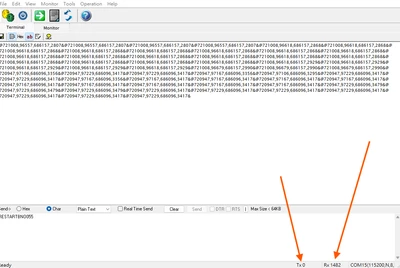
The AR Anchors result is well (Head Mount Display application), I use the USB VCP to Transmit the BNO055 Quaternion data to PC or SBC, using the function CDC_Transmit_FS. But I face a problem immediately, the transmit speed is 100Hz, it will caused the USB_BUSY(race condition), I try some methods, such as add delay in the while loop, using timer interrupt and flag to limit the transmit speed, avoid using sprintf function, it could not solve this problem. As the picture shown below, Tx could write the data from STM32 to PC, but Rx could not write the data from PC to STM32
stevefeng_0-1770104498862.png

Files include the main.c and usbd_cdc_if.c
Could you give me some advices to resolve this problem.


Thank you

Best Regard Steve


5 REPLIES 5
Andrew Neil
Super User

Welcome to the forum.

Please give some more details about your setup - see:

How to write your question to maximize your chances to find a solution

A complex system that works is invariably found to have evolved from a simple system that worked.
A complex system designed from scratch never works and cannot be patched up to make it work.
steve feng
Associate II

Hi, Andrew
Thank you for your advice, I'll write describe my problem more detail.

In the power point, the CubeMX and KEIL configuration and the problem I meet. 

It would be better to describe it here in a post

A complex system that works is invariably found to have evolved from a simple system that worked.
A complex system designed from scratch never works and cannot be patched up to make it work.
steve feng
Associate II

Hi, I try to explain the problem on the website, could you pls give me any advices to solve this problem.

Thank you

BR Steve


Desired Result

  • Stm32 read the Quaternion data via I2C
  • STM32 could send the Quaternion data to PC at default frequency, and the PC could send command (string) to the STM32 via USB VCP ,such turn on HMD, turn off HMD,  Brightness adjust, … … etc. the block structure is shown below
     stevefeng_0-1770263357149.png


STM32 CubeMX Configuration - 1

  • Choose the MCU “STM32f103c8t6”
  • Heap size: 0x200, Stack size: 0x800
  • Page - System Core:
    • RCC: High Speed Clock>> Crystal/Ceramic Resonator
    • SYS: Debug>>Serial Wire
  • Page – Timers:
  • TIM2: Clock Source>>Internal Clock
    • Prescaler: 7199, Counter Period:99
    • NVIC Setting>>TIM2 global interrupt enable
      stevefeng_10-1770270127906.pngstevefeng_11-1770270131392.png

STM32 CubeMX Configuration - 2

  • Page - Connectivity
    • I2C1:I2C>>I2C (Fast Mode)
    • USART1:Mode>>Asynchronous
    • USB: Mode>>Device(FS) selected
  • Page – Middleware and Software Packs
    • USB_Device: Class for FS IP: Communication Device Class (VCP)
  • Others Setting
    • Add necessary library files as reference in  the toolchain project configuration file
    • Generate peripheral initialization as a pair of .c/.h files per peripheral
    • System Core>>NVIC>>Change the Preemption Priority from USB
      stevefeng_6-1770270020188.pngstevefeng_7-1770270028556.png


      stevefeng_8-1770270032056.pngstevefeng_9-1770270036560.png

BNO055 Library and  Hardware

  • Purchase the Adafruit  9-DOF IMU  BNO055
  • Read/Write via the I2C
    • device address:0x28,COM3 pull low
  • Use the Library to from ivyknob
    • Download the “bno055.c”, “bno055_stm32.h”, “bno055.h
    • Put these files in project, *.c file in Src and *.h file in Inc
      stevefeng_4-1770269996271.pngstevefeng_5-1770270000504.png

Test1- BNO055 Testing using UART

  • Use UART to transmit the data(Quaternion) from stm32 to PC to make sure the BNO055 is work or not
  • Options for target”xxxx”, in the target page, select the Use Micro LIB
  • Connect FT232 to USB module to STM32
    • STM32, PA9 TX-> FT232 RX
    • STM32, PA10 RX->FT232 TX
    • STM32, GND->GND
    • Connect the FT232 module and turn on the STM32
    • Open PC’s Device manager to find the COMPORT
    • Open COMPORT terminate software and connected the device start communicate
  • Result: Successful to Read the data from BNO055 and transmit these data to PC COM Portstevefeng_14-1770270845222.png
  • Code


//Include “bno055_stm32.h”
//In user code begin 2
bno055_assignI2C(&hi2c1);
bno055_setup();
bno055_setOperationModeNDOF();
//In user code begin 3
bno055_vector_t v = bno055_getVectorQuaternion();		
int32_t iw = (int32_t)(v.w * 1000000);
int32_t ix = (int32_t)(v.x * 1000000);
int32_t iy = (int32_t)(v.y * 1000000);
int32_t iz = (int32_t)(v.z * 1000000);
printf("@%d,%d,%d,%d&",iw , ix, iy, iz);		
HAL_Delay(10);

Test2- BNO055 Testing using VCP

  • Use VCP to transmit the data(Quaternion) from stm32 to PC to make sure the BNO055 is work or not
  • Options for target”xxxx”, in the target page, select the Use Micro LIB
  • Connect FT232 to USB module to STM32
    • STM32, PA9 TX-> FT232 RX
    • STM32, PA10 RX->FT232 TX
    • STM32, GND->GND
    • Turn on the STM32 with USB Cable
    • Open PC’s Device manager to find the COMPORT
    • Open COMPORT terminate software and connected the device start communicate
  • Result: Successful to Read the data from BNO055 and transmit these data to PC COM Portstevefeng_13-1770270834117.png
  • code
//main.c
//Include “bno055_stm32.h”,”bno055_stm32.h”,”usbd_cdc_if.h”,”stdio.h”,”stdlib.h”,
//In user code begin PV
char msg[128];
//In user code begin 2
HAL_Delay(1000);//important, make sure usb configuration finish.
bno055_assignI2C(&hi2c1);
bno055_setup();
bno055_setOperationModeNDOF();
//In user code begin 3
bno055_vector_t v = bno055_getVectorQuaternion();		
int32_t iw = (int32_t)(v.w * 1000000);
int32_t ix = (int32_t)(v.x * 1000000);
int32_t iy = (int32_t)(v.y * 1000000);
int32_t iz = (int32_t)(v.z * 1000000);
sprintf(msg,"@%d,%d,%d,%d&",iw,ix,iy,iz);
CDC_Transmit_FS((uint8_t*)msg, strlen(msg))		
HAL_Delay(10);

Test3 – STM32 Receive 

  • In my HMD design, there have some commands need to use VCP to communicate PC with STM32. The STM32 needs to determine whether the string transmitted from the PC is a control command or not.
  • In the “usbd_cdc_if.c”>> CDC_Receive_FS function
  • in user code begin 6, add string judgement
  • In the main.c while loop
  • In user code 3, Add the judgement, as picture shown below
  • Result: Fail, PC could not send command to STM32 via VCPstevefeng_12-1770270794024.png
  • code
//usbd_cdc_if.c
static int8_t CDC_Receive_FS(uint8_t* Buf, uint32_t *Len)
{
  /* USER CODE BEGIN 6 */
	Buf[*Len] = '\0';
	if(strcmp((char*)Buf,"RESTARTBNO055")==0)
	{
		FLAG_BNO_RST = 1;
		char dta[]="RESTARK IMU\r\n";
		CDC_Transmit_FS((uint8_t*)dta,strlen(dta));
	}
	USBD_CDC_SetRxBuffer(&hUsbDeviceFS, &Buf[0]);
  USBD_CDC_ReceivePacket(&hUsbDeviceFS);
  return (USBD_OK);
	
	
  USBD_CDC_SetRxBuffer(&hUsbDeviceFS, &Buf[0]);
  USBD_CDC_ReceivePacket(&hUsbDeviceFS);
  return (USBD_OK);
  /* USER CODE END 6 */
}


//main.c while loop
  /* USER CODE BEGIN WHILE */
  while (1)
  {
    /* USER CODE END WHILE */

    /* USER CODE BEGIN 3 */
	if (FLAG_BNO_RST)
	{
	  FLAG_BNO_RST = 0;
	  bno055_setup();
	  bno055_setOperationModeNDOF();
	  reset_timer =HAL_GetTick();
	  //HAL_Delay(3000);  							
	}
  bno055_vector_t v = bno055_getVectorQuaternion();
  int32_t iw = (int32_t)(v.w * 1000000);
  int32_t ix = (int32_t)(v.x * 1000000);
  int32_t iy = (int32_t)(v.y * 1000000);
  int32_t iz = (int32_t)(v.z * 1000000);
  sprintf(msg,"@%d,%d,%d,%d&",iw,ix,iy,iz);
  CDC_Transmit_FS((uint8_t*)msg, strlen(msg));
  }
  /* USER CODE END 3 */

Test4 – STM32 Receive Trying

  • Test1: Comment the CDC_Transmit_FS((uint8_t*)msg, strlen(msg)), PC could send data to STM32
  • Test2: UnComment the CDC_Transmit_FS((uint8_t*)msg, strlen(msg)), PC could not send data to STM32
  • Test3: Add 1000ms delay after CDC_Transmit_FS((uint8_t*)msg, strlen(msg)), PC could send data to STM32, but this frequency could not realize the AR Anchor effect,(BNO055 default setting 100Hz, this setting will get the best Euler Angle for head mount display for human pose estimation, therefore, I hope to maintain this frequency)
  • Test4: Using the timer interrupt to limit the STM32 to PC’s send frequency, timer ISR: 72Mhz/7200/100 (F=100Hz) (T=10ms), the setting shown in the right-hand side, PC could not send data to STM32
  • code
  /* Infinite loop */
  /* USER CODE BEGIN WHILE */
  while (1)
  {
    /* USER CODE END WHILE */

    /* USER CODE BEGIN 3 */
		bno055_vector_t v = bno055_getVectorQuaternion();
		
		if(timer_10ms_flag==1)
		{
			timer_10ms_flag=0;
			pkt.header = '@';
			pkt.w = v.w;
			pkt.x = v.x;
			pkt.y = v.y;
			pkt.z = v.z;
			pkt.tail = '&';			
			CDC_Transmit_FS((uint8_t*)&pkt,sizeof(pkt));
			char dta[]="RESTARK IMU\r\n";
			CDC_Transmit_FS((uint8_t*)dta,strlen(dta));				
		}
		if(FLAG_BNO_RST==1)
		{
			FLAG_BNO_RST=0;
			bno055_assignI2C(&hi2c1);
			bno055_setup();
			bno055_setOperationModeNDOF();
			char dta[]="while1 restart\r\n";
			CDC_Transmit_FS((uint8_t*)dta,strlen(dta));	
			HAL_Delay(2000);			
		}
  }
  /* USER CODE END 3 */​


steve feng
Associate II

Hi, members, There have some kind people give me some advice and I try it

Update this column. 2026.02.13
-------------------------------------------------------------------------------------------------------------------------

  • advice1:
    • Method: Try to moving the "USBD_CDC_SetRxBuffer " and "USBD_CDC_ReceivePacket" statements from the "cdc_receive_fs" before the if statement
    • Reason: Timing optimization, no architecture changes
    • Result: Fail
    • Code:
static int8_t CDC_Receive_FS(uint8_t* Buf, uint32_t *Len)
{
  /* USER CODE BEGIN 6 */
        USBD_CDC_SetRxBuffer(&hUsbDeviceFS, &Buf[0]);
        USBD_CDC_ReceivePacket(&hUsbDeviceFS);
	Buf[*Len] = '\0';
	if(strcmp((char*)Buf,"RESTARTBNO055")==0)
	{
	 FLAG_BNO_RST = 1;
	 char dta[]="RESTARK IMU\r\n";
	 CDC_Transmit_FS((uint8_t*)dta,strlen(dta));
	}
        //USBD_CDC_SetRxBuffer(&hUsbDeviceFS, &Buf[0]);
        //USBD_CDC_ReceivePacket(&hUsbDeviceFS);
  return (USBD_OK);
  /* USER CODE END 6 */
}​


-------------------------------------------------------------------------------------------------------------------------

  • advcie2:
    • Don't do any other progress in the receiving function, just copy the contents of "Buf" to your variable according to the number of "Len" variables.
    • Reason: Just copy the buffer data, do not do other progress
    • result: both, Fail
    • code1:
//in the usbd_cdc_if.c
#define CDC_RX_BUF_SIZE 256
volatile uint8_t  cdc_rx_buf[CDC_RX_BUF_SIZE];
volatile uint16_t cdc_rx_head = 0;
volatile uint16_t cdc_rx_tail = 0;


static int8_t CDC_Receive_FS(uint8_t* Buf, uint32_t *Len)
{
    for(uint32_t i = 0; i < *Len; i++)
    {
        ringbuffer_put(Buf[i]);
    }
    USBD_CDC_SetRxBuffer(&hUsbDeviceFS, Buf);
    USBD_CDC_ReceivePacket(&hUsbDeviceFS);
    return USBD_OK;
}
//add this function
void ringbuffer_put(uint8_t data)
{
    uint16_t next = (cdc_rx_head + 1) % CDC_RX_BUF_SIZE;

    if(next != cdc_rx_tail)   // buffer not full
    {
        cdc_rx_buf[cdc_rx_head] = data;
        cdc_rx_head = next;
    }
    else
    {
    }
}
//in the main.c 
//add this funciton
void CDC_Process(void)
{
    static char cmd[64];
    static uint8_t idx = 0;

    while(cdc_rx_tail != cdc_rx_head)
    {
        char c = cdc_rx_buf[cdc_rx_tail];
        cdc_rx_tail = (cdc_rx_tail + 1) % CDC_RX_BUF_SIZE;

        if(c == '\n')
        {
            cmd[idx] = 0;
            idx = 0;

            if(strcmp(cmd, "RESTARTBNO055\r") == 0)
            {
                FLAG_BNO_RST = 1;
                CDC_Transmit_FS((uint8_t*)"RESTART IMU\r\n", 13);
            }
        }
        else
        {
            if(idx < sizeof(cmd)-1)
                cmd[idx++] = c;
        }
    }
}

// in the while loop
while(1)
{
    CDC_Process();
    bno055_vector_t v = bno055_getVectorQuaternion();
    int32_t iw = (int32_t)(v.w * 1000000);
    int32_t ix = (int32_t)(v.x * 1000000);
    int32_t iy = (int32_t)(v.y * 1000000);
    int32_t iz = (int32_t)(v.z * 1000000);
    sprintf(msg, "@%d,%d,%d,%d&\r\n", iw, ix, iy, iz);  
    if (CDC_Transmit_FS((uint8_t*)msg, strlen(msg)) == USBD_OK) {
    } else {}
    HAL_Delay(10);
    }


​
  • code2:
//in the usbd_cdc_if.c
static int8_t CDC_Receive_FS(uint8_t* Buf, uint32_t *Len) {
  /* USER CODE BEGIN 6 */
  if (*Len < CDC_RX_BUF_SIZE) {
    memcpy(rx_buffer, Buf, *Len);
    rx_buffer[*Len] = '\0'; 
    rx_len = *Len;
    rx_flag = 1; 
  }
  USBD_CDC_SetRxBuffer(&hUsbDeviceFS, &Buf[0]);
  USBD_CDC_ReceivePacket(&hUsbDeviceFS);
  return (USBD_OK);
}

//in the main.c
  /* USER CODE BEGIN WHILE */
  while (1)
  {
    /* USER CODE END WHILE */

    /* USER CODE BEGIN 3 */
	if(rx_flag)
	{
		rx_flag = 0;
		if(strcmp((char*)rx_buffer,"RESTARTBNO055")==0)
		{
			char dta[] = "restart imu\r\n";
			CDC_Transmit_FS((uint8_t*)dta,strlen(dta));
			FLAG_BNO_RST=1;
		}
	}
	if (FLAG_BNO_RST)
			{
				bno055_setup();
				bno055_setOperationModeNDOF();
				FLAG_BNO_RST = 0;								
			}			
	 bno055_vector_t v = bno055_getVectorQuaternion();
		int32_t iw = (int32_t)(v.w * 1000000);
		int32_t ix = (int32_t)(v.x * 1000000);
		int32_t iy = (int32_t)(v.y * 1000000);
		int32_t iz = (int32_t)(v.z * 1000000);
		sprintf(msg,"@%d,%d,%d,%d&\r\n",iw,ix,iy,iz);
		if(CDC_Transmit_FS((uint8_t*)msg, strlen(msg))==USBD_BUSY)
		{}
		else{}
		HAL_Delay(10);
  }
  /* USER CODE END 3 */​

-------------------------------------------------------------------------------------------------------------------------

ref:
1. https://community.st.com/t5/stm32-mcus-embedded-software/receive-via-usb-cdc-a-k-a-virtual-com-port/td-p/759154
2. https://mcu.eetrend.com/content/2017/100008322.html

3. https://community.st.com/t5/stm32-mcus-embedded-software/usb-cdc-receive-for-the-stm32f103c8-using-cubemx/td-p/335561

-------------------------------------------------------------------------------------------------------------------------

remark: I try to slow down the frequency from100hz to 20hz, the data could send and receive via USB VCP. Conditions where using the Kalman filter is unfavorable.