


Jonah
Associate
Mar 29, 2021 8:13 PM UTC
Question

"No STM32 target found" on consumer device

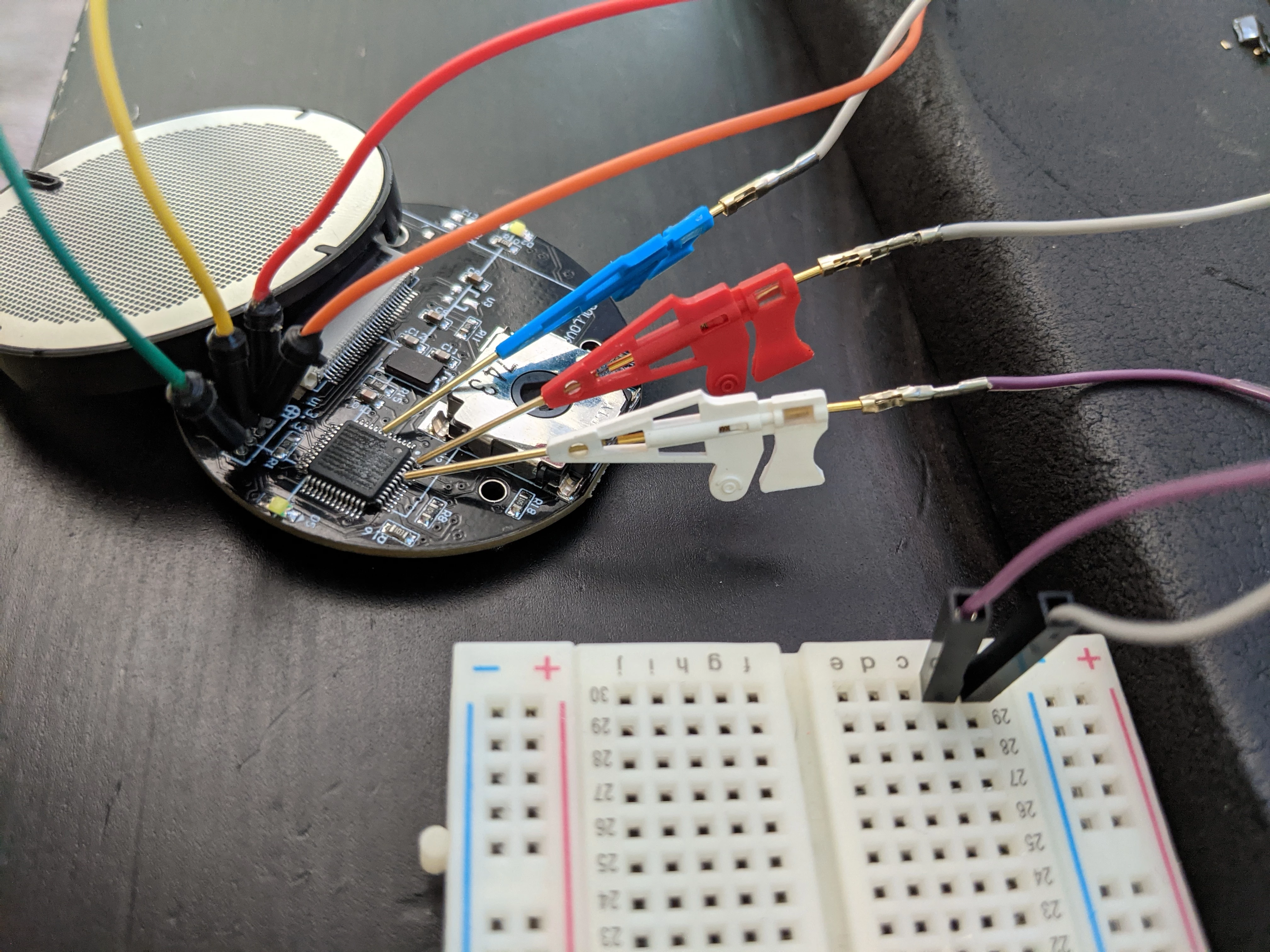
I'm trying to use a ST-LINKv2 to re-program a consumer device that I know has an STM32 of some kind inside (fairly sure it's a STM32L-something). I found four headers on the board that a continuity tester has shown to be Vdd, Vcc, SCLK, and SWDIO.

Connecting with only those 4 wires did not allow STM32CubeProgrammer to connect to the device. It gives the message "No STM32 target found!". Same with the ST-Link Utility. So I next tried tying boot0 high (w/ and w/out a 1k resistor). I have confirmed that this prevents the device's normal program from starting. Connection still fails. I then tried connecting NRST to the ST-LINK so that it could control hardware-reset. I can verify that trying to connect to the device does reset it over NRST. But it still can't connect

Port: SWD

Frequency: 100kHz

Mode: Under reset

Reset mode: Hardware Reset

Output:

12:57:17 : ST-LINK SN : 55FF6E066684564922161687
 12:57:17 : ST-LINK FW : V2J37S7
 12:57:17 : Board : --
 12:57:17 : Voltage : 1.05V
 12:57:17 : Error: No STM32 target found!

If I increase the frequency to 4000kHz, then the error changes to: "Error: ST-LINK error (DEV_TARGET_CMD_ERR)"

I've tried so many combinations of configurations, swapped the CLK/IO pins just to be sure, updated the ST-LINK firmware, but nothing fixes the connection. Am I missing something obvious here? Is it possible that the chip is locked-down during manufacturing so that it can't be modified?
0693W000008yDk9QAE.jpg

This topic has been closed for replies.

10 replies

Tesla DeLorean
Guru
Mar 29, 2021 8:24 PM UTC

>>Is it possible that the chip is locked-down during manufacturing so that it can't be modified?

Given they defaced the markings, would expect they set Read Out Protection and turned off SWD/JTAG

Tips, Buy me a coffee, or three.. PayPal Venmo (See Profile) Up vote any posts that you find helpful, it shows what's working..
Jonah
JonahAuthor
Associate
Mar 30, 2021 1:56 AM UTC

> Given they defaced the markings

Is it normal to obfuscate chip markings on purpose during manufacturing?

> would expect they set Read Out Protection and turned off SWD/JTAG

How likely is that, and does that mean there's nothing I can do? If RDP is enabled, is it possible to still write a new program?

Uwe Bonnes
Chief
Apr 15, 2021 9:53 AM UTC

You can only write to an RDP2 device if there is a loader program in the device.

Jonah
JonahAuthor
Associate
Apr 11, 2021 6:58 PM UTC

Just leaving a follow-up on this. I'm not certain yet whether the issue was with the RDP. I took the nuclear option and soldered a replacement MCU onto the board. It had the exact same problem (no target) until I found another tutorial on how to interface with bare MCUs. Video #5 in this post described how the SWCLK needs to be tied to Vcc, and SWDIO needs to be pulled to Vdd.

https://hackaday.io/project/25097-arm-microcontroller-bare-chip-tutorial-series

Adding that to the wiring setup allowed me to read from the new empty replacement.

waclawek.jan
Super User
Apr 11, 2021 9:17 PM UTC

SCLK/SWDIO are pulled up/down as needed internally, read the GPIO chapter in RM for your STM32. If external pullups/downs worked, it probably was coincidental or it masked some other problems. Long flying leads are often source of problems with high-speed signals, coupled with inadequate return/ground; and the breadboard is something I recommend to position strategically into the garbage pin.

JW

Jonah
JonahAuthor
Associate
Apr 15, 2021 1:16 AM UTC

Based on your comment, I decided to to a bit more fiddling. I've found that not having a pull-down on SWCLK ground did not affect things. However, with dozens of attempts either way, it can only read when SWDIO has a pull-up resistor.

Unfortunately without fabricating a custom connector, I'm stuck with the breadboard for now. Another thing I found is that selecting any frequency besides 4000kHz prevents reading. I thought selecting a lower frequency would reduce any signal integrity issues, but it does not connect when that's changed

Uwe Bonnes
Chief
Apr 15, 2021 9:55 AM UTC

Try other debuggers, like pyocd, openocd or bl*ckma*gic hosted. They may be more verbose.

Jonah
JonahAuthor
Associate
Apr 18, 2021 10:41 PM UTC

It seems that you are correct. I did some googling on how to use openocd, and this blog post came up indicating that the target still needs external power

http://www.rudi-horn.de/Home/7-debugging-the-stmf-with-an-st-linkv-and-openocd

This is consistent with my experimentation. If I try to connect with openocd without a resistor, it gives me this output:

~ >>> sudo openocd -f interface/stlink.cfg -f target/stm32l5x.cfg -c 'adapter speed 4000'
Open On-Chip Debugger 0.11.0
Licensed under GNU GPL v2
For bug reports, read
	http://openocd.org/doc/doxygen/bugs.html
Info : auto-selecting first available session transport "hla_swd". To override use 'transport select <transport>'.
Info : The selected transport took over low-level target control. The results might differ compared to plain JTAG/SWD
adapter speed: 4000 kHz
 
Info : Listening on port 6666 for tcl connections
Info : Listening on port 4444 for telnet connections
Info : clock speed 4000 kHz
Info : STLINK V2J29S7 (API v2) VID:PID 0483:3748
Info : Target voltage: 1.419829
Error: target voltage may be too low for reliable debugging
Error: init mode failed (unable to connect to the target)

Note the warning at the bottom about the voltage (1.4v is definitely too low). It's not totally clear how a pull-up resistor on SWDIO would change that (brings it up to 2.8v according to openocd), but it does.

If I remove the pull-up resistor _but also_ touch the original batteries to the contacts, the power again comes up to almost 3v. Here's the output when it successfully connects:

~ >>> sudo openocd -f interface/stlink.cfg -f target/stm32l5x.cfg -c 'adapter speed 4000'
Open On-Chip Debugger 0.11.0
Licensed under GNU GPL v2
For bug reports, read
	http://openocd.org/doc/doxygen/bugs.html
Info : auto-selecting first available session transport "hla_swd". To override use 'transport select <transport>'.
Info : The selected transport took over low-level target control. The results might differ compared to plain JTAG/SWD
adapter speed: 4000 kHz
 
Info : Listening on port 6666 for tcl connections
Info : Listening on port 4444 for telnet connections
Info : clock speed 4000 kHz
Info : STLINK V2J29S7 (API v2) VID:PID 0483:3748
Info : Target voltage: 2.981484
Info : stm32l5x.cpu: hardware has 8 breakpoints, 4 watchpoints
Info : starting gdb server for stm32l5x.cpu on 3333
Info : Listening on port 3333 for gdb connections

So it seems you're right, the pull-up is not necessary for normal operation. In fact when I provide the battery power, connecting at lower frequencies (even as low as 50) works. However, `mdb` isn't working as I would expect. I can't yet dump any flash data, but that's probably user-error. Here's what I get over telnet:

~ >>> telnet 127.0.0.1 4444 
Trying 127.0.0.1...
Connected to 127.0.0.1.
Escape character is '^]'.
Open On-Chip Debugger
> mdb 0x0 64 
 
jtag status contains invalid mode value - communication failure
Polling target stm32l5x.cpu failed, trying to reexamine
stm32l5x.cpu: hardware has 8 breakpoints, 4 watchpoints
Previous state query failed, trying to reconnect
>

I'll post here again if I figure out how to get the flash dump to work.

Jonah
JonahAuthor
Associate
Apr 19, 2021 1:46 AM UTC

Made progress with reading with OpenOCD. It thinks that it's reading, but it always prints out zeros, no matter where I read from. Even addresses that according to the manual (such as the device ID) are zero.

~ >>> sudo openocd -f interface/stlink.cfg -f target/stm32l5x.cfg -c 'init' -c 'mdw 0x0BFA0590 3' -c 'exit'
Open On-Chip Debugger 0.11.0
Licensed under GNU GPL v2
For bug reports, read
	http://openocd.org/doc/doxygen/bugs.html
Info : auto-selecting first available session transport "hla_swd". To override use 'transport select <transport>'.
Info : The selected transport took over low-level target control. The results might differ compared to plain JTAG/SWD
Info : clock speed 500 kHz
Info : STLINK V2J29S7 (API v2) VID:PID 0483:3748
Info : Target voltage: 2.899213
Info : stm32l5x.cpu: hardware has 8 breakpoints, 4 watchpoints
Info : starting gdb server for stm32l5x.cpu on 3333
Info : Listening on port 3333 for gdb connections
0x0bfa0590: 00000000 00000000 00000000

For reference, the address there (0x0BFA0590) is taken from RM0438, section 53.1

https://www.st.com/resource/en/reference_manual/dm00346336-stm32l552xx-and-stm32l562xx-advanced-armbased-32bit-mcus-stmicroelectronics.pdf

Jonah
JonahAuthor
Associate
Apr 19, 2021 1:52 AM UTC

False alarm! I accidentally had the reset jumper tied low from testing a previous theory. I can now read meaningful data.

~ >>> sudo openocd -f interface/stlink.cfg -f target/stm32l5x.cfg -c 'init' -c 'reset init' -c 'mdw 0x0BFA0590 9' -c 'exit'
Open On-Chip Debugger 0.11.0
Licensed under GNU GPL v2
For bug reports, read
	http://openocd.org/doc/doxygen/bugs.html
Info : auto-selecting first available session transport "hla_swd". To override use 'transport select <transport>'.
Info : The selected transport took over low-level target control. The results might differ compared to plain JTAG/SWD
Info : clock speed 500 kHz
Info : STLINK V2J29S7 (API v2) VID:PID 0483:3748
Info : Target voltage: 2.806299
Info : stm32l5x.cpu: hardware has 8 breakpoints, 4 watchpoints
Info : starting gdb server for stm32l5x.cpu on 3333
Info : Listening on port 3333 for gdb connections
target halted due to debug-request, current mode: Thread 
xPSR: 0xf9000000 pc: 0xfffffffe msp: 0xfffffffc
0x0bfa0590: 00150010 59505003 20373858 ffffffff ffffff1b ffffffff 06750405 ffffffff

This topic can be considered closed I guess, as far as I can tell, I have full access to the device. Thank so much for your help @Community member​ , @Uwe Bonnes​ and @Community member​