

mantisrobot
Associate III
November 29, 2021
Solved

DMA _Init() being called in wrong place by code generator

  • November 29, 2021
  • 4 replies
  • 2855 views

The code generator is inserting the DMA_Init() and BDMA_Init functions in the wrong place, leaving DMA not working unless I manually move them after every call code generator run.

I place them in the USER CODE segment above the INIT segment then remove the auto generated versions each time otherwise DMA doesn't work.

 /* USER CODE BEGIN SysInit */
 MX_BDMA_Init();
 MX_DMA_Init();
 
 /* USER CODE END SysInit */
 
 /* Initialize all configured peripherals */
 MX_GPIO_Init();
 MX_USART3_UART_Init();
 MX_USART2_UART_Init();
 MX_TIM2_Init();
 MX_DMA_Init(); // PLACED HERE BY CODE GENERATOR
 MX_LPUART1_UART_Init();
 MX_BDMA_Init(); // PLACED HERE BY CODE GENERATOR
 MX_I2C1_Init();
 MX_TIM3_Init();
 /* USER CODE BEGIN 2 */

This topic has been closed for replies.
Best answer by Khouloud OTHMAN

Hello @mantisrobot​ ,

As I've already stated, the MX_DMA_Init wrong order is corrected in the latest CubeMX version. Hence newly created project with this version will generate the correct initialization functions order.

For old projects, hereafter some steps to overcome this misbehavior:

  1. Open the saved .ioc file (already created with 6.3.0 version) with any text editor installed in your machine and delete the line: ProjectManager.functionlistsort=.....
  2. After saving the modification, re-open the .ioc file with latest CubeMX version 6.4.0 ( STM32CubeIDE Version: 1.8.0).
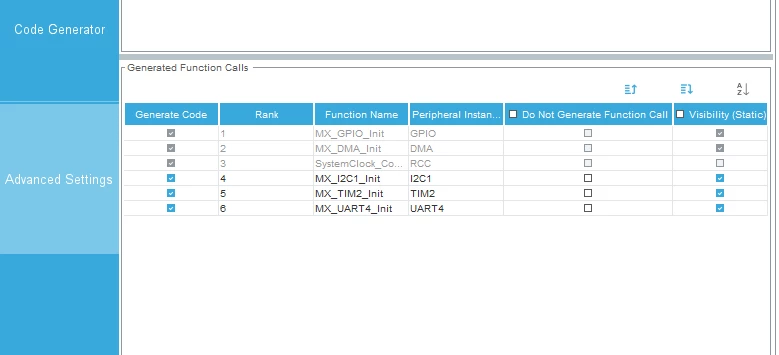
  3. Through Project Manager view > Advanced Settings tab, make sure that the initialization functions are correctly ordered and re-generate your project:

0693W00000GZRkyQAH.pngThe project will be correctly generated.

Hope this will help. Otherwise do not hesitate to raise any feedback.

Khouloud.

4 replies

waclawek.jan
Super User
November 29, 2021

This is a known bug. Maybe in the new version of CubeMX it's fixed.

JW

Khouloud OTHMAN
Associate
November 29, 2021

Hello @mantisrobot​ ,

 As already mentioned by @Community member​ , this is a known issue. In fat, it is a regression that was detected with CubeMX 6.3.0 version and corrected in the latest STM32CubeMX 6.4.0 version published lately.

Please make sure to upgrade your CubeMX to the latest version.

Hope that this misbehavior will no longer be reproduced from your side.

Khouloud.

mantisrobot
Associate III
November 29, 2021

Hi,

I'm using STM32CubeIDE Version: 1.7.0

Matt.

Khouloud OTHMAN
Associate
November 29, 2021

Hi @mantisrobot​ ,

STM32CubeIDE Version1.7.0 is integrating  STM32CubeMX 6.3.0 version. A new version of STM32CubeIDE is available: version 1.8.0 aligned with the latest STM32CubeMX 6.4.0.

Khouloud.

Khouloud OTHMAN
Khouloud OTHMANBest answer
Associate
November 30, 2021

Hello @mantisrobot​ ,

As I've already stated, the MX_DMA_Init wrong order is corrected in the latest CubeMX version. Hence newly created project with this version will generate the correct initialization functions order.

For old projects, hereafter some steps to overcome this misbehavior:

  1. Open the saved .ioc file (already created with 6.3.0 version) with any text editor installed in your machine and delete the line: ProjectManager.functionlistsort=.....
  2. After saving the modification, re-open the .ioc file with latest CubeMX version 6.4.0 ( STM32CubeIDE Version: 1.8.0).
  3. Through Project Manager view > Advanced Settings tab, make sure that the initialization functions are correctly ordered and re-generate your project:

0693W00000GZRkyQAH.pngThe project will be correctly generated.

Hope this will help. Otherwise do not hesitate to raise any feedback.

Khouloud.

mantisrobot
Associate III
December 2, 2021

Hi,

Thanks for the reply. This migration step fixed the issue!

Regards

matt.