
cancel
Showing results for 
Search instead for 
Did you mean: 

Floating Point variable debug - limit decimal places ?

tensaisakuragi06
Associate III

To sum up my project, i get temperature value from NTC. I made ADC reading. There is no problem about getting values. I define temperature value as floating point variable. When observing it on debug screen, because it was floating, numbers after . is too much like seven digit. As you see in picture, is there any way to reduce the number of digits on debug window?
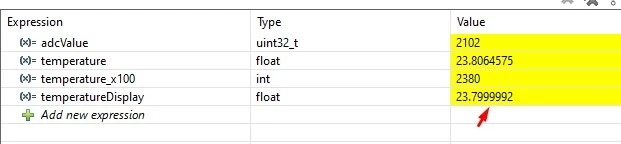
 

temperatureDisplaytemperatureDisplay


1 ACCEPTED SOLUTION

Accepted Solutions

@Ozone wrote:

Not using float at all will save you several kB of code space.


Indeed.

Even though the F4 does have an FPU, it is only single-precision - which can cause issues with standard C libraries:

Be aware: Floating Point Operations on ARM Cortex-M4F


And that's apart from all the other issues inherent in floating-point on binary computers:

Pitfalls of Floating-Point Numbers (And How To Avoid Them)

What every computer scientist should know about floating-point arithmetic

See also: https://docs.oracle.com/cd/E19957-01/806-3568/ncg_goldberg.html 

A complex system that works is invariably found to have evolved from a simple system that worked.
A complex system designed from scratch never works and cannot be patched up to make it work.

View solution in original post

9 REPLIES 9
Andrew Neil
Super User

@tensaisakuragi06 wrote:

I define temperature value as floating point variable.


Why ?

A complex system that works is invariably found to have evolved from a simple system that worked.
A complex system designed from scratch never works and cannot be patched up to make it work.
tensaisakuragi06
Associate III

Its a little disturbing. It feels like value changes frequently. I do not need precise measurement. Just two digits is enough for me. This is actually not a problem. I seek for if it was possible.

waclawek.jan
Super User

Instead of the variable itself, you can perhaps display an expression which contains rounded/truncated value.

Just an idea to be experimented with, maybe not viable - I don't use Cube.

JW

You can do the calculation in integer. Or in integer fractions ("scaled math", e.g. in 1/10th °C).
Not using float at all will save you several kB of code space.

I can't really comment on the CubeIDE debugger, I don't use it.
But I would check if the context menu has such a precision option, or check the manual.

tensaisakuragi06
Associate III

In excell, it gives option show two digits after , :) . Its not a major problem(it is actually not a problem). Maybe later this option can be added. I am not sure this kind of thing is logical or not. By the way, when i display value on LCD or OLED(any kind of screen), i can display it as two digits after . as library functions allows me to do. So, if it is not possible i can left it as it is.


@Ozone wrote:

Not using float at all will save you several kB of code space.


Indeed.

Even though the F4 does have an FPU, it is only single-precision - which can cause issues with standard C libraries:

Be aware: Floating Point Operations on ARM Cortex-M4F


And that's apart from all the other issues inherent in floating-point on binary computers:

Pitfalls of Floating-Point Numbers (And How To Avoid Them)

What every computer scientist should know about floating-point arithmetic

See also: https://docs.oracle.com/cd/E19957-01/806-3568/ncg_goldberg.html 

A complex system that works is invariably found to have evolved from a simple system that worked.
A complex system designed from scratch never works and cannot be patched up to make it work.

Be aware: Floating Point Operations on ARM Cortex-M4F this article give idea and helpful for me. I can accept it as solution. TY.

You may want to scale to an integer. If you want 2 digits multiply by 100, if you want 3 multiply by 1000. etc. Add 0.5 to round.

 
Screenshot 2026-04-02 162645.png

You can also scale back to float/double, but the downside is that you cannot represent all decimal fractions perfectly with powers of 2. Such as 0.1:

Screenshot 2026-04-02 163046.png

If you want more options you can use snprintf to print the value to a string and then add the string to live expression.


Screenshot 2026-04-02 163706.png

Screenshot 2026-04-02 164008.png

Kudo posts if you have the same problem and kudo replies if the solution works.
Click "Accept as Solution" if a reply solved your problem. If no solution was posted please answer with your own.

@tensaisakuragi06 wrote:

 I can accept it as solution. TY.


It is a side-track from the original question of formatting in the debugger.

The thing with formatting in the debugger is - how much would it actually get used?

Remember that it's just a debug view - it's not an end-user display

As noted, a lot of embedded system just avoid floating-point altogether anyhow.

A complex system that works is invariably found to have evolved from a simple system that worked.
A complex system designed from scratch never works and cannot be patched up to make it work.