

scottSD
Senior III
November 4, 2019
Solved

Definition of USE_BPP when compiling code in STM32CubeIDE 'not declared in this scope'.

  • November 4, 2019
  • 1 reply
  • 1732 views

I have a project that compiles fine when compiling within TouchGFX 4.12.3's "Run Target".

However I am attempting to compile/debug a similar project via STM32CubeIDE 1.1.0 and am running into an error that says 'USE_BPP' was not declared in this scope.

I see that USE_BPP is defined in TouchGFX\config\gcc\app.mk:
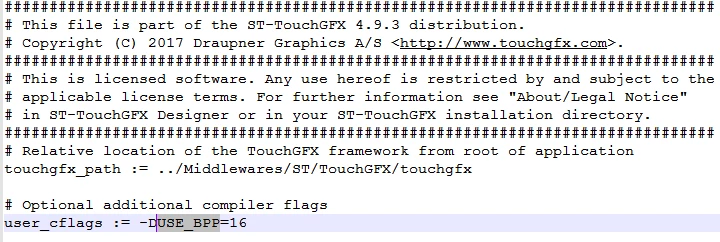
0690X00000ArfBpQAJ.png

Is USE_BPP supported in TouchGFX 4.12.3? I assume it is since it works when not compiled in STM32CubeIDE.

I was planning on using this to determine what depth to set bmp cache for dynamic bitmaps.

This topic has been closed for replies.
Best answer by scottSD

Martin,

Thanks for the reply. You are correct. I did copy in some code from a previously created application within the TouchGFX designer.

It took a bit of digging, but I did find out where to set it up in the compiler settings. I describe what to do in STM32CubeIDE below in case anyone else has this same question:

1) Go to the project's Properties.

2) Under C/C++ Build, select "Settings".

3) Select the "Tool Settings" tab.

4) Under MCU G++ Compiler, select "Preprocessor".

5) Add the Define symbol. In this case I added USB_BPP=16

6) Apply and Close.

Note that this will need to be changed if hardware configuration changes (it is not automatically changed if you setup 24 BPP in CubeMX).

1 reply

Martin KJELDSEN
Principal III
November 5, 2019

Hi @scottSD​,

I would imagine that you're trying to compile an application created from an application template through the designer, with CubeIDE. Correct? Your BoardConfiguration is expecting USE_BPP because it supports multiple bit depths and CubeIDE does not know anything about this .mk file.

You could simply define this symbol in your compiler settings for CubeIDE and it should work. Let me know!

/Martin

scottSD
scottSDAuthorBest answer
Senior III
November 5, 2019

Martin,

Thanks for the reply. You are correct. I did copy in some code from a previously created application within the TouchGFX designer.

It took a bit of digging, but I did find out where to set it up in the compiler settings. I describe what to do in STM32CubeIDE below in case anyone else has this same question:

1) Go to the project's Properties.

2) Under C/C++ Build, select "Settings".

3) Select the "Tool Settings" tab.

4) Under MCU G++ Compiler, select "Preprocessor".

5) Add the Define symbol. In this case I added USB_BPP=16

6) Apply and Close.

Note that this will need to be changed if hardware configuration changes (it is not automatically changed if you setup 24 BPP in CubeMX).