mehmet.karakaya
Associate III
December 10, 2012
Question

help ! memcpy causes hardfault

  • December 10, 2012
  • 17 replies
  • 6839 views
Posted on December 10, 2012 at 22:37

hello forum ,


I am trying to run a TCP/IP demo on a Olimex STM32F4 board


with eclipse + yagarto


however I cannot connect to the board with LAN


when I stop the demo with JTAG to look where it hangs


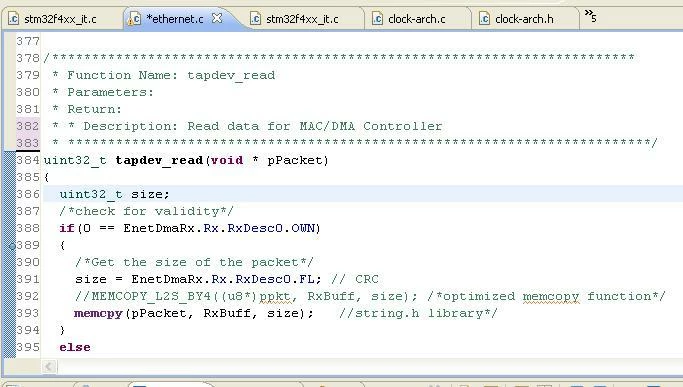
it shows below code


I tried to set up breakpoint before the memcpy function


as shown in the attached picture


It stops at the breakpoint just before the memcpy function


however when I rerun from this point


it ends up at hardfault handler as shown below


please advice how can I proceed ?


void


HardFault_Handler(

void

)


{


/* Go to infinite loop when Hard Fault exception occurs */

while

(1)

{

}

}0690X00000602nOQAQ.jpg

#stm32f4-memcpy-hardfault #makefile #memcpy-hardfault-stm32f4 #linkerscript
    This topic has been closed for replies.

    17 replies

    Tesla DeLorean
    Guru
    December 18, 2012
    Posted on December 18, 2012 at 23:08

    Are you sure it doesn't fault because it leaves main()? Where does it go then?

    Try putting a while(1); at the end so it stays within main()
    Tips, Buy me a coffee, or three.. PayPal Venmo (See Profile) Up vote any posts that you find helpful, it shows what's working..
    mehmet.karakaya
    Associate III
    December 19, 2012
    Posted on December 19, 2012 at 10:26

    hello

    of course I have memcpy inside infinite loop 

    I omitted it for simplicity of the message

    the micro still goes into hardfault when it sees memcpy

    how much simpler can a memcpy command be ( previous post ) ?

    I suspect that the linkerscript is somehow bad

    can you please comment on my linkerscript ?

    thanks

    frankmeyer9
    Associate III
    December 19, 2012
    Posted on December 19, 2012 at 11:19

    Is it possible that you link to a wrong library ?

    If the library code contains ARM32 instructions, it will surely hardfault.

    Make sure you link to a THUMB/THUMB2 library.

    Tesla DeLorean
    Guru
    December 19, 2012
    Posted on December 19, 2012 at 13:26

    If in doubt disassemble the code. I don't think the linker script is the issue.

    Tips, Buy me a coffee, or three.. PayPal Venmo (See Profile) Up vote any posts that you find helpful, it shows what's working..
    mehmet.karakaya
    Associate III
    December 19, 2012
    Posted on December 19, 2012 at 22:58

    0690X00000602muQAA.jpg

    hello

    here is the assembly of the program

    I only know 8051 assembler no ARM assembler

    how can you help me what is wrong with my code

    thank you

    Tesla DeLorean
    Guru
    December 19, 2012
    Posted on December 20, 2012 at 00:48

    The ''blx 0x800B584'' is indicative of a call to 32-bit ARM code, you could look at 0x800B584 to confirm this. This would suggest your linker is pulling in 32-bit libraries (ARM7/ARM9) instead of the 16-bit Thumb libraries.

    The 16-bit memcpy should look a bit like this, from my .LSS listing file

    08000188 <
    memcpy
    >:
    8000188: 2a0f cmp r2, #15
    800018a: b4f0 push {r4, r5, r6, r7}
    800018c: d940 bls.n 8000210 <
    memcpy
    +0x88>
    800018e: ea41 0300 orr.w r3, r1, r0
    8000192: 079b lsls r3, r3, #30
    8000194: d13e bne.n 8000214 <
    memcpy
    +0x8c>
    8000196: 460c mov r4, r1
    8000198: 4603 mov r3, r0
    800019a: 4615 mov r5, r2
    800019c: 6826 ldr r6, [r4, #0]
    800019e: 3d10 subs r5, #16
    80001a0: 601e str r6, [r3, #0]
    80001a2: 6866 ldr r6, [r4, #4]
    80001a4: 605e str r6, [r3, #4]
    80001a6: 68a6 ldr r6, [r4, #8]

    A typical compiler command line

    arm-none-eabi-gcc -c -mcpu=cortex-m3 -mthumb -O3 -ffunction-sections -fdata-sections -Wall -Wstrict-prototypes -Wextra -std=gnu89 -g -ggdb3 -fverbose-asm -Wa,-ahlms=out/usbd_msc_bot.lst -DUSE_STDPERIPH_DRIVER -DSTM32F4XX -DUSE_STM32F4_DISCOVERY -DUSE_USB_OTG_FS -DHSE_VALUE=8000000 -MD -MP -MF out/usbd_msc_bot.d -I. -Iinc usbd_msc_bot.c -o out/usbd_msc_bot.o

    A typical linker command line

    arm-none-eabi-g++ -mcpu=cortex-m3 -mthumb -Tstm32f4xx.ld -g -Wl,-Map=out/demo.map,--cref,--no-warn-mismatch -Wl,--gc-sections -nostartfiles out/startup_stm32f4xx.o out/app.o out/misc.o out/stm32f4_discovery.o out/stm32f4_discovery_sdio_sd.o out/stm32f4xx_dma.o out/stm32f4xx_gpio.o out/stm32f4xx_rcc.o out/stm32f4xx_sdio.o out/stm32fxxx_it.o out/system_stm32f4xx.o out/usb_bsp.o out/usb_core.o out/usb_dcd.o out/usb_dcd_int.o out/usbd_core.o out/usbd_desc.o out/usbd_ioreq.o out/usbd_msc_bot.o out/usbd_msc_core.o out/usbd_msc_data.o out/usbd_msc_scsi.o out/usbd_req.o out/usbd_storage_msd.o out/usbd_usr.o out/test.o -o out/demo.elf

    Tips, Buy me a coffee, or three.. PayPal Venmo (See Profile) Up vote any posts that you find helpful, it shows what's working..
    mehmet.karakaya
    Associate III
    December 22, 2012
    Posted on December 22, 2012 at 18:35

    Hello Clive ,

    you are really a great person

    I added below switches to linker command line and the program linked succesfully with correct library

    before : LDFLAGS

    = 

    -g -v -nostartfiles

    now : LDFLAGS 

    = -

    mcpu

    =cortex-m3 -mthumb -g -v -nostartfiles

    and the TCP / IP demo run succesfully - I can connect to my Olimex STM32-E407 board through LAN

    thank you and other who replied to my post