Turn on suggestions
Auto-suggest helps you quickly narrow down your search results by suggesting possible matches as you type.
Showing results for
- STMicroelectronics Community
- STM32 MPUs
- STM32 MPUs Products and hardware related
- STM32MP157-DK2 not connecting to ethernet
Options
- Subscribe to RSS Feed
- Mark Topic as New
- Mark Topic as Read
- Float this Topic for Current User
- Bookmark
- Subscribe
- Mute
- Printer Friendly Page
STM32MP157-DK2 not connecting to ethernet

Options
- Mark as New
- Bookmark
- Subscribe
- Mute
- Subscribe to RSS Feed
- Permalink
- Email to a Friend
- Report Inappropriate Content
2019-07-05 9:10 AM
Hello,
i have a problem when tring to establish a ethernet connection with the STM32MP157-DK2 board.
Windows 10 -64bit system, no firewall, no antivirus. DHCP enabled.
Tried with cross & straight CAT6 ethernet cable.
I cannot establish a SSH connection with the board trough putty on port 22.
The yellow LED from the ethernet connector is blinking, the GREN led is off.
In the board "netdata perf monitor" i have no ethernet connection.
I wonder what i am missing here?
Here is the ifconfig
root@stm32mp1:~# ifconfig
eth0      Link encap:Ethernet  HWaddr 00:80:E1:42:55:EF
          inet6 addr: fe80::280:e1ff:fe42:55ef/64 Scope:Link
          UP BROADCAST RUNNING MULTICAST  MTU:1500  Metric:1
          RX packets:66 errors:0 dropped:0 overruns:0 frame:0
          TX packets:48 errors:0 dropped:0 overruns:0 carrier:0
          collisions:0 txqueuelen:1000
          RX bytes:9472 (9.2 KiB)  TX bytes:8923 (8.7 KiB)
          Interrupt:60 Base address:0x8000

lo        Link encap:Local Loopback
          inet addr:127.0.0.1  Mask:255.0.0.0
          inet6 addr: ::1/128 Scope:Host
          UP LOOPBACK RUNNING  MTU:65536  Metric:1
          RX packets:264 errors:0 dropped:0 overruns:0 frame:0
          TX packets:264 errors:0 dropped:0 overruns:0 carrier:0
          collisions:0 txqueuelen:1000
          RX bytes:16800 (16.4 KiB)  TX bytes:16800 (16.4 KiB)

usb0      Link encap:Ethernet  HWaddr EE:66:75:77:9F:02
          inet addr:192.168.7.2  Bcast:192.168.7.255  Mask:255.255.255.0
          UP BROADCAST MULTICAST  MTU:1500  Metric:1
          RX packets:0 errors:0 dropped:0 overruns:0 frame:0
          TX packets:0 errors:0 dropped:0 overruns:0 carrier:0
          collisions:0 txqueuelen:1000
          RX bytes:0 (0.0 B)  TX bytes:0 (0.0 B)

root@stm32mp1:~#
Labels:
- Labels:
-
STM32MP15 lines
This discussion is locked. Please start a new topic to ask your question.
8 REPLIES 8
Options
- Mark as New
- Bookmark
- Subscribe
- Mute
- Subscribe to RSS Feed
- Permalink
- Email to a Friend
- Report Inappropriate Content
2019-07-07 4:08 AM
It seems to work, only when i have the cable plugged into the router.
Tried before to connect the board to 2 laptops without success...
How to configure eth0 to run ipv4 with dhcp enabled?
noticed /etc/network/interface file is missing

Options
- Mark as New
- Bookmark
- Subscribe
- Mute
- Subscribe to RSS Feed
- Permalink
- Email to a Friend
- Report Inappropriate Content
2019-07-08 7:45 AM
Hello,
Did you visit the ST wiki page: https://wiki.st.com/stm32mpu/wiki/How_to_configure_ethernet_interface ?
It shows you how to configure eth0 /ipv4 with DHCP enabled.
BR
O.
In order to give better visibility on the answered topics, please click on 'Accept as Solution' on the reply which solved your issue or answered your question.
Options
- Mark as New
- Bookmark
- Subscribe
- Mute
- Subscribe to RSS Feed
- Permalink
- Email to a Friend
- Report Inappropriate Content
2019-07-09 12:53 PM
Hello
i manually configured a ip, on the pc side dhcp is enabled.
After doing this, i still can't connect via ssh, not even ping ..,
Is it posible to disable ipv6? And how to doit?
root@stm32mp1:~# ifconfig eth0 192.168.100.97
root@stm32mp1:~# ifconfig
eth0      Link encap:Ethernet  HWaddr 00:80:E1:42:55:EF
          inet addr:192.168.100.97  Bcast:192.168.100.255  Mask:255.255.255.0
          inet6 addr: fe80::280:e1ff:fe42:55ef/64 Scope:Link
          UP BROADCAST RUNNING MULTICAST  MTU:1500  Metric:1
          RX packets:99 errors:0 dropped:0 overruns:0 frame:0
          TX packets:54 errors:0 dropped:0 overruns:0 carrier:0
          collisions:0 txqueuelen:1000
          RX bytes:11100 (10.8 KiB)  TX bytes:10386 (10.1 KiB)
          Interrupt:60 Base address:0x8000

lo        Link encap:Local Loopback
          inet addr:127.0.0.1  Mask:255.0.0.0
          inet6 addr: ::1/128 Scope:Host
          UP LOOPBACK RUNNING  MTU:65536  Metric:1
          RX packets:264 errors:0 dropped:0 overruns:0 frame:0
          TX packets:264 errors:0 dropped:0 overruns:0 carrier:0
          collisions:0 txqueuelen:1000
          RX bytes:16800 (16.4 KiB)  TX bytes:16800 (16.4 KiB)

usb0      Link encap:Ethernet  HWaddr D6:62:9A:22:E4:74
          inet addr:192.168.7.2  Bcast:192.168.7.255  Mask:255.255.255.0
          UP BROADCAST MULTICAST  MTU:1500  Metric:1
          RX packets:0 errors:0 dropped:0 overruns:0 frame:0
          TX packets:0 errors:0 dropped:0 overruns:0 carrier:0
          collisions:0 txqueuelen:1000
          RX bytes:0 (0.0 B)  TX bytes:0 (0.0 B)

root@stm32mp1:~# route
Kernel IP routing table
Destination     Gateway         Genmask         Flags Metric Ref    Use Iface
192.168.7.0     *               255.255.255.0   U     0      0        0 usb0
192.168.100.0 * 255.255.255.0 U 0 0 0 eth0Options
- Mark as New
- Bookmark
- Subscribe
- Mute
- Subscribe to RSS Feed
- Permalink
- Email to a Friend
- Report Inappropriate Content
2019-07-10 2:04 AM
Hi,
you said that via a Router all is correct with DHCP enabled, which is the correct behaviour. Did you try to disable DHCP using a p2p connexion?
I would recommend USB/Ethernet bridge for a P2P connexion. Just plug a USB TypeC cable to the OTG USB DK2 board and type ifconfig again, then manually assign this bridge to a static IP address :ifconfig <bridgename> 192.168.7.1 netmask 255.255.255.0 . Then you should be able to ping the board at 192.168.7.2,
In order to give better visibility on the answered topics, please click on 'Accept as Solution' on the reply which solved your issue or answered your question.
Options
- Mark as New
- Bookmark
- Subscribe
- Mute
- Subscribe to RSS Feed
- Permalink
- Email to a Friend
- Report Inappropriate Content
2019-07-13 2:49 AM
Hello Oliver,
i tried the followings
- dhcp enabled on the PC side
- power up the DK2 board
- ethernet & usb otg cable connected
- ifconfig eth0 192.168.7.22 netmask 255.255.255.0
- on the pc when ping 192.168.7.22 i get time out response
tried the same with the usb otg connection, and get ping timeout
To be honest its my first approach with a linux embedded system, didn't thought to be such challenging to do a network connection.
Options
- Mark as New
- Bookmark
- Subscribe
- Mute
- Subscribe to RSS Feed
- Permalink
- Email to a Friend
- Report Inappropriate Content
2019-07-15 2:35 AM
Hello Anton,
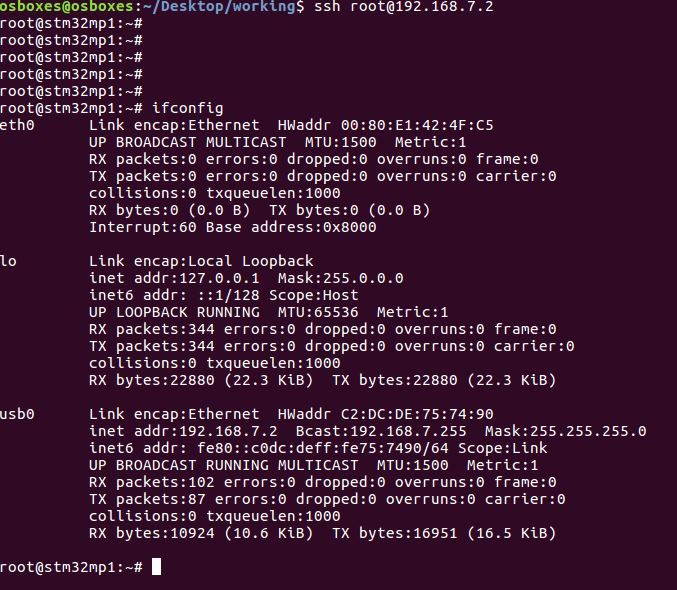
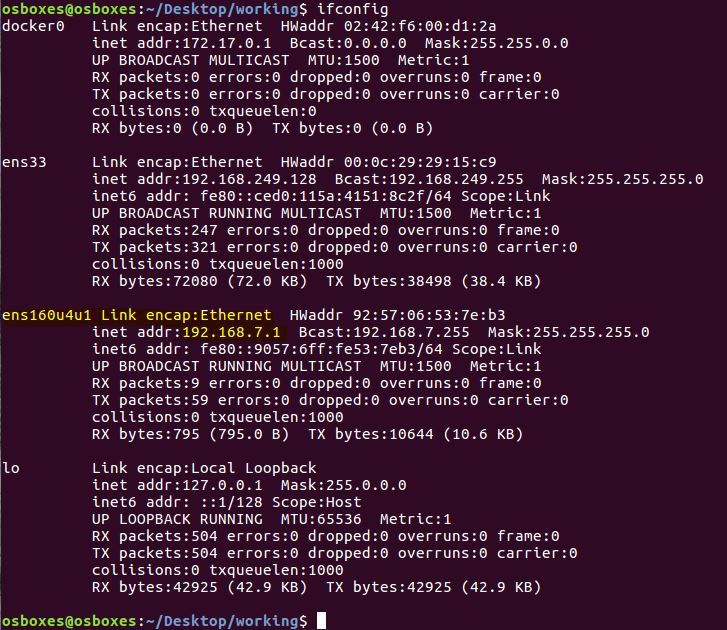
Make sure the DK2 board boot pins are set so that you could see a demo on target display screen.
With the Ethernet/USB bridge (using USB type C cable), you should have the following network setup (or similar) from the host side and board side. I've highlighted the bridge which appears when you plug the USB Type C cable. I run linux on a Linux VM on Windows 10.
In order to give better visibility on the answered topics, please click on 'Accept as Solution' on the reply which solved your issue or answered your question.
Options
- Mark as New
- Bookmark
- Subscribe
- Mute
- Subscribe to RSS Feed
- Permalink
- Email to a Friend
- Report Inappropriate Content
2019-07-15 10:25 AM
Hello Oliver,
thanks for your patience,
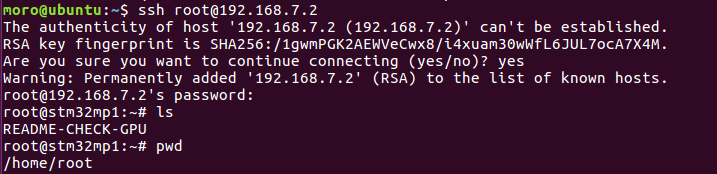
i finally managed to establish a ssh connection between my pc and the dk2 board trough USB-C connection.
I setup 192.168.7.1 static ip for my usb network connection on the PC side.
Then i was able to ping 192.168.7.2 board, also ssh worked via putty.
Options
- Mark as New
- Bookmark
- Subscribe
- Mute
- Subscribe to RSS Feed
- Permalink
- Email to a Friend
- Report Inappropriate Content
2019-07-15 10:26 AM

Related Content
- Very slow Ethernet connection on ETH1 in STM32 MPUs Products and hardware related
- "Activation of network connection failed" error after connecting ethernet cable to STM32MP157x-DK2 in STM32 MPUs Products and hardware related
- STM32MP135F-DK Industrial Camera Connection in STM32 MPUs Embedded software and solutions
- STM32MP1 ethernet issue in STM32 MPUs Products and hardware related
- Ethernet MAC Driver Not Supporting More than one VLAN ID in STM32 MPUs Products and hardware related