

How to set up the OSPI peripheral to interface with the IS25LX256 from ISSI
Introduction
It is very common for HMI-of-Things applications to have the capability to control and display data between a user and the machine. Such applications require the ability to interface with external memory such as non-volatile memories that can be used to store the graphics assets. The STM32’s integrated Octo-Serial Peripheral Interface (OSPI) peripheral makes it easy to interface with OSPI memories.
In this article we will see how to configure the OSPI peripheral of the STM32 to interface with the IS25LX256 from ISSI – datasheet available upon request from ISSI:
https://www.issi.com/US/product-flash.shtml
The OSPI memory is available for mass market from Mouser:
https://www.mouser.com/ProductDetail/ISSI/IS25LX256-JHLE?qs=DPoM0jnrROVUOUbt0%2FY1Mw%3D%3D
Prerequisites:
- Microcontroller: STM32H7B3LI
- Software: TouchGFX Designer, STM32CubeIDE and STM32CubeMx
The STM32H7B3I-DK board includes a 512-Mbit Octo‑SPI NOR Flash memory device from Macronix that’s pin-to-pin compatible with IS25LX256. In this article we’ll see how to setup the OSPI peripheral in the STM32H7B3I-DK TouchGFX Board Setup (TBS) to have the ability to save the graphics assets in the OSPI IS25LX256.
Steps:
- De-solder the part U27 MX25LM51234 and solder IS25LX256.
- Create TouchGFX application
Create a TouchGFX application based on the STM32H7B3I-DK Board Setup.
If you don’t know how to do this step, please refer to this link: https://support.touchgfx.com/4.18/docs/tutorials/tutorial-02
The tutorial uses the STM32F746G-DK while in this article we’ll be using the STM32H7B3I-DK.
- Open the STM32CubeMx project
Under the project location, open the STM32CubeMx project by double-clicking on STM32H7B3I-DK.ioc 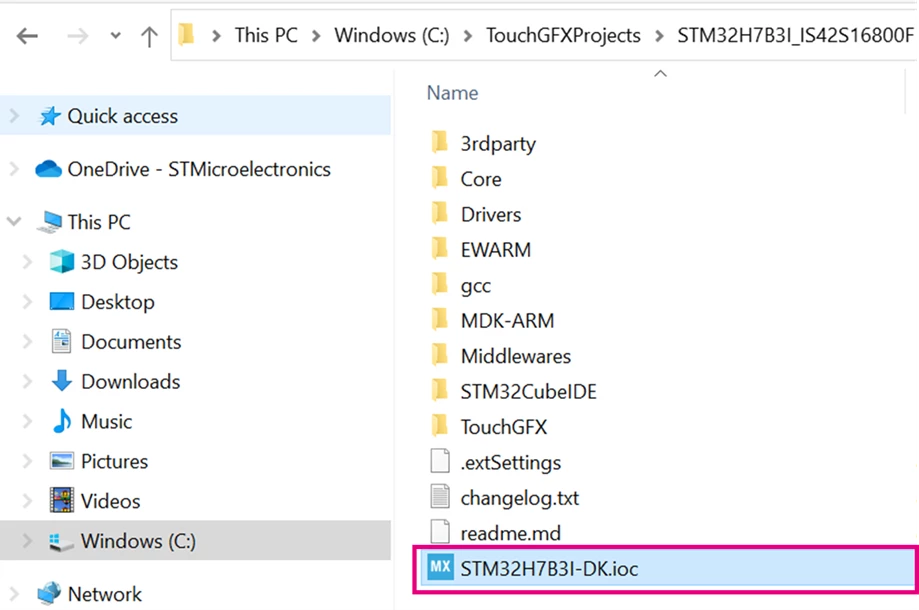
4. Set up the OSPI clock
From the OSPI memory datasheet, we see that the max clock of the OSPI is 133MHz.
Per the STM32H7B3LI datasheet, we see that the maximum OSPI clock depends on the mode (either Single-Data Rate (SDR) or Double-Transfer Rate (DTR)), the supply (VDD) voltage, and the load capacitance (CLoad). Table 89 and Table 90 (below) show the different values: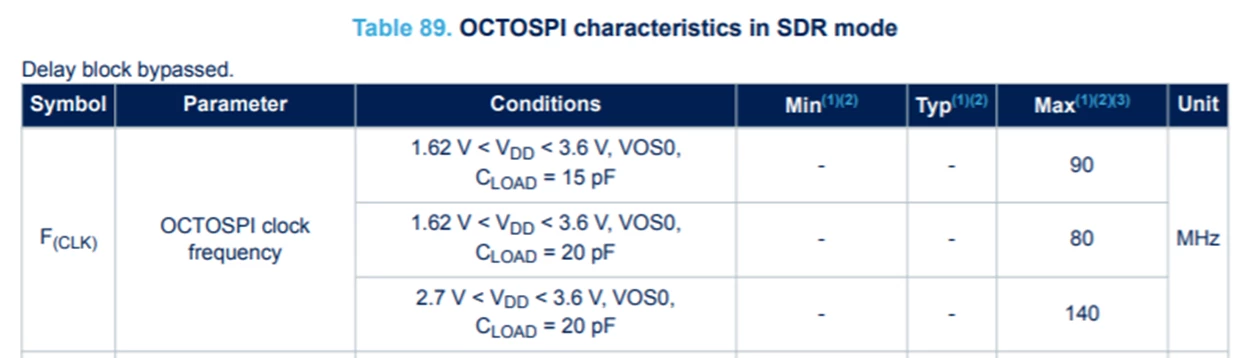
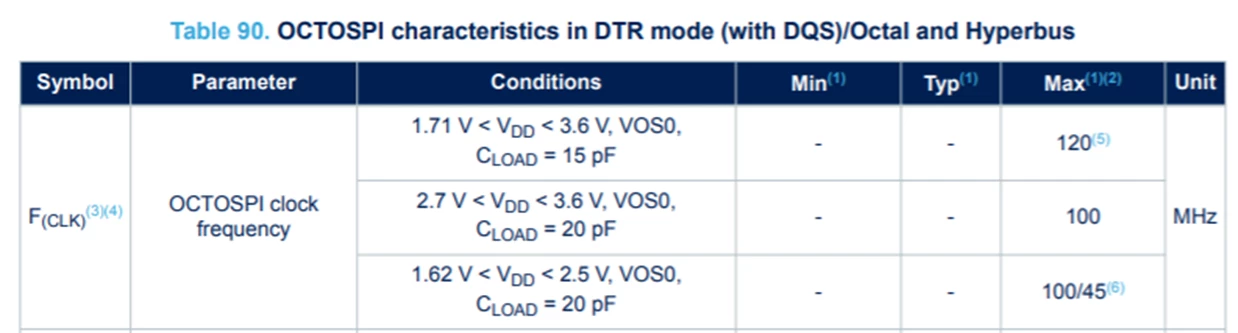
In this article we’ll use the OSPI kernel clock frequency, which is the clock that feeds the OSPI peripheral, at 133MHz. It is important to note the difference between OSPI kernel clock and the OSPI clock:
- The OSPI kernel clock is the clock that feeds the OSPI peripheral
- The OSPI clock is the clock you see on OSPI CLK pin and that’s the clock that feeds the OSPI memory
The first step is to setup the OSPI kernel clock. Here we will use PLL2 to set it to 133MHz. We’ll see later that the OSPI clock is derived from this OSPI kernel clock and using 133MHz you can get up to 133MHz as OSPI clock with the prescaler set to 1. Refer to section 6) v)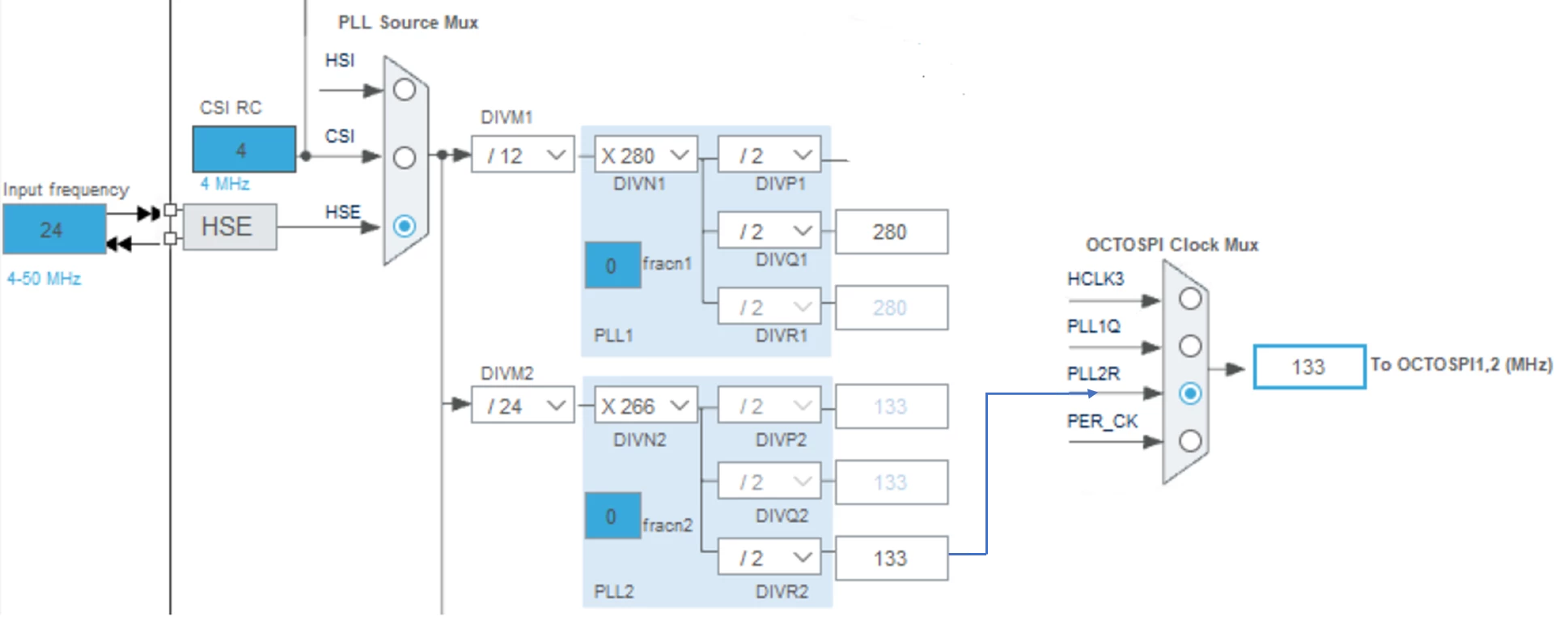
In STM32CubeMx, under the Clock Configuration Tab, we see the OCTOSPI clock mux. As shown below, the OSPI clock can be derived from PLL2, PLL1, HCLK3, or Peripheral Clock (PER_CK). Thus, we need to set up the DIVM2 and PLL2 “N” multiplier, “R” and the divider right after the output of the PLL2 in a way to get 133MHz to the OSPI peripheral.
One possible solution is to have DIVM2 = 24, N = 266, R = 2. This solution gives an OSPI kernel clock of 133MHz. This clock will get divided by 4 later in the OSPI configuration – refer to section “6) v)”.
- Set up the OSPI mode
STM32H7B3 family embeds two instances of OSPIs:
- OCTOSPI1: addressable from 0x9000 0000 in memory-mapped mode
- OCTOSPI2: addressable from 0x7000 0000 in memory-mapped mode
The internal pins of OSPI1 and OSPI2 each could be mapped to either port 1 or port 2 as shown below: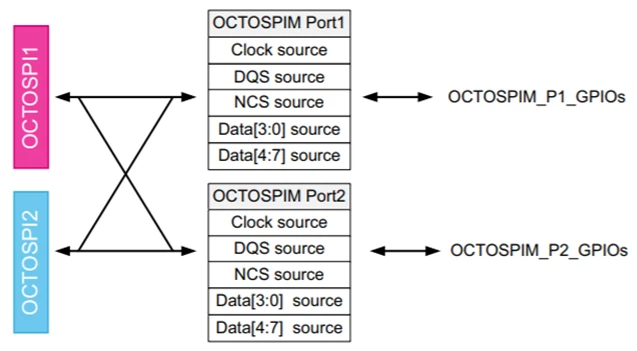
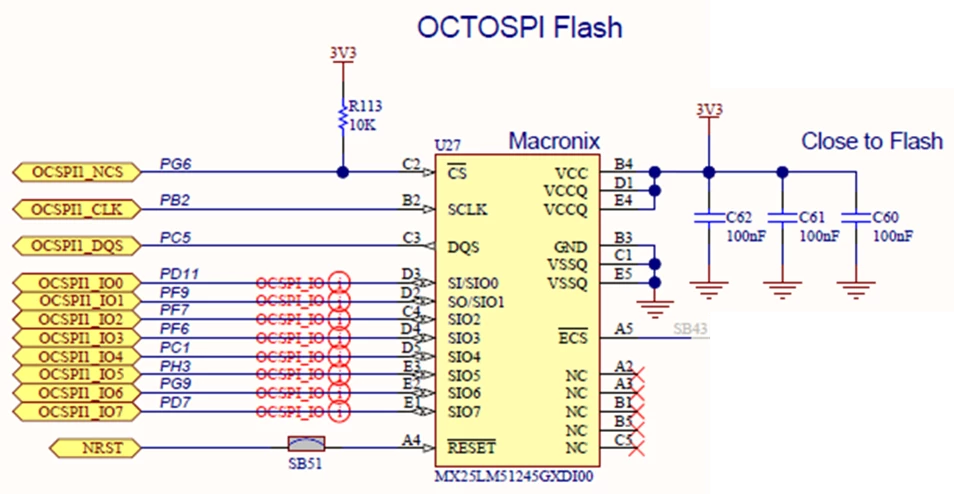
Per the schematic below:
- OCTOSPI1 is used to interface with OSPI memory.
- 8 pins for data (IO0 to IO7) meaning in the mode we need to select OCTO mode.
- DQS pin is used
 |
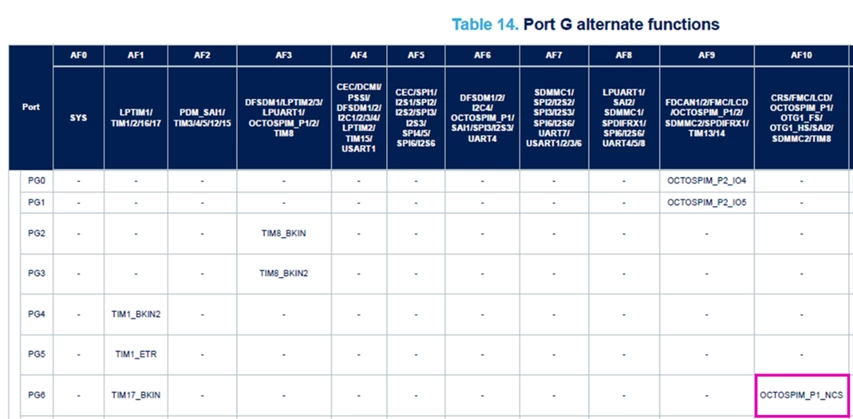
- OSPI Port 1 is selected to map the internal OSPI pins to the GPIO pins. PG6, for example, can be mapped to OCTOSPIM_P1_NCS (P1 stands for Port 1) using AF10 as shown in Table 14 of the device datasheet. Similarly, Clock, Data Strobe, Data [3:0], Data [7:4] are mapped to OSPI port 1.
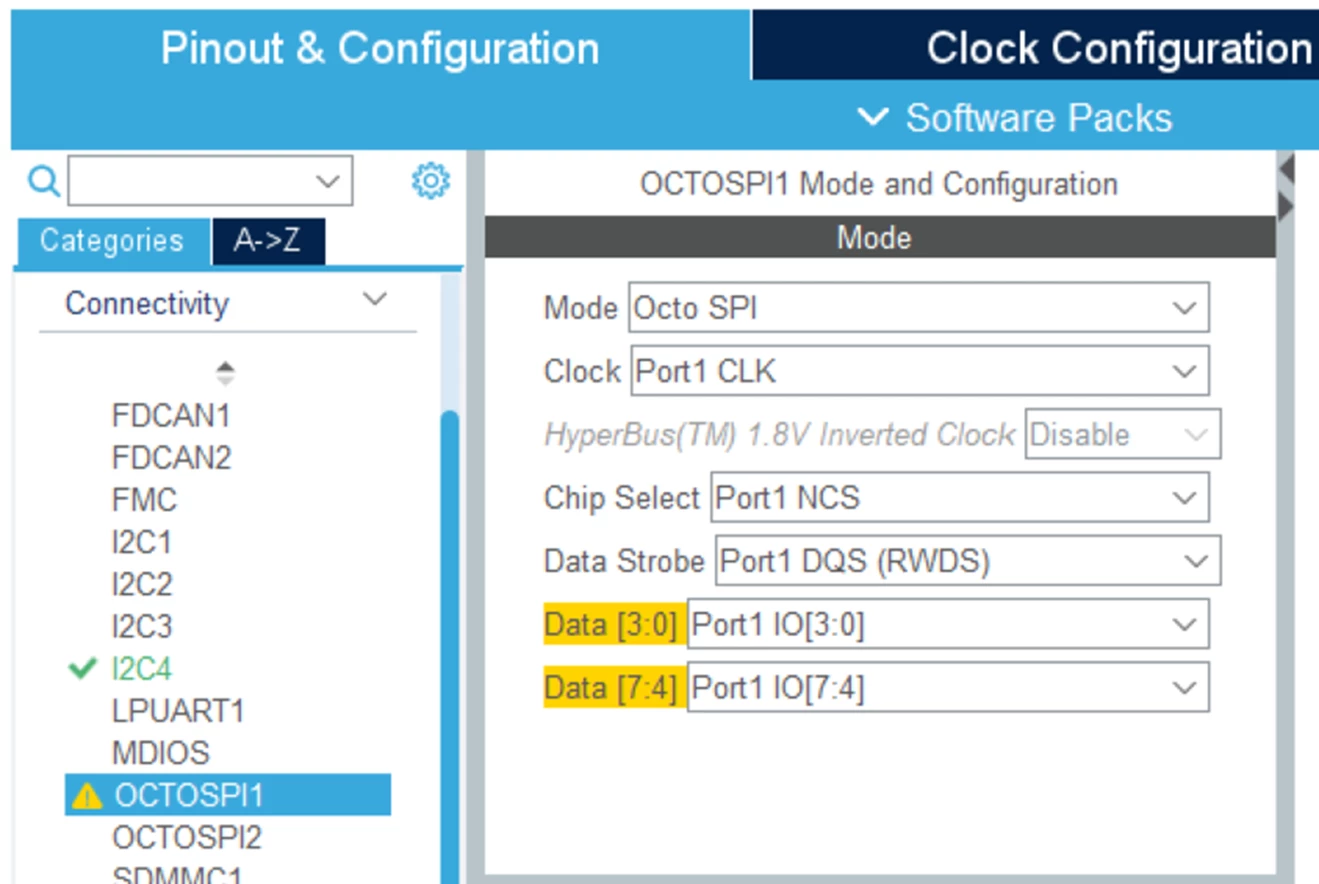
Based on the configuration above, in STM32CubeMx we can set the OSPI1 mode to OCTO mode and then use port 1 for the control and data signals.
- Set the OSPI parameters
-
-
- Memory type: The data is organized D0 – D1 – D2 – D3 as shown below. In STM32CubeMx we set the mode to “Micron”:
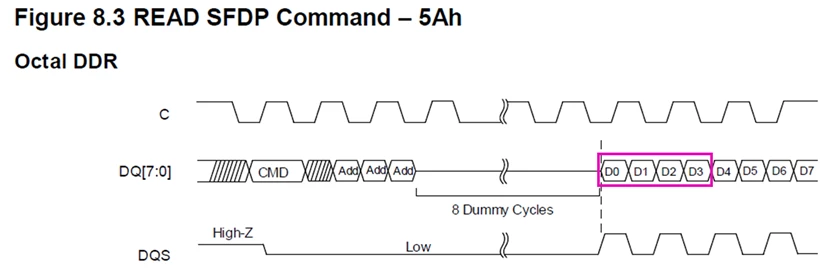
- Memory type: The data is organized D0 – D1 – D2 – D3 as shown below. In STM32CubeMx we set the mode to “Micron”:
-
-
-
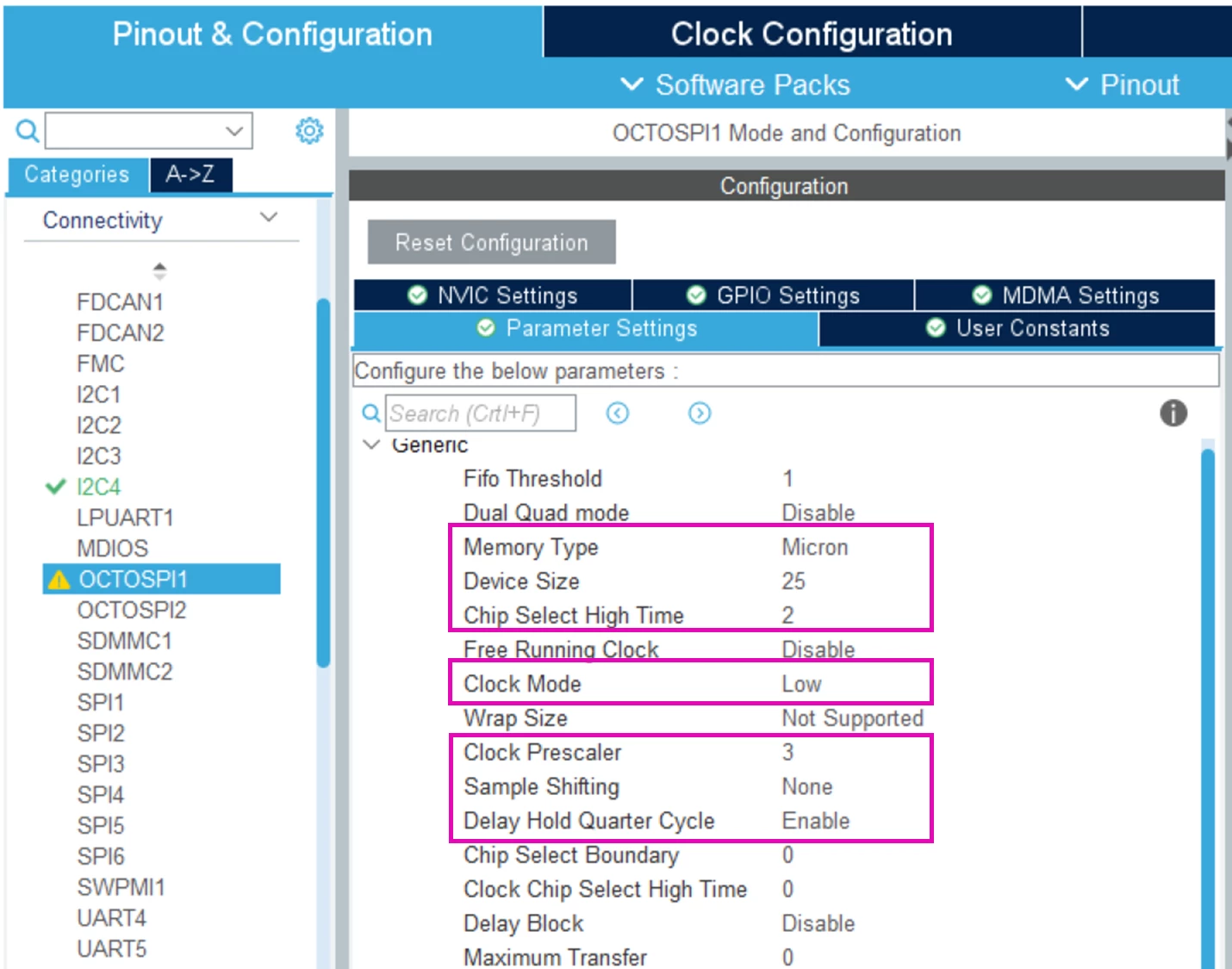
- Device Size: The size of the OSPI memory in bytes and expressed in 2^n. The datasheet of the IS25LX256 is 256MBits = 32Mbytes = 0x200 0000. We see the bit 25 is set meaning 2^25 = 32 MBytes. In STM32CubeMx we set the device size field to 25.
-
-
-
- Chip Select High Time is the minimum number of clock cycles where the CS must remain high between commands. The IS25LX256 specifies 30ns – page 88. We divide the 88ns by the clock persiod of OSPI 30ns/(133MHz / prescaler) = 133MHz / 3. The clock period is 3/133MHz. 30ns /(3/133MHz) = 1.33. we round up to the next integer value which is 2. In CubeMx we set the chip select high time to 2.

- Chip Select High Time is the minimum number of clock cycles where the CS must remain high between commands. The IS25LX256 specifies 30ns – page 88. We divide the 88ns by the clock persiod of OSPI 30ns/(133MHz / prescaler) = 133MHz / 3. The clock period is 3/133MHz. 30ns /(3/133MHz) = 1.33. we round up to the next integer value which is 2. In CubeMx we set the chip select high time to 2.
-
-
-
- The clock mode specifies the level of the clock – In page 47 of IS25LX256 datasheet, we see the memory supports Mode 0 or low level and Mode 3 which is high level. The memory supports high and low. In STM32CubeMx, we’ll select low.
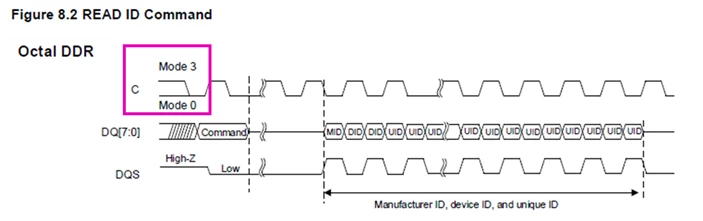
- The clock mode specifies the level of the clock – In page 47 of IS25LX256 datasheet, we see the memory supports Mode 0 or low level and Mode 3 which is high level. The memory supports high and low. In STM32CubeMx, we’ll select low.
-
-
-
- Clock prescaler: In STM32CubeMx, we’ll set the prescaler to 3. This means the clock on the bus is 133MHz / 3 = 44.3MHz.
- Per the OSPI specification in RM0455, the sample shifting needs to be set to none in DTR mode – see excerpt below. In STM32CubeMx, we set sample shifting to “none”.

- Per the OSPI specification in RM0455, it is recommended to enable the delay hold quarter cycle meaning a quarter cycle delay on the outputs in DTR communication. See excerpt below from RM0455.

- The other parameters will be left with the default values.
-
- Setup the GPIO
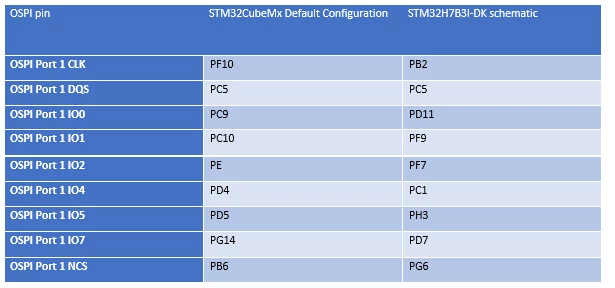
Hence, we need to change the mapping of OSPI pins listed in the table above to match the STM32H7B3I-DK schematic:
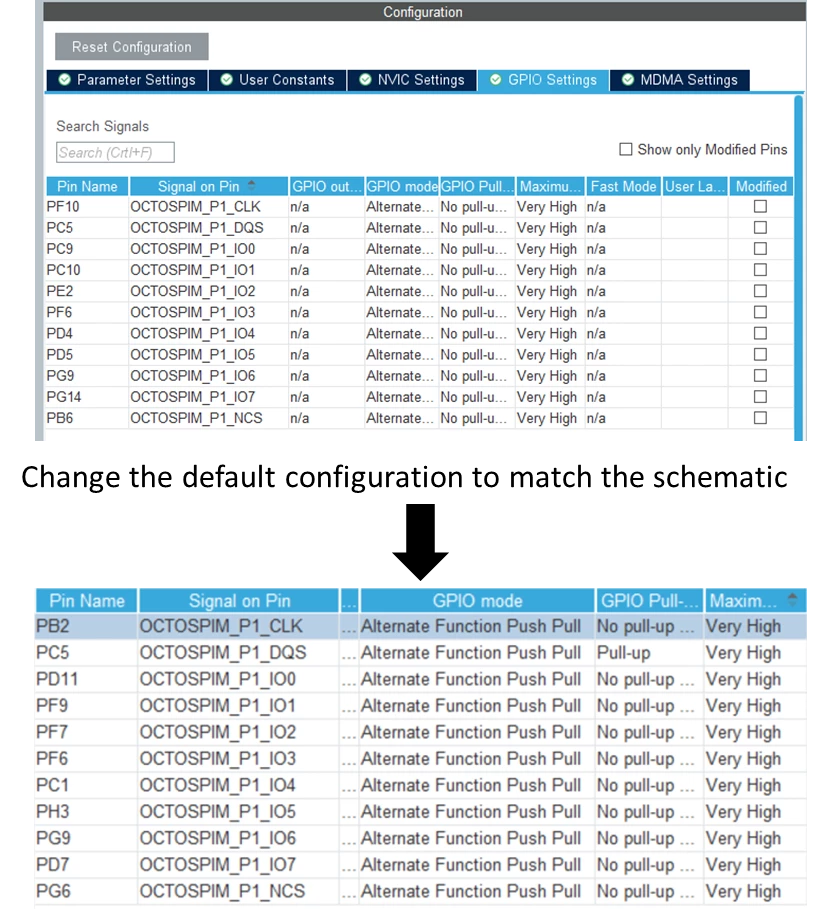
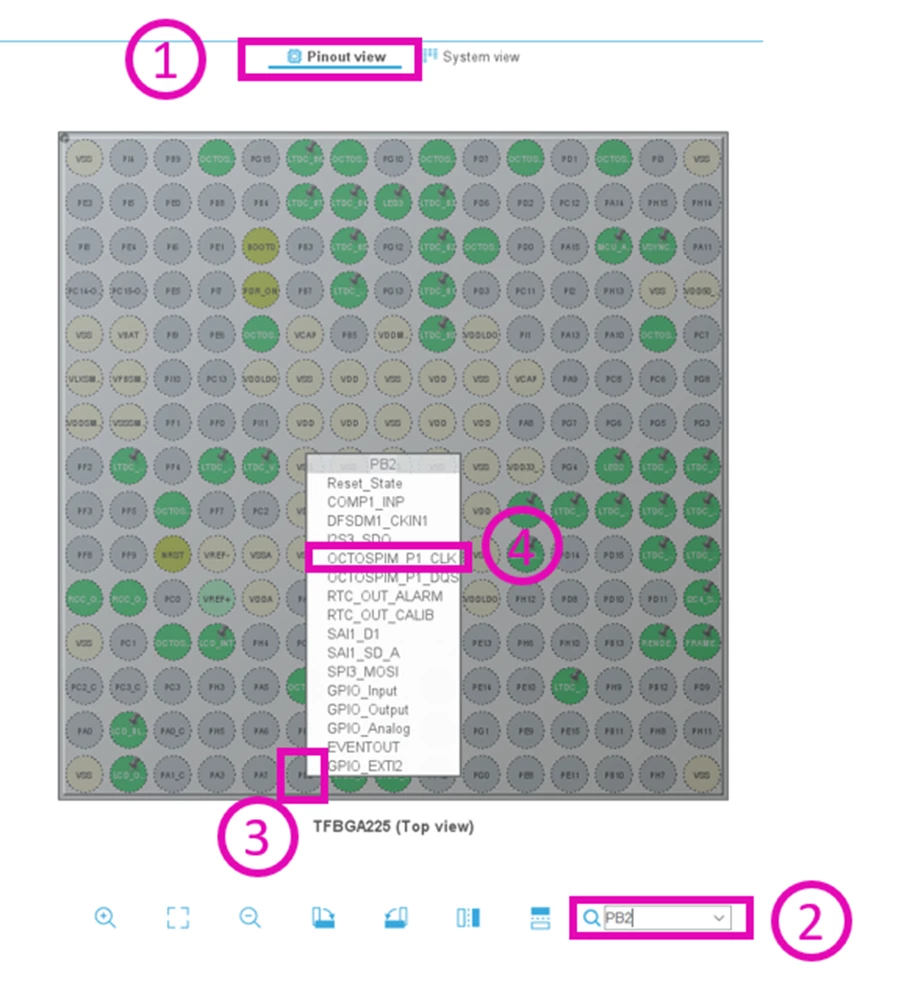
In the pinout view tab, type the name of the pin in the search field, the pin will be highlighted, left click on the pin and then change the alternate function to OSPI signal.
The example below shows how to change OSPI Port 1 CLK from PF10 to PB2:
- OSPI Configuration sequence
By default, the IS25LX256 uses 1-line SDR SPI mode with a limited maximum clock frequency. To benefit from OCTO and DTR modes at high-speed accesses we need to send specific commands as follows:
- Step 1: Reset the memory to make sure to start from the default state of the memory.
- Step 2: Setup the dummy cycles: The dummy cycles are used to give the OSPI memory the time to prepare the data with high-speed accesses. The IS25LX256 datasheet shows the dummy cycles need to be set to 5 cycles when the clock frequency is 50MHz.
- Step 3: Setup the octal DTR mode: By default, the IS25LX256 uses 1-line SDR SPI mode and to benefit from OCTO and DTR modes we need to enable them.
- Step 4: Enable the memory mapped mode. This is a configuration of the OSPI peripheral that configures the external OSPI flash memory in the internal memory space mapped at address 0x9000 0000.
The snippet code below shows the implementation of the configuration sequence:
/* USER CODE BEGIN OCTOSPI1_Init 2 */
 /* Step 1: Reset the OSPI memory */
 if(OSPI_ResetMemory(&hospi1) != 0)
 {
 Error_Handler();
 }
 /* Step 2: Setup the dummy cycles */
 if(OSPI_SetupDummyCycles(&hospi1) != 0)
 {
 Error_Handler();
 }
 if(OSPI_SetupOctalDDRMode(&hospi1) != 0)
 {
 Error_Handler();
 }
 /* Step 4: Enable the memory mapped mode */
 if(OSPI_EnableMemoryMappedMode(&hospi1) != 0)
 {
 Error_Handler();
 }
 /* USER CODE END OCTOSPI1_Init 2 */