

Minkyu Kim
Associate II
December 20, 2023
Solved

How to use STM32WB5MM-DK?

  • December 20, 2023
  • 1 reply
  • 1209 views

Hi,

It's first time using st product to me.

according to that's UM, i thought that connect CN11 to PC it work debugging.

but it wasn't and showed warning message "No ST-LINK detected! Please connect ST-LINK and restart the debug session"

ST-LINK isn't included on the board?

It is necessary to buy ST-LINK/V2? if it is how to connect this board?
Best answer by STTwo-32

Hello @Minkyu Kim 

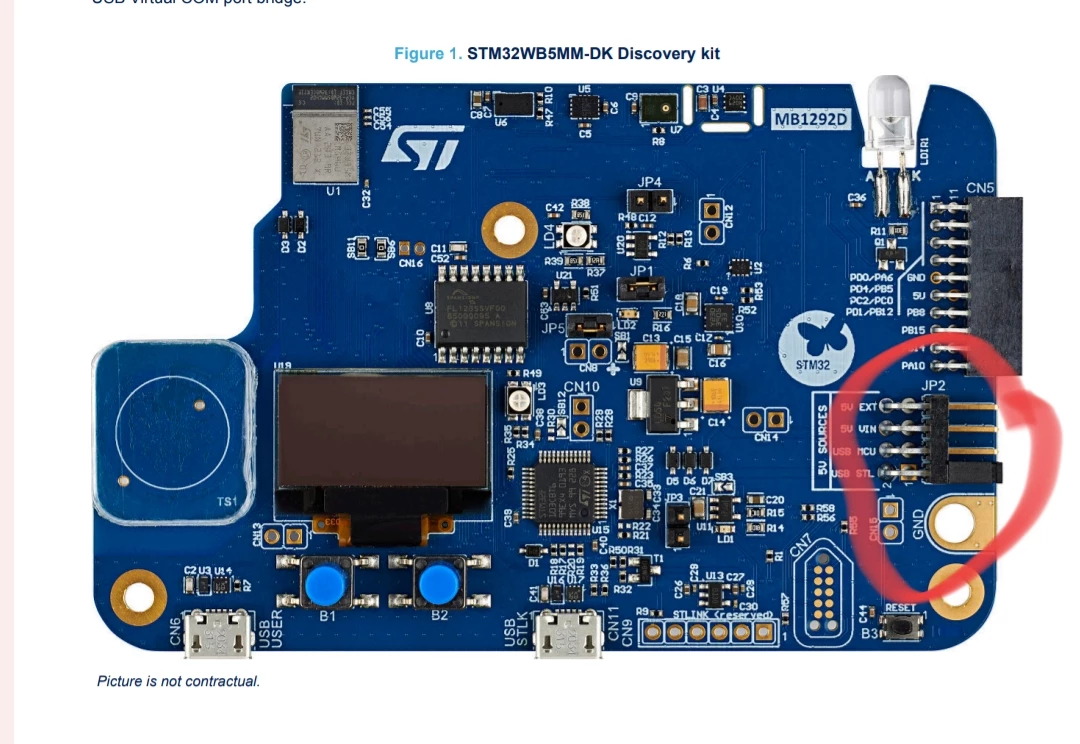
As @TDK said, you have to make sure that you are using the CN11 (USB STLK) and not the CN6 (USB USER). Also, you have to Make sure that the jumper JP2 is connected to the USB ST:

Screenshot_2023-12-20-04-26-29-85_e2d5b3f32b79de1d45acd1fad96fbb0f.jpg

Best Regards.

STTwo-32 

1 reply

TDK
December 20, 2023

The STM32WB5MM-DK board has an on-board ST-Link/V2-1. Make sure you are connecting the st-link USB port and not the user USB port. Make sure your USB cable has data and is not power-only.

TDK_0-1703038847764.png


"If you feel a post has answered your question, please click ""Accept as Solution""."
STTwo-32
STTwo-32Best answer
ST Technical Moderator
December 20, 2023

Hello @Minkyu Kim 

As @TDK said, you have to make sure that you are using the CN11 (USB STLK) and not the CN6 (USB USER). Also, you have to Make sure that the jumper JP2 is connected to the USB ST:

Screenshot_2023-12-20-04-26-29-85_e2d5b3f32b79de1d45acd1fad96fbb0f.jpg

Best Regards.

STTwo-32 

To give better visibility on the answered topics, please click on Accept as Solution on the reply which solved your issue or answered your question.