

cancel
Showing results for 
Search instead for 
Did you mean: 

ETM trace maximum data rate on STM32U575

Hello everyone,


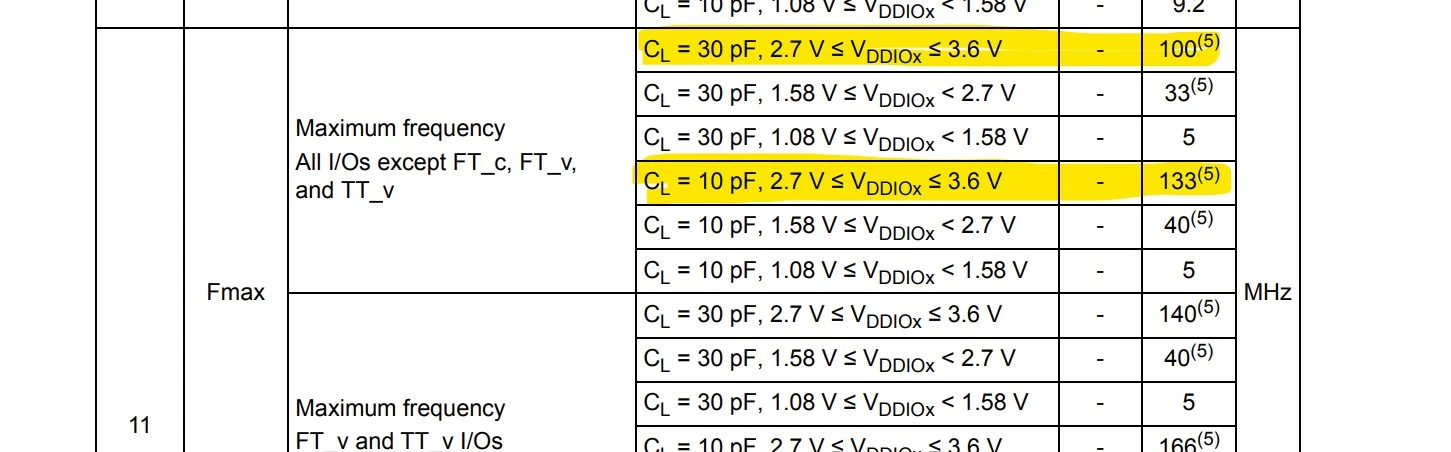
We are having trouble getting tracing to work with our target at full clock speed and would like to understand why, we have an application running on STM32U575 @ 160MHz CPU clock, we also connected the J-Tracer to it using a connector glued next to the uC and short wires (~10mm) to PE2 ... PE6 (pins 1 to 5 on the LQFP100), the GPIO pins are all configured (using a JLinkScript) as AF and at maximum speed, and from what we understood on the documentation (Arm trace technical specification - SEGGER Wiki​) the trace clock and trace data operate at half the CPU speed, I checked the ST datasheet and the GPIOs we are using should be good up to 100MHz, so in theory the trace should be possible with the CPU running at 160MHz and outputting trace data @ 80MHz, or?
Screenshot 2024-06-11 163220.jpg

- I have tested with the CPU at 160MHz and 2 trace data pins instead of 4, and it works, but the trace buffer overflows every time, as only 2 data lines are too slow for the amount of information.

- I also tested with the CPU at 80MHz and everything works as expected, with trace using all 4 data lines working without problems.

Had anyone success tracing this uC with a CPU clock of 160MHz and all data lines?

First I would like to confirm that the HW should support this and then, if so, I will need to find out why it is not working, perhaps checking the signal delays with a fast enough oscilloscope and trying to optimise the distances and parasitic capacitance, any help or tips will be appreciated

Thank you
Gustavo

6 REPLIES 6
Kalpak
Associate

Is there some other alternate function available for these pins that can be clocked at higher speed as a cross check?

E.g. Timer or SPI.

Hello Gustavo,

any success here? Which tools are used to collect trace data?

I tried to run H75x at 400MHz CPU / 100MHz trace clock using Keil µVision but had no luck, although the signals fulfil the timing specifications.

Now I design another board with U5 @@160MHz and I'd like to know if the trace feature on your board works now as expected.

Thank you

Jochen

Bob S
Super User

In general, 80MHz-100MHz signals require very careful routing and solid ground connections.  Impedance mis-matches and/or discontinuities, insufficient termination, stray capacitance, etc. can all cause ringing, reflections or slow rise/fall times on the signals and mess up the data transfer.

You might try adding 22 ohm series resistors from the STM32 pins to the "short" jumper wires to the trace connector and see if that helps.  Double-check (and beef up) your ground wires.

I'm unsure what happens if the bandwidth of the TRACE port is too low to send the instructions. Is there any error reported, if so, how, or are just instructions lost?
What happens if the receiver is too slow to handle the bandwidth of the TRACE port? I guess in this case the tool throws out a warning e.g. "buffer overflow"? This is what I get with my board and Keil µVision. 

Bob S
Super User

You don't say what debug device you are using (ST-Link, J-Link, etc.).  I did a very quick search on "trace buffer overflow" and found this:


https://kb.segger.com/J-Trace_overflow_error


Might be helpful even if you aren't using a Segger device.

Yes, I'm using J-TRACE pro Cortex-M now, gave up on ULINKpro.

I did a test with OZONE and now I see more helpful error messages in the log:

LTRACE (Time since start: 1.206 035, Thread=BGND): Buffer on emulator side ran out of space.
Target sends data faster than the USB interface can transfer.
(current: 37809 KB/s, peak: 37809 KB/s)
Streaming trace stopped.
When using a J-Trace Pro V2 or later make sure the USB3 connection is extablished correctly.

I replaced the USB2.0 cable by a USB3.0 cable, now I get this rare error from time to time

LTRACE (Time since start: 1:27.430 120, Thread=BGND): Buffer on emulator side ran out of space.
Target sends data faster than host computer can process it.
(current: 80203 KB/s ,peak: 102806 KB/s)

My laptop has USB 3.1 plus Intel i7 @ 2GHz but seems not to be able to process the data stream in some situations. Probably the CPU has too much IO load to handle from time to time. I wrote a ticket to SEGGER now.