

cancel
Showing results for 
Search instead for 
Did you mean: 

ST-LINK V2, DEV_TARGET_CMD_ERR, SWD does not work properly

Vandrey
Associate

Hello,

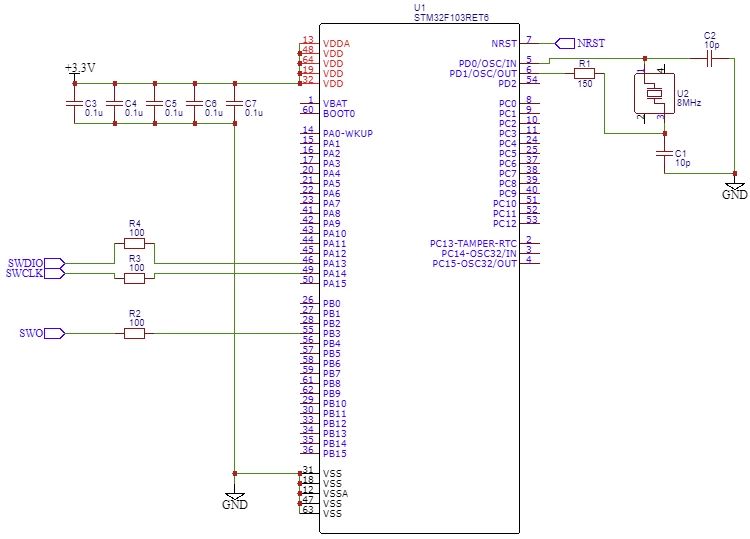
I have a custom STM32 board which has basically only the needed components to flash and use an STM32F103RET6 on board. This means, there are only a few capacitors for voltage stability, an 8MHz quarz + circuitry, and a few connectors on it.

I have the SWDIO, SWCLK and NRST lines connected through a 100 Ohms resistor exposed so a connector, so I can use them to program the device.

Now the problem ist, that I cannot connect to the device via STM32CubeProgrammer, nor the CLI, nor my IDE of choice (Keil uVision).

When I use my ST-LINK V2, connect it to the board and my pc, and then press "connect" in the program, I get the error "DEV_TARGET_CMD_ERR".

There is literally no explanation of this error anywhere, other than "hardware issues".

I then proceeded to try out the CLI and it didnt work either. My Keil uVision just throws the error "Internal Command Error".

So I set up a logic analyzer and found out, that the device is actually communicating with my ST-LINK.

It is basically doing this:

  1. Line Reset
  2. Read IDCODE (successfully)
  3. Wants to write to CTRL/STAT (gets ACK WAIT as response)
  4. Line Reset
  5. Repeat 1-4 ca. 100 times
  6. Read IDCODE
  7. Read from CTRL/STAT (successfully, response: 0xF0000000)
  8. Somehow stops doing anything and throws the error mentioned above.

My BOOT0 pin is floating, if that is of interest.

I have no idea how to proceed from here. I cant even connect to the device, however, the device is clearly communicating with the chip.

I checked a chip of my batch on a Evalboard (Nucleo), and it promptly connected and read the memory. So the chips are not defect.

Do I have to remove any write protection or something which the debug interface does automatically on the Nucleo-Board, or why cant I use my chip at all?

Thank you very much in advance!

Attachment:

The analysis of the SWD communication.

Schematics:
0693W00000aHqd3QAC.png 

This discussion is locked. Please start a new topic to ask your question.
1 ACCEPTED SOLUTION

Accepted Solutions
Vandrey
Associate

We found the issue.

The Problem was that `VDDA` pin had not enough energy supplied to it.

This means, it was a hardware issue.

To make clear what the actual problem was and why we didnt detect it:

We checked all `VDD(A)` pins and found that every pin had the right voltage supplied. However, in the gerber files we discovered that the `VDDA` pin via was not connected properly to the 3.3V plane. There was a huge resistance (in this case 600kΩ) between the 3.3V rail and the `VDDA` pin. We measured the right voltage at the `VDDA` pin because there was a capacitor and it had enough time to charge up. Thus we measured the correct voltage. However, once the uC started to draw actual power, the cap didnt provide enough energy/current and the uC couldnt start up. That also explained the error message from JLINK "Couldnt start up DAP".

Ergo: `DEV_TARGET_CMD_ERR` is probably a hardware issue.

View solution in original post

2 REPLIES 2
Sara BEN HADJ YAHYA
ST Employee

Hello @Vandrey​ ,

Thanks for your feedback,

Please make sure that the power supply VDD from the application board is connected to the ST-LINK/V2 pin1 to ensure signal compatibility between the boards.

You need to connect at least one of STLink/V2 GND to the ground as well.

Let me know if it helps!

Sara.


In order to give better visibility on the answered topics, please click on 'Accept as Solution' on the reply which solved your issue or answered your question.
Vandrey
Associate

We found the issue.

The Problem was that `VDDA` pin had not enough energy supplied to it.

This means, it was a hardware issue.

To make clear what the actual problem was and why we didnt detect it:

We checked all `VDD(A)` pins and found that every pin had the right voltage supplied. However, in the gerber files we discovered that the `VDDA` pin via was not connected properly to the 3.3V plane. There was a huge resistance (in this case 600kΩ) between the 3.3V rail and the `VDDA` pin. We measured the right voltage at the `VDDA` pin because there was a capacitor and it had enough time to charge up. Thus we measured the correct voltage. However, once the uC started to draw actual power, the cap didnt provide enough energy/current and the uC couldnt start up. That also explained the error message from JLINK "Couldnt start up DAP".

Ergo: `DEV_TARGET_CMD_ERR` is probably a hardware issue.
