Issues with Portrait Orientation on STM32F746G-Discovery Kit
I have followed the instructions in the following link:
https://touchgfx.zendesk.com/hc/en-us/articles/203563972-Display-Orientation
It gives instructions for portrait orientation for the target (via editing BoardConfiguration.cpp) , Simulator (via via editing the simulator's main.cpp file), and the TouchGFX Designer (via editing the project file).
I believe the instructions are not up-to-date (especially for the Designer).
TouchGFX Designer:
Swapping the Width and Height values in touchgfx project file did not put the Designer in portrait mode. I also needed to change the "DisplayOrientation" to "Portrait" (in the touchgfx project file) :
"LandscapeSkinX": 0,
 "LandscapeSkinY": 0,
 "PortraitSkinX": 0,
 "PortraitSkinY": 0,
 "DisplayOrientation": "Portrait"
TouchGFX Simulator
The simulator did function correctly in portrait when adding the following to its main.cpp file:
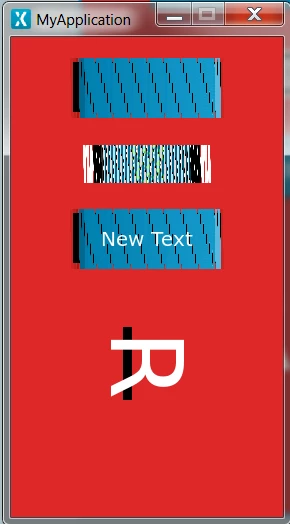
HAL::getInstance()->setDisplayOrientation(ORIENTATION_PORTRAIT);However, items are distorted on the simulator:
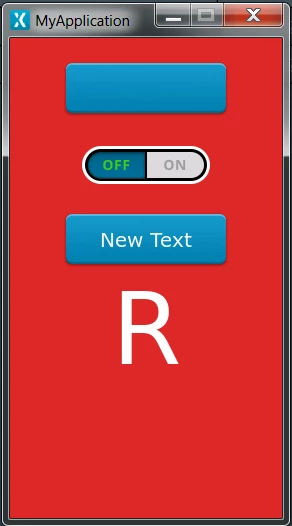
 This is what it looks like in the Designer:
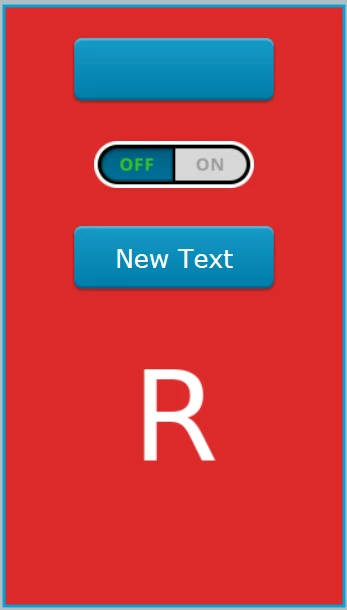
The "R" is an Image widget I added.
The target shows the same thing as the image above (after editing the BoardConfiguration.cpp file).
Is there anything I can do to fix the distortion of the widgets?