

ACher.10
Associate
April 9, 2023
Question

STM32F103 stuck at boot0

  • April 9, 2023
  • 3 replies
  • 7477 views

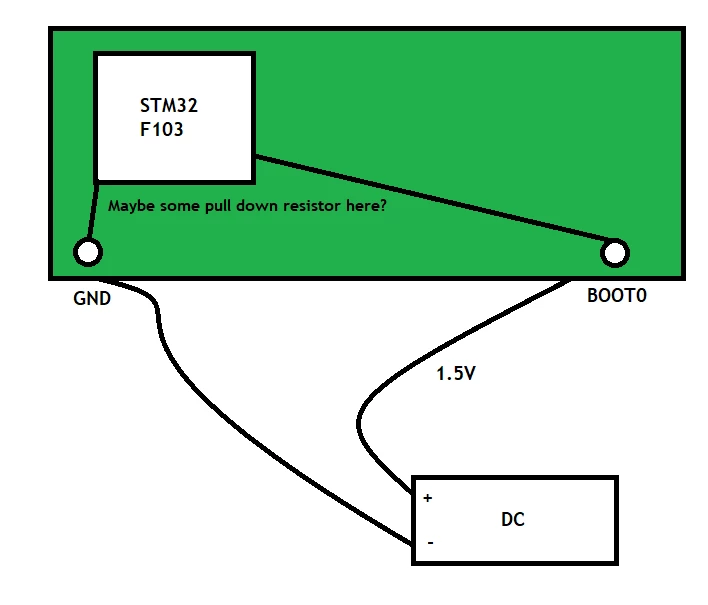
I have a system based on STM32F103 microchip. It has a PCB boot0 pin which is used only when flashing new firmware. During the daily usage of the system, the PCB boot0 is not connected to anything. I have always connected to 1.5 Volts input in order to make it to the bootloader mode and flash it with a new firmware, when needed. I have done it for about a year on a weekly basis, without any problems. The 1.5 Volt input was chosen in order to work "safely" and not to give too high voltage (the max value it can handle according to its datasheet is 9 Volts).

But today it got stuck on the boot0 bootloader mode and can't get back to the regular mode (when boots from the internal 0x08000000 flash). I can see using SWD hardware debugger that the PC is in the area of 0x1FFFF7XX, which is related to boot mode ROM. Since I am not the system engineer of that PCB device, I can't tell whether it is connected to specific resistors or not.

Is there any way to get it back to the boot-from-flash regular mode? Or any way to disable the boot0 mode via SWD/JTAG? Or maybe I have damaged the boot0 internal IC?

_legacyfs_online_stmicro_images_0693W00000bhlktQAA.png

This topic has been closed for replies.

3 replies

Tesla DeLorean
Guru
April 9, 2023

Couldn't you just ground the BOOT0 pin instead?

Do you have a circuit diagram for this board?​

Tips, Buy me a coffee, or three.. PayPal Venmo (See Profile) Up vote any posts that you find helpful, it shows what's working..
ACher.10
ACher.10Author
Associate
April 9, 2023
I tried to ground the BOOT0 pin to the PCB ground but nothing happened. Tried for some times, turned on an off the supply voltage of the PCB but it is still stuck at BOOT mode.

Unfortunately, I don't have the circuit diagram.
ASpie.1
Associate
April 10, 2023

You should have "Boot0" and "Boot1" pins on your STM32F103 MCU. If you are applying power to the Boot0, what are you doing with your other BOOT pin? The table below shows the modes of boot loading depending on the pin configuration. If you have been leaving your Boot1 floating, it could have corrupted memory locations by disrupting the flash process or have uploaded to the wrong memory causing SRAM vector table issues.

I typically just leave both of my Boot loaders to ground and have not had any issues.

If your device is locked up and not accepting a new program, you can hold down your reset button on the MCU. Then, start to load the program with your computer software, and after it starts to connect, release your reset button. This can sometimes help bypass things that get set wrong and or corrupted memory. 


_legacyfs_online_stmicro_images_0693W00000bhm5hQAA.png

ACher.10
ACher.10Author
Associate
April 10, 2023
Thanks. Now I see that the boot0 pin leaks 0.9 volts, but it's hard to tell why.
ACher.10
ACher.10Author
Associate
April 10, 2023

Fixed it temporarily using SWD debugger. Reset the STM32 controller, set 0xE000ED08 VTOR register to point to the flash firmware start at 0x08000000 and set PC to be at the IVT handler of the firmware's entry point. Need to set it each time you turn the device on, but works.