

PSarr.1
Associate II
September 25, 2020
Solved

How do you install X-CUBE-Azure STM32Cube extension pack?

  • September 25, 2020
  • 2 replies
  • 2120 views

Hi,

I am trying to install the X-CuBE-Azure expansion for STM32Cube. See expansion packages page: https://my.st.com/content/my_st_com/en/products/embedded-software/mcu-mpu-embedded-software/stm32-embedded-software/stm32cube-expansion-packages/x-cube-azure.html

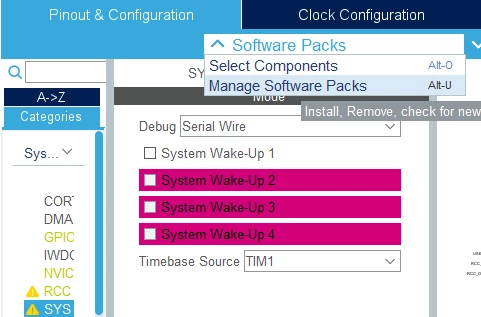
I tried to integrate it the cube by using the Manage Software Pack in the Device configuration tool:
0693W000004HB3aQAG.png

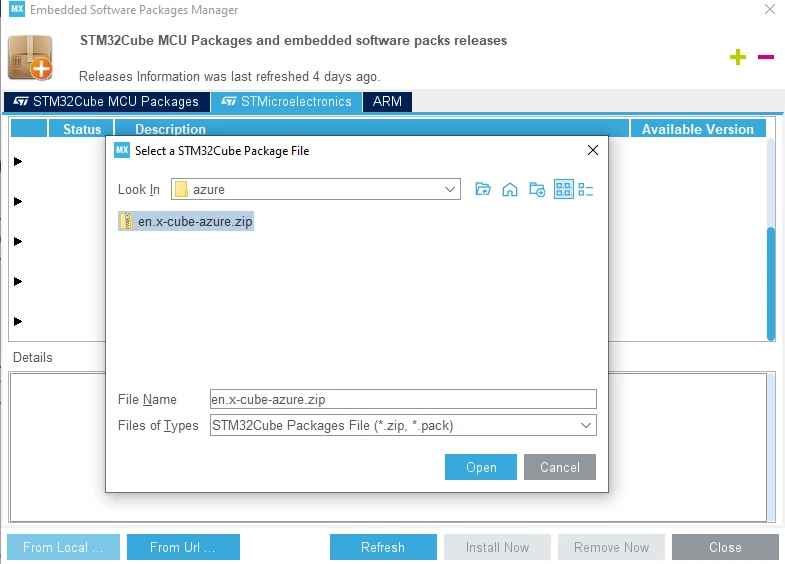
Then I select "From local" and select the en.x-cube-azure.zip file.
0693W000004HB4iQAG.png

I get the following error:

0693W000004HB5WQAW.gif

any ideas how to import that expansion into the cube?

Is it better to do my own porting of azure to my STM32F7 from the original GIT?

Regards

This topic has been closed for replies.
Best answer by Guillaume K

X-CUBE-Azure is not a "CMSIS pack". It is not installable with CubeMX.

Just unzip the X-CUBE-Azure .zip file at root of c:\ and run the project files for the desired development environment (EWARM, MDK-ARM, STM32CubeIDE).

2 replies

Guillaume K
Guillaume KBest answer
ST Employee
October 5, 2020

X-CUBE-Azure is not a "CMSIS pack". It is not installable with CubeMX.

Just unzip the X-CUBE-Azure .zip file at root of c:\ and run the project files for the desired development environment (EWARM, MDK-ARM, STM32CubeIDE).

PSarr.1
PSarr.1Author
Associate II
October 5, 2020

Thanks! it is clear now. I will probably do my own azure porting then...
