
STM32CubeIDE: JSON Compilation Database Generator does not create correct compile_commands.json
I am looking for a way to use a different editor for a STM32CubeIDE project. For the editor to show correct errors and provide code-completion, I would need a compile_commands.json file, which the clangd language server can use.
I found this post which describes how to generate this file using an external program called compiledb. But I also found a setting in STM32CubeIDE under Project -> Properties -> C/C++ Build -> JSON Compilation Database Generator, which can be enabled to have STM32CubeIDE generate a compile_commands.json file when building automatically, which would be exactly what I need.
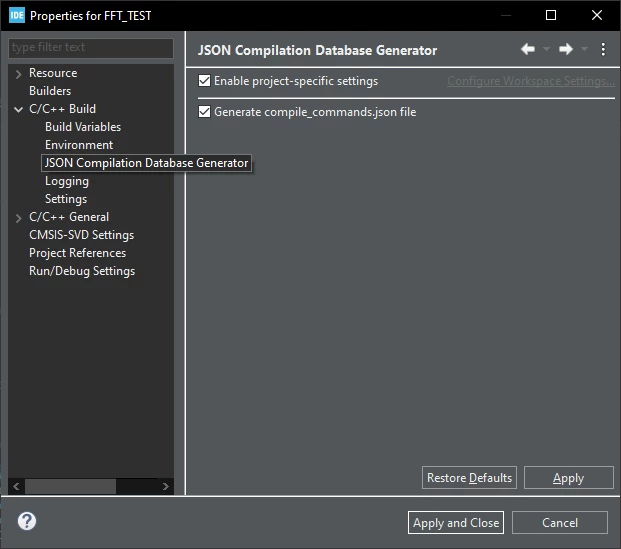
But the created compile_commands.json file seems to be not correct, specifically the relative paths used for the includes are wrong.
An exemplary entry in the compile_commands.json file looks like this:
{
"directory": "/full/path/to/project/dir",
"command": "arm-none-eabi-gcc \"/full/path/to/project/dir/Drivers/BSP/STM32H7xx_Nucleo/stm32h7xx_nucleo.c\" -mcpu\u003dcortex-m7 -std\u003dgnu11 -g3 -DDEBUG -DUSE_PWR_DIRECT_SMPS_SUPPLY -DUSE_NUCLEO_64 -DUSE_HAL_DRIVER -DSTM32H7A3xxQ -c -I../Inc -I../Drivers/STM32H7xx_HAL_Driver/Inc -I../Drivers/STM32H7xx_HAL_Driver/Inc/Legacy -I../Drivers/BSP/STM32H7xx_Nucleo -I../Drivers/CMSIS/Device/ST/STM32H7xx/Include -I../Drivers/CMSIS/Include -I\"..\\dependencies\\CMSIS-DSP\\Include\" -I\"..\\dependencies\\CMSIS-DSP\\PrivateInclude\" -O0 -ffunction-sections -fdata-sections -Wall -fstack-usage --specs\u003dnano.specs -mfpu\u003dfpv5-d16 -mfloat-abi\u003dhard -mthumb -o \"/full/path/to/project/dir/Debug/Drivers/BSP/STM32H7xx_Nucleo/stm32h7xx_nucleo.o\"",
"file": "/full/path/to/project/dir/Drivers/BSP/STM32H7xx_Nucleo/stm32h7xx_nucleo.c"
},
The relevant part is, that the "directory" is the path to the top level project directory, yet all the -I include paths in "command", are relative to the ./Debug / output directory in which the compile_commands.json file is located.
Thus, clangd cannot find any of the #include "xxx.h" files.
This is either a problem with the generation of the compile_commands.json file, or it is my problem, in case I simply did not use it correctly / there is a setting to change this behavior. If it's the second, I would appreciate some guidance on how to correct this.
Another note: If I manually add /Debug to all the "directory" paths, the includes work, except for all the standard C includes like math.h, string.h, ... which are also used in the HAL files. This would also be something which I would be glad if someone could help with.
