Associate II
March 23, 2025
Solved

How to Add C++ Compiler in STM32CubeIDE for Mixed C/C++ Project?

  • March 23, 2025
  • 1 reply
  • 1180 views

Hello everyone,

I’m working on a project in STM32CubeIDE with C, and I’d like to add a C++ library. I’ve read that it’s possible to mix C and C++ using different compilers, but in my project settings (C/C++ Build > Settings > Paths and Symbols), I only see the GNU C compiler (arm-none-eabi-gcc).

How can I add the C++ compiler (arm-none-eabi-g++) in STM32CubeIDE?
Do I need to change any other settings to properly handle mixed C and C++ code in the project?

Thank you for your help!

This topic has been closed for replies.
Best answer by TDK

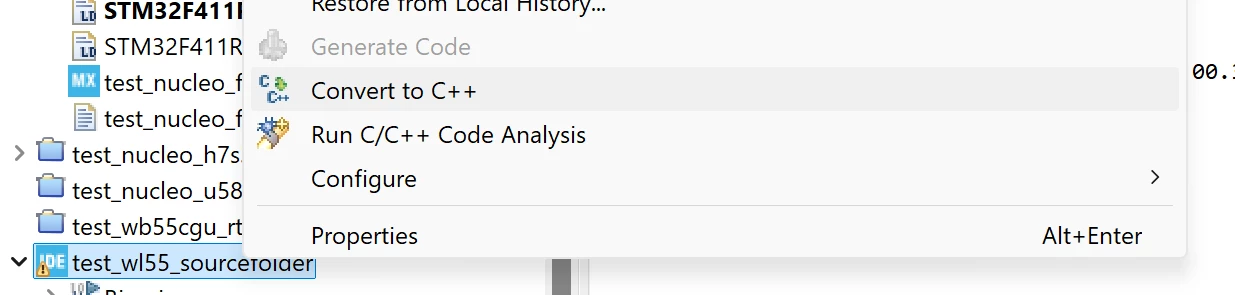
Right click the project in the Project Explorer and select "Convert to C++".

TDK_1-1742766931874.png


1 reply

TDK
TDKBest answer
March 23, 2025

Right click the project in the Project Explorer and select "Convert to C++".

TDK_1-1742766931874.png


"If you feel a post has answered your question, please click ""Accept as Solution""."
Associate II
March 23, 2025

Thank you for your reply!
I’d like to clarify — does "Convert to C++" change all my project files to C++, meaning main.c becomes main.cpp? Or does it just add the C++ compiler, allowing me to mix C and C++ in the same project?

TDK
March 23, 2025

> does it just add the C++ compiler, allowing me to mix C and C++ in the same project?

This one. No files are changed. CubeMX still generates C files.

"If you feel a post has answered your question, please click ""Accept as Solution""."