


MHoll.2
Senior III
January 23, 2026
Solved

Build Analyzer not working as expected

  • January 23, 2026
  • 2 replies
  • 283 views

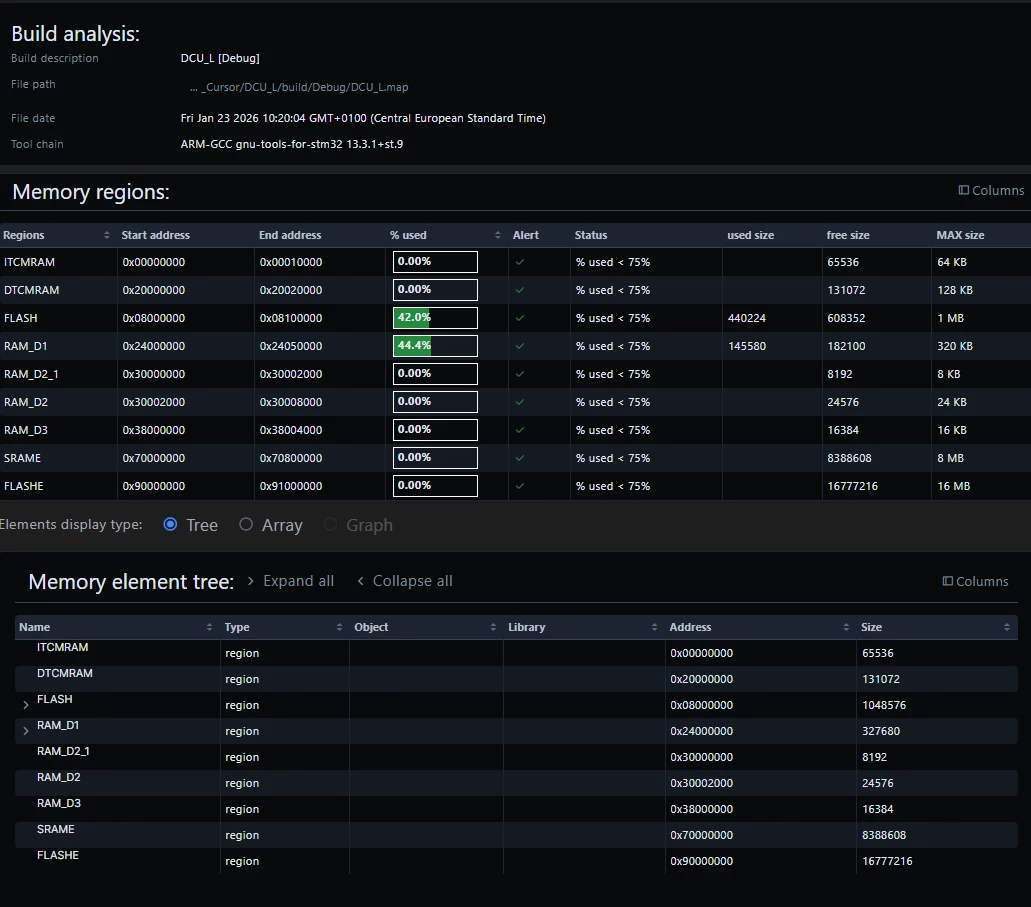
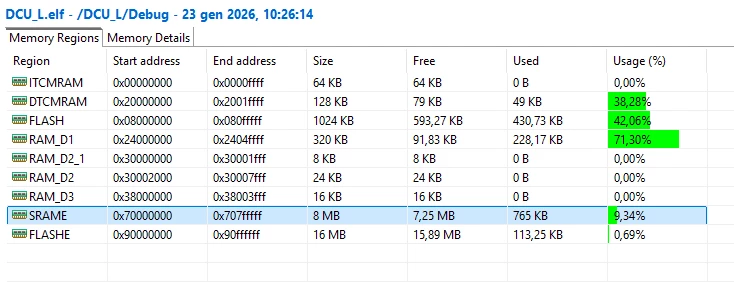
I tried to use the Build analyzer in VSCode, but there are some important allocations missing:

VSCode:
MHoll2_0-1769160598505.png

STM32CubeIDE (using *.elf file produced by VSCode):
MHoll2_1-1769160677585.png

This is probably because the VSCode plugin is using the *.map file while the STM32CubeIDE uses the *.elf file.

Is there any chance to have the same Analyzer in VSCode?

Best answer by Nawres GHARBI

Hi @MHoll.2 

Thanks for the suggestion already in the pipe for a later release

2 replies

Nawres GHARBI
Nawres GHARBIBest answer
ST Technical Moderator
February 3, 2026

Hi @MHoll.2 

Thanks for the suggestion already in the pipe for a later release

ST Employee
July 21, 2026

@MHoll.2 
The July update of STM32CubeIDE for Microsoft Visual Studio Code resolves this issue adding binary file processing as extra map file to get more data. Update the local setup to benefit from this improvement.

To give better visibility on the answered topics, please click on Accept as Solution on the reply which solved your issue or answered your question.