


How to add your spi flash into the STM32CubeProgrammer's External Loader Part 2
Welcome back with the part 2 of our article series that explains how to add a custom SPI flash memory in the External Loader portion of the STM32CubeProgrammer and in the STM32CubeIDE.
In the first part we covered the pre-requisites and linker script needed code edit - the full file edited is presented at the end of this article.
The next steps will show how to create the necessary files of the External Loader.
First, create the file that will receive all the necessary External Loader functions. In Core -> Src click with right mouse button, go to New -> Source File and create a file named “Loader_Src.c”.
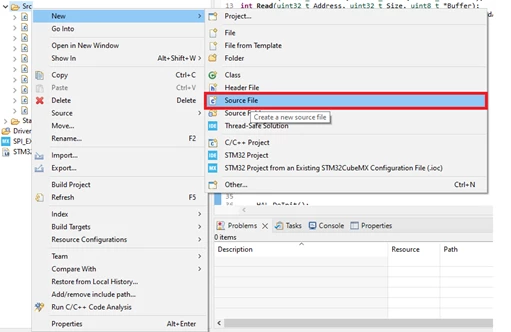
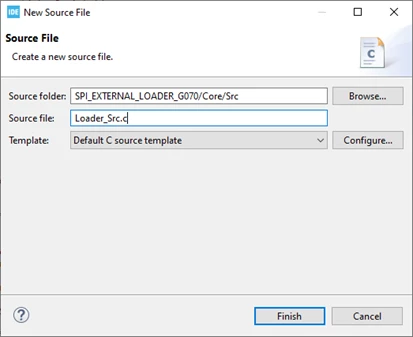
This file needs to receive the following functions in these specific format (the same names, types, parameters and return values). These functions will be used by STM32CubeProgrammer to manage the external memory and you should place your memory driver inside that, according to the function purpose. These are the functions will need to populate:
int Write(uint32_t Address, uint32_t Size, uint8_t *buffer);
int Read(uint32_t Address, uint32_t Size, uint8_t *Buffer);
int SectorErase (uint32_t EraseStartAddress ,uint32_t EraseEndAddress);
int MassErase(void);
You can add these following functions too, but they are optional:
uint32_t CheckSum(uint32_t StartAddress, uint32_t Size, uint32_t InitVal);
int Verify (uint32_t MemoryAddr, uint32_t RAMBufferAddr, uint32_t Size);
The return values of the functions need to be “0” to represent an operation failed or “1” when it succeeded, and you can create these defines to help you to manage that:
#define LOADER_OK	0x1
#define LOADER_FAIL	0x0
We need to include the HAL drivers and some initialization functions to manage the peripherals, so add the following lines to the code:
#include "main.h"
#include "gpio.h"
extern void SystemClock_Config(void);
extern void MX_SPI2_Init(void);
extern void MX_GPIO_Init(void);
The remaining function that we need to create in this file is the Init function that will be called by the Entry Point mentioned in the linker script step by step:
int Init(void) {

	SystemInit();

	SCB->VTOR = 0x20000000 | 0x200;

	HAL_DeInit();
	HAL_Init();

	/* Configure the system clock */
	SystemClock_Config();

	/* Initialize all configured peripherals */
	MX_GPIO_Init();
	MX_SPI2_Init();

	__set_PRIMASK(0);	//enable interrupts
	W25qxx_Init();	 	//External memory function initialization
	__set_PRIMASK(1);	//disable interrupts

	return LOADER_OK;
}
The other two files that we need to create are “Dev_Info.c” and “Dev_Info.h”. These files will manage the header memory information used by STM32CubeProgrammer to read, program and erase the device – there are examples available in the STM32CubeProgrammer installation folder and also referred in the UM2237. So, let’s start creating these files from scratch. Create “Dev_Inf.h” in Core - > Inc folder, and “Dev_Inf.c” in Core -> Src.
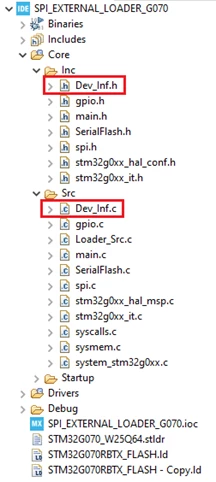
Starting by the header code, we need to create a specific struct that will receive all the necessary information about the memory and communication type. So, add the following code on the file.
#define 	MCU_FLASH 	1
#define 	NAND_FLASH 2
#define 	NOR_FLASH 3
#define 	SRAM 4
#define 	PSRAM 5
#define 	PC_CARD 6
#define 	SPI_FLASH 7
#define 	I2C_FLASH 8
#define 	SDRAM 9
#define 	I2C_EEPROM 10

#define SECTOR_NUM 10				// Max Number of Sector types

struct DeviceSectors
{
 unsigned long		SectorNum; // Number of Sectors
 unsigned long		SectorSize; // Sector Size in Bytes
};

struct StorageInfo
{
 char 	 DeviceName[100];				// Device Name and Description
 unsigned short DeviceType;					// Device Type: ONCHIP, EXT8BIT, EXT16BIT, ...
 unsigned long DeviceStartAddress;			// Default Device Start Address
 unsigned long DeviceSize;					// Total Size of Device
 unsigned long PageSize;						// Programming Page Size
 unsigned char EraseValue;					// Content of Erased Memory
 struct 	 DeviceSectors	 sectors[SECTOR_NUM];
};
In “Dev_Inf.c” we only need to declare and initialize that struct and store it on the .Dev_info section of the RAM (for that, an __attribute__(section(“.Dev_Info”)) is placed in the struct declaration). The variable data of the struct should be changed to be compatible with the memory.
/*
 * Dev_Inf.c
 *
 */
#include "Dev_Inf.h"

/* This structure contains information used by ST-LINK Utility to program and erase the device */
#if defined (__ICCARM__)
__root struct StorageInfo const StorageInfo = {
#else
struct StorageInfo __attribute__((section(".Dev_info"))) /*const*/ StorageInfo = {
#endif
		"W25Q64_STM32G070R", 	 	 // Device Name + version number
		SPI_FLASH, 		 // Device Type
		0x00000000, 			 // Device Start Address
		MEMORY_FLASH_SIZE, 	 // Device Size in Bytes
		MEMORY_PAGE_SIZE, // Programming Page Size
		0xFF, // Initial Content of Erased Memory

		// Specify Size and Address of Sectors (view example below)
		{
				{ 0x80, 			// Sector Numbers,
				 0x1000 }, 	//Sector Size

				{ 0x00000000, 0x00000000 }
		}
};
The struct data is shown by Cube Programmer when the External Loader is present on that.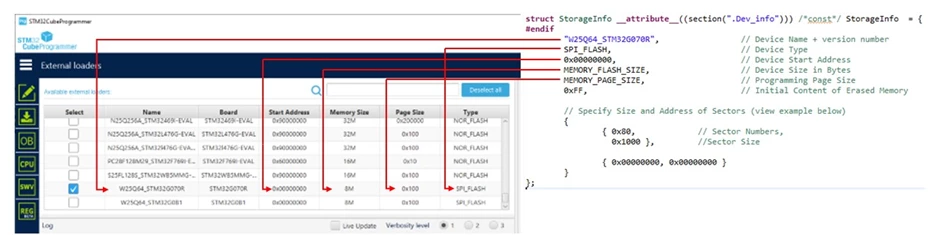
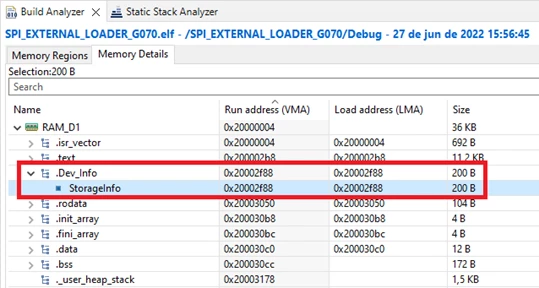
Building the project, the functions (including the memory driver functions) should be inside the .text section that are in the RAM_D1 memory area and a section named .Dev_Info with the StorageInfo struct was created.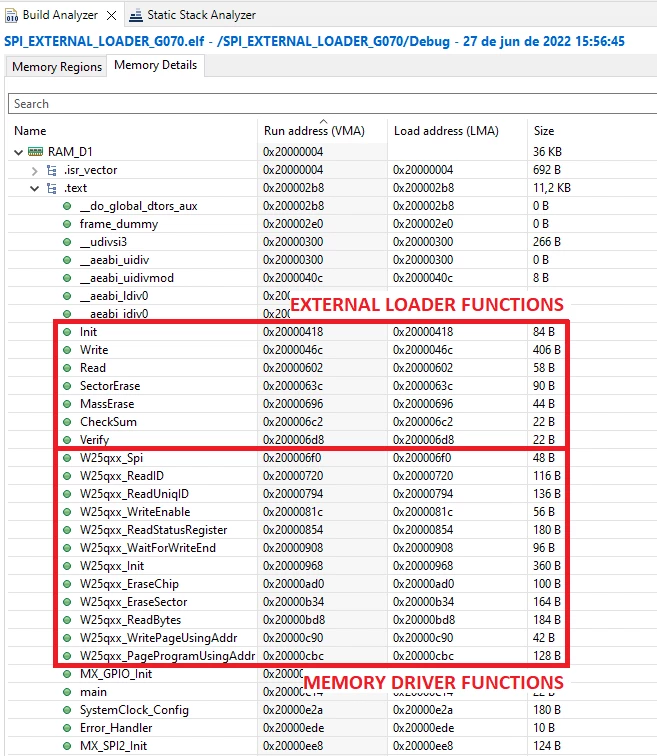
The final creation step of the external loader is to set the STM32 Project settings to generate the .stld (ST Loader) file after build the files. For that, click with right mouse button on the project and go to Properties.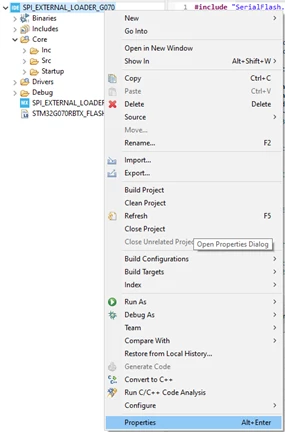
In the settings, go to C/C++ Build -> Build Steps and add the following text in Command text box of Post-build steps:
cp "${BuildArtifactFileBaseName}.elf" "../STM32G070_W25Q64.stldr"
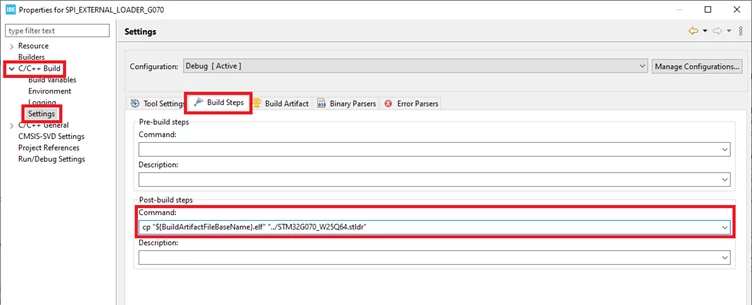 Build the application and check in the project files if the STM32G070_W25Q64.stldr file was created (you can change the name if you want in the command text).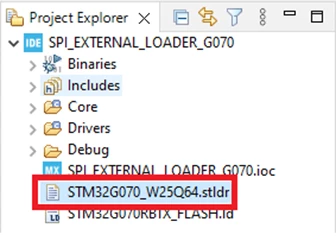
Now, the driver is ready to be used and we need to import that in the STM32CubeProgrammer. Copy the STM32G070_W25Q64.stldr file (that’s located in the root project folder) to the External Loader folder of the STM32CubeProgrammer. A fast way to locate this file is clicking with right mouse button on that and going to Show In -> System Explorer, so the file explorer should be open in the file located folder.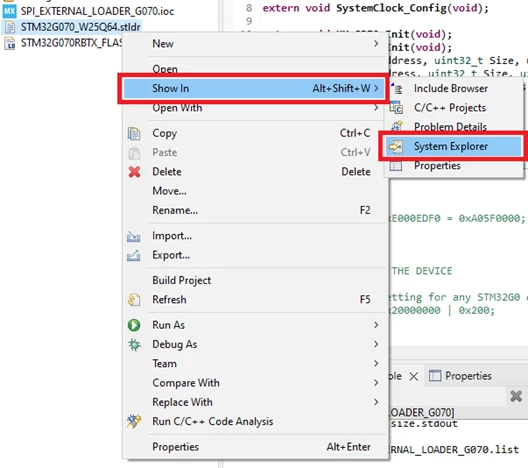
Then, copy and paste the *.stldr file to External Loader folder of the STM32CubeProgrammer, located in:
“C:\Program Files\STMicroelectronics\STM32Cube\STM32CubeProgrammer\bin\ExternalLoader”
(this path can change depending of your installation path, another way to reach on that is clicking with right mouse button on the STM32CubeProgrammer desktop shortcut and going to “Open file location” and search for the ExternalLoader folder on the opened location).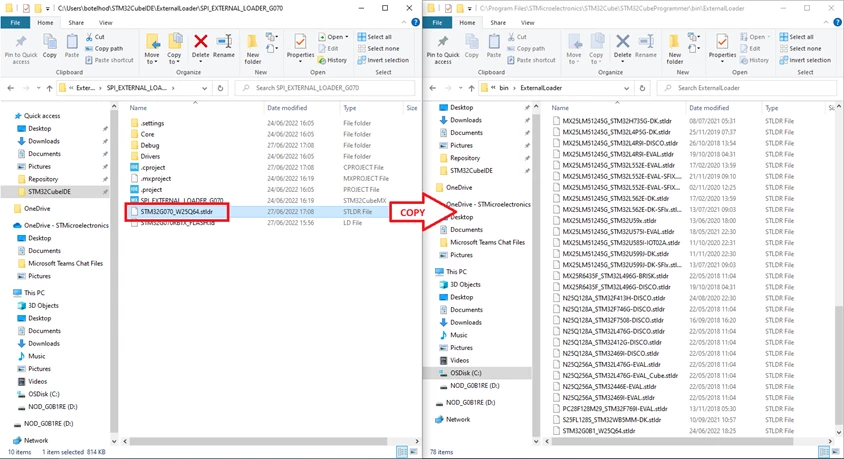 Finally, open the STM32CubeProgrammer and go to EL (External Loader) tab, search for the created loader and active that checking the current box.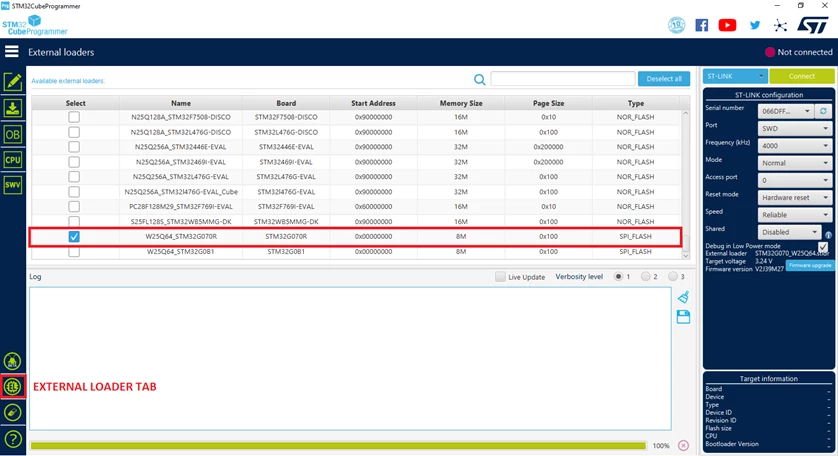
Going back to “Memory & File edition” and searching for an address of the external memory, if the process done well, you will see the content stored on that. In this case there are a sequence stored on the memory that starts from the 0x00000000 address. 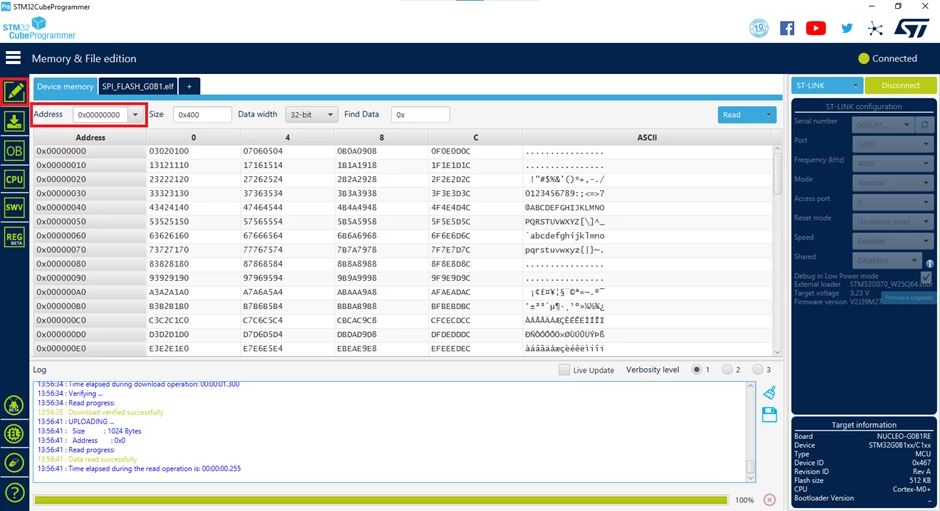
If all the steps were properly made, the External Loader is running properly and now you can directly read, program and erase external memories. Congratulations!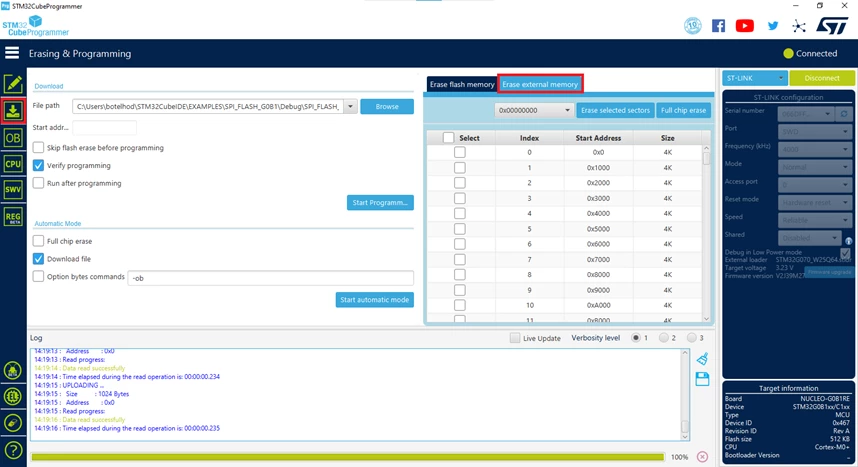
References:
- NUCLEO-G070RB - STM32 Nucleo-64 development board with STM32G070RB MCU, supports Arduino and ST morpho connectivity
- STM32 Nucleo-64 boards (MB1360) - User manual
- Arm® Cortex®-M0+ 32-bit MCU, 128 KB Flash, 36 KB RAM, 4x USART, timers, ADC, DAC, comm. I/Fs, 1.7-3.6V
- STM32G0x0 advanced Arm®-based 32-bit MCUs - Reference manual
- STM32CubeProg - STM32CubeProgrammer software for all STM32
- STM32CubeProgrammer software description - User manual
Linker file code:
/* Entry Point */
ENTRY(Init)

/* Generate 2 segment for Loader code and device info */
PHDRS {Loader PT_LOAD ; SgInfo PT_LOAD ; }

/* Highest address of the user mode stack */
_estack = ORIGIN(RAM_D1) + LENGTH(RAM_D1); /* end of "RAM" Ram type memory */

_Min_Heap_Size = 0x200 ; /* required amount of heap */
_Min_Stack_Size = 0x400 ; /* required amount of stack */

/* Memories definition */
MEMORY
{
 RAM_D1 (xrw) : ORIGIN = 0x20000004, LENGTH = 36K-4
}

/* Sections */
SECTIONS
{

 .isr_vector :
 {
 	. = . + 0x1FC; /* ISR vector offset */
 . = ALIGN(4);
 KEEP(*(.isr_vector)) /* Startup code */
 . = ALIGN(4);
 } >RAM_D1 :Loader

 .ARM.extab : { *(.ARM.extab* .gnu.linkonce.armextab.*) } >RAM_D1

 .ARM : {
 __exidx_start = .;
 *(.ARM.exidx*)
 __exidx_end = .;
 } >RAM_D1 :Loader

 .preinit_array :
 {
 PROVIDE_HIDDEN (__preinit_array_start = .);
 KEEP (*(.preinit_array*))
 PROVIDE_HIDDEN (__preinit_array_end = .);
 } >RAM_D1 :Loader

 .init_array :
 {
 PROVIDE_HIDDEN (__init_array_start = .);
 KEEP (*(SORT(.init_array.*)))
 KEEP (*(.init_array*))
 PROVIDE_HIDDEN (__init_array_end = .);
 } >RAM_D1 :Loader

 .fini_array :
 {
 PROVIDE_HIDDEN (__fini_array_start = .);
 KEEP (*(SORT(.fini_array.*)))
 KEEP (*(.fini_array*))
 PROVIDE_HIDDEN (__fini_array_end = .);
 } >RAM_D1 :Loader

 /* Used by the startup to initialize data */
 _sidata = LOADADDR(.data);

 /* Initialized data sections into "RAM" Ram type memory */
 .data :
 {
 . = ALIGN(4);
 _sdata = .; /* create a global symbol at data start */
 *(.data) /* .data sections */
 *(.data*) /* .data* sections */

 . = ALIGN(4);
 _edata = .; /* define a global symbol at data end */

 } >RAM_D1 :Loader

 /* Uninitialized data section */
 . = ALIGN(4);
 .bss :
 {
 /* This is used by the startup in order to initialize the .bss section */
 _sbss = .; /* define a global symbol at bss start */
 __bss_start__ = _sbss;
 *(.bss)
 *(.bss*)
 *(COMMON)

 . = ALIGN(4);
 _ebss = .; /* define a global symbol at bss end */
 __bss_end__ = _ebss;
 } >RAM_D1 :Loader

 /* The program code and other data into RAM type memory */
 .text :
 {
 . = ALIGN(4);
 *(.text) /* .text sections (code) */
 *(.text*) /* .text* sections (code) */
 *(.glue_7) /* glue arm to thumb code */
 *(.glue_7t) /* glue thumb to arm code */
 *(.eh_frame)

 KEEP (*(.init))
 KEEP (*(.fini))
	KEEP (*Loader_Src.o ( .text* ))
 . = ALIGN(4);
 _etext = .; /* define a global symbols at end of code */
 } >RAM_D1 : Loader

 .Dev_Info :
 {
 	__Dev_info_START = .;
 	*(.Dev_info*)
 	KEEP(*(.Dev_info))
 	__Dev_info_END = .;
 } >RAM_D1 :SgInfo

 /* Constant data into "FLASH" Rom type memory */
 .rodata :
 {
 . = ALIGN(4);
 *(.rodata) /* .rodata sections (constants, strings, etc.) */
 *(.rodata*) /* .rodata* sections (constants, strings, etc.) */
 . = ALIGN(4);
 } >RAM_D1 :Loader

 /* User_heap_stack section, used to check that there is enough "RAM" Ram type memory left */
 ._user_heap_stack :
 {
 . = ALIGN(8);
 PROVIDE ( end = . );
 PROVIDE ( _end = . );
 . = . + _Min_Heap_Size;
 . = . + _Min_Stack_Size;
 . = ALIGN(8);
 } >RAM_D1 :Loader

 /* Remove information from the compiler libraries */
 /DISCARD/ :
 {
 libc.a ( * )
 libm.a ( * )
 libgcc.a ( * )
 }

 .ARM.attributes 0 : { *(.ARM.attributes) }
}