
Associate II
May 23, 2025
Solved

STM32WL33x default SWD pins

  • May 23, 2025
  • 4 replies
  • 595 views

Hello all :)

I am designing a board using the STM32WL33CCV6TR, and want to program/debug using the SWD interface. However, there are multiple pins the SWDIO and SWCLK can be mapped to using alternate functions. Usually with STM products, I have seen a footnote saying which pins the SWD interface is mapped to on boot. However, I cannot see this on the STM32WL33xx datasheet.


My question is which pins should I use as SWDIO and SWCLK so that I can program the chip out of the box (without having to mess around with the bootloader). And could I have found this information, as I am sure it is somewhere but cannot find it. I am guessing the PA2 and PA3 pins, but not really for any good reason...


Many thanks in advance!
Best answer by STTwo-32

Hello @angus123 

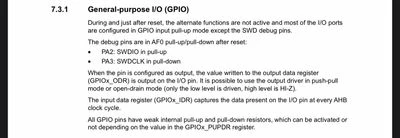
As Said @TDK , this information should be available on the RM0511 specially on the paragraph 7.3.1: 

During and just after reset, the alternate functions are not active and most of the 1/0 ports are configured in GPIO input pull-up mode except the SWD debug pins.

The debug pins are in AFO pull-up/pull-down after reset:

  • PA2: SWDIO in pull-up
  • PA3: SWDCLK in pull-down

STTwo32_0-1748076135331.jpeg

Best Regards.

STTwo-32

4 replies

TDK
May 23, 2025

Look at the default GPIO register settings in the Reference Manual.

"If you feel a post has answered your question, please click ""Accept as Solution""."
STTwo-32
STTwo-32Best answer
ST Technical Moderator
May 24, 2025

Hello @angus123 

As Said @TDK , this information should be available on the RM0511 specially on the paragraph 7.3.1: 

During and just after reset, the alternate functions are not active and most of the 1/0 ports are configured in GPIO input pull-up mode except the SWD debug pins.

The debug pins are in AFO pull-up/pull-down after reset:

  • PA2: SWDIO in pull-up
  • PA3: SWDCLK in pull-down

STTwo32_0-1748076135331.jpeg

Best Regards.

STTwo-32

To give better visibility on the answered topics, please click on Accept as Solution on the reply which solved your issue or answered your question.
angus123Author
Associate II
May 27, 2025

Thank you for your help @TDK and @STTwo-32  much appriciated :)
