

2026-05-05 2:12 AM
hello ST Community,
I'm trying to protect sector 0 of the flash drive from mass erasure using the PCCOP Protection option on the NUCLEO-H755ZI-Q.
After tinkering around a bit to understand its functions, I can no longer reset its protection to its default state. Currently, it looks like the one in the photo:

When I try to set these values
PROT_AREA_START1 = 0x0801FF00
PROT_AREA_END1 = 0x080100FF
which i believe are their default values, both in the RDP=0xAA and RDP=0xBB states, I get this error.
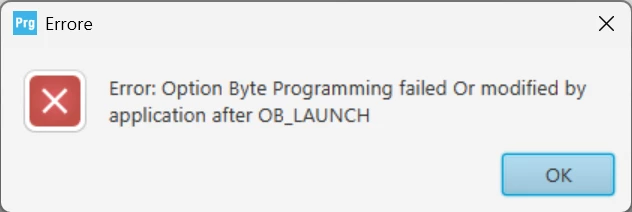
How can I fix this? Is there a way to reset PCROP Protection to its default mode?
Thanks for the support.

Solved! Go to Solution.
2026-05-06 7:50 AM
Hello @Domy_ST,
what you describe to me looks like SBSFU application. You definitely do not need to perform RDP regression to update the Application SW. It should even work in RDP2 without any problem. Unless modification of OB is involved, of course.
Please have a look at X-CUBE-SBSFU | Product - STMicroelectronics examples, which you can use as inspiration and starting point.
It's well tested to provide security to Application SW while retaining the flexibility of secure firmware update.
BR,
J
To give better visibility on the answered topics, please click on Accept as Solution on the reply which solved your issue or answered your question.
2026-05-06 1:38 AM
Hello @Domy_ST ,
yes, you can reset the PCROP, but only when the RDP is changed at the same time:
Which means that you need to set the RDP to 0xBB and then, in the same step, request both RDP=0xAA and the PCROP modification.
BR,
J
To give better visibility on the answered topics, please click on Accept as Solution on the reply which solved your issue or answered your question.
2026-05-06 1:50 AM
@hello @Bubbles,
I managed to get PCROP to enable and disable protection depending on the size of the flash drive I wanted. But another problem arose:
The problem is that before enabling PCROP protection, you write data to the flash drive from 0x08000000 to 0x0801FFFF (a single 128KB page in sector 0). After enabling PCROP protection, you only write data to that area with DMEP = 0 to protect it from deletion. However, after enabling PCROP protection, the data is still deleted; after PCROP protection, it cannot be overwritten.
Is there a way to prevent data from being deleted while enabling PCROP?
Thanks for support
2026-05-06 2:47 AM
Hello @Domy_ST,
enabling PCROP should not erase the protected memory.
I suspect there's some other problem. How do you determine it's deleted?
BR,
J
To give better visibility on the answered topics, please click on Accept as Solution on the reply which solved your issue or answered your question.
2026-05-06 2:59 AM
I simply write data and verify that they are populated on STM32CubeProgrammer and it's ok. Then I enable PCROP and DMEP = 0 only for that area and then I recheck that they are still populated on STM32CubeProgrammer and instead they are all populated at 0x00000000 for that area of sector 0.
2026-05-06 3:01 AM
hello @Domy_ST ,
Enabling PCROP should not erase the data.
The DMEP is feature that protects a PCROP-ed region from being erased by an RDP regression.
you have to program the flash with the your program (upload the elf to the device), then enabled the PCROP region.
Could you clarify how you determine that the data has been deleted?
Also what do you mean by data is deleted:
Possible causes of the PCROP region being erased include:
Best regards.
2026-05-06 5:33 AM
hello @Onizuka09,
Here's the sequence of how I write data to that flash area, again using the STM32Cubeprogrammer tool:
Is there a way to prevent it from returning zero, but instead return data from binary files as before, but still need to be protected by PCROP during the regression from RDP = 1 to RDP = 0?
Thanks
2026-05-06 6:20 AM
Hi @Domy_ST,
the very purpose of PCROP is to return zeros when being read. The fact that it's not erased during regression is secondary. Maybe you can try using secure area instead? It may be better fitting your use case.
BR,
J
To give better visibility on the answered topics, please click on Accept as Solution on the reply which solved your issue or answered your question.
2026-05-06 6:29 AM - edited 2026-05-06 6:29 AM
hello @Domy_ST,
To add on what @Bubbles said, PCROP is a security mechanism, its purpose is to protect a proprietary code from being read (leaked) or altered. It sets a memory region as execute only by the CPU. All other types of access including data read, write and erase operations are strictly prohibited. So external access to that region via DMA or debug interface is blocked.
Thanks.
2026-05-06 6:43 AM
OK, thanks @Bubbles @Onizuka09,
So, in my case, PCROP doesn't work. What is the safe area in the flash (at least 128KB) that I can write data to and that can be accessed not only by the CPU but also externally (UART and YMODEM management) for the bootloader, and that prevents deletion during the RDP = 1 to RDP = 0 regression?
Or is there a way other than the PCROP option that permanently protects sector 0 of the flash from deletion during RDP = 1 to RDP = 0 regression?
Thanks for support