
Associate II
January 12, 2024
Solved

STM32F405RGT6 custom board not working

  • January 12, 2024
  • 7 replies
  • 9803 views

Hi guys, this is my first post here on the forum. I'm starting my learning in STM and I created a custom board with a STM32F405RGT6, I followed a basic MCU operation schematic that I found in a video on Youtube, but the MCU is not starting. I did several tests to check if the USB connection was correct, if the voltages also worked well and everything is ok. However, I saw that I really don't get a clock from the crystal, the crystal I'm using is already known to me from other projects. So I'm leaving here a print of the connection schematic and if anyone can give me some light on where to look for the problem that causes the MCU to not start, I would be very grateful.:grinning_face:
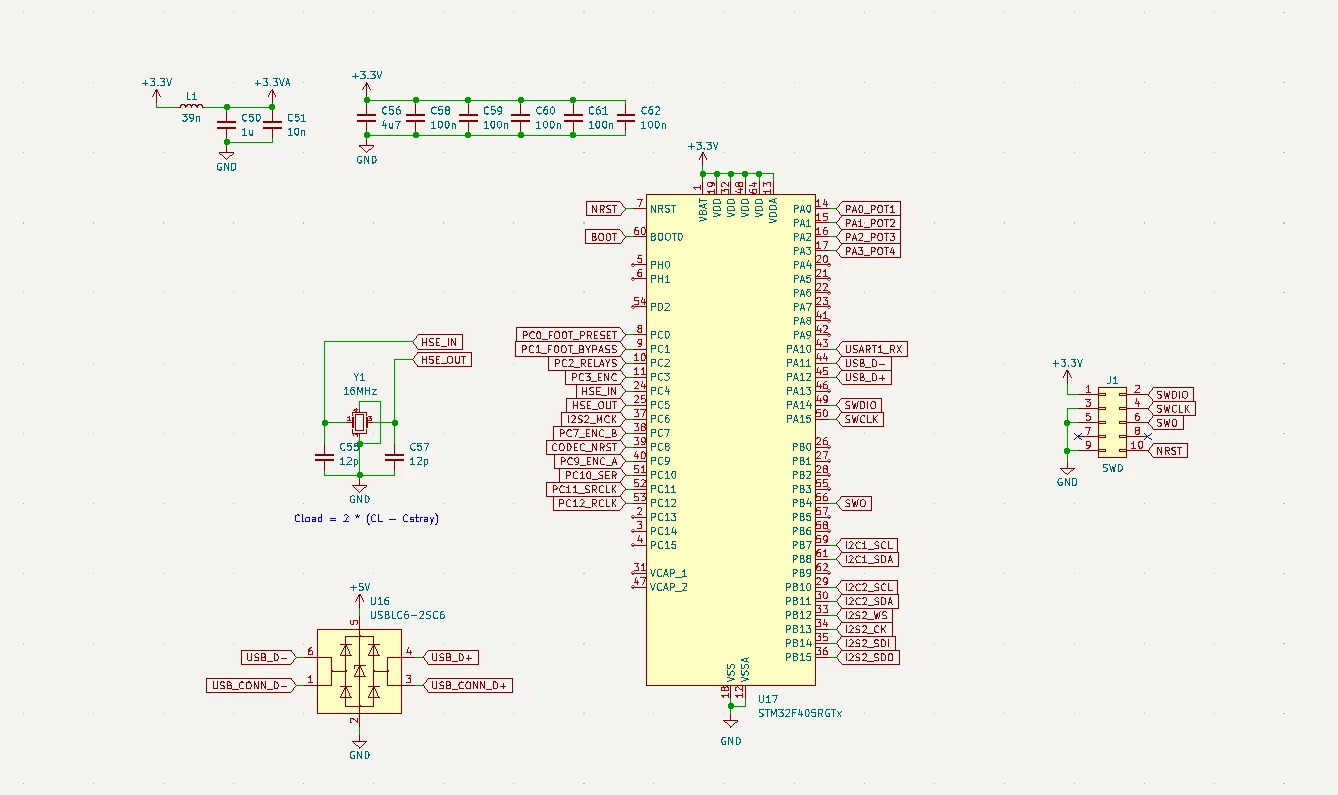

 

Captura de tela 2024-01-12 100142.png

This topic has been closed for replies.
Best answer by mƎALLEm

Also, I didn't notice this at first glance:

You're connecting OSC_IN and OSC_OUT to PC4 and PC5 while it should be connected to PH0 and PH1 like provided in the datasheet:

SofLit_0-1705069356147.png

I'm wondering what kind of Youtube link you're referring to!


7 replies

Visitor II
January 12, 2024

I think it's wise to check your PCB and troubleshoot if needed. 

Associate II
January 12, 2024

Hi guy, thanks for your reply. I have already done all the checking on my PCB and the schematic is being fully respected, I am a guitar pedal manufacturer and have a lot of experience with custom boards from other MCUs (Atmel and ESP). Can you see a connection error or a pin that should have a connection and is floating in the image I attached?

TDK
January 12, 2024

Did you fix the VCAP errors? Going to be hard if you didn't put any traces/pads on those pins. Is the voltage on VCAP ~1.2V?


Once it's set up right, you should be able to open STM32CubeProgrammer and hit connect to connect to the device.

"If you feel a post has answered your question, please click ""Accept as Solution""."
mƎALLEm
ST Technical Moderator
January 12, 2024

Hello,

You need to refer to the STM32F4 hardware getting started AN4488 and refer to the schematics.

From your schematics at least VCAPx capacitors are missing:

SofLit_0-1705065893038.png


To give better visibility on the answered topics, please click "Best answer" on the reply which solved your issue or answered your question.
TDK
January 12, 2024

Can STM32CubeProgrammer connect to it? Looks like VCAP is the only issue, but it wouldn't respond at all if that were the case. The crystal won't put out a signal until you run a program that activates it.


Design guide:

https://www.st.com/resource/en/application_note/an4488-getting-started-with-stm32f4xxxx-mcu-hardware-development-stmicroelectronics.pdf


"If you feel a post has answered your question, please click ""Accept as Solution""."
mƎALLEm
ST Technical Moderator
January 12, 2024

Forget about the crystal for now and try to run with HSI as clock source for system clock:

SofLit_0-1705066901251.png

Do you face the same issue?

To give better visibility on the answered topics, please click "Best answer" on the reply which solved your issue or answered your question.
Associate II
January 12, 2024

My attitude must be very noob, but I was just hoping to connect the MCU via USB and some device would appear on the computer, apparently this isn't the initial step, right?

Is the connection header I created (J1) or is there a pin missing from it? I have a ST LINK-V3 MINI DEBUGGER, should I use it to do this initial MCU configuration?

I really apologize for questions that should be very simple for those who are already used to MTS, but my knowledge of these devices is really minimal.

Associate II
January 12, 2024

Does the St-link V2 Mini also serve to communicate with the STM32F405RGT6?

mƎALLEm
ST Technical Moderator
January 12, 2024

"Does the St-link V2 Mini also serve to communicate with the STM32F405RGT6?"

--> Yes

To give better visibility on the answered topics, please click "Best answer" on the reply which solved your issue or answered your question.
Associate II
January 12, 2024

Excellent, I haven't found the ST V3 in my laboratory, so I'm going to buy this V2.

mƎALLEm
mƎALLEmBest answer
ST Technical Moderator
January 12, 2024

Also, I didn't notice this at first glance:

You're connecting OSC_IN and OSC_OUT to PC4 and PC5 while it should be connected to PH0 and PH1 like provided in the datasheet:

SofLit_0-1705069356147.png

I'm wondering what kind of Youtube link you're referring to!


To give better visibility on the answered topics, please click "Best answer" on the reply which solved your issue or answered your question.
Associate II
January 19, 2024

Hi Guys, I managed to communicate with the STM via USB and record a hello word on it.

I didn't have access to st link v2 and v3. However, I managed to correct the layout errors on my custom PCB. The crystal oscillator was actually on the wrong pins and the lack of VCAPs prevented the STM from starting. I managed to solder these components to the STM pins and everything worked.

Thank you for your support, I will be more attentive when following youtubers schematic :grinning_face_with_sweat:
