Associate II
April 16, 2024
Solved

Setting up HSE on NUCLEO-H743ZI2 Development Board

Hello, 

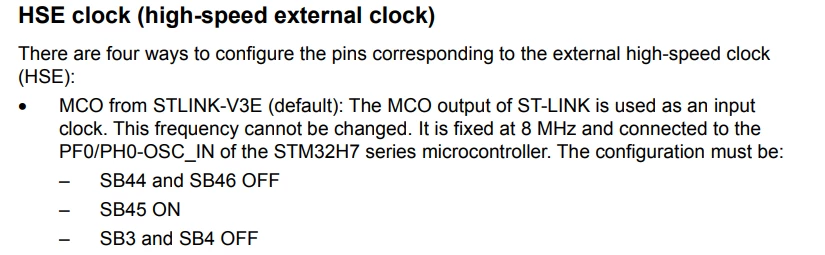
I want to use the HSE of the NUCLEO-H743ZI2 development board. I tried to set it up according to the instructions in the user manual using MCO from STLINK-V3E.
HMsDobby2_0-1713254167464.png

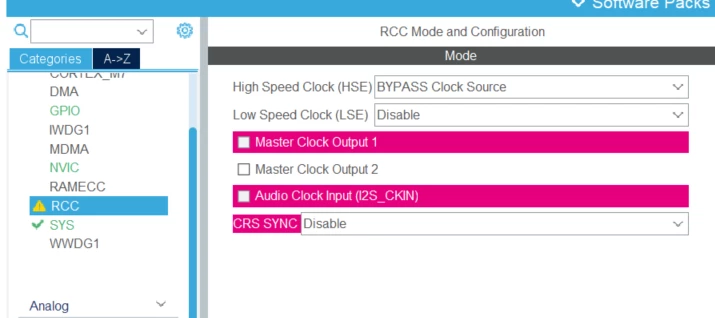
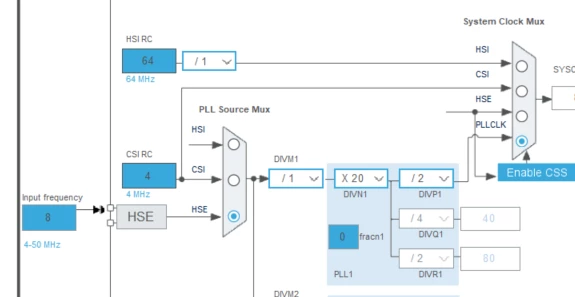
Here's my setup:

HMsDobby2_2-1713254244896.pngHMsDobby2_1-1713254228918.png

However, when I checked STLinkUpgrade, I found that the HSE is set to 8.33MHz.
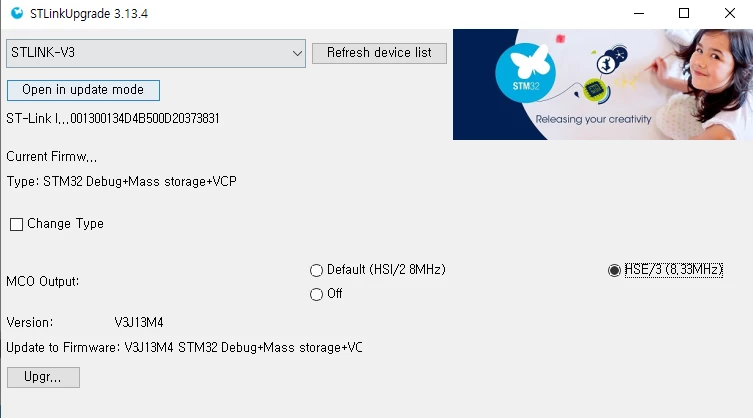
HMsDobby2_3-1713254358599.png

In the clock configuration, should I set the input frequency of HSE to 8Hz or 8.33MHz?

Thank you very much for your guidance.

This topic has been closed for replies.
mƎALLEm
mƎALLEmBest answer
ST Technical Moderator
April 16, 2024

Hello,

Let me first thank you for this question.

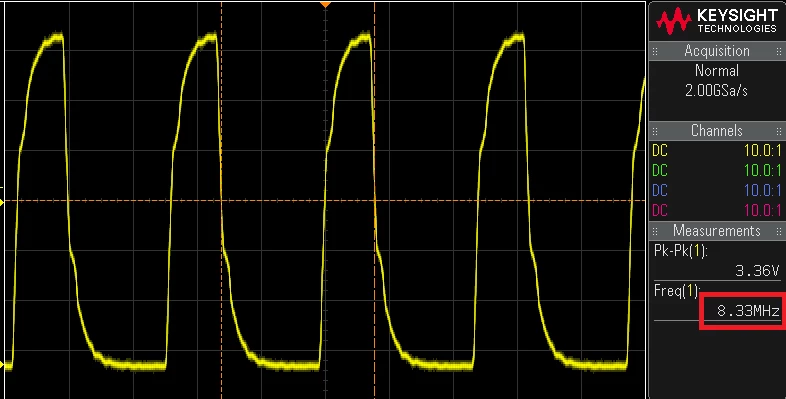
Indeed, you need to set HSE source of your MCU to 8.33MHz as it is a source coming from HSE of the ST-LinkV3 module divided by 3: 25MHz/3 = 8.33MHz.

This is an oscilloscope screenshot probing ST-LINKV3 MCO output and showing the 8.33MHz:

SofLit_1-1713282915941.png

In STLINK V2 = MCO output frequency is 8MHz.


To give better visibility on the answered topics, please click "Best answer" on the reply which solved your issue or answered your question.

5 replies

Pavel A.
April 16, 2024

> should I set the input frequency of HSE to 8Hz or 8.33MHz?

A very good question))

Many examples assume 8 MHz clock so you can be tempted to use this. But note that the 8 MHz comes from internal oscillator (HSI), which is imprecise. And if you want a precise crystal (HSE) - you get 8.3(3) Mhz, which comes from 25 Mhz divided by 3.


mƎALLEm
mƎALLEmBest answer
ST Technical Moderator
April 16, 2024

Hello,

Let me first thank you for this question.

Indeed, you need to set HSE source of your MCU to 8.33MHz as it is a source coming from HSE of the ST-LinkV3 module divided by 3: 25MHz/3 = 8.33MHz.

This is an oscilloscope screenshot probing ST-LINKV3 MCO output and showing the 8.33MHz:

SofLit_1-1713282915941.png

In STLINK V2 = MCO output frequency is 8MHz.


To give better visibility on the answered topics, please click "Best answer" on the reply which solved your issue or answered your question.
Tesla DeLorean
Guru
April 16, 2024

I'd set HSE_VALUE to 8333333 so speeds and baud rates are correct.

You could use the 8 MHz HSI sourced clock from the ST-LINK, but that would not be good for CAN /USB peripheral

Tips, Buy me a coffee, or three.. PayPal Venmo (See Profile) Up vote any posts that you find helpful, it shows what's working..
mƎALLEm
ST Technical Moderator
April 19, 2024

An update + good news:

The latest ST-LINKV3 firmware version V3J14M5B5 supports a MCO output frequency of 5MHz (25MHz/5) which is an integer value (HSE as source). 

So please use ST-LinkUpgrade.exe tool (downloadable from here) and select 5MHz as shown below:

SofLit_0-1713548328367.png


To give better visibility on the answered topics, please click "Best answer" on the reply which solved your issue or answered your question.
Tesla DeLorean
Guru
April 19, 2024

That is excellent news, thanks for the update

Tips, Buy me a coffee, or three.. PayPal Venmo (See Profile) Up vote any posts that you find helpful, it shows what's working..