

GTann.1
Associate II
January 23, 2025
Question

Failed to execute MI command - load .elf file

  • January 23, 2025
  • 8 replies
  • 3942 views

I have been using a NUCLEO-F413 board to try and understand how to program to user FLASH using the example code in the STMicro repository and STM32Cube to program. However when I now try and program the board I get the below error:
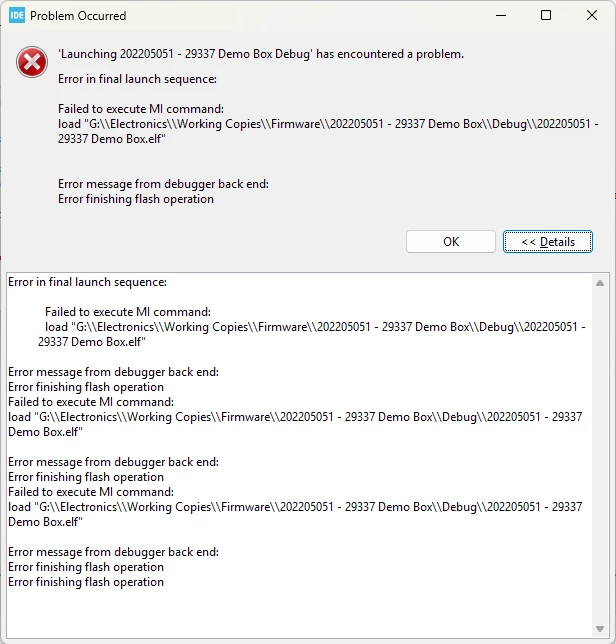
 

GTann1_0-1737636142566.png

Has me trying to write to the FLASH damaged the program space? If so is it possible to restore it or is the board now dead?

This topic has been closed for replies.

8 replies

Andrew Neil
Super User
January 23, 2025

It could be just that the ELF file does not exist ...

A complex system that works is invariably found to have evolved from a simple system that worked.A complex system designed from scratch never works and cannot be patched up to make it work.
GTann.1
GTann.1Author
Associate II
January 23, 2025

The ELF file does exist.


GTann1_0-1737636833312.png


MOBEJ
ST Employee
January 23, 2025

Hello @GTann.1 , 


To resolve the issue with your NUCLEO-F413 board, please install the STM32CubeF4 package from  ST.com . Then, navigate to the directory Firmware\Projects\STM32F413ZH-Nucleo\Examples\FLASH and open the flash example project using STM32CubeIDE. Build and run the project on your board, and ensure you follow the instructions provided in the README file to make it work properly.

Regards . 

To give better visibility on the answered topics, please click on Accept as Solution on the reply which solved your issue or answered your question.
GTann.1
GTann.1Author
Associate II
January 27, 2025

I have tried this however I still get an error that the .elf file can not be loaded onto the board.

MOBEJ
ST Employee
January 27, 2025


Please uninstall the current version of STM32CubeIDE and reinstall the latest version from ST.com , If you have MDK ARM (Keil) or EWARM (IAR) IDEs available, try running the same project in these environments. These steps will help to identify and isolate the issue.

To give better visibility on the answered topics, please click on Accept as Solution on the reply which solved your issue or answered your question.