Turn on suggestions
Auto-suggest helps you quickly narrow down your search results by suggesting possible matches as you type.
Showing results for
- STMicroelectronics Community
- STM32 MCUs Software development tools
- STM32CubeIDE (MCUs)
- IDE not generating .elf file, Program file does no...
Options
- Subscribe to RSS Feed
- Mark Topic as New
- Mark Topic as Read
- Float this Topic for Current User
- Bookmark
- Subscribe
- Mute
- Printer Friendly Page
IDE not generating .elf file, Program file does not exist

Options
- Mark as New
- Bookmark
- Subscribe
- Mute
- Subscribe to RSS Feed
- Permalink
- Email to a Friend
- Report Inappropriate Content
2021-02-02 7:23 AM
I have a project that compiles with no errors, but when I try to debug I get an error:
"Program Filed does not exist"
With details:
Program file does not exist
C:\HDRlowerMicro\HDRlowerMicro\Debug\HDRlowerMicro.elf not found
C:\HDRlowerMicro\HDRlowerMicro\Debug\HDRlowerMicro.elf not found
C:\HDRlowerMicro\HDRlowerMicro\Debug\HDRlowerMicro.elf not found
When I check the directory there is no .elf files being created. I tried cleaning the project and playing with the debugger settings, but no luck. How do I tell the IDE to generate a .elf file or check where it is being saved?
Labels:
- Labels:
-
STM32CubeIDE
7 REPLIES 7

Options
- Mark as New
- Bookmark
- Subscribe
- Mute
- Subscribe to RSS Feed
- Permalink
- Email to a Friend
- Report Inappropriate Content
2021-02-05 2:51 AM
You can check in the Project Explorer view where the binaries were generated. If you open Dubgu Configurations... in the "main" tab you can Search Project...
When you press the bug icon for debugging, make sure that the project is selected in the Project Explorer view.

Options
- Mark as New
- Bookmark
- Subscribe
- Mute
- Subscribe to RSS Feed
- Permalink
- Email to a Friend
- Report Inappropriate Content
2021-02-05 12:20 PM
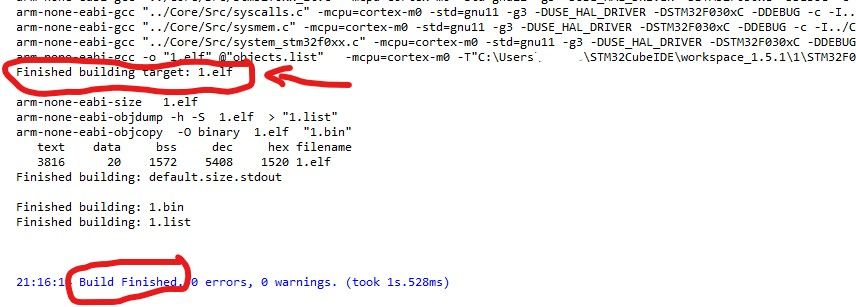
.elf file generation and location is promoted as part of build console log
Options
- Mark as New
- Bookmark
- Subscribe
- Mute
- Subscribe to RSS Feed
- Permalink
- Email to a Friend
- Report Inappropriate Content
2021-11-21 5:21 PM
Thank you, @KnarfB . I also selected the project but didn't select the C/C++ application by using Search Project button right bellow the Project selection.
After the select the C/C++ application, it works very well.
Thanks again and have a good day~
Options
- Mark as New
- Bookmark
- Subscribe
- Mute
- Subscribe to RSS Feed
- Permalink
- Email to a Friend
- Report Inappropriate Content
2025-02-25 12:39 AM
It happened to me also.
I removed the Debug folder and made Project->clean, then you can build and run.
Here are steps to copy and rename project:
To copy an STM32CubeIDE project:
1. Make sure the new name does not exist in the workspace, if it does, then
delete it inside the IDE. Make sure old project is error free.
2. Copy the folder in explorer
3. Rename the folder in explorer
4. Edit .project using vi or other text editor and rename
<name>OLD_PROJECT_NAME</name> to <name>NEW_PROJECT_NAME</name>
in line 3
5. Edit .cproject
Change all references from OLD_PROJECT_NAME to NEW_PROJECT_NAME
6. Start IDE by clicking on .project
Also you can use import

Options
- Mark as New
- Bookmark
- Subscribe
- Mute
- Subscribe to RSS Feed
- Permalink
- Email to a Friend
- Report Inappropriate Content
2026-05-26 4:52 AM
Hello! But what to do if binaries are not generated? I tried manually switch to utf8, but it has no effect
Options
- Mark as New
- Bookmark
- Subscribe
- Mute
- Subscribe to RSS Feed
- Permalink
- Email to a Friend
- Report Inappropriate Content
2026-05-26 4:56 AM
I also keep receiving this messege from CubeIDE like there is still no applicable launches for debugger and ,,run'' section


Options
- Mark as New
- Bookmark
- Subscribe
- Mute
- Subscribe to RSS Feed
- Permalink
- Email to a Friend
- Report Inappropriate Content
2026-05-26 8:52 AM - edited 2026-05-26 8:52 AM
There should be some reason why the binary (elf) wasn't generated. Please carefully check the build log.
Clean the project, refresh, rebuild.
Without the binary, you cannot debug, of course.

Related Content
- Problems running MSYS2 UCRT64 gcc from PATH alongside CubeCLT in STM32CubeIDE (MCUs)
- STM32WB55CEU, Bricked, Option Bytes corrupted in STM32CubeProgrammer (MCUs)
- Object initialization silently skipped with picolibc due to missing linker symbols in STM32CubeIDE for Visual Studio Code (MCUs)
- CubeMx error in STM32CubeMX (MCUs)
- CubeMX generates wrong configuration for STM32L071 in STM32CubeMX (MCUs)