

Integrating and debugging external memory on STM32 MCUs: part 2 – firmware configuration and validation
- 0 replies
- 1260 views
Summary
This article continues the practical guide on integrating and debugging external memory with STM32 MCUs, focusing on firmware configuration, initialization, and comprehensive validation techniques. It highlights key firmware settings, middleware usage, and debugging strategies to ensure robust and reliable external memory operation in real-world applications.
- Summary
- Introduction
- Overview
- 1. Firmware debugging checklist
- 1.1 Peripheral initialization
- 1.2 Pins/alternate function
- 1.3 Memory timing
- 1.3.1 Mapping datasheet timing parameters to STM32CubeMX settings
- 1.4 Memory mapping
- 1.5 Cache and MPU
- 1.6 Driver/stack
- 1.7 Enabling debug prints step-by-step
- 1.7.1 Project setup
- 1.7.2 UART debug print setup in ExtMemLoader
- 1.7.3 Debug macro and function call tracing
- 1.7.4 Code integration and testing
- 2. Debugging and validation
- 2.1 Basic communication
- 2.2 Test patterns
- 2.3 Status registers
- 2.4 Error handling
- 2.5 Throughput and latency
- 2.6 Boot/startup issues
- 3. Final tips
- Conclusion
- Related links
Introduction
Building on the hardware verification and memory device understanding covered in part 1, this second part dives into the firmware aspects critical to successful external memory integration. Proper firmware configuration translates memory datasheet specifications into working code, ensuring correct timings, modes, and command sequences. Additionally, thorough debugging and validation practices help confirm system stability and performance. This guide also introduces ST’s middleware tools designed to simplify and accelerate development with external memory on STM32 MCUs.
Overview
In part 1, we covered the first two essential steps of the external memory integration and debugging process: understanding your memory device and performing hardware-level verification. In this second part, we continue with steps 3 and 4 firmware configuration and initialization, followed by debugging and validation. Together, these stages complete the systematic approach needed for reliable and robust external memory operation on STM32 MCUs.
1. Firmware debugging checklist
It’s easy to assume that if the hardware is correct, the rest is just a matter of “turning it on” in software. But with external memory, the firmware is responsible for translating the memory’s datasheet into real, working configuration timings, modes, and command sequences. Even a small mismatch (like an off-by-one timing parameter or a missed initialization step) can make the difference between a system that works and one that fails silently or intermittently.
Firmware-level checks are about bridging the gap between the physical world and the digital one. They ensure that the MCU and the memory are truly speaking the same language, and that every transaction is happening as intended. Debugging at this level is not just about fixing bugs, it’s about building confidence that your system is robust, reliable, and ready for production.
If you follow this checklist and leverage the debug output, you’ll be able to quickly identify and resolve most firmware-level issues with external memory on STM32. ST offers an external memory manager and external memory loader middleware (EMM/EML) for flash-less MCUs, featuring an API that supports access to various memory types, enables launching applications stored in external memory, and generates external memory loader files. If you need more guidance about the middleware, our wiki article is a great place to start.
1.1 Peripheral initialization
- Confirm the correct peripheral (FMC, XSPI, QSPI, PSSI) is initialized with the right parameters (timings, bus width, mode).
- Use STM32CubeMX or reference code for initial configuration.
1.2 Pins/alternate function
- Ensure all relevant GPIOs are set to the correct alternate function and speed.
- Check for conflicts with other peripherals.
1.3 Memory timing
- Set memory timings (setup, hold, clock, data valid, etc.) according to the memory datasheet and MCU reference manual.
- For SDRAM, ensure correct refresh rate and initialization sequence.
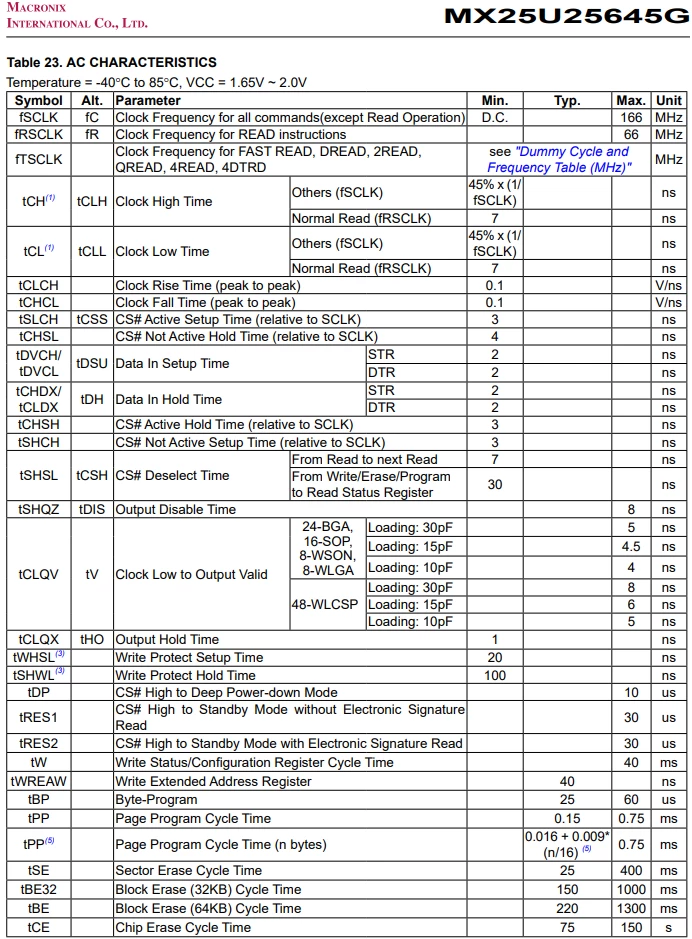
- Below is an excerpt from the MX25U25645G datasheet (Serial Flash Device) of the AC characteristics (Table 23.) It shows the setup, hold, clock, and data valid times, among others:
1.3.1 Mapping datasheet timing parameters to STM32CubeMX settings
Using the MX25U25645G as an example, here’s a correlation table for NOR FLASH timing parameters and how they map to STM32CubeMX external memory loader, manager, and XSPI settings.
|
Datasheet parameter |
Datasheet symbol/section |
Typical value (MX25U25645G) |
STM32CubeMX EML/EMM/XSPI setting |
Notes |
|
Max SPI clock |
fSCLK, Table 23: AC characteristics (see above) |
166 MHz |
Clock configuration → XSPI XSPI configuration → clock prescaler |
Set XSPI clock ≤ max value. For 133 MHz, prescaler = (kernel clock / 133 MHz) - 1. The XSPI AXI clock (xspi_aclk) has to be greater or equal than the XSPI kernel clock (xspi_ker_ck). |
|
Page size |
Table 14: SFDP Table Page Program Size Notes & Data |
256 bytes |
EML → Page Size |
Set to 256 bytes for program operations. |
|
Sector size |
Section 1: Features - General |
4 KB, 32 KB, or 64 KB |
EML → Sector Size |
Use 4 KB for finer erase granularity, 64 KB for faster bulk erase. |
|
Number of sectors |
Section 5: Memory Organization |
8192 for 4 KB sectors, 1024 for 32 KB sectors, 512 for 64 KB sectors |
EML → Number of Sectors |
Calculation: Memory size / sector size = Number of Sectors |
|
Memory size |
Page 1 |
256 M-Bit = 32 MB (megabytes) |
XSPI → Memory Size |
|
|
Page program time |
tPP, Table 23 |
Typ 0.15 ms, max 0.75 ms |
EML → Program Page Timeout |
Set value in STM32CubeMX 1-2ms over the datasheet value for margin. CubeMX default is often much higher (for example, 10 s) |
|
Sector erase time |
tSE, Table 23 |
Typ 25 ms, max 400 ms |
EML → Erase Sector Timeout |
Set to 500 – 1000 ms for margin. CubeMX default is often much higher (e.g. 6s). |
|
CS# deselect time |
tCSH |
From Read to next Read 7 ns. |
XSPI → Chip Select High Time Cycle |
CSHT + 1 defines the minimum number of CLK cycles where the chip-select (NCS) must remain high between commands issued to the external device. CS# Deselect time indicates the minimum time CS# must be high between commands. |
|
CS# Setup/Hold |
tCSS, tCHSH, Table 23 |
Min 3 ns for each setup and hold |
Not user settable |
Handled by XSPI hardware |
|
Clock high/low tsime |
tCH, tCL, Table 23 |
tCH and tCL are the same: Others (fSCLK) 45% x (1/ fSCLK) ns Normal Read (fRSCLK) 7 ns |
Not user settable |
The XSPIs must provide a clock to the external memory, with a duty cycle distortion generally lower than 5%. To reach this requirement, the kernel clock provided to the XSPIs has a typical duty cycle of 50%. |
|
Data valid after SCK |
tV, Clock Low to Output Valid, Table 23 |
Varies based on memory package and capacitive loading; anywhere from 4 ns to 8 ns |
XSPI → Sample Shifting and/or XSPI → Delay Hold Quarter Cycle (DHQC) |
tV tells you how long after the clock edge the NOR Flash guarantees valid data. If the SPI/XSPI clock is fast, you may need to enable Sample Shifting or DHQC in XSPI configuration to delay the sampling point. This ensures the MCU read valid data after tV has elapsed. |
|
Output disable time |
tDIS, Table 23 |
Max 8 ns |
Not directly settable |
Handled by XSPI peripheral; ensure not sampling too soon after CS# deassertion. |
|
Wrap size |
Not supported by this memory chip |
N/A |
XSPI → Wrap Size |
Wrap size is a feature used in some high-speed memory devices to optimize burst read/write operations, especially for XIP (eXecute In Place) and cache line alignment. |
|
I/O lines |
Pin Description, Table 2 |
1, 2, or 4 (QUAD) |
XSPI → Mode EMM → Number of Memory Data Line |
XSPI Mode à Quad SPI |
|
SPI mode |
Section 1: Features - General |
Mode 0 and Mode 3 |
XSPI → Clock Mode Low or High |
SPI Modes are defined by two parameters, Clock Polarity (CPOL) and Clock Phase (CPHA) that indicate what value means the clock is idle and when data is sampled. Mode 0 has both low, where Mode 3 has both high. As this device supports both, you can use either as long as the master and slave use the same mode. |
|
SFDP support |
Section 1: Features - General |
Supported |
EMM → Driver Type: NOR SFDP |
Use SFDP for autoconfiguration, but always verify detected parameters. |
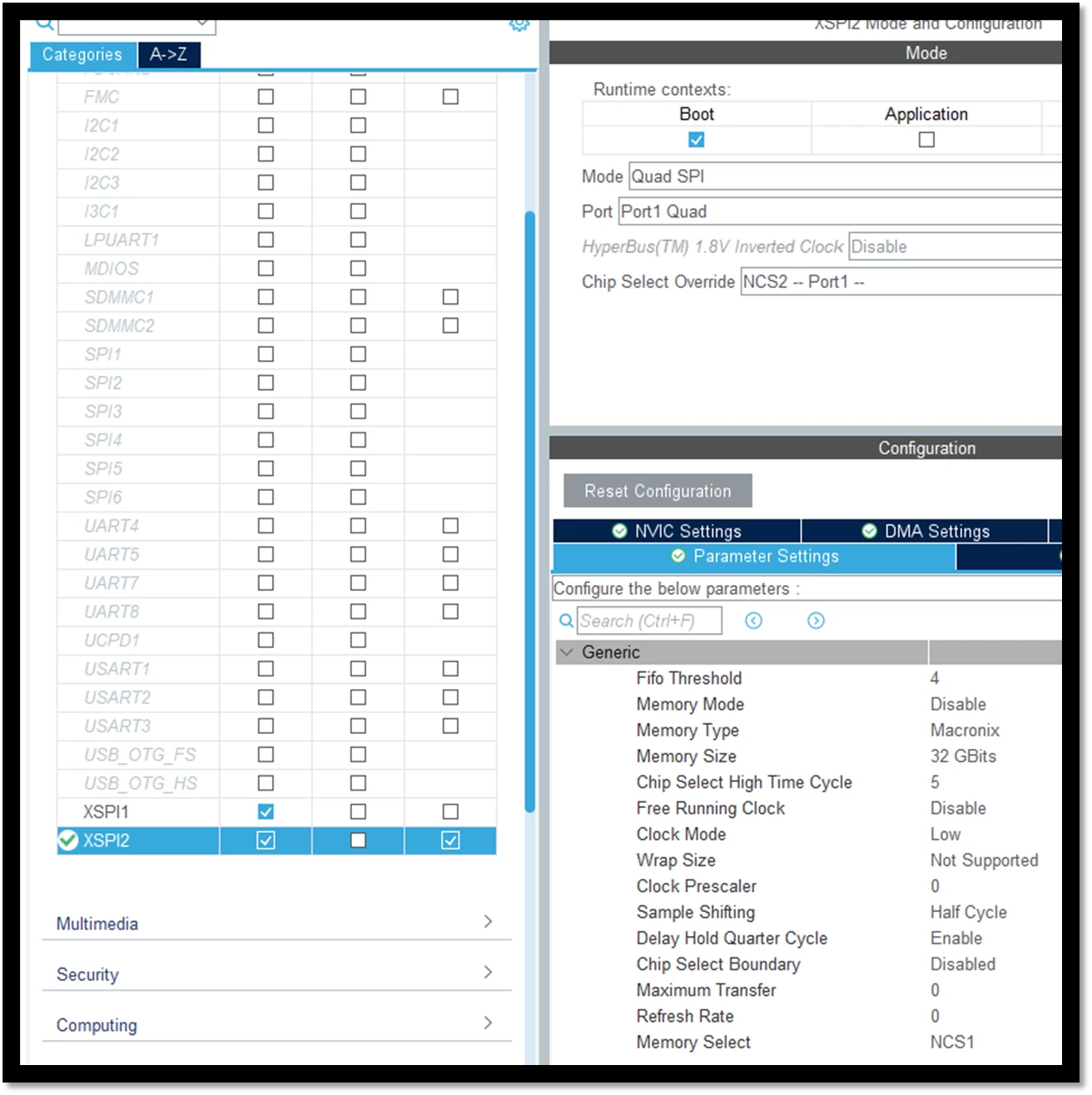
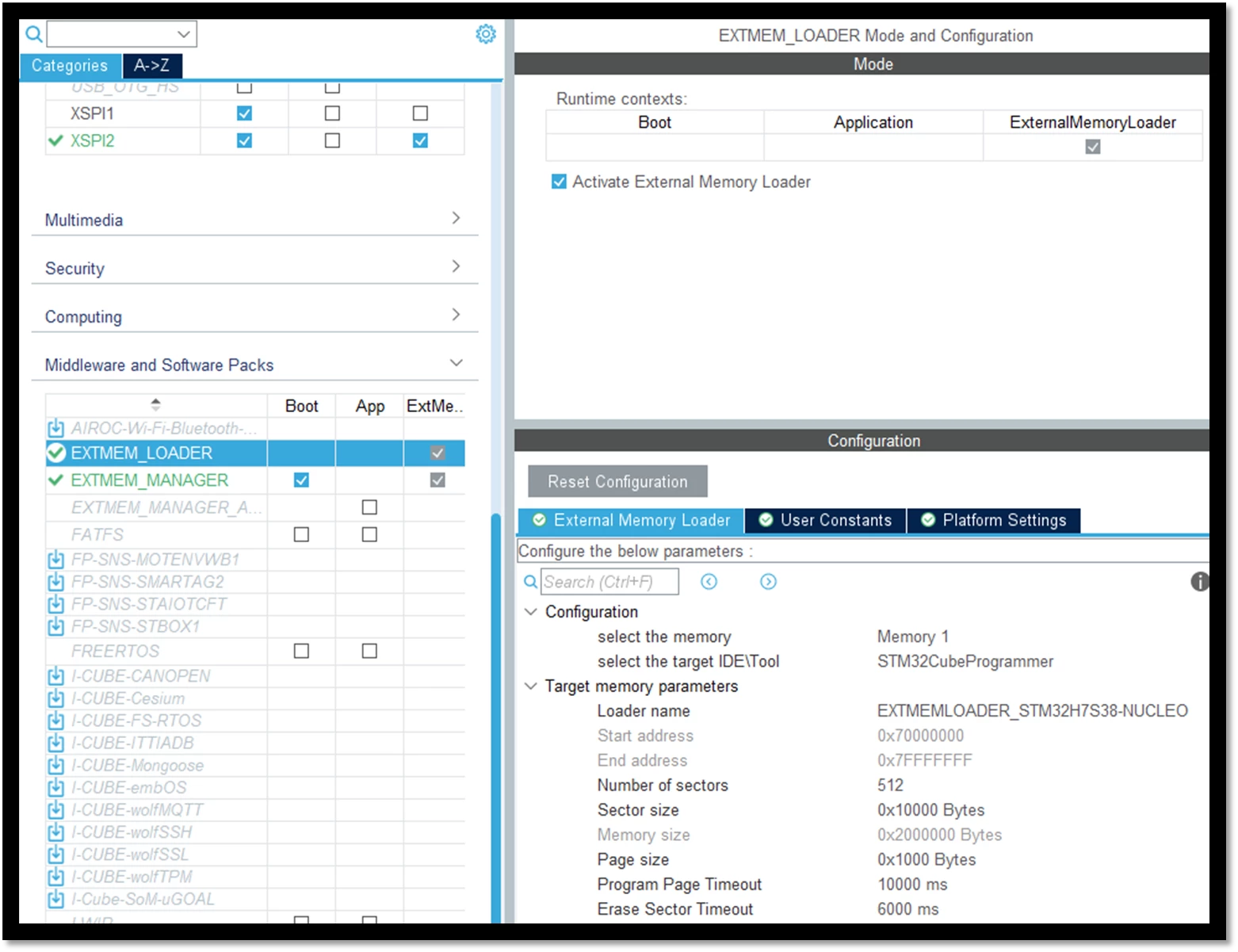
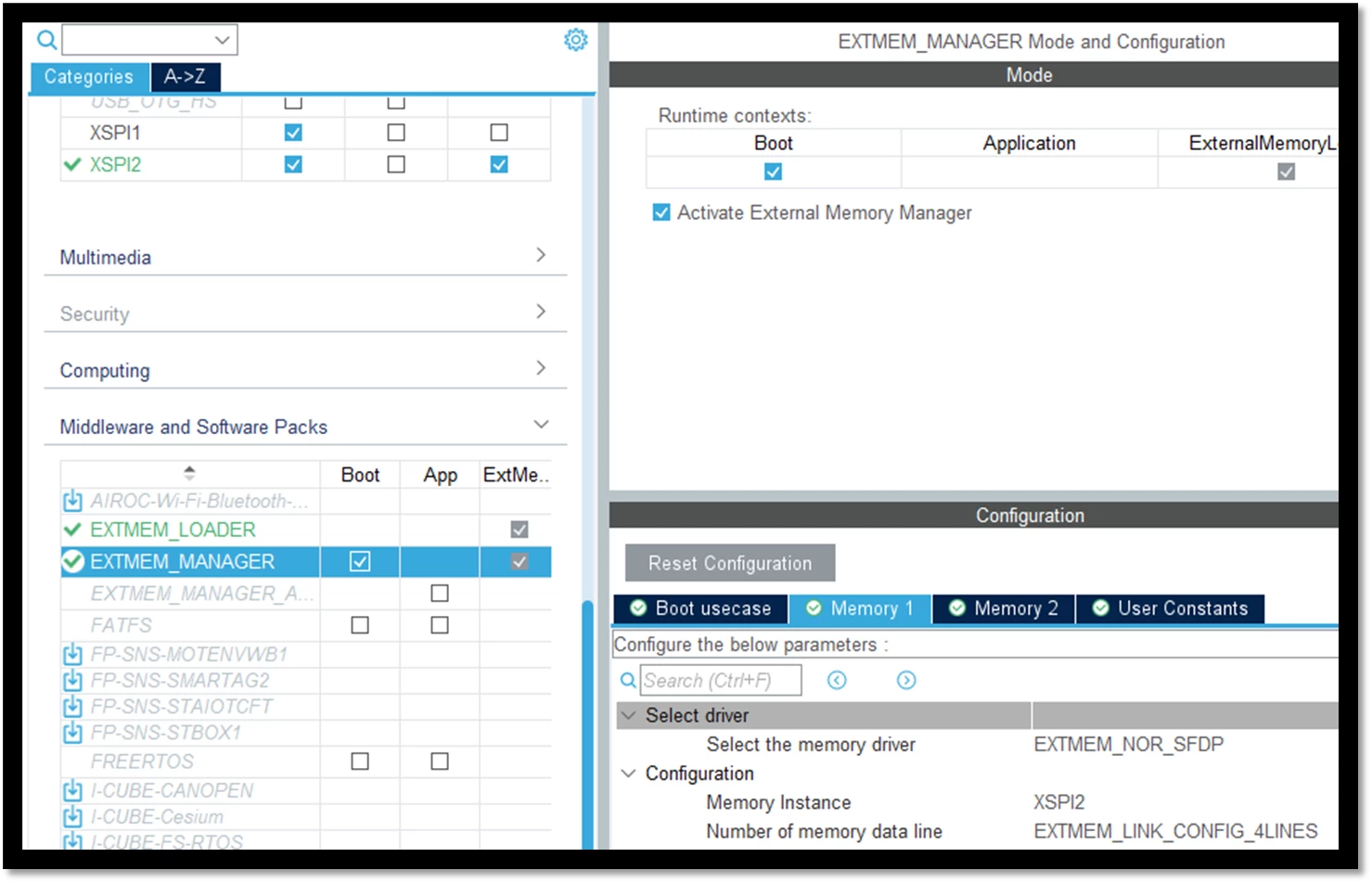
Find the screenshots of the STM32CubeMX settings for "XSPI", "External Memory Loader", and "External Memory Manager" below:
1.4 Memory mapping
- For memory-mapped mode, verify the address range and remapping are correct.
- For XSPI, ensure the memory-mapped mode is enabled.
- For the STM32H7Rx/7Sx, information on the XSPI memory-mapped mode can be found in section 24.4.12 of the reference manual RM0477. For the STM32N6, this section is 28.4.12 of the reference manual RM0486.
- Memory-mapped mode is entered by setting FMODE[1:0] = 11 in XSPI_CR (on both the STM32H7Rx/7Sx and STM32N6).
1.5 Cache and MPU
- Configure the MPU and cache settings for external memory regions (cacheable, bufferable, device, etc.).
- For DMA, ensure that buffers are in noncacheable regions or use cache maintenance operations.
1.6 Driver/stack
- Use or adapt the ST-provided BSP/driver for your memory type.
- Use debug prints. Real-time debug output from the BSP/driver is invaluable for seeing what’s happening at each step (initialization, command, error). Always enable debug macros when bringing up new memory or troubleshooting.
- If using EMM, you can do this by enabling EXTMEM_MACRO_DEBUG. Find the detailed instructions below.
1.7 Enabling debug prints step-by-step
1.7.1 Project setup
- Create a new project in STM32CubeMX for your target board. I chose the NUCLEO-H7S3L8. Ensure the Boot and ExternalMemoryLoader contexts are included in the project.
Note: Untick "Generate demonstration code" for the Virtual Com Port when given the option.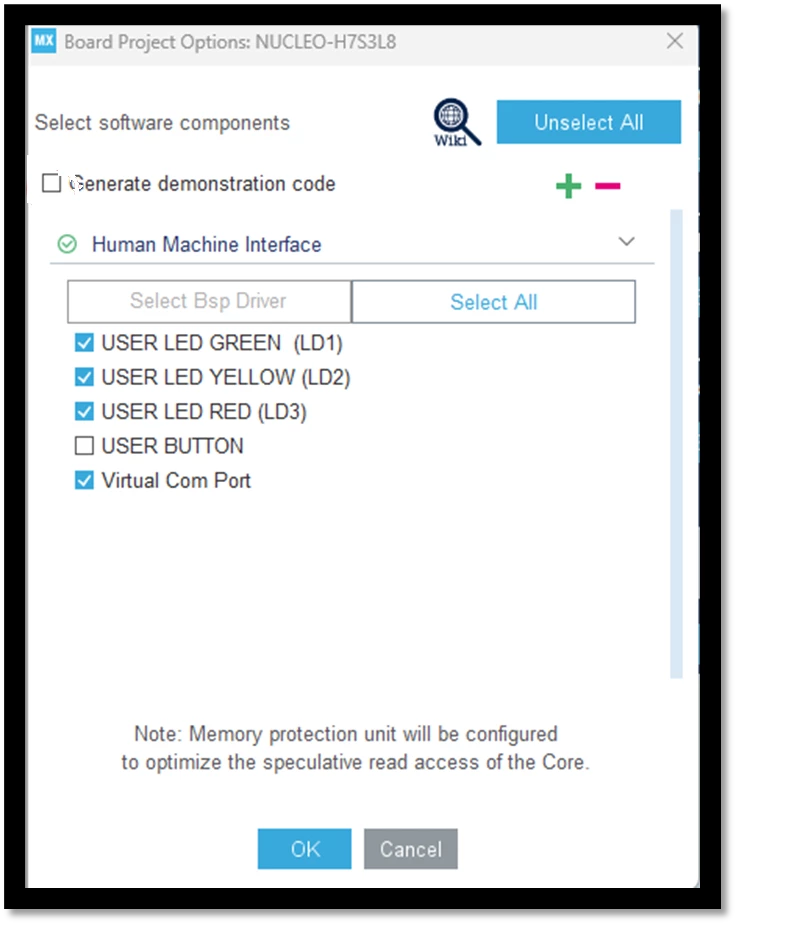
- Enable USART3, ensuring the pins are PD8 and PD9 for UART debug output through the Virtual Com Port.
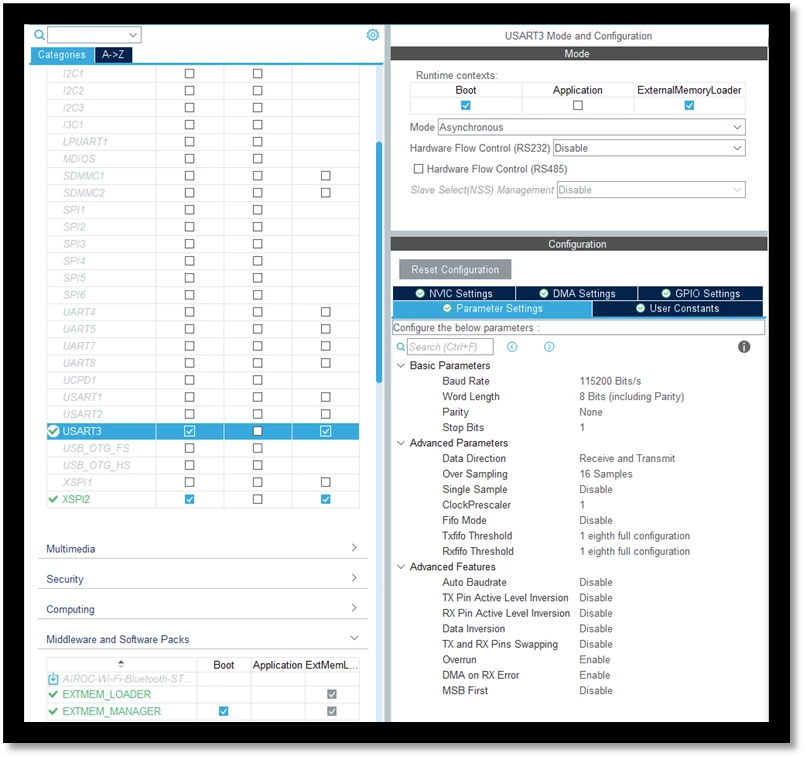
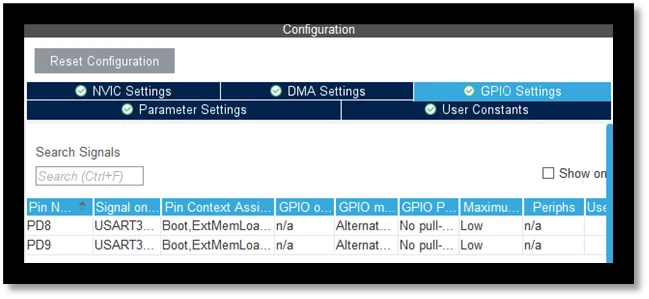
- Enable XSPI2 for external memory interface. Refer to the example above, however for the memory on the NUCLEO-H7S3L8, octo-SPI is supported, so update accordingly.
- Configure External Memory Manager (EMM), refer to the example above. However, the memory on NUCLEO-H7S3L8 can operate in quad-SPI or octo-SPI, so you can update the lines accordingly.
- Enable External Memory Loader. The loader name can be customized to your project.
- Generate code for your IDE; I chose STM32CubeIDE.
1.7.2 UART debug print setup in ExtMemLoader
- Confirm USART3 initialization and USART3 GPIO initialization.
- Add retargeting function to redirect printf to UART in extmemloader_init.c (ExtMemLoader project Core/Src).
- Added fflush(stdout); to the EXTMEM_TRACE function in stm32_extmem.c (in Middlewares).
/**
 * @brief Retargets the C library printf function to the USART.
 * None
 * @retval None
 */
#ifdef __GNUC__
/* With GCC/RAISONANCE, small printf (option LD Linker->Libraries->Small printf
 set to 'Yes') calls __io_putchar() */
#define PUTCHAR_PROTOTYPE int __io_putchar(int ch)
#else
#define PUTCHAR_PROTOTYPE int fputc(int ch, FILE *f)
#endif

PUTCHAR_PROTOTYPE
{
 HAL_UART_Transmit(&huart3, (uint8_t *)&ch, 1, HAL_MAX_DELAY);
 return ch;
}
/* Private functions ---------------------------------------------------------*/

void EXTMEM_TRACE(uint8_t *Message) {
 printf("%s", Message);
 fflush(stdout);
}
1.7.3 Debug macro and function call tracing
- Set EXTMEM_DEBUG_LEVEL to 2 or higher in the stm32_extmem_conf header file.
- Define the EXTMEM_MACRO_DEBUG in the stm32_extmem_conf header file.
- Set EXTMEM_DRIVER_NOR_SFDP_DEBUG_LEVEL to 2 or higher in the stm32_extmem_conf header file.
#if defined(DEBUG_TRACE)
extern void EXTMEM_TRACE(uint8_t *Message);
/*
 * @brief definition of the debug macro
 */
#define EXTMEM_MACRO_DEBUG(_MSG_) EXTMEM_TRACE((uint8_t *)_MSG_)

/*
 * @brief debug level of the different layers
 */
#define EXTMEM_DEBUG_LEVEL 3
#define EXTMEM_DRIVER_NOR_SFDP_DEBUG_LEVEL 3
#define EXTMEM_DRIVER_PSRAM_DEBUG_LEVEL 0
#define EXTMEM_SAL_XSPI_DEBUG_LEVEL 0
#endif /* defined(DEBUG_TRACE) */
1.7.4 Code integration and testing
- Minimal tests, breakpoints, and verify output in a serial terminal like Tera Term (correct COM port, 115200 baud, 8N1).
- Here’s the expected output with the external memory initialization using EXTMEM_MACRO_DEBUG as described above:
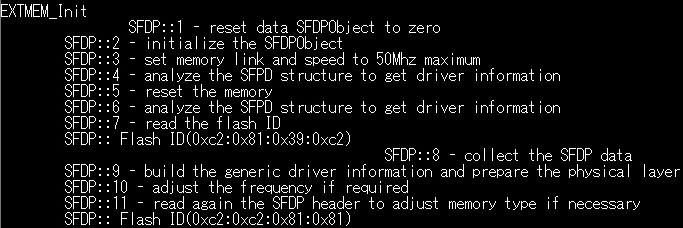
Now, you can use this custom external loader for your Boot and Appli projects!
2. Debugging and validation
Before moving on to debugging and validation, it’s important to recognize that even with careful hardware and firmware setup, real-world systems can still present unexpected challenges. Debugging is where you bring together your understanding of the memory device, your board, and your firmware to systematically verify that every part of the system is working as intended. This stage is about finding faults, confirming that your design is robust, your assumptions are correct, and your system is ready for real application use. Effective validation ensures that your external memory interface will be reliable in the lab and in the field.
2.1 Basic communication
- Use a logic analyzer or oscilloscope to check for activity on the bus (CS, CLK, data lines).
- Try simple read/write/erase commands and check for expected responses.
2.2 Test patterns
- Write known patterns (for example, 0xAA, 0x55, 0x00, 0xFF) and read back to verify data integrity.
- For SDRAM/SRAM, run a memory test (walking ones/zeros, March test).
2.3 Status registers
- Read memory status registers (for example, ID, status, configuration) to confirm correct communication and mode.
- For QSPI/XSPI, check that the device is in the expected addressing mode (3-byte vs. 4-byte).
2.4 Error handling
- Check for bus faults, hard faults, or ECC errors.
- Implement error callbacks and log any failures.
- Add debug prints at each step for real-time debug output.
2.5 Throughput and latency
- Measure read/write speeds and compare to expected values.
- If performance is low, check for cache, DMA, or timing misconfiguration.
2.6 Boot/startup issues
- If using external memory for code execution (XIP), ensure the bootloader and vector table are correctly mapped.
- For secure MCUs like the STM32N6, check that memory regions are allowed by the RIF/MPU.
3. Final tips
- Always add pull-ups on CS and RESET unless the memory device datasheet states otherwise.
- Use the debug macros created by you or provided by ST’s middleware for detailed software-level insight.
- Signal integrity issues are often the root causes, scope your signals early.
- If stuck, isolate the problem with minimal test code focusing solely on memory initialization and simple read/write.
Conclusion
Successfully debugging external memory on STM32 MCUs requires a systematic approach that combines thorough hardware verification, precise firmware configuration, and comprehensive validation. By understanding the unique characteristics of your memory device, carefully checking signal integrity and power stability, and leveraging ST’s middleware debug tools, you can efficiently identify and resolve issues that might otherwise cause subtle or intermittent failures. Following this guide and checklist helps you build confidence in your design, reduce development time, and ensure reliable operation of external memory in your application in the lab and in the field.
Related links
- Knowledge article: Integrating and debugging external memory on STM32 MCUs: part 1 – hardware and device fundamentals
- Application note AN5050: Getting Started with Octo-SPI, Hexadeca-SPI, and XSPI interfaces on STM32 MCUs
- Application note AN6101: Introduction to external memory manager and loader middleware for boot flash MCU
- ST wiki: Getting started with external memory manager and loader
- GitHub: STM32 external loader
- Reference manual RM0486: STM32N647/657xx MCUs
- Reference manual RM0477: STM32H7Rx/7Sx MCUs Reference Manual