2025-03-19 5:33 AM
Hello,
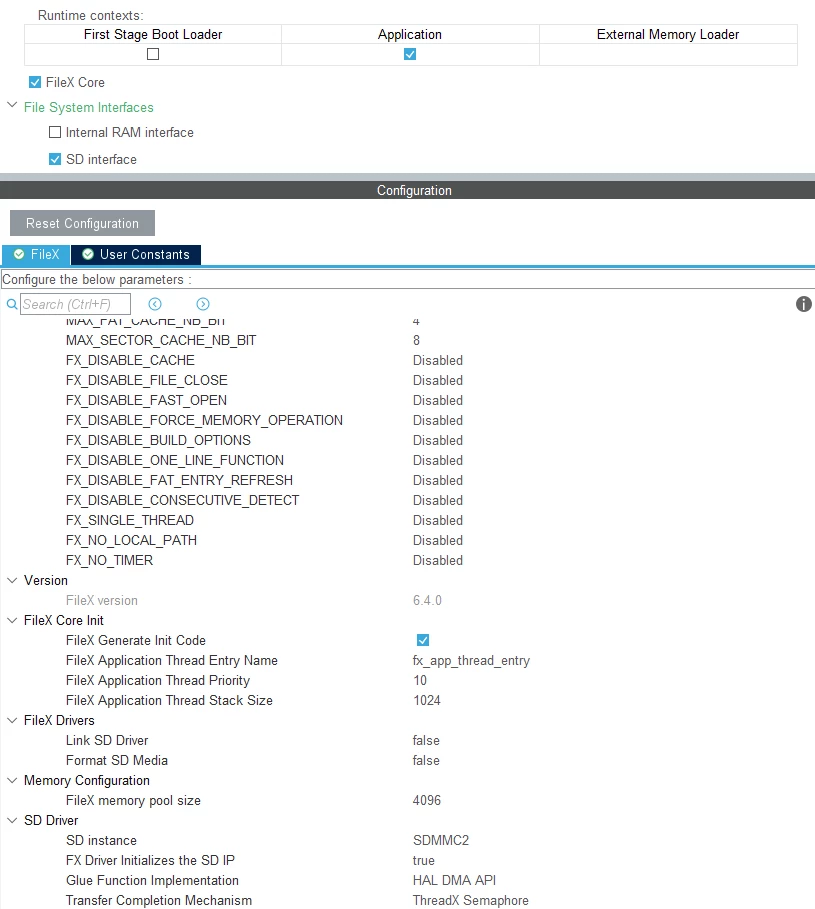
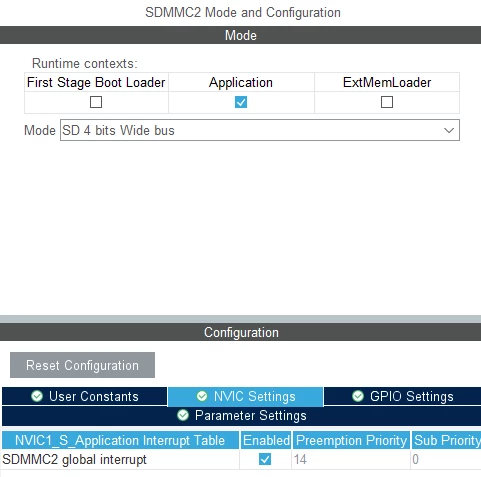
I am working with an STM32N6570-DK board and facing an issue while setting up the SD card. I created a project using TouchGFX Designer, generated the code, and opened the .ioc file. In there, I enabled SDMMC2 with 4-bit Wide mode and enabled global interrupt:
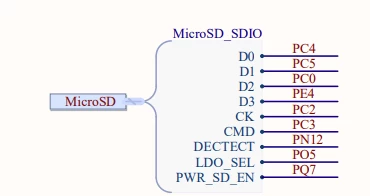
After checking the schematics, I noticed that the CK pin was incorrect, so I assigned the correct pin (PC2:(
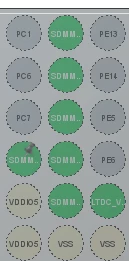
I made the following additional configurations:
After this setup, I attempted to initialize the SD card with the following call:
fx_media_open(&sdio_disk, "SDIO_DISK", fx_stm32_sd_driver, NULL, fx_sd_media_memory, FX_STM32_SD_DEFAULT_SECTOR_SIZE);However, this returns error 0x01 (FX_BOOT_ERROR). Upon further debugging, I found the issue occurs in this section of fx_stm32_sd_driver.c:
case FX_DRIVER_BOOT_READ:
{
/* the boot sector is the sector zero */
status = sd_read_data(media_ptr, 0, media_ptr->fx_media_driver_sectors, unaligned_buffer);
if (status != FX_SUCCESS)
{
media_ptr->fx_media_driver_status = status;
break;
}
/* Check if the sector 0 is the actual boot sector, otherwise calculate the offset into it.
Please note that this should belong to higher level of MW to do this check and it is here
as a temporary work solution */
partition_start = 0;
status = _fx_partition_offset_calculate(media_ptr -> fx_media_driver_buffer, 0,
&partition_start, &partition_size);
/* Check partition read error. */
if (status)
{
/* Unsuccessful driver request. */
media_ptr -> fx_media_driver_status = FX_IO_ERROR;
break;
}
/* Now determine if there is a partition... */
if (partition_start)
{
if (check_sd_status(FX_STM32_SD_INSTANCE) != 0)
{
media_ptr->fx_media_driver_status = FX_IO_ERROR;
break;
}
/* Yes, now lets read the actual boot record. */
status = sd_read_data(media_ptr, partition_start, media_ptr->fx_media_driver_sectors, unaligned_buffer);
if (status != FX_SUCCESS)
{
media_ptr->fx_media_driver_status = status;
break;
}
}
/* Successful driver request. */
media_ptr -> fx_media_driver_status = FX_SUCCESS;
break;
}The function sd_read_data() returns FX_SUCCESS, but when inspecting the buffer in the debugger, it is empty (no data is present).
Questions:
Solved! Go to Solution.
2025-05-12 11:17 PM
Hello @Saket_Om
When I tried to make the SD card work, there was no support for FileX at the time. After updating HALs, I recreated the project with FileX, and everything worked.
2025-05-12 8:32 AM
Hello @TerZer
Does the SDMMC work without fileX?
2025-05-12 11:17 PM
Hello @Saket_Om
When I tried to make the SD card work, there was no support for FileX at the time. After updating HALs, I recreated the project with FileX, and everything worked.
2025-11-25 9:55 PM
Hai TerZer,
I'm currently working on the same controller and on the same peripheral (SD Card) and facing the same issue like it is returning error 0x01 (FX_BOOT_ERROR).
Did you find any Solution?
If yes, Kindly assist me with this it will be very helpful to me.
Thanks
2025-11-25 11:45 PM
Yes, I got that fixed, but I don't remember exactly what the fix was. I can provide my code for sd init, maybe you will find a solution:
/**
* @brief SD MSP Initialization
* This function configures the hardware resources used in this example
* @PAram hsd: SD handle pointer
* @retval None
*/
void HAL_SD_MspInit(SD_HandleTypeDef* hsd)
{
GPIO_InitTypeDef GPIO_InitStruct = {0};
RCC_PeriphCLKInitTypeDef PeriphClkInitStruct = {0};
if(hsd->Instance==SDMMC2)
{
/* USER CODE BEGIN SDMMC2_MspInit 0 */
__HAL_RCC_GPIOD_CLK_ENABLE();
/* USER CODE END SDMMC2_MspInit 0 */
/** Initializes the peripherals clock
*/
PeriphClkInitStruct.PeriphClockSelection = RCC_PERIPHCLK_SDMMC2;
PeriphClkInitStruct.Sdmmc2ClockSelection = RCC_SDMMC2CLKSOURCE_HCLK;
if (HAL_RCCEx_PeriphCLKConfig(&PeriphClkInitStruct) != HAL_OK)
{
Error_Handler();
}
/* Peripheral clock enable */
__HAL_RCC_SDMMC2_CLK_ENABLE();
__HAL_RCC_GPIOC_CLK_ENABLE();
__HAL_RCC_GPIOE_CLK_ENABLE();
/**SDMMC2 GPIO Configuration
PC4 ------> SDMMC2_D0
PC5 ------> SDMMC2_D1
PC0 ------> SDMMC2_D2
PC2 ------> SDMMC2_CK
PE4 ------> SDMMC2_D3
PC3 ------> SDMMC2_CMD
*/
GPIO_InitStruct.Pin = GPIO_PIN_4|GPIO_PIN_5|GPIO_PIN_0|GPIO_PIN_2
|GPIO_PIN_3;
GPIO_InitStruct.Mode = GPIO_MODE_AF_PP;
GPIO_InitStruct.Pull = GPIO_PULLUP;
GPIO_InitStruct.Speed = GPIO_SPEED_FREQ_VERY_HIGH;
GPIO_InitStruct.Alternate = GPIO_AF11_SDMMC2;
HAL_GPIO_Init(GPIOC, &GPIO_InitStruct);
GPIO_InitStruct.Pin = GPIO_PIN_4;
GPIO_InitStruct.Mode = GPIO_MODE_AF_PP;
GPIO_InitStruct.Pull = GPIO_PULLUP;
GPIO_InitStruct.Speed = GPIO_SPEED_FREQ_VERY_HIGH;
GPIO_InitStruct.Alternate = GPIO_AF11_SDMMC2;
HAL_GPIO_Init(GPIOE, &GPIO_InitStruct);
/* SDMMC2 interrupt Init */
HAL_NVIC_SetPriority(SDMMC2_IRQn, 14, 0);
HAL_NVIC_EnableIRQ(SDMMC2_IRQn);
/* USER CODE BEGIN SDMMC2_MspInit 1 */
/* USER CODE END SDMMC2_MspInit 1 */
}
}/**
* @brief SDMMC2 Initialization Function
* @PAram None
* @retval None
*/
void MX_SDMMC2_SD_Init(void)
{
/* USER CODE BEGIN SDMMC2_Init 0 */
/* USER CODE END SDMMC2_Init 0 */
/* USER CODE BEGIN SDMMC2_Init 1 */
/* USER CODE END SDMMC2_Init 1 */
hsd2.Instance = SDMMC2;
hsd2.Init.ClockEdge = SDMMC_CLOCK_EDGE_RISING;
hsd2.Init.ClockPowerSave = SDMMC_CLOCK_POWER_SAVE_DISABLE;
hsd2.Init.BusWide = SDMMC_BUS_WIDE_4B;
hsd2.Init.HardwareFlowControl = SDMMC_HARDWARE_FLOW_CONTROL_DISABLE;
hsd2.Init.ClockDiv = 2;
if (HAL_SD_Init(&hsd2) != HAL_OK)
{
Error_Handler();
}
/* USER CODE BEGIN SDMMC2_Init 2 */
/* USER CODE END SDMMC2_Init 2 */
}/**
* @brief Initializes the SD IP instance
* @PAram UINT instance SD instance to initialize
* @retval 0 on success error value otherwise
*/
INT fx_stm32_sd_init(UINT instance)
{
INT ret = 0;
/* USER CODE BEGIN PRE_FX_SD_INIT */
UNUSED(instance);
/* USER CODE END PRE_FX_SD_INIT */
#if (FX_STM32_SD_INIT == 1)
MX_SDMMC2_SD_Init();
#endif
/* USER CODE BEGIN POST_FX_SD_INIT */
HAL_SD_ConfigSpeedBusOperation(&hsd2,SDMMC_SPEED_MODE_AUTO);
if(Wait_SDCARD_Ready() != HAL_OK)
{
Error_Handler();
}
/* USER CODE END POST_FX_SD_INIT */
return ret;
}
/* USER CODE BEGIN 1 */
/**
* @brief Wait SD Card ready status
* @PAram None
* @retval None
*/
static uint8_t Wait_SDCARD_Ready(void)
{
uint32_t loop = SD_TIMEOUT;
/* Wait for the Erasing process is completed */
/* Verify that SD card is ready to use after the Erase */
while(loop > 0)
{
loop--;
if(HAL_SD_GetCardState(&hsd2) == HAL_SD_CARD_TRANSFER)
{
return HAL_OK;
}
}
return HAL_ERROR;
}
/* USER CODE END 1 */