cancel
Showing results for 
Search instead for 
Did you mean: 

Transmit line stuck high on STM32F415 with MAX3232

tgomulin
Visitor

The STM32F415 transmit and receive lines are connected to the MAX3232 chip. The board also contains chips to control LEDs and read tokens, which are controlled by the STM32F415, and those functionalities work, but I am having issues with the RS-232 communication. I get nothing on the receiving end. When I hook up a scope to the transmit line for UART4 (pin 51) on the STM32 chip, it is always high (3.3 V) and nothing is transmitted. What could cause this issue?

1 ACCEPTED SOLUTION

Accepted Solutions

@mƎALLEm wrote:

I suggest you at first to use HAL/CubeMx to start your project and validate your hardware.


+1

@tgomulin As suggested earlier, start with something that just validates the UART - nothing else.


AndrewNeil_0-1778514412059.png

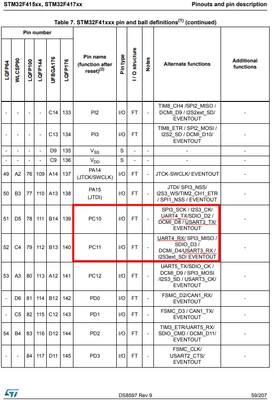
TX and RX here match the datasheet:

AndrewNeil_1-1778514457127.png

https://www.st.com/resource/en/datasheet/stm32f415rg.pdf#page=59

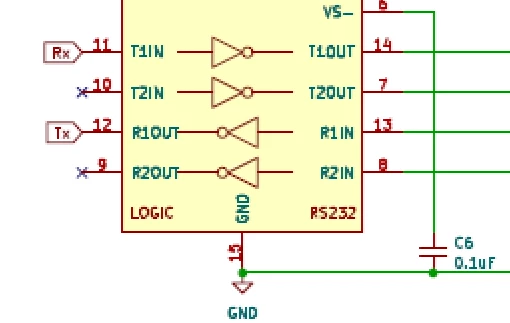
But this is wrong:

AndrewNeil_2-1778514489466.png

RX is an input to the STM32 - so should be driven by receiver R1OUT;

TX is an output from the STM32 - so should drive transmitter T1IN.


A complex system that works is invariably found to have evolved from a simple system that worked.
A complex system designed from scratch never works and cannot be patched up to make it work.

View solution in original post

7 REPLIES 7
Andrew Neil
Super User

Welcome to the forum.

Please see How to write your question to maximize your chances to find a solution for best results.


Have you used a debugger to see if your UART code is actually being executed?


Is this a custom board? If so, please post the schematic.

If it is, have you tried your software on an ST board?

Please post a minimal but complete code example which illustrates the example - just a simple UART transmit.

How to insert source code.

A complex system that works is invariably found to have evolved from a simple system that worked.
A complex system designed from scratch never works and cannot be patched up to make it work.
tgomulin
Visitor

I have used STM32CubeIDE to step through the code, and the UART transmit code seems to be executed and returns HAL_OK when I had it returning a value.

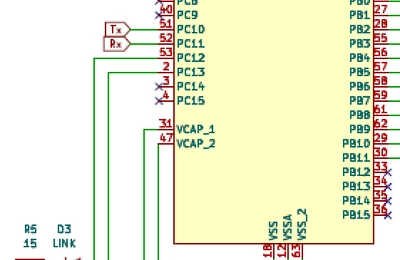
This is a custom board. It has not been tried on an ST board. Below is the subset of the schematic with the STM32 and MAX3232 chips.

STM32F415_MAX3232.png


Parts of this code including the SystemClockConfig are reused from another group. I didn't do the individual bit setting in that function. I'm wondering if something is missing from that, or if the Tx/Rx lines are swapped somewhere, or there is something else wrong. I ended up with this board, and both hardware people who took the old design and modified it to this have left the company.

#include <dev_lofo.h>
#include <dev_lp5024.h>
#include <dev_tca9548.h>
#include <dev_eeprom.h>
#include <stdint.h>
#include "main.h"
#include "stm32f4_Config.h"
#include "CommandManager.h"
#include "rs232_driver.h"
#include "RS232Manager.h"
#include "stm32f4xx_hal_rcc.h"
#include "TokenIndicator.h"

EEPROM_Config eepromConfig;
Command cmdT;
unsigned char buff[64];
void SystemClockConfig();
void ConfigureGPIO(void);
UART_HandleTypeDef huart1;

// Token status change function
void LOFO_OnChange(unsigned char channel, unsigned char stateOld, unsigned char stateNew);

int main(void)
{
	// Setup mcu clock configuration
	SystemClockConfig();

	SystemInit();

	// Configure system GPIO
	ConfigureGPIO();

	// Configure I2C2 Bus
	I2C2_Init(GPIO_PORT_B, GPIO_P11, GPIO_PORT_B, GPIO_P10, I2C_CLOCK_100KHZ);

	// Configure LED control modules
	LP5024_Init(LP5024_ID | (LP5024_ADDRESS));
	LP5024_Init(LP5024_ID | (LP5024_ADDRESS +1));

	// Configure I2C Multiplexer
	TCA9548_Init();

	// Initialize the LOFO pin monitor.
	LOFO_Init();

	// The following config initializes the reader to read IST 64K tokens.  This can be reconfigured via a command to the command manager.
	eepromConfig.PageBuffer = 32;
	eepromConfig.Device_ID = 0x50;
	eepromConfig.Device_Address = 0x00;
	eepromConfig.Address_Length = 2;
	eepromConfig.Capacity = 8192;

	// Initialize the EEPROM module.
	EEPROM_Init(eepromConfig);

	TokenIndicatorInitialize();

	// Register the callback function for Token Change events
	LOFO_RegisterCallback(LOFO_OnChange);

	// Initialize the RS232 device
	RS232_Init(&huart1);

	  STATUS_LED = 1;
	  SysTick_Delay(1000);
	  STATUS_LED = 0;
	  SysTick_Delay(1000);
	  STATUS_LED = 1;
	  SysTick_Delay(1000);
	  STATUS_LED = 0;
	  SysTick_Delay(1000);

	int startAddr = LP5024_ID | (LP5024_ADDRESS);

	// Turn all LEDS on and off to start with
	for (int chip = 0; chip < 2; ++chip)
	{
		for (int i = 0; i < 8; i++)
		{
			(void) LP5024_LED_Color_Set((startAddr+chip), i, 0, 255, 0);
			SysTick_Delay(1000);
			(void) LP5024_LED_Color_Set((startAddr+chip), i, 0, 0, 0);
			SysTick_Delay(1000);
		}
	}

	uint8_t msg[] = "Hello RS232!\r\n";
	HAL_UART_Transmit(&huart1, msg, sizeof(msg)-1, HAL_MAX_DELAY);
	SysTick_Delay(1000);
}

void SystemClockConfig()
{
	RCC_CTL->CR.HSEON = 1;
	while(!RCC_CTL->CR.HSERDY){}

	// Turn on APB1ENR power
	RCC_CTL->APB1ENR.PWREN = 1;
	while(RCC_CTL->APB1ENR.PWREN != 1){}
	PWR_CTL->CR.Bits.VOS = 0b11;

	// Enable Instruction Cache
	FLASH_CTL->ACR.Bits.ICEN = 1;

	// Enable Data Cache
	FLASH_CTL->ACR.Bits.DCEN = 1;

	// Enable Prefetch Cache
	FLASH_CTL->ACR.Bits.PRFTEN = 1;

	// Configure flash to 5 wait states
	FLASH_CTL->ACR.Bits.LATENCY = 5;

	// Configure AHB Prescaler
	RCC_CTL->CFGR.HPRE = RCC_CFGR_HPRE_DIV1;

	// Configure APB1 Prescaler
	RCC_CTL->CFGR.PPRE1 = 0b101;

	// Configure APB2 Prescaler
	RCC_CTL->CFGR.PPRE2 = 0b100;

	// Configure PLLM
	RCC_CTL->PLLCFGR.PLLM = 16;

	// Configure PLLN
	RCC_CTL->PLLCFGR.PLLN = 336;

	// Configure PLLP
	RCC_CTL->PLLCFGR.PLLP = RCC_PLLCFGR_PLLP_DIV2;

	// Configure PLLQ
	RCC_CTL->PLLCFGR.PLLQ = 7;

	// Configure PLL Source Select
	RCC_CTL->PLLCFGR.PLLsrc=1;
	while(RCC_CTL->PLLCFGR.PLLSRC != 1){}

	RCC_CTL->CR.PLLON = 1;
	while(!RCC_CTL->CR.PLLRDY){}

	// Configure System clock switch
	RCC_CTL->CFGR.SW = RCC_CFGR_SW_PLL;
	while(!(RCC_CTL->CFGR.SWS == 2)){}
}

void ConfigureGPIO(void)
{
	// Configure Port A
	GPIO_Port_Config(GpioPort.A, Enable);
	GPIOA_MODE->B0 = GpioMode.INPUT; // LOFO Port 1
	GPIOA_MODE->B1 = GpioMode.INPUT; // LOFO Port 2
	GPIOA_MODE->B2 = GpioMode.INPUT; // LOFO Port 3
	GPIOA_MODE->B3 = GpioMode.INPUT; // LOFO Port 4
	GPIOA_MODE->B4 = GpioMode.INPUT; // LOFO Port 5
	GPIOA_MODE->B5 = GpioMode.INPUT; // LOFO Port 6
	GPIOA_MODE->B6 = GpioMode.INPUT; // LOFO Port 7
	GPIOA_MODE->B7 = GpioMode.INPUT; // LOFO Port 8
	GPIOA_MODE->B8 = GpioMode.INPUT; // LOFO Port 9

	// Configure Port B
	GPIO_Port_Config(GpioPort.B, Enable);
	GPIOB_MODE->B1 = GpioMode.INPUT; // LOFO Port 10
	GPIOB_MODE->B2 = GpioMode.INPUT; // LOFO Port 11
	GPIOB_MODE->B5 = GpioMode.INPUT; // LOFO Port 12
	GPIOB_MODE->B6 = GpioMode.INPUT; // LOFO Port 13
	GPIOB_MODE->B7 = GpioMode.INPUT; // LOFO Port 14
	GPIOB_MODE->B8 = GpioMode.INPUT; // LOFO Port 15
	GPIOB_MODE->B9 = GpioMode.INPUT; // LOFO Port 16

	// Configure Port C
	GPIO_Port_Config(GpioPort.C, Enable);
	GPIOC_MODE->B12 = GpioMode.OUTPUT; // Enable Status LED pin
	GPIOC_MODE->B13 = GpioMode.OUTPUT; // Enable Link LED pin

	  /* Clock Enables */
	  __HAL_RCC_GPIOC_CLK_ENABLE();
	  __HAL_RCC_UART4_CLK_ENABLE();

}

// Hopefully we never end up here but if we do then it means the device had an unrecoverable error.
void Error_Handler(void)
{
  //__disable_irq();
  while (1)
  {
	  STATUS_LED = 1;
	  SysTick_Delay(1000);
	  STATUS_LED = 0;
	  SysTick_Delay(1000);
  }
}

void LOFO_OnChange(unsigned char channel, unsigned char stateOld, unsigned char stateNew)
{
    CommandReset(&cmdT);
    cmdT.commandID = 0xFF;
    cmdT.requestID[0] = 0xFF;
    cmdT.requestID[1] = 0xFF;
    cmdT.requestID[2] = 0xFF;
    cmdT.action = 0x01;
    cmdT.status = 0x01;
    cmdT.position = channel;
    cmdT.packetLen = 0x02;
    cmdT.packetLenHighByte = 0x00;
    cmdT.packetLenLowByte = 0x02;
    cmdT.packetData[0] = stateNew; /* This is the new state of the token at position {channel}*/
    cmdT.packetData[1] = LOFO_GetInsertionStatus(); /* This is the state of all channels */
    CommandEnqueue(cmdT);
}


Hello,

I suggest you at first to use HAL/CubeMx to start your project and validate your hardware.

If all is ok you can move forward with the direct access to the registers. 

Starting with direct access to the registers spreads confusion.

So please validate your hardware first and inspire from the HAL implementation for the direct access to the registers..

To give better visibility on the answered topics, please click on "Accept as Solution" on the reply which solved your issue or answered your question.

@mƎALLEm wrote:

I suggest you at first to use HAL/CubeMx to start your project and validate your hardware.


+1

@tgomulin As suggested earlier, start with something that just validates the UART - nothing else.


AndrewNeil_0-1778514412059.png

TX and RX here match the datasheet:

AndrewNeil_1-1778514457127.png

https://www.st.com/resource/en/datasheet/stm32f415rg.pdf#page=59

But this is wrong:

AndrewNeil_2-1778514489466.png

RX is an input to the STM32 - so should be driven by receiver R1OUT;

TX is an output from the STM32 - so should drive transmitter T1IN.


A complex system that works is invariably found to have evolved from a simple system that worked.
A complex system designed from scratch never works and cannot be patched up to make it work.

Thanks for identifying that. We'll work on getting a new board. Thanks!

Meanwhile, I suggest that you prototype this on an ST board.

Then you will have something known to work when the new board arrives.

Also something that others can reproduce if you run into issues.

A complex system that works is invariably found to have evolved from a simple system that worked.
A complex system designed from scratch never works and cannot be patched up to make it work.

What ST board would you recommend? This is not really my realm. Thanks!