
2026-03-17 8:53 AM - last edited on 2026-03-17 9:02 AM by Andrew Neil
Continued from: STM32 Host with ST67W611 Wifi BLE
Hi everyone,
Currently, I'm trying to re-flash firmware for ST67W61 module via UART without host ( use USB TTL), and I got the issue in below:
[22:36:53.388] - Serial port is COM5
[22:36:53.394] - ==================================================
[22:36:53.394] - FW get address from partiton file C:\Users\Admin\STM32Cube\Repository\Packs\STMicroelectronics\X-CUBE-ST67W61\1.2.0\Projects\ST67W6X_Scripts\Binaries\NCP_Binaries\./partition.bin
[22:36:53.394] - Address=0x10000
[22:36:53.394] - FW get size from partiton file C:\Users\Admin\STM32Cube\Repository\Packs\STMicroelectronics\X-CUBE-ST67W61\1.2.0\Projects\ST67W6X_Scripts\Binaries\NCP_Binaries\./partition.bin
[22:36:53.394] - Size=1785856
[22:36:53.397] - Program Start
[22:36:53.397] - ========= eflash loader cmd arguments =========
[22:36:53.397] - serial port is COM5
[22:36:53.397] - cpu_reset=False
[22:36:53.677] - com speed: 2000000
[22:36:53.677] - ========= Interface is uart =========
[22:36:53.677] - Bootrom load
[22:36:53.677] - ========= get_boot_info =========
[22:36:53.679] - ========= image get bootinfo =========
[22:36:53.939] - tx rx and power off, press the machine!
[22:36:53.939] - cutoff time is 0.05
[22:36:53.993] - power on tx and rx
[22:36:54.988] - reset cnt: 0, reset hold: 0.05, shake hand delay: 0.1
[22:36:54.989] - clean buf
[22:36:54.995] - send sync
[22:36:55.097] - ack is b''
[22:36:55.097] - retry
[22:36:55.363] - tx rx and power off, press the machine!
[22:36:55.364] - cutoff time is 0.05
[22:36:55.419] - power on tx and rx
[22:36:56.382] - reset cnt: 0, reset hold: 0.05, shake hand delay: 0.1
[22:36:56.383] - clean buf
[22:36:56.388] - send sync
[22:36:56.612] - ack is b'4f4b'
[22:36:56.612] - shake hand success
[22:36:57.127] - data read is b'0200160601000100a7128201dcd2037b82401c008f758090e8805be3'
[22:36:57.127] - ========= ChipID: 40827b03d2dc =========
[22:36:57.127] - Get bootinfo time cost(ms): 3448.666748046875
[22:36:57.127] - change bdrate: 2000000
[22:36:57.127] - Clock PLL set
[22:36:57.127] - Set clock time cost(ms): 0.0
[22:36:57.253] - flash set para
[22:36:57.253] - get flash pin cfg from bootinfo: 0x08
[22:36:57.253] - set flash cfg: 1014108
[22:36:57.253] - Set flash config
[22:36:59.261] - ack is b''
[22:36:59.261] - Retry
[22:37:01.267] - ack is b''
[22:37:01.267] - Retry
[22:37:03.279] - ack is b''
[22:37:03.279] - Retry
[22:37:05.283] - ack is b''
[22:37:05.283] - {"ErrorCode": "003B","ErrorMsg":"CHIP FLASH SET PARA FAIL"}
[22:37:05.286] - Burn Retry
[22:37:05.286] - Burn return with retry fail
The Hardware that I setup in below:
1. USB-TTL connect to ST67W61 via TX/RX pin
2. PIN BOOT, ENABLE is to pull-up with 3.3V via SW1 (BOOT) and SW2 (ENABLE), see the picture in attachment
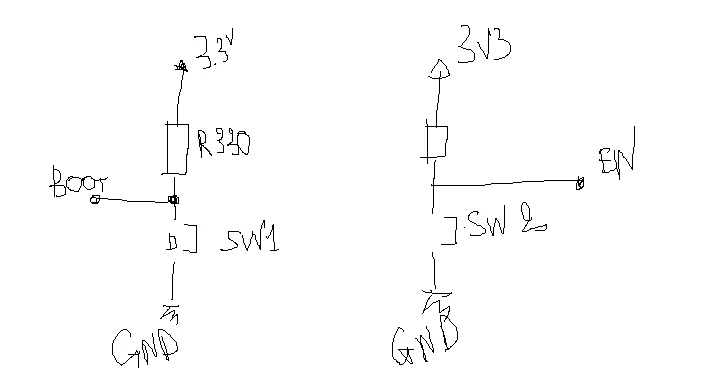
3. The sequence that I did : press and hold SW2 (chip ENABLE), press and release SW1 (BOOT), then release SW2.
Do everyone has experience please help me to check whether my HW and sequence already correct or not?
Thank you very much!
Giang

2026-03-18 12:25 AM
Hello,
By default the BOOT is pull down (33k) and the CHIP_EN is pull up (already inside the module, no need to add external pull up). So on the your schematic, the switch SW1 should be linked to 3.3V and to enter the boot mode, you have to follow this sequence:
- Press SW1 to keep BOOT at 3.3V.
- Push and release SW2: make a "reset".
- Release SW1.
Then the module is in BOOT mode and you should be able to flash the module.
Hope it will help,
Regards,
Damien.
2026-03-18 8:32 AM
Hi @DHUBA.1 ,
Thanks for your response!
1. I'm setup the schematic like this, please help me to review.
2. Could you help me to check the timming and shoud I add this command after which steps?
QConn_Flash\QConn_Flash_Cmd.exe --port COM5 --config NCP_Binaries\mission_t01_flash_prog_cfg.ini --efuse=NCP_Binaries\efusedata.bin
Step 1: Press SW1 to keep BOOT at 3.3V.
Step 2: Push and release SW2: make a "reset".
Step 3: Release SW1.
Regards,
Giang
2026-03-19 12:43 AM
Hi Giang,
I think I gave you a wrong information, there's no pull up on the CHIP_EN signal inside the module but the pull up is managed by the host (STM32). Can you detailed a little bit more your schematic ? how do you interface the ST67 (UART / SPI) ? Which host are you using ?
If you only want to to flash the module and control manually the CHIP_EN and the UART (no Host connected), you indeed need external Pull_up on CHIP_EN and Pull_down on the BOOT (see image in attachment).
In that Hardware configuration, your timing is correct.
Regards,
Damien.
2026-03-19 2:58 AM
Hi @DHUBA.1
Background is that I want to use a host (STM32F7) to communicate with ST67W61 via SPI (follow T01 architecture).
follow topic: https://community.st.com/t5/interface-and-connectivity-ics/stm32-host-with-st67w611-wifi-ble/m-p/886532/highlight/true#M12366
I understand that I have to re-flash for ST67W61 module before start with any applicaiton in host like P2P client, ...
and now, I'm trying to flash fimrware for ST67W61, I used UART TTL module, connect to ST67W61 via TX/RX pins, and the BOOT pin, ENABLE pin I setup following your recommend.
after setup, I use this command to start for flashing:
QConn_Flash\QConn_Flash_Cmd.exe --port COM5 --config NCP_Binaries\mission_t01_flash_prog_cfg.ini --efuse=NCP_Binaries\efusedata.bin
Unfurtunately, I'm still got the same problem that I mentioned at the begin of this topic.
Do you have any suggestion?
Regards,
Giang
2026-03-19 8:36 AM - edited 2026-03-19 9:09 AM
If I understood your problem correctly, unfortunately I'm also seeing the same issue after installing t01 the first time. I'm unable to re-flash the ST67 again and for me the device seems bricked. I tried it on several boards and see the same issue. I have no problem re-flashing on boards with t02 installed the first time. It allows reflashing of t02 again and again. However, the moment I flash t01 successfully, the device gets bricked.
My workaround was to do a full chip erase before reflash
QConn_Flash\QConn_Flash_Cmd.exe --port COM38 --erase --whole_chip
After which I was able to flash either binary on ST67s
2026-03-19 9:45 AM
Hi @Nkh ,
Thanks for your information!
for my case, this is the first time I try to flash for ST67W61.
could you share some experience like HW setup, sequency for press and release button BOOT and ENABLE?
@DHUBA.1 already shared about the schematic for BOOT, ENABLE, also sequecen. but I just get the handshake success, still not flash successfully yet.
Thanks,
Giang
2026-03-19 10:21 AM
Not sure about the timings as I also do it manually via a switch. Here's an example of the start of a successful output
D:\temp\x-cube-st67w61-main\Projects\ST67W6X_Scripts\Binaries>QConn_Flash\QConn_Flash_Cmd.exe --port COM38 --config NCP_Binaries\mission_t01_flash_prog_cfg.ini --efuse=NCP_Binaries\efusedata.bin
[09:03:22.096] - Serial port is COM38
[09:03:22.096] - ==================================================
[09:03:22.096] - FW get address from partiton file D:\temp\x-cube-st67w61-main\Projects\ST67W6X_Scripts\Binaries\NCP_Binaries\./partition.bin
[09:03:22.096] - Address=0x10000
[09:03:22.096] - FW get size from partiton file D:\temp\x-cube-st67w61-main\Projects\ST67W6X_Scripts\Binaries\NCP_Binaries\./partition.bin
[09:03:22.096] - Size=1785856
[09:03:22.096] - Program Start
[09:03:22.104] - ========= eflash loader cmd arguments =========
[09:03:22.111] - serial port is COM38
[09:03:22.111] - cpu_reset=False
[09:03:22.277] - com speed: 2000000
[09:03:22.277] - ========= Interface is uart =========
[09:03:22.277] - Bootrom load
[09:03:22.277] - ========= get_boot_info =========
[09:03:22.277] - ========= image get bootinfo =========
[09:03:22.588] - tx rx and power off, press the machine!
[09:03:22.588] - cutoff time is 0.05
[09:03:22.652] - power on tx and rx
[09:03:23.649] - reset cnt: 0, reset hold: 0.05, shake hand delay: 0.1
[09:03:23.649] - clean buf
[09:03:23.650] - send sync
[09:03:23.885] - ack is b'4f4b'
[09:03:23.885] - shake hand success
[09:03:24.387] - data read is b'0200160601000100a71282014277037b82401d008f7580904514c32d'
[09:03:24.387] - ========= ChipID: 40827b037742 =========
[09:03:24.389] - Get bootinfo time cost(ms): 2111.311767578125
[09:03:24.389] - change bdrate: 2000000
[09:03:24.389] - Clock PLL set
[09:03:24.389] - Set clock time cost(ms): 0.0
[09:03:24.513] - flash set para
[09:03:24.513] - get flash pin cfg from bootinfo: 0x08
[09:03:24.515] - set flash cfg: 1014108
[09:03:24.515] - Set flash config
[09:03:24.524] - Set para time cost(ms): 8.99951171875
[09:03:24.525] - ========= flash read jedec ID =========
[09:03:24.525] - Read flash jedec ID
[09:03:24.525] - readdata:
[09:03:24.526] - b'c4601600'
[09:03:24.526] - Finished
[09:03:24.526] - flash config Not found, use default
[09:03:24.526] - jedec_id:c46016
[09:03:24.526] - capacity_id:22
[09:03:24.526] - capacity:4.0M
[09:03:24.526] - get flash size: 0x00400000
[09:03:24.527] - Program operation
[09:03:24.527] - Flash Chip Erase All
[09:03:24.534] - Chip erase time cost(ms): 6.32275390625
[09:03:24.535] - Dealing Index 0
[09:03:24.535] - ========= programming D:\temp\x-cube-st67w61-main\Projects\ST67W6X_Scripts\Binaries\NCP_Binaries\.\st67w611m_boot2_v8.1.9.bin to 0x000000
[09:03:24.535] - flash para file: D:\temp\x-cube-st67w61-main\Projects\ST67W6X_Scripts\Binaries\QConn_Flash\chips/chip/efuse_bootheader/flash_para.bin
[09:03:24.536] - Set flash config
[09:03:24.546] - Set para time cost(ms): 9.849853515625
[09:03:24.546] - ========= flash load =========
[09:03:24.558] - decompress flash load 27576
[09:03:24.574] - Load 2048/27576 {"progress":7}
[09:03:24.612] - Load 4096/27576 {"progress":14}
[09:03:24.634] - Load 6144/27576 {"progress":22}
[09:03:24.656] - Load 8192/27576 {"progress":29}
[09:03:24.671] - Load 10240/27576 {"progress":37}
[09:03:24.690] - Load 12288/27576 {"progress":44}
[09:03:24.715] - Load 14336/27576 {"progress":51}
[09:03:24.738] - Load 16384/27576 {"progress":59}
[09:03:24.760] - Load 18432/27576 {"progress":66}
[09:03:24.776] - Load 20480/27576 {"progress":74}
[09:03:24.797] - Load 22528/27576 {"progress":81}
[09:03:24.808] - Load 24576/27576 {"progress":89}
[09:03:24.842] - Load 26624/27576 {"progress":96}
[09:03:24.854] - Load 27576/27576 {"progress":100}
[09:03:24.854] - Load 27576/27576 {"progress":100}
[09:03:24.854] - Write check
[09:03:24.881] - Flash load time cost(ms): 335.114013671875
[09:03:24.881] - Finished
[
2026-03-19 10:26 AM
One other important thing if you are using your own custom board... your serial port must be able to support 2000000 (2M) baud rate. The flashing only works at that speed.