

STM32CubeIDE for Visual Studio Code
The March 2026 release of STM32CubeIDE for Visual Studio Code is a key part of the STM32C5 series launch and the wider evolution of the STM32Cube ecosystem. Together with the new STM32CubeMX2 configuration tool and the updated STM32CubeIDE and STM32CubeIDE for VS Code integrations, this release is designed to provide seamless development experience for the next generation of STM32 MCUs.
ST thanks the developer community for their feedback and patience as the team continues to build tools for VS Code.
Highlights of the March 2026 update
STM32 View update: faster access to tools and resources in VS Code
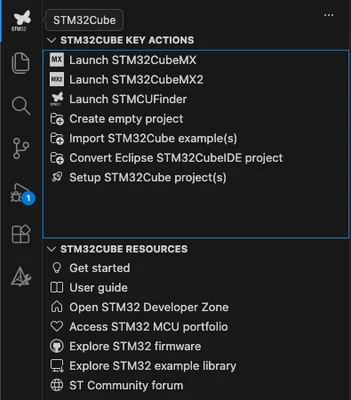
The latest STM32 View update introduces new shortcuts that help developers launch tools and find documentation more efficiently.
New shortcuts allow you to:
- Launch STM32CubeMX2
Start STM32CubeMX2 directly from VS Code for faster project configuration.
- Import STM32Cube examples
Bring STM32Cube example projects into VS Code in just a few clicks.
Limitation: only single-core‑ STM32CubeIDE/Eclipse projects are supported. - Convert STM32CubeIDE/Eclipse projects
Convert native STM32CubeIDE/Eclipse projects to CMake and import them into VS Code. - Explore the STM32 MCU portfolio
Quickly browse the STM32 MCU portfolio from within your development environment. - Access the online example library
Open the new STM32 example library portal to discover and reuse ready-to‑-run‑ code.
VS Code documentation now available online
The STM32 VS Code User Guide is now accessible online at STM32CubeIDE for Visual Studio Code.
This update means developers can:
- Access the documentation without installing the tool
- Deep-link directly to specific chapters from other pages, emails, or support content
Please note: the online documentation is still under development and will continue to be updated and expanded.
Native macOS AArch64 support
STM32 VS Code integration now offers native AArch64 support on macOS.
The dependency on x86_64 binaries has been removed, so:
- Apple silicon users no longer need the Rosetta emulation layer
- Performance and responsiveness are improved when developing on M1/M2/M3‑based Macs
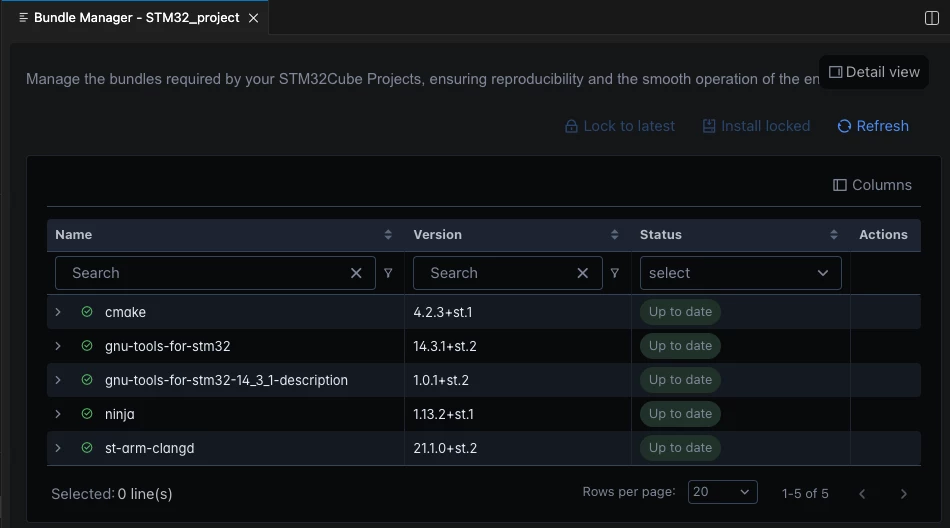
Updated Bundle Manager GUI
The Bundle Manager interface has been redesigned to provide a more intuitive, developer friendly experience.
With the new GUI, developers can:
- Install and manage multiple tool versions
Easily add different versions of tools such as CMake, GCC, and SEGGER J‑LINK. - Lock tool versions per project
Each project can pin the exact tool versions it requires, ensuring a reproducible and shareable tool environment across teams and machines.
Toolchain updates
The latest release brings significant improvements to both GCCbased and ‑Clangbased‑ toolchains for STM32 developers.
GNU Tools for STM32 (GCC 14.3.1)
- Native AArch64 package for macOS
Faster builds on Apple silicon thanks to native support (no Rosetta required). - Newlib rebuilt with -O2
Improved runtime performance from optimized C library builds. - More details online
Full release notes are available in the online documentation.
ST Arm Clang (Clang 21.1.1)
- Better standards conformance and optimization
Enhanced code generation quality and language compliance. - Improved modern C/C++ support
Better support for C++20/23 and C23, along with upgraded diagnostics and static analysis. - Updated C libraries
Includes Picolibc 1.8.10 and Newlib 4.5.0 for more robust embedded C support.
Project conversion and import
New tools make it easier to bring existing STM32 projects into VS Code by converting native STM32CubeIDE/Eclipse projects to CMake.
These features enable developers to:
- Migrate projects from STM32CubeIDE/Eclipse to STM32CubeIDE for VS Code
- Import ST example projects delivered in STM32CubeIDE/Eclipse format directly into VS Code
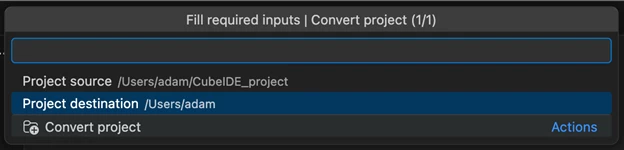
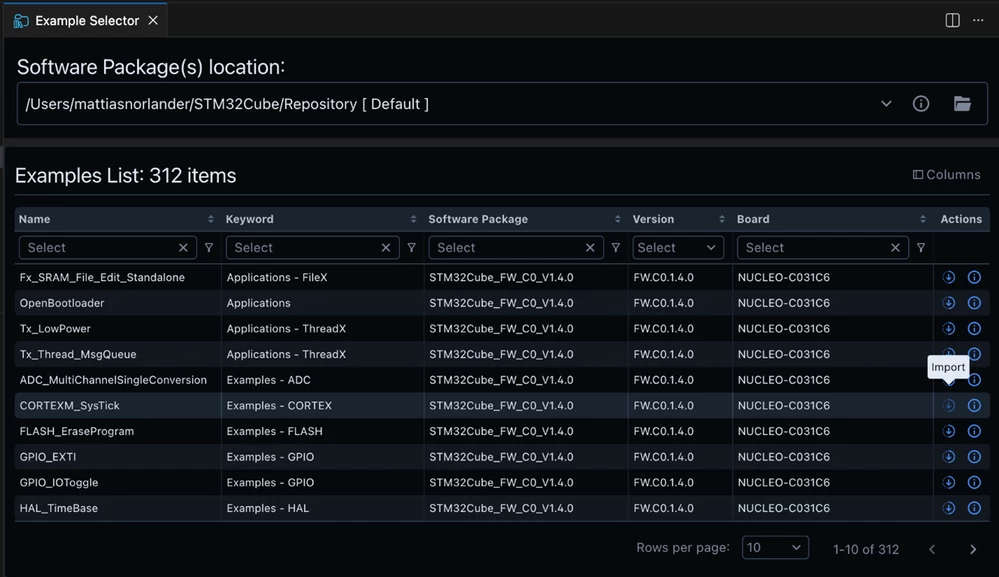
Limitation: multi-context projects (dual‑-core‑, TrustZone, etc.) and pre/post-build‑ steps are not currently supported.
Debug enhancements
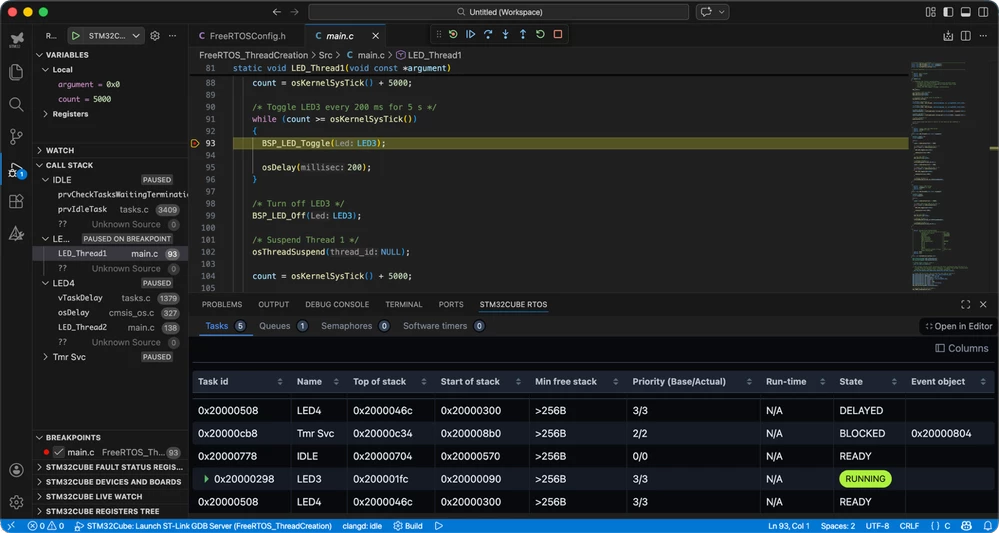
RTOS debug views now display information in horizontal tables instead of vertical tree views, making task and resource data easier to scan and compare.
This is the first major enhancement since the initial launch in May 2025. Developers who prefer the RTOS views from the open‑source mcu-debug extensions can continue to use them, as ST upstreams debug support for ST‑LINK and SEGGER DAPs into those projects.
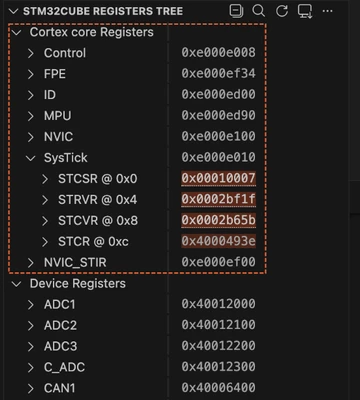
The Registers view now provides visualization of Cortex core registers, SysTick, NVIC, and more.
Developers can also export register contents to XML for offline analysis, debugging, or documentation.
Your feedback is essential in shaping the future of STM32Cube for Visual Studio Code and helping us tailor it precisely to your requirements. We look forward to reading your ideas and questions on our community forum!
Additional resources
- Get STM32CubeIDE for Visual Studio Code
- Video: Introduction to the STM32Cube ecosystem
- Video: [Getting started] STM32CubeIDE
- Video: Get started with STM32Cube for VS Code: from installation to debugging
First published on Mar 16, 2026