


Using STM32 devices with Keil Studio for Visual Studio Code
The content of this blog article has been provided by arm Keil.
Using STM32 devices with Keil Studio for Visual Studio Code
Keil Studio, Arm's latest IDE, integrates embedded development tools directly into Visual Studio Code. As the successor to µVision, it offers modern features including seamless industry tool integration, version control, and a CLI for CI workflows.
Being part of Arm Keil MDK 6, Keil Studio provides comprehensive support for Cortex-M based microcontrollers, including the extensive STM32 family from STMicroelectronics. It combines the reliability and maturity of the Arm Compiler and extensive device support, with the flexibility and extensibility of Visual Studio Code.
Get started
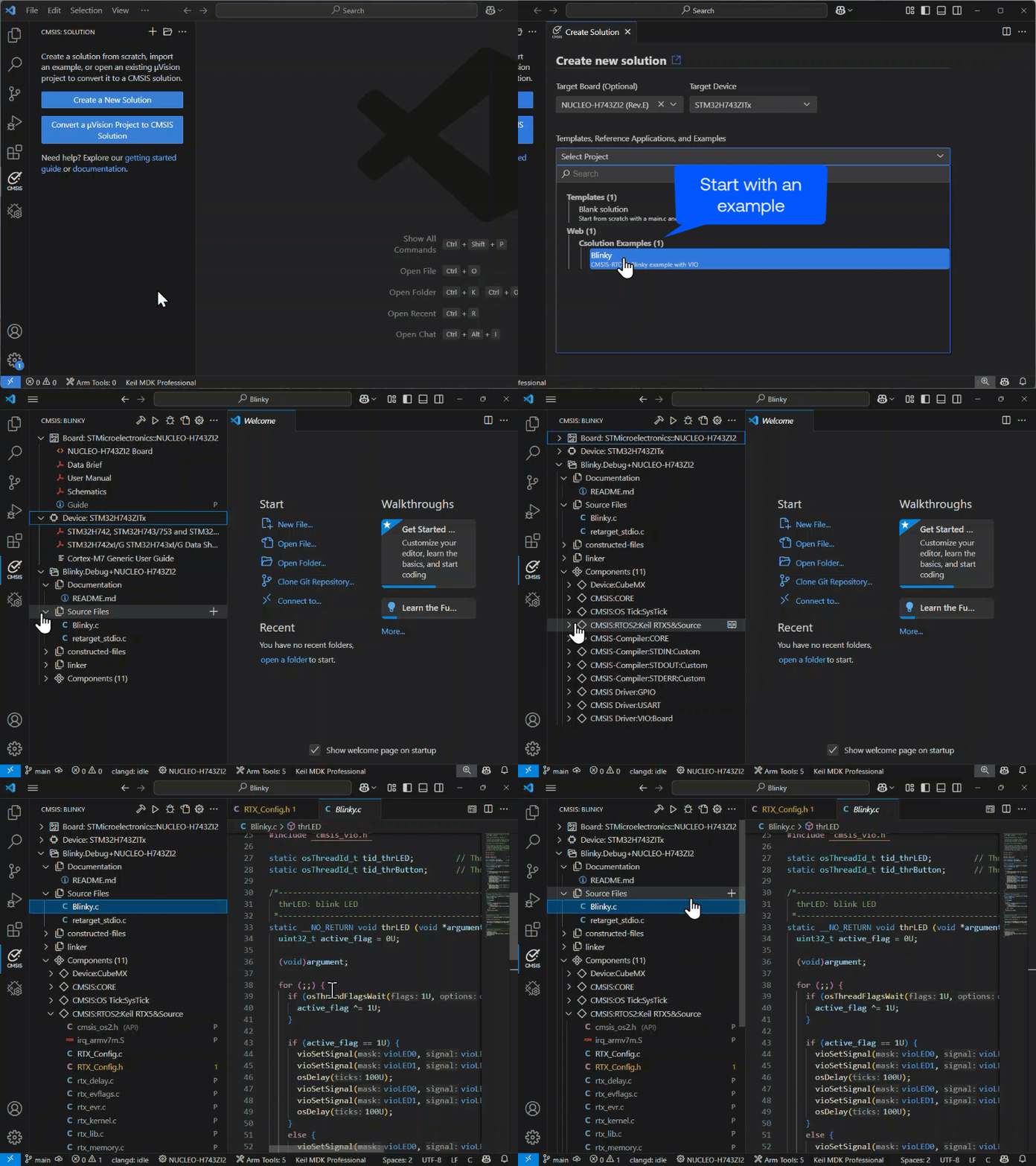
Getting started with Keil Studio is straightforward using the Create New Solution dialog in the CMSIS view. Select your STM32 board or device to access board-specific examples or templates for starting from scratch (with STM32CubeMX support). By default, the required tools and packs are installed automatically.
Bare-Metal or RTOS
Keil Studio is designed for all types of embedded projects, ranging from bare-metal firmware to complex RTOS-based systems. It provides direct hardware access, kernel awareness for supported RTOSes, and software component viewers for middleware and system services. For safety-critical applications, the MDK-Professional edition includes FuSa RTS.
STM32CubeMX Interface
STM32CubeMX (CubeMX) is a graphical tool for configuration of an STM32 device or board.
Keil Studio interacts with CubeMX as explained in the CMSIS-Toolbox User's Guide. Invoke CubeMX directly in the CMSIS View from the component Device:CubeMX as explained in this video.
Debug and test
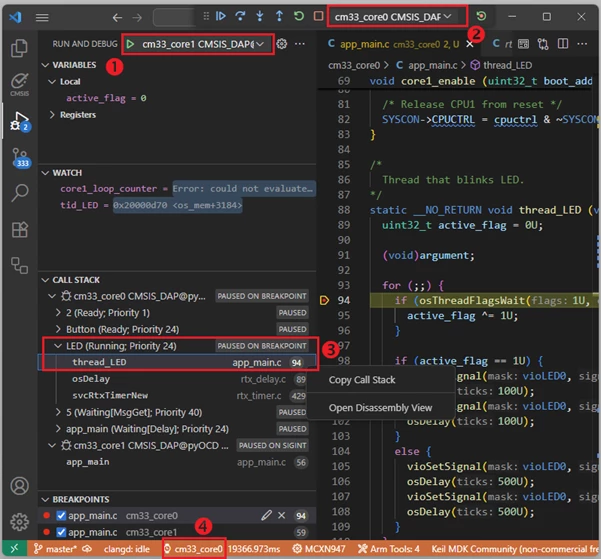
Keil Studio delivers powerful debugging through the Run and Debug view, supporting multiple debug adapters including ST-LINK, CMSIS-DAP, Segger J-Link, and Arm FVP simulation models. The debugger can even attach to a running target (1), giving you full control over program execution.
For RTOS-based projects, the CALL STACK (3) provides kernel-aware insights for FreeRTOS, Zephyr, and Keil RTX5. Multi-core debugging is supported through processor selection in the debug toolbar (2), with each core having independent debug views (4). With the Trace and Live View, you can monitor variables and system behavior while the application is running.
Summary
Keil Studio for VS Code provides STM32 developers with a modern, cross-platform development environment that combines the CMSIS-Toolbox with Visual Studio Code. The workflow integrates STM32CubeMX device configuration, CMSIS software packs, and comprehensive debug capabilities through pyOCD (for ST-Link and ULink) and J-Link support.
Try Keil Studio and install the free MDK-Community edition for exploring the various example projects.
First published on Jan 27, 2026