Treacy Yao
Associate III
July 23, 2019
Solved

CDC function added but no any com port shown

  • July 23, 2019
  • 6 replies
  • 9483 views

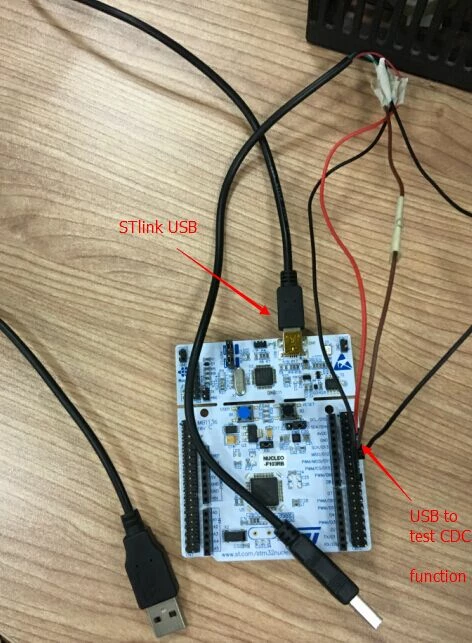
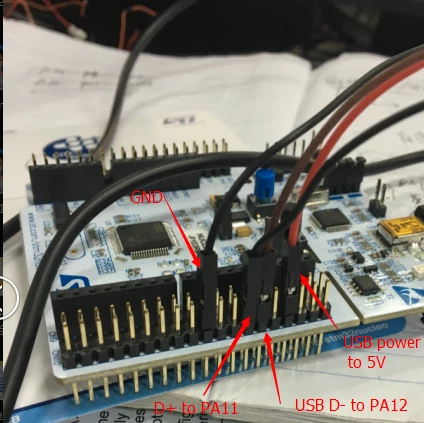
I want to add CDC function. I use the STM32F103RB NUCLEO to add this function. But when I running my application, and insert USB to PC, no COM port shown in PC. I generate the code from cube and I don't know where is the problem. I test WIN10 and WIN7 PC, both are no any port. I have install the related driver in win70690X000009Z0poQAC.png0690X000009Z0peQAC.jpg
This topic has been closed for replies.
Best answer by GSome

I cant figure how to add 2 picures at once so I did separate post

6 replies

Uwe Bonnes
Chief
July 23, 2019

Do you have the pullyp on DP?

Treacy Yao
Associate III
July 23, 2019

What's pullyp on DP? I don't understand

T J
Senior III
July 23, 2019

Just some wires though several connections will not work.

USB is running at 12MHz, you need to use a proper cable, not just several wires that you find around on the bench.

To have half a chance, get a USB cable and cut the end off, then remove the Pin headers and solder the ends directly on the pcb.

CDC works very well if you run the properly routed differential traces on the PCB connected directly to your PCB mounted USB connector.

Actually, I have never tried to use a $10 nucleo board like you have, so I don't know if it can work that way.

You can get your own boards manufactured in China at low cost, then it will work.

Are you aware that there are other nucleo boards that have a usb connector, connected to the processor,?

if you try these boards the Cube CDC function will work without modification for enumeration.

I add some code to make the CDC DMA work correctly, this is your work.

I don't use any pullups on either wire...

Your problem is still the cable.

I suggest you make your own board, it is likely to work first time if you use a proper USB cable.

GSome
Visitor II
July 23, 2019

I use a small adaptor to connect to my nucleo303 board with jumper wires and it works ok.

If you look up user manual UM1974 for nucleo 144 pin boards on page 77 you will see how they connect to an onboard connector.

You will see a connection to a 1.5k resistor to pin G6, this is a pullup resistor to tell pc a cdc device is connected.

I use pin B8 on mine as there is no pin G6

I found connecting 1.5k resistor direct to 3.3 volts caused problems on trying to connect to pc.

I don't use the ESDA6V1BC6 protection diodes but I do add 22 ohm resistors inline with USB_DM and USB_DP

GSome
GSomeBest answer
Visitor II
July 23, 2019

I cant figure how to add 2 picures at once so I did separate post

Treacy Yao
Associate III
July 24, 2019

I add 1.5K register and PC have something show and "device descriptor request failed" happen0690X000009Z2AyQAK.png

T J
Senior III
July 23, 2019

I am surprised that works..

good work @GSome​ 

Treacy Yao
Associate III
July 24, 2019
  1. I'm confused. So need I add 1.5K register to D+?
  2. I don't think my USB cable have the problem? It works fine in other device. Which USB cable should I use? Any suggestion? Because I only get Nucleo board, no any other board or lines.
Treacy Yao
Associate III
July 24, 2019

I add 1.5K register and PC have something show and "device descriptor request failed" happen.

0690X000009Z2AyQAK.png

GSome
Visitor II
July 25, 2019

My code is for a F303 chip and it is for using as a 4 channel oscilloscope so it would not run on your system.

I ran some tests on mine. My program communicates with a program on a windows computer.

With the setup I have with pullup resistor connected to PortB8 the program runs ok.

If I press the reset button (Black button) on the nucleo this signal goes low briefly then transmission from the pc stars in a steady stream but my nucleo program only sends data on command

If I connect pullup resistor direct to 3.3 volt line and press reset I don't see any pull down of this line and running pc program windows gives me an error device attached is not working.

If I then unplug the pullup resistor, then plug into ground, then unplug and plug back into 3.3 vols again the pc program starts working again.

I am no usb cdc expert but I assume means the pc sees voltage change on pin so it sends command to device to send descriptor. Device responds with descriptor and all is ok

An other method I found was to unplug and then replug the primary usb connector (the white connector in my picture) as this also drives voltage low which reprogramming or pressing rest does not do.

Hope this helps

George