
cancel
Showing results for 
Search instead for 
Did you mean: 

Sound Source Localization using MEMSMIC1

Sans__0_0
Associate II

Hello ST team,
I am using Nucleo H753zi board, and I wanted to use X-CUBE-MEMSMIC1 expansion for sound source localization.
I have already designed simple PCB to use MEMs microphone and connect it to H7 board's ADC. I want to understand how I can program my board to use 4 mics- GCC-PHAT algorithm to get location of sound source. 

I have gone through UM2212 and UM1901. Due to lack of experience in this field, can you guide me through how I can use this X-CUBE-MEMSMIC1 expansion for sound source localization? I found this diagram helpful and would like to understand how should I code to feed data from cache to Acoustic SL for processing.
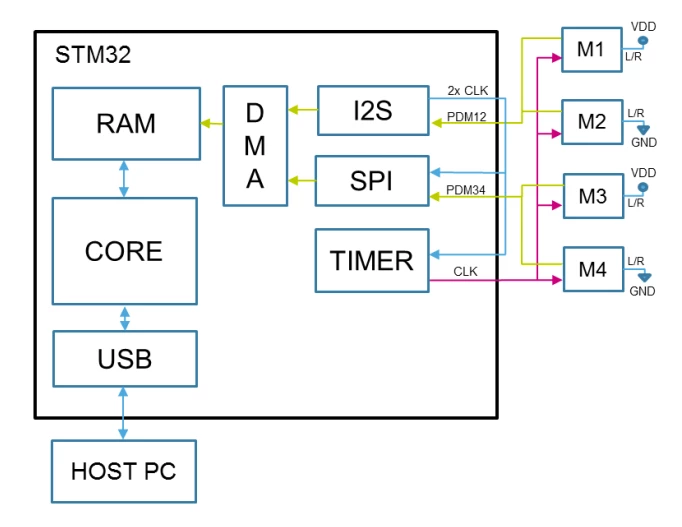
Sans__0_0_0-1769669684549.png


10 REPLIES 10
Ozone
Principal III

> I am using Nucleo H753zi board, and I wanted to use X-CUBE-MEMSMIC1 expansion for sound source localization.

This is not really a STM32 / Nucleo-H753 specific issue, but a generic signal processing one.
So I would suggest to look for less specific resources, i.e. drop any "ARM" or "STM32" search term.

Basically, the method consists of concurrent multi-channel audio recording with a known spatial setup (microphone locations), detecting identical signals in those channels, and calculate location via triangulation from the signal delays.
The delay is usually determined via some cross-correlation algorithm.

Sans__0_0
Associate II

Sans__0_0_0-1769670447332.png

We intend to use Internal ADC to input MEMs microphone, FYI.

Which doesn't make much of a difference.
However, you need to assure a fixed correlation between channels, i.e. know at which time (relatively speaking) a sample from one channel was taken in relation to the others.

Running a sequence of <n> channels at the choosen sampling rate is sufficient.
You can allow for the sub-microsecond offset between subsequent channels in your evaluations.

SimonePradolini
ST Employee

Hello @Sans__0_0 

X-CUBE-MEMSMIC1 isn’t supporting Nucleo-H7 natively, but you can use the Acoustic_SL demo for NUCLEO-F401RE as a reference. Then, it’s meant to you port the code from STM32F4 to your specific STM32H7 platform.

The full example, in source code and distributed for IAR Embedded Workbench, Keil® MDK, and STM32CubeIDE, is available in Projects\STM32F401RE-Nucleo\Demonstration\CCA02M2\Acoustic_SL folder.

Would you like to evaluate an alternative code reference? Are you aware about the X-CUBE-AUDIO-KIT software package? It’s the latest development from ST on audio processing and it’s natively supporting STM32H7. The porting to your specific Nucleo-H7 board will be easier.


Best regards,

Simone

In order to give better visibility on the answered topics, please click on 'Accept as Solution' on the reply which solved your issue or answered your question.
Sans__0_0
Associate II

Hi @SimonePradolini ,

It appears that the x-cube-audio-kit package does not include the Acoustic_SL middleware. At this point, it seems my only option is to manually integrate the Acoustic_SL middleware and develop custom code to provide the necessary input values for angle computation.

I would be very grateful if you could guide me on how to properly import the middleware and how to structure the required code in main.c. The Acoustic_SL middleware includes three source files and one header file; however, my main challenge is determining the correct way to supply ADC inputs to the handler at a fixed sampling frequency. As I understand, the middleware will not perform any calculations if the inputs are provided at irregular frequencies.

Your support and guidance on this would be extremely helpful.
Thank you in advance.


Hello @Sans__0_0 

Sorry for the wrong suggestion. You are right: no support for Acoustic_SL library is included in X-CUBE-AUDIO-KIT.


So, lets talk about X-CUBE-MEMSMIC1, focusing on Acoustic_SL example for NUCLEO-F401RE. You can easily go through the source code. You’re free to use the compiled library either importing the AcousticSL.c source file.

The initialization procedure is invoked in main.c with the Audio_Libraries_Init() function.

Then, each 1ms, AudioProcess is called. Basically, AudioProcess is called when 1ms of audio data are available. The example is based on 1ms tick, and during this period there’s PDM to PCM conversion, source localization input, and USB streaming.

Furthermore, the example implements software interrupt routines: once the source localization library has the new input, it starts calculating the angle. AcousticSL_Process will return the estimated angle.


What you need for your application is:

  • Set up the library with the proper parameters in base of your specific application (that is: number of microphones used, number of audio samples to process, sampling frequency, ...)
  • Feed the library with the right audio input: in base of the channel_number and ptr_Mx_channels values, the library is expecting data are distributed in arrays. In our example, audio data are available into a unique array in interleaved fashion (that is: s1mic1|s1mic2|s1mic3|s1mic4|s2mic1|s2mic2|s2mic3|s2mic4|... where s stands for sample). 
  • How often are you receiving data from ADC? If you can set up your ADC to have data each 1ms, you can reuse the same approach as the original code. 

Consider also that everything can work properly only with a continuous data stream at a fixed sampling frequency.


Best regards,

Simone

In order to give better visibility on the answered topics, please click on 'Accept as Solution' on the reply which solved your issue or answered your question.

Thank you for your response, @SimonePradolini. I have additional questions. Should I convert the ADC output signal to a signed format? This is important because when using DMA, the internal ADC does not provide a signed output, yet the middleware (Acoustic_SL) requires a signed input.

Additionally, I have another question regarding the Middleware folder you provided. It contains three source files: AcousticSL.c, libSoundSourceLoc.c, and doa_via_block_sparsity.c, along with one header file, acoustic_sl.h. Are all these files necessary, or can I remove doa_via_block_sparsity.c? I would appreciate it if you could clarify the purpose of these files as well. In libSoundSourceLoc.c, it states that the number of samples to process is fixed, and if a different value is provided, the default value will be used. If I specify a higher value, will I gain any speed benefits?

Lastly, I am encountering an issue with getting the ADC to function at 32kHz. The library only supports three frequencies: 16kHz, 32kHz, and 48kHz. Therefore, the number of samples stored in the buffer, which contains 1ms of data, should be exactly 32, 8 converted data from each microphone.

Hello @Sans__0_0 


@Sans__0_0 wrote:

Should I convert the ADC output signal to a signed format? This is important because when using DMA, the internal ADC does not provide a signed output, yet the middleware (Acoustic_SL) requires a signed input.

Yes. Shift the ADC output signal. AcousticSL input data must be signed input, so you must shift ADC output around 0.


@Sans__0_0 wrote:

Additionally, I have another question regarding the Middleware folder you provided. It contains three source files: AcousticSL.c, libSoundSourceLoc.c, and doa_via_block_sparsity.c, along with one header file, acoustic_sl.h. Are all these files necessary, or can I remove doa_via_block_sparsity.c? I would appreciate it if you could clarify the purpose of these files as well. In libSoundSourceLoc.c, it states that the number of samples to process is fixed, and if a different value is provided, the default value will be used. If I specify a higher value, will I gain any speed benefits?


AcousticSL.c is the unique entry point for the application. The other files are then linked from AcousticSL.c, so they are included into the project. Simply add AcousticSL.c in your project and everything should work properly.

If you'd like to remove the doa_via_block_sparsity.c file, you must manually modify libSoundSourceLoc.c accordingly to remove any reference to methods and variables used in doa_via_block_sparsity.c. It's not straightforward.

Regarding samples to process value, are you referring to this portion of code?

  if ((SLocInternal->Type == ACOUSTIC_SL_ALGORITHM_GCCP) || (SLocInternal->Type== ACOUSTIC_SL_ALGORITHM_BMPH))
  {
    if( (SLocInternal->Sample_Number_To_Process == 32U)   ||
       (SLocInternal->Sample_Number_To_Process == 64U)   ||
         (SLocInternal->Sample_Number_To_Process == 128U)  ||
           (SLocInternal->Sample_Number_To_Process == 256U)  ||
             (SLocInternal->Sample_Number_To_Process == 512U)  ||
               (SLocInternal->Sample_Number_To_Process == 1024U) ||
                 (SLocInternal->Sample_Number_To_Process == 2048U) ||
                   (SLocInternal->Sample_Number_To_Process == 4096U))
    {
      
    }
    else
    {
      SLocInternal->Sample_Number_To_Process = 256; /*Set default Value*/
      SLocInternal->Sample_Number_To_Store   = 256; /*Set default Value*/
      ret |= ACOUSTIC_SL_NUM_OF_SAMPLES_ERROR;
    }
  }

If so, it states that the sample to process must be a specific value. If the user doesn't select a valid value, the library will restore the default one and will return the configuration error also. This parameter is used by frequency-based algorithms. So, the higher is the value, the longer is the window used for the processing in the frequency domain. You should have better results at the cost of slower output result updates.

Remember that the library is for evaluation only. The goal is to showcase how audio signal processing can be done with ST products, thus isn't optimized in memory footprint. Furthermore, it’s released AS IS, with no support from ST in a final product.


@Sans__0_0 wrote:

Lastly, I am encountering an issue with getting the ADC to function at 32kHz. The library only supports three frequencies: 16kHz, 32kHz, and 48kHz. Therefore, the number of samples stored in the buffer, which contains 1ms of data, should be exactly 32, 8 converted data from each microphone.


Are you sure the ADC setup is working properly? If you're acquiring audio data at 32kHz, you must have 32 samples for each millisecond for each microphone. Check the ADC settings in your setup.


Best regards,

Simone

In order to give better visibility on the answered topics, please click on 'Accept as Solution' on the reply which solved your issue or answered your question.
Sans__0_0
Associate II

Hello @SimonePradolini ,
Thank you for your assistance. We would appreciate your help on the following below...

My team has implemented AcousticSL in STM32CubeIDE for Sampling Frequency of 16KHz. I will try to explain what we have tried to do:

I am calling a polling function in main.c, which will take me to our custom app_acousticsl.c file. Here we first de interleaved the data by subtracting 32768 and saving the data in mic buffers (four buffers for each mic). Then we have initialized acousticsl library with App_AcousticSL_Init(void) 

void App_AcousticSL_Init(void)
{
sl_handler.algorithm = ACOUSTIC_SL_ALGORITHM_GCCP;
sl_handler.sampling_frequency = AUDIO_FS;
sl_handler.channel_number = 4;

sl_handler.ptr_M1_channels = 1;
sl_handler.ptr_M2_channels = 1;
sl_handler.ptr_M3_channels = 1;
sl_handler.ptr_M4_channels = 1;

sl_handler.M12_distance = 100; // in mm
sl_handler.M34_distance = 100;

// sl_handler.samples_to_process = 0;
sl_handler.samples_to_process = 256; //default value = 256 as well

AcousticSL_getMemorySize(&sl_handler);
sl_handler.pInternalMemory =
malloc(sl_handler.internal_memory_size);

AcousticSL_Init(&sl_handler);

sl_config.threshold = 24;
sl_config.resolution = 1;
AcousticSL_setConfig(&sl_handler, &sl_config);

/* Start ADC DMA */
HAL_ADC_Start_DMA(&hadc1,
(uint32_t *)adc_dma_buf,
MIC_COUNT * SAMPLES_1MS);
}

Next using flags we started 1ms processing and returning DoA value. But since we do not have any microphone for testing (requistion under progress...)  we need some way to check the DoA value. Currently with no microphone connected it results some random angles (switching between 135, 224, 314). Is there any alternative to test the algorithm without microphones?

Also we would like to know if this middleware can be used to estimate distance of sound source and number of targets it can localize at a time, etc.