
How to fuse high-g and low-g accelerometer data to get accuracy with X-NUCLEO-IKS5A1 and MEMS Studio
- March 11, 2026
- 1 reply
- 272 views
Summary
This knowledge article explains how you can easily implement the fusion of high-g and low-g accelerometer data, relying on the new expansion board X-NUCLEO-IKS5A1. This board features the latest generation of STMicroelectronics MEMS sensors for industrial applications. Among these MEMS sensors, there is the intelligent IMU ISM6GH256X with simultaneous low-g and high-g acceleration detection.
Introduction
Are you wondering how the fusion of high-g and low-g accelerometer data can be achieved?
The solution is to combine the new generation of ST MEMS industrial sensors with a dedicated software package that implements this algorithm. The software package is called X-CUBE-MEMS1 and contains a collection of libraries ready to be used, such as MotionXLF, and some examples of source code for the user’s development.
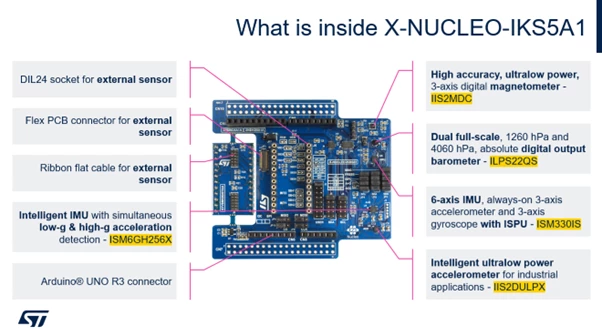 Figure 1: X-NUCLEO-IKS5A1: the new expansion board
Prerequisites
The following hardware and software components are used:
- X-CUBE-MEMS1, expansion software package for STM32Cube.
- MEMS Studio, a software solution for MEMS sensors with graphical no-code design of algorithms and development of embedded AI features.
- The new MEMS sensor expansion board X-NUCLEO-IKS5A1.
- NUCLEO-U575ZI-Q, STM32 Nucleo development board.
Demo setup
You can download the X-CUBE-MEMS1 software package from the “Tools & software” section of the official X-NUCLEO-IKS5A1 webpage on st.com.
While downloading this package, you can start mounting the X-NUCLEO-IKS5A1 expansion board on top of the NUCLEO-U575ZI-Q board.
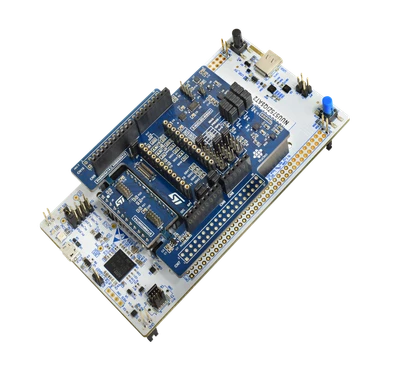 Figure 2: The new expansion board X-NUCLEO-IKS5A1, connected to NUCLEO-U575ZI-Q
Then, you connect the Nucleo board to the PC through a USB cable.
By opening the X-CUBE-MEMS1 software package, you can find the “Projects” folder where the projects are organized by boards inside the package X-CUBE-MEMS1.
Moreover, you can find a folder called “Applications” containing all the applications available for the different expansion boards, and one folder “Examples” where there is DataLog extended firmware. This example shows how to use a sensor expansion board to send data from a Nucleo board using UART to a connected PC.
In this specific case, the library MotionXLF is the one used and it is applied to the accelerometer data sensed by the IMU ISM6HG256X. You can find this library on the following path inside the X-CUBE-MEMS1 package: x-cube-mems1.zip\Projects\NUCLEO-U575ZI-Q\Applications\IKS5A1\HighGLowGFusion.
The MotionXLF high-g low-g fusion library fuses high-g and low-g accelerometer data to get accuracy. In fact, the high-g data are characterized by poor resolution and high dynamic range, while low-g data are characterized by high resolution and poor dynamic range.
Here are the main features of the MotionXLF library:
- The library is based on a finite state machine (FSM) and a software solution, which provides a smooth fusion between low-g data and high-g data. The high-g sensor can be turned on only when needed, allowing power saving when high-g data is not required.
- The low-g sensor can also run at a lower output data rate, and switch to a higher data rate only when needed, to save power.
- Fusing high-g and low-g data, you get no discontinuity, noise, and offset inconsistency issues.
- This library is compiled for different Cortex® architectures including M0+, M3, M4, M7, M33.
For further information, you can refer to the user manual: UM3509: Getting started with MotionXLF high-g low-g fusion library in X-CUBE-MEMS1 expansion for STM32Cube.
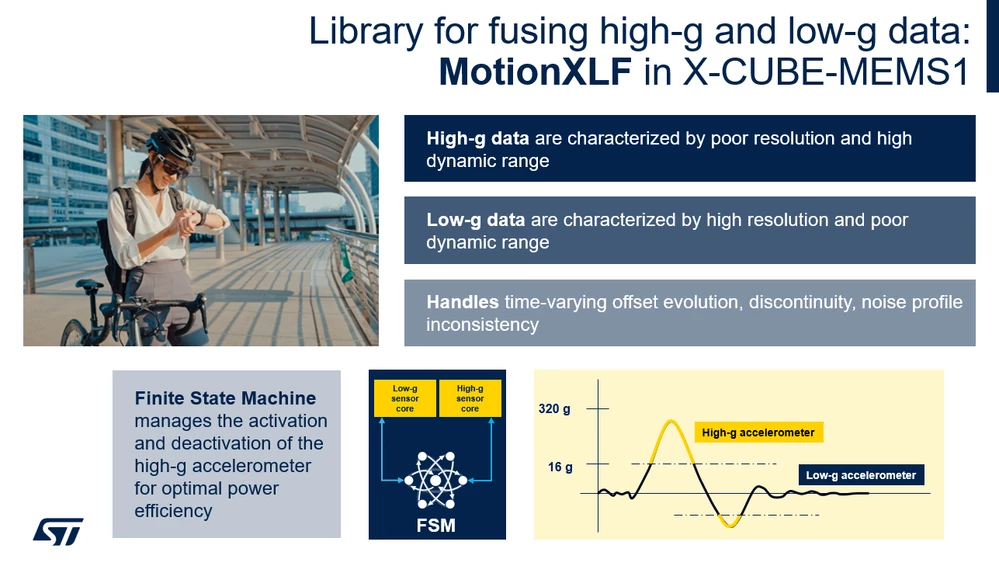 Figure 3: MotionXLF library
Data sensed by the accelerometer of the IMU ISM6HG256X is sent from the Nucleo board using UART to the connected PC. To run the application, it is needed to install and launch the MEMS Studio software solution on the PC.
After a connection has been established, the resulting data is displayed in the MEMS-Studio software tool, inside the section called "Library Evaluation". Here, the user can view and perform the fusion of both low-g and high-g accelerometer data. The user can also store the data in a .csv file and load the offline data from the csv file.
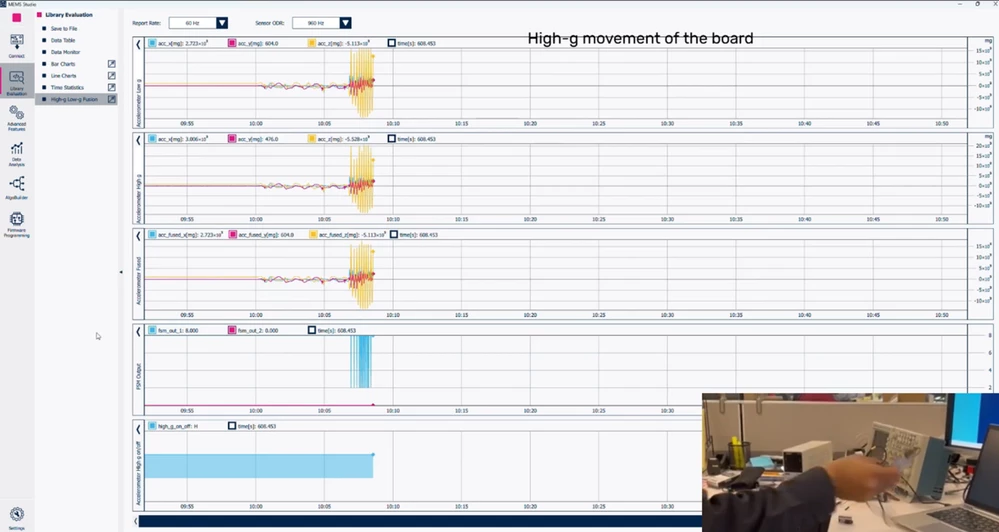 Figure 4: MEMS Studio – MotionXLF library evaluation.
Conclusion
With X-NUCLEO-IKS5A1, X-CUBE-MEMS1 software package and the MEMS-Studio software tool, you can speed up fusing the high-g and low-g accelerometer data to get accuracy.
Now, it’s your turn, choose your industrial sensor and start designing a new breakthrough application!
Related links
- Knowledge base article: How to implement an air blower state recognition with IIS2DULPX
- Knowledge base article: Creating a smart asset tracking application with ISM6HG256X and STM32U3
- Knowledge base article: How to implement a neural network on LSM6DSO16IS and ISM330IS with ISPU
- Dedicated webinar: MEMS sensors redefined: intelligent building blocks
for industrial innovation
