

Import an OpenSTLinux Project in CubeIDE 2.1.0
Hello everyone,
I'm a beginner in the STM32 world,
A teacher has lent us a STM32MP157C-DK2 board (with a A7 and a M4) for a challenge,
and I am currently trying to upload a program for the MCU (a button which switches the color of a RGB LED).
As I'll first describe my complete setup and what I have already done, so you can directly go to the end of the post if you want to see the main problem I'm facing which is :
To "import an OpenSTLinux Project" into cubeIDE,
to ultimately update the device tree of the Cortex-A7 into cubeIDE.
My setup:
A x64 computer running on Windows 11 with WSL 2 Ubuntu 24.04.01 LTS.
The STM32MP157C-DK2 board connected to my PC with ST-LINK and by network.
On WSL :
- I downloaded here and installed the STM32 cube IDE 2.1.0 for Debian.
- I downloaded here and installed the STM32 cube MX 6.17.0 for Linux.
- I downloaded here and installed the STM32MP1 OpenSTLinux Developer Package for x86.
- I turned my terminal from Dash to Bash.
- I added these lines to my /.bashrc :
# activer le SDK STM32
source /root/Developer-Package/SDK/Installation_v26/environment-setup-cortexa7t2hf-neon-vfpv4-ostl-linux-gnueabi

# alias pour les logiciels STM32 ST
alias cubeIDE='/opt/st/stm32cubeide_2.1.0/stm32cubeide'
alias cubeMX='/usr/local/STMicroelectronics/STM32Cube/STM32CubeMX/STM32CubeMX'
On cubeMX :
- I created a project based on the board STM32MP157F-DK2 (as the 'C' one is not available)
- I set up my GPIOs :
- the pin ARD_D7 as an EXTI 1 Rising Edge with a Pull-up
- the pins ARD_D9, ARD_D10, ARD_D11 as GPIO Output
- I enabled EXTI 1 Line 1 Interrupt, in system core > NVIC
- I selected 'Cortex-M4 FW' as "Pin Context Assignment" for all of these pins. - I selected "STM32 cube IDE" as Toolchain/IDE in the Project manager
- I clicked on "Generate Code"
On cube IDE :
- I opened a new workspace
- I imported the project as a 'STM32CubeMX1/STM32CubeIDE Project' by browsing the folder containing my .project file and it auto-detected 3 projects : the global one, containing the CA7 and the CM4.
Then I first tried to program the MCU :
- I edited the main.c for my goal :
/* USER CODE BEGIN 0 */
typedef enum { OFF = 0, RED = 1, GREEN = 2, BLUE = 3 } ColorState;
ColorState selector = RED;
uint32_t last_interrupt_time = 0; // Store the current time for the debounce
/* USER CODE END 0 *//* USER CODE BEGIN 4 */
void HAL_GPIO_EXTI_Rising_Callback(uint16_t GPIO_Pin)
{
// Check if it is the button which awoke the MCU
if(GPIO_Pin == GPIO_PIN_1)
{
// Check the timestamp for the debounce
uint32_t interrupt_time = HAL_GetTick();
// Debounce filter : if there was a previous trigger less than 200ms ago)
if ((interrupt_time - last_interrupt_time) > 200)
{
// change the color
selector = (ColorState)((selector + 1) % 4);
// Update pin state according to color code
if (selector == OFF) {
HAL_GPIO_WritePin(GPIOH, GPIO_PIN_6, GPIO_PIN_RESET);
HAL_GPIO_WritePin(GPIOE, GPIO_PIN_11, GPIO_PIN_RESET);
HAL_GPIO_WritePin(GPIOE, GPIO_PIN_14, GPIO_PIN_RESET);
}
else if (selector == RED) {
HAL_GPIO_WritePin(GPIOH, GPIO_PIN_6, GPIO_PIN_SET);
HAL_GPIO_WritePin(GPIOE, GPIO_PIN_11, GPIO_PIN_RESET);
HAL_GPIO_WritePin(GPIOE, GPIO_PIN_14, GPIO_PIN_RESET);
}
else if (selector == GREEN) {
HAL_GPIO_WritePin(GPIOH, GPIO_PIN_6, GPIO_PIN_RESET);
HAL_GPIO_WritePin(GPIOE, GPIO_PIN_11, GPIO_PIN_SET);
HAL_GPIO_WritePin(GPIOE, GPIO_PIN_14, GPIO_PIN_RESET);
}
else if (selector == BLUE) {
HAL_GPIO_WritePin(GPIOH, GPIO_PIN_6, GPIO_PIN_RESET);
HAL_GPIO_WritePin(GPIOE, GPIO_PIN_11, GPIO_PIN_RESET);
HAL_GPIO_WritePin(GPIOE, GPIO_PIN_14, GPIO_PIN_SET);
}
// Updates the timestamp for the next comparison of the debounce filter
last_interrupt_time = interrupt_time;
}
}
}
/* USER CODE END 4 */- I built the C/C++ application for the Cortex M4 project.
- I ran it, it uploaded, launched but it didn't work.
- As it didn't work, I launched the debug mode with breakpoints to help me and it happenned that :
when I was clicking on the button, the following function "HAL_GPIO_EXTI_IRQHandler()" was triggered but neither of these 2 conditions were met, and the program just returned to the while(1) of the main.c, whereas (as written in the function), the EXTI line interrupt was detected so far :
In file : CM4/Drivers/STM32MP1xx_HAL_Driver/stm32mp1xx_hal_gpio.c (line 501-515)
void HAL_GPIO_EXTI_IRQHandler(uint16_t GPIO_Pin)
{
 /* EXTI line interrupt detected */
 if (__HAL_GPIO_EXTI_GET_RISING_IT(GPIO_Pin) != RESET)
 {
 __HAL_GPIO_EXTI_CLEAR_RISING_IT(GPIO_Pin);
 HAL_GPIO_EXTI_Rising_Callback(GPIO_Pin);
 }

 if (__HAL_GPIO_EXTI_GET_FALLING_IT(GPIO_Pin) != RESET)
 {
 __HAL_GPIO_EXTI_CLEAR_FALLING_IT(GPIO_Pin);
 HAL_GPIO_EXTI_Falling_Callback(GPIO_Pin);
 }
}- I asked Gemini and it replied that it was due to the Cortex-A7 reading the interrupt faster than the Cortex-M4, and clearing the trigger. So a solution that worked was to force the function to enter its first condition like that :
void HAL_GPIO_EXTI_IRQHandler(uint16_t GPIO_Pin)
{
/* EXTI line interrupt detected */
if (1==1)
{
__HAL_GPIO_EXTI_CLEAR_RISING_IT(GPIO_Pin);
HAL_GPIO_EXTI_Rising_Callback(GPIO_Pin);
}
if (__HAL_GPIO_EXTI_GET_FALLING_IT(GPIO_Pin) != RESET)
{
__HAL_GPIO_EXTI_CLEAR_FALLING_IT(GPIO_Pin);
HAL_GPIO_EXTI_Falling_Callback(GPIO_Pin);
}
}And it perfectly worked. I was able to switch my LED color thanks to the button.
However, I wanted to do it properly, and follow its advice which was to update the Device Tree of the A7, at the kernel level so that u-boot could definitely prevent the Cortex-A7 to interact with the pins assigned to the M4.
And at this point, I was completely clueless after 3 days debugging my setup, retrying clean installations, and updating each piece of software (aside from Ubuntu) :
I tried desperatly to follow this tutorial from ST...
In the CubeIDE :
- At Windows > Preferences > STM32Cube > OpenSTLinux SDK Manager
I browsed the SDK folder, and after clicking 'apply', it detected the following SDK :
Version : openstlinux-6.6-yocto-scarthgap-mpu-v26.02.18
Arch : arm
Location : /root/Developer-Package/SDK/Installation_v26 - I checked the Yocto version mentioned in the CubeMX settings of my project and it is the 26.02.18 as well.
Here is the manifest.prop in the CA7 folder :
MANIFEST_VERSION = openstlinux-6.6-yocto-scarthgap-mpu-v26.02.18
KERNEL_DT = ./DeviceTree/Bouton_RGB/kernel
OPTEE_DT = ./DeviceTree/Bouton_RGB/optee-os
UBOOT_DT = ./DeviceTree/Bouton_RGB/u-boot
TFA_DT = ./DeviceTree/Bouton_RGB/tf-a- I right-clicked on the A7 project > setup OpenSTLinux > Yes > Continue, selected and installed all plugins.
There was an error each time, : Here is .metadata/.log just for that operation of setup OpenSTLinux :
!SESSION 2026-03-06 13:59:17.516 -----------------------------------------------
eclipse.buildId=Version 2.1.0
java.version=21.0.9
java.vendor=Eclipse Adoptium
BootLoader constants: OS=linux, ARCH=x86_64, WS=gtk, NL=en
Command-line arguments: -os linux -ws gtk -arch x86_64
This is a continuation of log file /root/Projets_STM32/bouton_RGB_LED_IDE/.metadata/.bak_2.log
Created Time: 2026-03-06 14:05:04.423
!ENTRY org.eclipse.ui 4 0 2026-03-06 14:05:04.423
!MESSAGE Error occurred during status handling
!STACK 0
java.lang.NullPointerException: Cannot invoke "org.eclipse.core.runtime.dynamichelpers.IExtensionTracker.registerHandler(org.eclipse.core.runtime.dynamichelpers.IExtensionChangeHandler, org.eclipse.core.runtime.dynamichelpers.IFilter)" because "tracker" is null
at org.eclipse.ui.internal.statushandlers.StatusHandlerRegistry.<init>(StatusHandlerRegistry.java:71)
at org.eclipse.ui.internal.statushandlers.StatusHandlerRegistry.getDefault(StatusHandlerRegistry.java:88)
at org.eclipse.ui.statushandlers.StatusManager.getStatusHandler(StatusManager.java:158)
at org.eclipse.ui.statushandlers.StatusManager.handle(StatusManager.java:215)
at org.eclipse.ui.statushandlers.StatusManager.handle(StatusManager.java:259)
at org.eclipse.ui.statushandlers.StatusManager$StatusManagerLogListener.logging(StatusManager.java:327)
at org.eclipse.core.internal.runtime.RuntimeLog.logToListeners(RuntimeLog.java:163)
at org.eclipse.core.internal.runtime.PlatformLogWriter.logged(PlatformLogWriter.java:109)
at org.eclipse.osgi.internal.log.ExtendedLogReaderServiceFactory.safeLogged(ExtendedLogReaderServiceFactory.java:108)
at org.eclipse.osgi.internal.log.ExtendedLogReaderServiceFactory.logPrivileged(ExtendedLogReaderServiceFactory.java:259)
at org.eclipse.osgi.internal.log.ExtendedLogReaderServiceFactory.log(ExtendedLogReaderServiceFactory.java:229)
at org.eclipse.osgi.internal.log.ExtendedLogServiceFactory.log(ExtendedLogServiceFactory.java:106)
at org.eclipse.osgi.internal.log.LoggerImpl.log(LoggerImpl.java:91)
... (too many lines to display them all, but it is quite all the same) ...
at org.eclipse.osgi.container.SystemModule.stopWorker(SystemModule.java:281)
at org.eclipse.osgi.internal.framework.EquinoxBundle$SystemBundle$EquinoxSystemModule.stopWorker(EquinoxBundle.java:222)
at org.eclipse.osgi.container.Module.doStop(Module.java:695)
at org.eclipse.osgi.container.Module.stop(Module.java:554)
at org.eclipse.osgi.container.SystemModule.stop(SystemModule.java:212)
at org.eclipse.osgi.internal.framework.EquinoxBundle$SystemBundle$EquinoxSystemModule$1.run(EquinoxBundle.java:240)
at java.base/java.lang.Thread.run(Thread.java:1583)
!ENTRY org.eclipse.core.resources 2 10035 2026-03-06 14:05:04.557
!MESSAGE The workspace will exit with unsaved changes in this session.
!SESSION 2026-03-06 14:05:16.345 -----------------------------------------------
eclipse.buildId=Version 2.1.0
java.version=21.0.9
java.vendor=Eclipse Adoptium
BootLoader constants: OS=linux, ARCH=x86_64, WS=gtk, NL=en
Command-line arguments: -os linux -ws gtk -arch x86_64
!ENTRY org.eclipse.core.resources 2 10035 2026-03-06 14:05:19.834
!MESSAGE The workspace exited with unsaved changes in the previous session; refreshing workspace to recover changes.
!ENTRY com.st.stm32cube.ide.mcu.informationcenter 1 1 2026-03-06 14:05:21.455
!MESSAGE Log4j2 initialized with config file /root/Projets_STM32/bouton_RGB_LED_IDE/.metadata/.log4j2.xml
!ENTRY com.st.stm32cube.ide.mcu.ide 1 1 2026-03-06 14:05:24.434
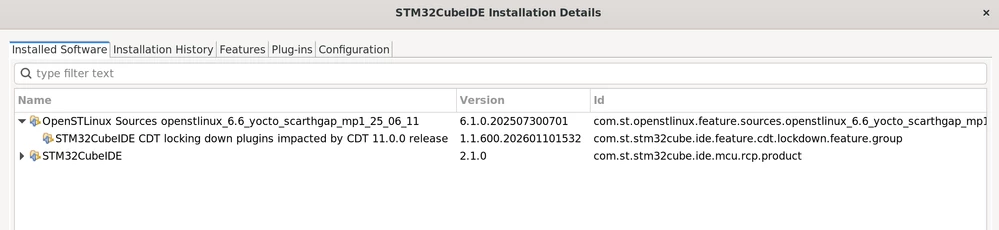
!MESSAGE Started RMI Server, listening on port 41337- I checked in Help > About STM32CubeIDE > Installation Details and it seems that it is stuck to the old version (v25.06.11) it is my first suspect in here :
- I downloaded here the STM32MP1 OpenSTLinux Developer Package SOURCE.
- I unzipped the whole folder as well as the linux archive that I patched and versionned :
root@PC-BENOIT:~/Developer-Package/SOURCES-stm32mp-openstlinux-6.6-yocto-scarthgap-mpu-v26.02.18/stm32mp-openstlinux-6.6-yocto-scarthgap-mpu-v26.02.18/sources/ostl-linux# tree -L 2
...
├── linux-stm32mp-6.6.116-stm32mp-r3-r0
│ ├── 0001-v6.6-stm32mp-r3.patch
│ ├── README.HOW_TO.txt.stm32mp1
│ ├── README.HOW_TO.txt.stm32mp2
│ ├── README.HOW_TO.txt.stm32mp2-m33td
│ ├── fragment-03-systemd.config
│ ├── fragment-04-modules.config
│ ├── linux-6.6.116
│ ├── linux-6.6.116.tar.xz
│ ├── optional-fragment-05-signature.config
│ ├── optional-fragment-06-nosmp.config
│ ├── optional-fragment-07-efi.config
│ ├── series
│ ├── stm32mp1-snd.conf
│ └── stm32mp2_ucsi.conf
...And there is the big problem I am fighting with for 3 days :
When I right-click on the A7 project > open an OpenSTLinux Project and fill the paths : 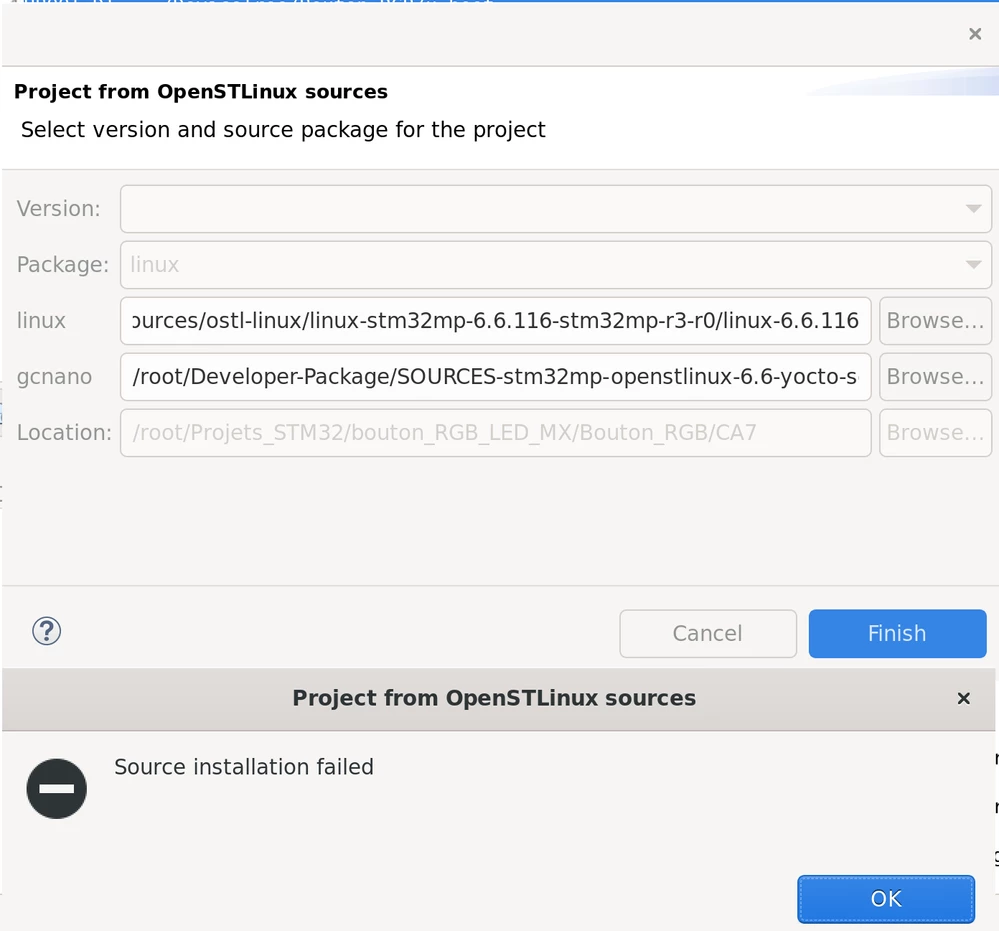
I can't manage to get the version loaded in the first field, as in the tutorial !
That's why I'm asking for help on these questions :
- Should the plugin version be 26_02_18 instead of 25_06_11 ?
- Does someone have an idea of why the version is not loaded and ultimately the "Source installation failed" ?
- Do I really need to update the Device Tree so that my MCU project works without bypassing the gpio driver's file ?
- Any advice ?
Thank you for reading all of this ! Have a good day,
Benoit
Posted on 6th of March 2026 - France