


STM32 AES byte ordering: Why your encryption/decryption output doesn't match the test vector
Introduction
When STM32 AES encryption or decryption output doesn't match the expected test vector, the instinct is to immediately question the key, mode, or algorithm. In many cases, the real issue is more simple: the bytes are correct in memory, but they are not packed into the AES input register in the order expected by the peripheral.
This article explains why that happens and how to fix it when using the STM32 hardware AES/CRYP peripheral. The provided example is tested on STM32U585. The same principle applies to other STM32 devices that include a hardware CRYP/AES peripheral.
For demonstration purposes we use a AES ECB (Electronic Codebook) example vector from the National Institute of Standards and Technology: NIST special publication 800-38a.
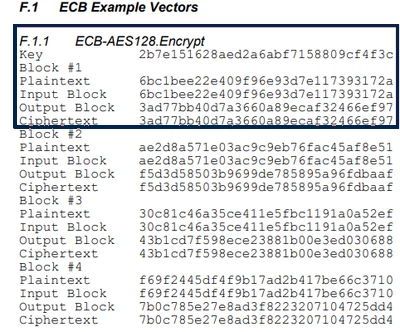
Figure 1: AES ECB NIST Example Vector
- Introduction
- 1. AES on STM32: what matters here?
- 2.The Byte-Order Problem
- 3. Endianness reminder
- 4. Case study
- 4.1 Case study: Array of bytes (uint8_t[])
- 4.2 Case study: Array of word (uint32_t[])
- 5. Fixing the Issue with the Swap Mechanism
- 6. Does this only affect ECB mode?
- 7. Complete working example
- 8. Expected result
- 9. Recommendations when working with AES
- 10. Annex
- 10.1 OpenSSL example
- 10.2 Python cryptodome library
- Related links
1. AES on STM32: what matters here?
STM32 devices include a hardware accelerator for the AES algorithm. Depending on the device family, the peripheral supports modes such as: ECB, CBC, CTR, GCM, GMAC and CCM chaining for key sizes of 128 and 256 bits.
The image below is a representation of the AES ECB peripheral overview:
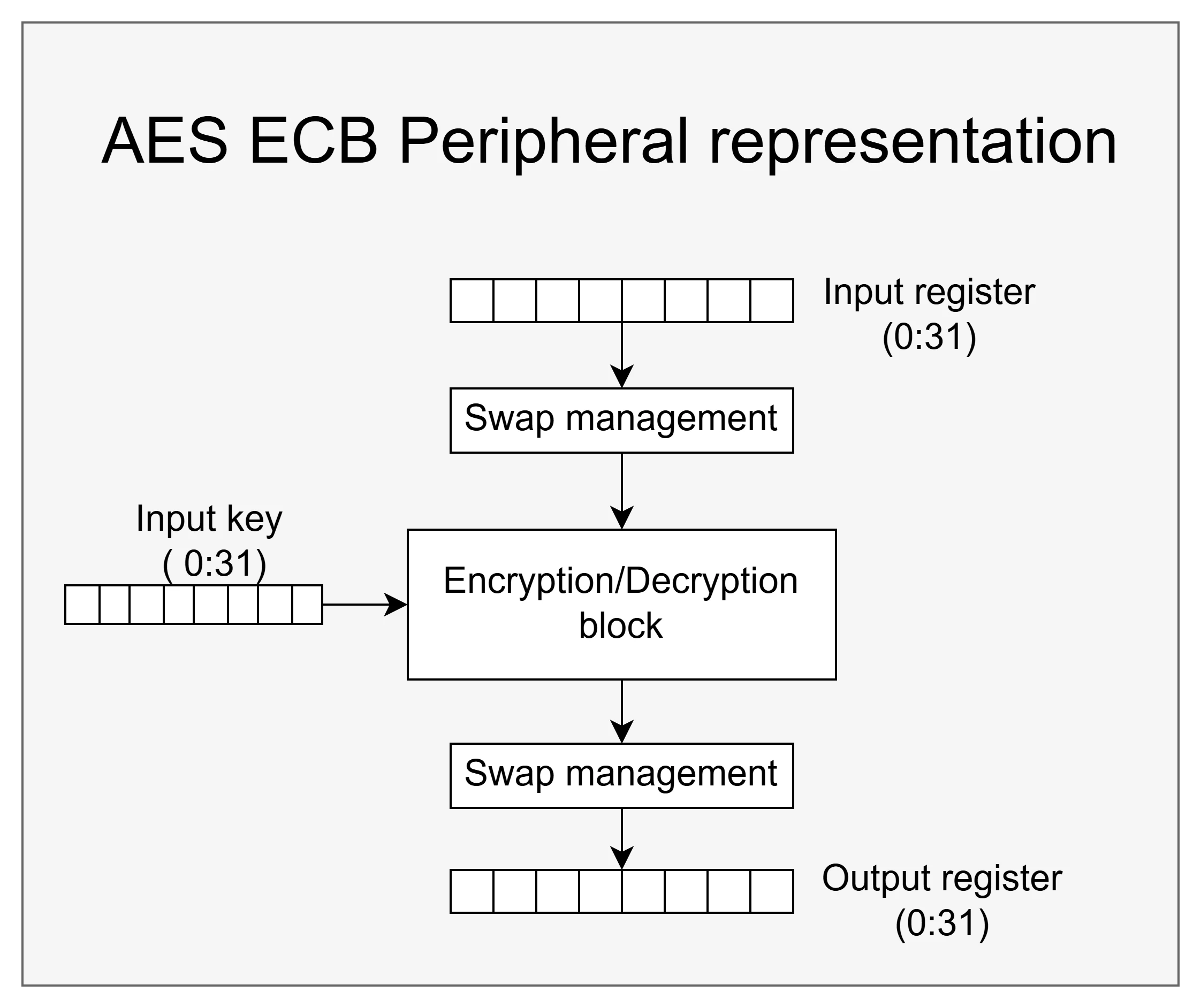 Figure 2: AES ECB peripheral representation.
AES processes 128-bit (16 bytes) blocks of plaintext, but on STM32 the data is transferred through 32-bit register accesses. That means the way data is stored in memory, and the way it is read by the CPU and written to the peripheral, matters.
AES itself is not “big endian” or “little endian”. The issue is not the algorithm. The issue is purely about how the peripheral interface packs bytes into its 32-bit registers.
2. The Byte-Order Problem
The confusion comes from the interaction of three facts:
- NIST AES test vectors are defined as byte sequences: A 16-byte plaintext block is written as a flat list of bytes.
- Cortex®-M is little endian: When four consecutive bytes are read as a 32-bit word, the least significant byte is stored at the lowest address.
- The STM32 AES input register expects a specific byte order: In our case, the peripheral expects data to be written in big endian order.
The choice of buffer representation (uint32_t[], uint16_t[], or uint8_t[]) affects how the data is fed to the peripheral, how the data is represented in memory, and the operation result (encryption/decryption).
This is the sample test vector:
6b c1 be e2 2e 40 9f 96 e9 3d 7e 11 73 93 17 2a 3. Endianness reminder
- A little endian system stores the least significant bit (LSB) at the lowest address of memory.
- A big endian system stores the most significant bit (MSB) at the lowest address of memory.
4. Case study
For demonstration purposes we show 2 test cases with the AES peripheral.
- The first test case represents the input data as an array of bytes.
- The second test case represents the input data as an array of words.
4.1 Case study: Array of bytes (uint8_t[])
The NIST AES-128 ECB plaintext stored as a uint8_t :
uint8_t input_data[16] = {
 0x6b, 0xc1, 0xbe, 0xe2,
 0x2e, 0x40, 0x9f, 0x96,
 0xe9, 0x3d, 0x7e, 0x11,
 0x73, 0x93, 0x17, 0x2a
};
Take the first four bytes:
6b c1 be e2
In memory, the first four bytes are laid out exactly in that order:
Address: 0x20000000 0x20000001 0x20000002 0x20000003
Data: 0x6b 0xc1 0xbe 0xe2
On a little endian Cortex®-M, when these four bytes are read as a 32-bit word, the value becomes:
0xE2BEC16B
If this word is written directly to the AES input register, the bytes enter the peripheral in the wrong order.
Register: 0x40000000 0x40000001 0x40000002 0x40000003
Data: 0xe2 0xbe 0xc1 0x6b
4.2 Case study: Array of word (uint32_t[])
Consider the same logical data stored as 32-bit words:
__ALIGN_BEGIN uint32_t input_data[4] __ALIGN_END= {
 0x6BC1BEE2,
 0x2E409F96,
 0xE93D7E11,
 0x7393172A
};
In this case, the first word is written into memory as follows:
Register: 0x20000000 0x20000001 0x20000002 0x20000003
Data: 0xe2 0xbe 0xc1 0x6b
The value written to the AES input register already matches the expected order for the peripheral.
Register: 0x40000000 0x40000001 0x40000002 0x40000003
Data: 0x6b 0xc1 0xbe 0xe2
That is why two buffers can represent the same plaintext at the application level but behave differently in hardware:
- uint8_t[] stores raw bytes exactly as written
- uint32_t[] stores pregrouped 32-bit words
This difference matters when the AES peripheral receives data through 32-bit accesses.
Note: The AES input data register is write-only. Therefore, the content shown here is only a conceptual representation of the written data.
5. Fixing the Issue with the Swap Mechanism
As Figure 2 AES ECB peripheral representation illustrates, the AES peripheral incorporates a mechanism for swapping, controlled via special control bits located in the control register.
The swap mechanism can perform:
- NO SWAP
- Half-word SWAP
- Byte SWAP
- Bit SWAP
In HAL, this is controlled by the DataType field in CRYP_HandleTypeDef.
If your data is stored as uint8_t[] use:
hcryp.Init.DataType = CRYP_DATATYPE_8B;This tells the peripheral to reverse the byte order of each 32-bit word as it is loaded into the AES core.
The value that would otherwise be interpreted as:
0xE2BEC16B
Is swapped to:
0x6BC1BEE2
This is the correct and sufficient fix when your input buffer is a byte-for-byte copy of the NIST test vector.
If your data is stored as uint32_t[]: If your data is already arranged as 32-bit words in the correct order, use:
hcryp.Init.DataType = CRYP_DATATYPE_32B;6. Does this only affect ECB mode?
No, this is applicable to all AES modes.
AES ECB is used here only because it is the simplest mode to demonstrate: one independent 16-byte block, with no IV or counter.
The same byte-order issue applies to all AES modes supported by the peripheral, because they all feed data through the same 32-bit input path.
Be careful with:
- Plaintext and ciphertext buffers
- Keys
- IVs and nonces
- AAD / associated data in GCM and CCM
7. Complete working example
Below is a minimal AES-128 ECB example using the NIST test vector.
#include "main.h"

__ALIGN_BEGIN static const uint32_t pKeyAES[4] __ALIGN_END = {
 0x2B7E1516,0x28AED2A6,0xABF71588,0x09CF4F3C};

uint8_t input_data[16] = { 0x6b, 0xc1, 0xbe, 0xe2, 0x2e, 0x40, 0x9f, 0x96, 0xe9,
		0x3d, 0x7e, 0x11, 0x73, 0x93, 0x17, 0x2a };

uint8_t encrypted_data[16];
uint8_t decrypted_data[16];

CRYP_HandleTypeDef hcryp;

static void MX_AES_Init(void)
{
	hcryp.Instance = AES;
	hcryp.Init.DataType = CRYP_DATATYPE_8B; /* byte swap for uint8_t[] */
	hcryp.Init.KeySize = CRYP_KEYSIZE_128B;
	hcryp.Init.pKey = (uint32_t*) pKeyAES;
	hcryp.Init.Algorithm = CRYP_AES_ECB;
	hcryp.Init.DataWidthUnit = CRYP_DATAWIDTHUNIT_BYTE;
	hcryp.Init.KeyIVConfigSkip = CRYP_KEYIVCONFIG_ALWAYS;
	if (HAL_CRYP_Init(&hcryp) != HAL_OK) {
		Error_Handler();
	}
}

int main(void) {
	HAL_Init();
	SystemClock_Config();
	MX_AES_Init();

	/* Encrypt */
	if (HAL_CRYP_Encrypt(&hcryp, (uint32_t*) input_data, sizeof(input_data),
			(uint32_t*) encrypted_data, 1000) != HAL_OK) {
		Error_Handler();
	}

	/* Decrypt */
	if (HAL_CRYP_Decrypt(&hcryp, (uint32_t*) encrypted_data, sizeof(input_data),
			(uint32_t*) decrypted_data, 1000) != HAL_OK) {
		Error_Handler();
	}

	while (1) {

	}

}
8. Expected result
For this NIST AES-128 ECB test vector, the expected ciphertext is:
3a d7 7b b4 0d 7a 36 60 a8 9e ca f3 24 66 ef 97
9. Recommendations when working with AES
- Use properly aligned buffers when working with word-based data.
Since the AES peripheral is accessed through 32-bit registers, key and data buffers represented as uint32_t[] should be stored in 4-byte aligned memory. - Configure the data width unit according to the buffer format.
The DataWidthUnit parameter must match the way the buffer length is expressed in the application:
hcryp.Init.DataWidthUnit = CRYP_DATAWIDTHUNIT_X;
- Set the correct configuration for swap management.
The DataType must be selected so that the byte sequence processed by the AES peripheral matches the intended plaintext or ciphertext representation:
hcryp.Init.DataType = CRYP_DATATYPE_X ;
- The key and the IV (Input Vector) are not affected by the data swapping manager.
- Always verify the result with a known reference vector:
You can use OpenSSL, an open-source crypto library, and CLI tool. Alternatively, you can use any trusted online tool or a Python library like Pycryptodome.
10. Annex
In this section, we provide examples of how to use the OpenSSL CLI tool to encrypt and decrypt data, along with a sample Python program using PyCryptodome.
10.1 OpenSSL example
- OpenSSL example encryption example:
openssl enc -aes-128-ecb -K 2b7e151628aed2a6abf7158809cf4f3c -nopad -nosalt -in plain.bin -out enc.bin
- OpenSSL decryption example:
openssl enc -d -aes-128-ecb -K 2b7e151628aed2a6abf7158809cf4f3c -nopad -nosalt -in enc.bin -out dec.bin
- To visualize the encrypted data:
hexdump -C enc.bin
Note: The plain.bin contains the NIST test vector in binary format. You can find it attached below.
10.2 Python cryptodome library
from Crypto.Cipher import AES

key = bytes([
 0x2b, 0x7e, 0x15, 0x16,
 0x28, 0xae, 0xd2, 0xa6,
 0xab, 0xf7, 0x15, 0x88,
 0x09, 0xcf, 0x4f, 0x3c
])

plaintext = bytes([
 0x6b, 0xc1, 0xbe, 0xe2,
 0x2e, 0x40, 0x9f, 0x96,
 0xe9, 0x3d, 0x7e, 0x11,
 0x73, 0x93, 0x17, 0x2a
])


cipher = AES.new(key, AES.MODE_ECB)

ciphertext = cipher.encrypt(plaintext)
decrypted = cipher.decrypt(ciphertext)


print("Key :", key.hex())
print("Plaintext :", plaintext.hex())
print("Ciphertext :", ciphertext.hex())
print("Decrypted :", decrypted.hex())