

LwIP integration in a TouchGFX project: recommendations and pitfalls
Summary
This article guides developers through integrating a LwIP application into a TouchGFX project running on an RTOS. It covers project setup, configuration, memory protection unit (MPU) and descriptor management, and best practices to avoid common pitfalls that affect performance and stability.
Introduction
In embedded systems, combining a rich graphical user interface (GUI) with network connectivity is increasingly common. TouchGFX provides a powerful framework for creating high-performance GUIs on STM32 microcontrollers, while LwIP (Lightweight IP) offers a compact TCP/IP stack suitable for embedded devices. Integrating these two under a real-time operating system (RTOS) enables responsive user interfaces alongside robust network services.
- Summary
- Introduction
- 2. Board Description (STM32H750B-DK)
- 3. Starting point: TouchGFX designer project
- 4. Integrating the LwIP application
- 4.1 Modifying TouchGFX project CubeMX configuration
- 4.1.1 Importance of MPU Configuration for RTOS and LwIP
- 4.1.2 Configuring descriptor locations
- 4.1.3 Ethernet configuration
- 4.1.4 FreeRTOS™ configuration
- 4.1.5 Configuring LwIP
- 4.2 Integrating LwIP Echo server source code
- 4.2.1 Modifying the Linker File
- 4.2.2 Creating the TCP and UDP echo server initialization functions
- 4.2.3 UDP echo server
- 4.2.4 TCP echo server
- 4.2.5 Initializing LwIP in the application
- 6. Best Practices for LwIP integration
- 6.1 Memory management considerations
- 6.2 Common pitfalls and how to avoid them
- 6.3 Descriptor locations
- 6.3.1 Understanding descriptor locations in memory
- 6.3.2 Guidelines for optimal descriptor placement
- 6.4 Optimizing RTOS performance with LwIP
- 6.5 Best practices for TouchGFX integration and optimization
- 6.5.1 Framebuffer memory allocation
- 6.5.2 Project setup recommendations
- 6.5.3 Performance and bandwidth considerations
- 6.5.4Resource management and prioritization
- 6.5.5 Memory management and fragmentation
- 6.5.6 Recommended mitigation strategies
- Conclusion
- Related links
2. Board Description (STM32H750B-DK)
This article uses the STM32H750B-DK development kit, which is based on the STM32H750XB microcontroller, part of the STM32H7 series. The kit is designed for high-performance applications requiring advanced graphics and connectivity.
- Core: Arm Cortex®-M7 running at up to 480 MHz
- Internal memory: 1 MB RAM (partitioned into AXI SRAM, DTCM, and SRAM3)
- External memory: 16 MB SDRAM (IS42S16800J-6BLI) connected via the Flexible Memory Controller (FMC). This SDRAM is essential for storing large framebuffers and graphics assets, especially in TouchGFX applications.
- Display: 4.3” TFT LCD with capacitive touch, driven by the LTDC controller and supported by DMA2D for hardware-accelerated graphics.
- Connectivity: 10/100 Ethernet with dedicated DMA and onboard PHY
- Peripherals: USB OTG, CAN, UART, SPI, I2C, microSD™, audio, and more.
3. Starting point: TouchGFX designer project
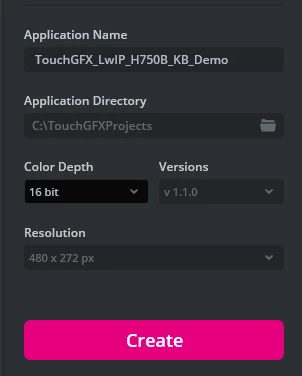
Since this article focuses on integration, a preexisting TouchGFX project available for the STM32H750B-DK board is selected to save time. Specifically, the Gauge application is used, which features animations requiring constant display refreshing and consumes more resources.
(Optional): To generate the application, download the latest version of TouchGFXDesigner, open it, select the Gauge example for the STM32H750B-DK, choose a name for your application, and click "Create." After creation, click "Generate" and wait for the application to be generated in the specified directory.
Developers can follow these steps to test the integration or use their own TouchGFX projects.
4. Integrating the LwIP application
For the LwIP application, a UDP and TCP echo server is created that runs on a separate thread under the same RTOS. This example demonstrates a generic configuration that can be adapted to other LwIP applications.
4.1 Modifying TouchGFX project CubeMX configuration
4.1.1 Importance of MPU Configuration for RTOS and LwIP
The memory protection unit (MPU) enforces memory access permissions, preventing accidental corruption and improving system stability. For RTOS-based systems running TouchGFX and LwIP, MPU configuration ensures safe concurrent access to shared resources.
4.1.2 Configuring descriptor locations
A key requirement for a functional LwIP application is well-configured memory. This includes a dedicated section to store transmit and receive DMA descriptors, sufficient space for Rx buffers, and a dedicated heap memory. LwIP memory sections must not overlap with other memory areas to avoid unexpected behavior.
Since a preexisting TouchGFX application is being used, opening the Cortex®-M7 configuration for the MPU reveals that TouchGFXDesigner has already loaded the necessary configurations for the graphics application, including proper permissions and memory sections.
The LwIP heap is allocated in SRAM2, leveraging its 128 KB size to provide sufficient memory for dynamic allocation of new pbufs, TCP/UDP control blocks, and other protocol data structures. The DMA descriptors are placed at the beginning of SRAM3, occupying 256 bytes each, with attributes set to noncacheable to prevent data corruption, shareable between the CPU and DMA, and bufferable.
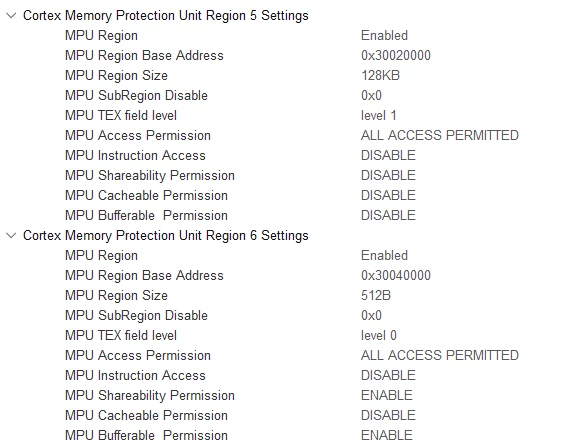
This configuration is specific to the STM32H750B-DK and must be adjusted when using another microcontroller, as some may have smaller SRAM sizes. When working with graphics applications or designing a custom PCB, consider these factors to select the appropriate product. This step can be skipped when using a Cortex®-M4 core.
4.1.3 Ethernet configuration
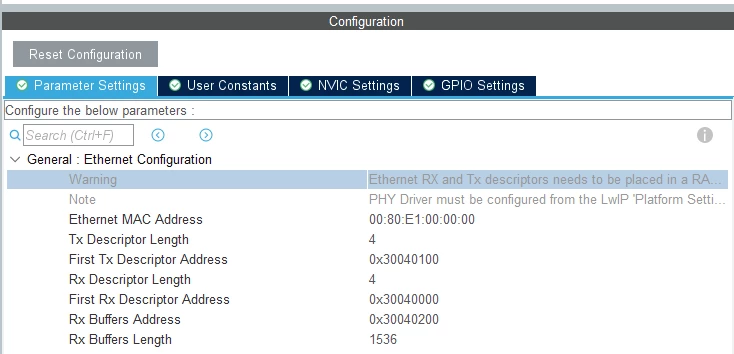
In the ETH tab under the Connectivity category, enable the Ethernet peripheral and set it to the mode supported by your board. For this example, set it to MII. Adjust the parameters as follows:
- First Rx Descriptor Address: 0x30040000
- First Tx Descriptor Address: 0x30040100
- Rx/Tx Descriptor Length: Number of descriptors, set to 4
- Rx Buffers Length: Size of the frame
- Rx Buffers Address: 0x30040200, which represents the base address of the receive pool where incoming frames will be stored. This memory region must be noncacheable to prevent frame corruption.
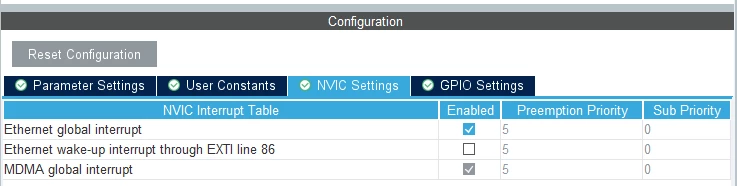
Since this application uses RTOS, we need to enable the Ethernet global interrupt to ensure that complete reception and transmission events are detected, allowing the appropriate callback functions to be executed.
Verify that the assigned pins are correctly mapped and set the maximum output speed to Very High.
4.1.4 FreeRTOS™ configuration
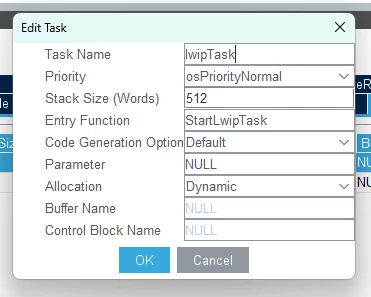
For LwIP to function properly, a thread is required for initialization. TouchGFX already has a preconfigured thread, so the focus is on the default thread. Increase its stack size to 512 words, which is sufficient to handle LwIP’s requirements, as a smaller stack size can lead to memory corruption. Keep the priority at osPriorityNormal. Monitor FreeRTOS™ heap usage to understand how much memory your application requires and how much heap is still available, allowing you to optimize memory allocation for other needs.
4.1.5 Configuring LwIP
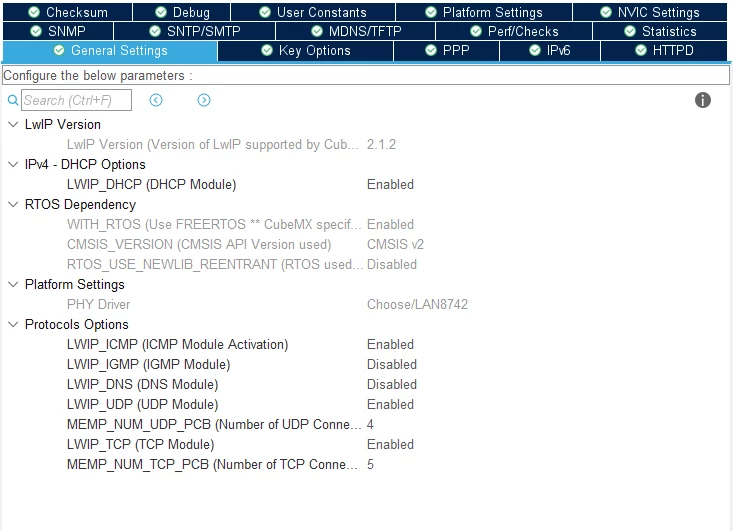
Enable LwIP under the Middleware tab. In the general settings, choose whether to use a static IP address or DHCP, depending on whether a working DHCP server is available on your network.
In Key Options, set the base address and size of the heap memory section defined in the MPU configuration.

For better TCP/IP performance, adjust the following parameters based on Adam Berlinger's knowledge base article:
- TCP_MSS: 1460 bytes
- TCP_SND_BUF: 5840 bytes
- TCP_WND: 5840 bytes
- TCP_SND_QUEUELEN: 16
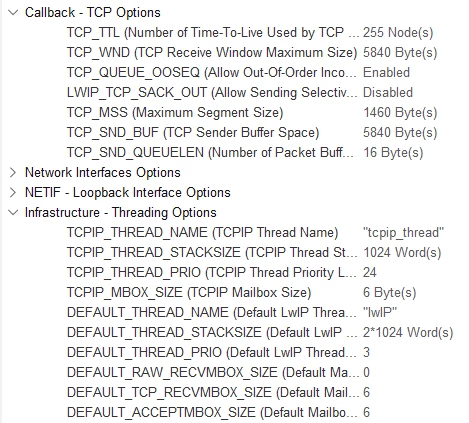 Additionally, double the size of DEFAULT_THREAD_STACK_SIZE to prevent application failure and hard faults.
Before proceeding, under Platform Settings, select the PHY driver used (in this case, the LAN8742) so the appropriate drivers are imported into the project folder.
Leave the clock tree as generated by TouchGFX, running at a maximum of 480 MHz, with the timebase set to TIM6 for enhanced RTOS scheduling performance, and keep the rest of the peripherals unchanged. This setup is based on the pre-configured TouchGFX project. Developers should customize the project according to their specific application requirements.
4.2 Integrating LwIP Echo server source code
4.2.1 Modifying the Linker File
When configuring Ethernet descriptors, specific memory addresses are set for each descriptor. Configuring this in CubeMX alone is insufficient if the GNU compiler embedded in STM32CubeIDE is used to build the project. A memory section dedicated to LwIP must be created to tell the compiler where to allocate each variable in memory.
This step can be skipped if the IAR Compiler or MDK ARM Compiler is used, as they support allocating variables at specific addresses directly from the source code.
Add the following code to the linker file:
 .lwip_sec (NOLOAD) :
 {
 . = ABSOLUTE(0x30040000);
 *(.RxDecripSection)

 . = ABSOLUTE(0x30040100);
 *(.TxDecripSection)

 . = ABSOLUTE(0x30040200);
 *(.Rx_PoolSection)
 } >RAM_D2
This linker script snippet places important network data structures specifically Ethernet DMA descriptors and buffers at fixed memory addresses in a special RAM area (D2 SRAM) on STM32 microcontrollers. These structures are not initialized at the program start. Instead, they are set up by the software at runtime. This approach is necessary because the Ethernet hardware requires these data structures to be located at specific memory addresses for reliable and efficient operation.
The name of each section is defined by LwIP developers and associated with the variables: DMARxDscrTab, DMATxDscrTab, and memp_memory_RX_POOL_base.
4.2.2 Creating the TCP and UDP echo server initialization functions
The core objective of the LwIP application is to create initialization and thread functions for both UDP and TCP protocols. Init functions must be declared in the lwip.h header file to ensure proper linkage and visibility throughout the project.
/* USER CODE BEGIN 0 */
 void tcpecho_init(void);
 void udpecho_init(void);
/* USER CODE END 0 */
4.2.3 UDP echo server
To efficiently handle UDP packet reception, create a dedicated FreeRTOS™ thread named udpecho_thread. This thread initializes a new UDP connection bound to port 7 (modifiable), allowing it to listen for incoming packets on any IP address. Within an infinite loop, the thread waits for packets using netconn_recv. Upon receiving data, it copies the payload into a local buffer and prints the message for debugging. It then prepares a new buffer to echo the received data back to the sender using netconn_sendto.
Proper error handling ensures reliable transmission, and all allocated buffers are deleted after use to prevent memory leaks. The thread is created with sufficient stack size and priority using sys_thread_new in the udpecho_init function, ensuring smooth multitasking alongside other RTOS threads.
/* USER CODE BEGIN 2 */
...
static void udpecho_thread(void *arg)
{
 struct netconn *conn;
 struct netbuf *buf, *tx_buf;
 err_t err;
 LWIP_UNUSED_ARG(arg);
 char data[100] = {'\0'};

 conn = netconn_new(NETCONN_UDP);
 netconn_bind(conn, IP_ADDR_ANY, 7);

 LWIP_ERROR("udpecho: invalid conn", (conn != NULL), return;);

 while (1) {
 err = netconn_recv(conn, &buf);
 if (err == ERR_OK) {

 /* Print received data */
 strncpy(data, buf->p->payload, buf->p->len);
 printf("%s \n", data);

 tx_buf = netbuf_new();
 netbuf_alloc(tx_buf, buf->p->tot_len);

 pbuf_take(tx_buf->p, (const void *)buf->p->payload, buf->p->tot_len);

 err = netconn_sendto(conn, tx_buf, (const ip_addr_t *)&(buf->addr), buf->port);
 if(err != ERR_OK) {
 LWIP_DEBUGF(LWIP_DBG_ON, ("netconn_send failed: %d\n", (int)err));
 } else {
 LWIP_DEBUGF(LWIP_DBG_ON, ("got %s\n", buffer));
 }
 netbuf_delete(tx_buf);
 }
 netbuf_delete(buf);
 }
}
void udpecho_init(void)
{
 sys_thread_new("udpecho_thread", udpecho_thread, NULL, (configMINIMAL_STACK_SIZE*5), osPriorityAboveNormal);
}
...
/* USER CODE END 2 */
4.2.4 TCP echo server
For TCP communication, create a dedicated FreeRTOS™ thread named tcpecho_thread. It sets up a TCP connection listening on port 7 (modifiable), ready to accept incoming client connections. When a client connects, the thread continuously receives data packets, prints the received content for debugging, and echoes the data back to the client. It handles multiple packets per connection and ensures proper cleanup by closing and deleting the connection once communication ends.
The thread is launched with appropriate stack size and priority using sys_thread_new in the tcpecho_init function, maintaining efficient operation alongside other RTOS tasks.
/* USER CODE BEGIN 2 */
static void tcpecho_thread(void *arg)
{
 struct netconn *conn, *newconn;
 err_t err;
 LWIP_UNUSED_ARG(arg);
 char buffer[100] = {'\0'};

 /* Create a new connection identifier. */
 /* Bind connection to well known port number 7. */
 conn = netconn_new(NETCONN_TCP);
 netconn_bind(conn, IP_ADDR_ANY, 7);

 LWIP_ERROR("tcpecho: invalid conn", (conn != NULL), return;);

 /* Tell connection to go into listening mode. */
 netconn_listen(conn);

 while (1) {

 /* Grab new connection. */
 err = netconn_accept(conn, &newconn);

 /* Process the new connection. */
 if (err == ERR_OK) {
 struct netbuf *buf;
 void *data;
 u16_t len;

 while ((err = netconn_recv(newconn, &buf)) == ERR_OK) {

 do {
 /* Print received data */
 strncpy(buffer, buf->p->payload, buf->p->len);
 printf("%s \n", buffer);
 netbuf_data(buf, &data, &len);
 err = netconn_write(newconn, data, len, NETCONN_COPY);
 } while (netbuf_next(buf) >= 0);
 netbuf_delete(buf);
 }

 /* Close connection and discard connection identifier. */
 netconn_close(newconn);
 netconn_delete(newconn);
 }
 }
}
void tcpecho_init(void)
{
 sys_thread_new("tcpecho_thread", tcpecho_thread, NULL, (configMINIMAL_STACK_SIZE*5), osPriorityAboveNormal);
}
/* USER CODE END 2 */
Thread functions use the netconn API functions. api.h must be included inside the lwip.c source file, as it provides the necessary declarations for the netconn interface.
/* USER CODE BEGIN 0 */
#include "api.h"
/* USER CODE END 0 */
4.2.5 Initializing LwIP in the application
The final step is to call the initialization functions within the LwIP task in the main source file. The function StartLwipTask handles this process. It begins by initializing the LwIP stack with MX_LWIP_Init(). Next, it starts the TCP and UDP echo server threads by calling tcpecho_init() and udpecho_init(), respectively.
After these initializations, the function enters an infinite loop where it immediately terminates the LwIP initialization thread using osThreadTerminate(lwipTaskHandle) to free resources, followed by a brief delay. This setup ensures that the echo servers run concurr
void StartLwipTask(void *argument)
{
 /* init code for LWIP */
 MX_LWIP_Init();
 /* USER CODE BEGIN 5 */
 /* Initialize the TCP echo server thread */
 tcpecho_init();
 /* Initialize the UDP echo server thread */
 udpecho_init();
 /* Infinite loop */
 for(;;)
 {
 /* Delete the Init Thread */
 osThreadTerminate(lwipTaskHandle);
 osDelay(1);
 }
 /* USER CODE END 5 */
}
ently under the RTOS while the initialization thread exits cleanly.
void StartLwipTask(void *argument)
{
 /* init code for LWIP */
 MX_LWIP_Init();
 /* USER CODE BEGIN 5 */
 /* Initialize the TCP echo server thread */
 tcpecho_init();
 /* Initialize the UDP echo server thread */
 udpecho_init();
 /* Infinite loop */
 for(;;)
 {
 /* Delete the Init Thread */
 osThreadTerminate(lwipTaskHandle);
 osDelay(1);
 }
 /* USER CODE END 5 */
}