


How to use EEPROM emulation with STM32CubeMX2
- June 4, 2026 at 4:13 PM
- 3 replies
- 1533 views
Summary
This article explains how to use the STM32 EEPROM emulation driver on STM32C5 devices by leveraging a ready-to-build Visual Studio Code, CMake, and GCC example project. It introduces the STM32C5 EDATA FLASH sector and the main concepts behind EEPROM emulation. The article describes the structure and configuration of the provided example, EDATA mapping, EEPROM emulation configuration, glue layer, and application code. Finally, the article demonstrates by example how the scenario writes and reads back 1000 virtual variables with cleanup handling, and details how to build and run this example on STM32C5. This example can be used as a reference for implementing robust nonvolatile storage.
- Summary
- Introduction
- 1. Prerequisites
- 2. EEPROM emulation concepts on STM32C5
- 3. STM32C5 EDATA sector and option bytes
- 4. Overview of the EEPROM emulation example
- 4.1 Example structure and toolchain
- 4.2 EEPROM emulation configuration (eeprom_emul_conf.h)
- 4.3 Glue layer: binding the driver to STM32C5 (mx_eeprom_emul.c/.h)
- 4.4 Application scenario (example.c)
- 4.5 Main entry point and execution control (main.c)
- 5. Debug and validation
- Conclusion
- Related links
Introduction
STM32C5 devices do not include a dedicated hardware EEPROM block. Instead, nonvolatile data such as configuration parameters, calibration values, and usage counters must be stored in on-chip flash memory. While this approach is common across STM32 families, it requires careful handling of flash constraints such as page-based erase operations, limited endurance, and strict alignment and access granularity rules.
To support this use case, the STM32C5 family introduces the EDATA FLASH sector: a dedicated 64 Kbyte region organized in two banks, each with 16 pages of 2 Kbytes. This smaller page size and specific layout are designed to improve endurance and flexibility when implementing EEPROM emulation algorithms, especially those using wear leveling techniques, and fine write granularity.
STMicroelectronics provides an EEPROM emulation driver that uses EDATA and exposes a simple API based on virtual addresses. The driver internally manages page usage, wear leveling, and data integrity, so applications can perform EEPROM-like read and write operations instead of raw FLASH accesses.
The objectives of this document are to:
- Explain the main concepts of EEPROM emulation on STM32C5 using the EDATA sector, virtual variables, endurance, cleanup, and data integrity.
- Show how to use the EEPROM emulation Visual Studio Code example, which is a complete project based on Visual Studio Code, CMake, and GCC. This example does not rely on STM32CubeMX2 code generation; instead, it is provided as a ready-to-build reference that can be run on a NUCLEO-C562RE board to observe driver behavior in a real application.
The sections below will help you understand the structure of the example. You will learn how to configure and initialize EEPROM emulation. The application manages 1,000 virtual variables by writing and reading them back. You will also see how the driver functions in an STM32C5 project.
1. Prerequisites
Hardware
Software
- STM32CubeProgrammer
- Visual Studio Code with the STM32CubeIDE Extension pack
- STM32CubeMX2
- STM32C5 EEPROM Emulation code example.
2. EEPROM emulation concepts on STM32C5
This section summarizes the key concepts used by the STM32C5 EEPROM emulation driver to help interpret the behavior of the Visual Studio Code example.
Virtual variables and logical addressing
The EEPROM emulation driver exposes virtual variables identified by virtual addresses, for example, from 1 to EE_NB_OF_VARIABLES:
- The application reads and writes data using APIs such as EE_WriteVariable8bits() and EE_ReadVariable8bits().
- Each variable is referenced by a virtual ID, not by a physical FLASH address.
- The driver maps these virtual IDs to locations inside the EDATA sector and maintains the most recent value for each ID.
This indirection allows the driver to move data between pages for wear leveling and cleanup, without the application being aware of the underlying Flash layout.
Wear leveling and page usage
Each EDATA page supports a limited number of erase cycles. To extend effective endurance:
- The driver writes new values sequentially within the EDATA pages instead of rewriting in place.
- When a page becomes full or reaches a certain usage threshold, valid data is transferred to another page, and the old page is erased.
- Guard pages and the number of pages allocated to EEPROM emulation determine how evenly erase cycles are spread across the EDATA sector.
Parameters such as:
#define EE_CYCLES_NUMBER (1U)
#define EE_GUARD_PAGES_NUMBER (1U)
#define EE_NB_OF_VARIABLES (1000U)
In eeprom_emul_conf.h control how many pages are used and how many 8-bit variables the emulation can handle. For the provided example, 1000 variables (approximately 7 Kbytes) are used, leading to an effective write endurance significantly higher than the raw page erase limit.
Cleanup and maintenance operations
During normal operation:
- Each write adds a new record to the EDATA log.
- Over time, pages accumulate obsolete entries.
When the driver detects that a page is reaching capacity or that memory needs to be compacted, write operations may return:
- EE_INFO_CLEANUP_REQUIRED – indicating that a cleanup (page transfer) is needed.
In this case, the application must call:
- EE_CleanUp();
to allow the driver to:
- Transfer valid data to a new page.
- Erase old pages.
- Restore sufficient free space for future writes.
The Visual Studio Code example demonstrates this pattern by checking for EE_INFO_CLEANUP_REQUIRED after each write and calling EE_CleanUp() when needed.
Data integrity and CRC
To ensure the integrity of emulated EEPROM data:
- The driver uses the CRC peripheral to compute checks over internal structures.
- When the EDATA area is scanned at initialization or during page transfers, CRC helps detect corrupted entries or unexpected data patterns.
If integrity checks fail, the driver may return error codes, and the application can react accordingly, for example, signaling an error and avoiding the use of invalid data.
Status and error codes
The main status codes relevant to the example are:
- EE_OK – Operation completed successfully.
- EE_INFO_CLEANUP_REQUIRED – Operation succeeded, but a cleanup is required soon.
- Other error codes – Indicate failures such as initialization errors, read/write issues, or internal driver problems.
The example code checks these return values and:
- Calls EE_CleanUp() when cleanup is requested.
- Aborts the scenario and reports an error if an unexpected status is returned.
With these concepts in mind, the next sections describe how the STM32C5 EDATA sector is configured. Additionally, how Visual Studio Code example maps and configures the EEPROM emulation driver on top of it.
3. STM32C5 EDATA sector and option bytes
Before running the EEPROM emulation example, the STM32C5 EDATA sector must be understood and configured correctly.
EDATA sector overview
On STM32C5, the EDATA region is a dedicated 64 Kbyte FLASH sector intended for EEPROM emulation:
- Total size: 64 Kbytes
- Banks: 2 banks
- Pages per bank: 16 pages
- Page size: 2 Kbytes
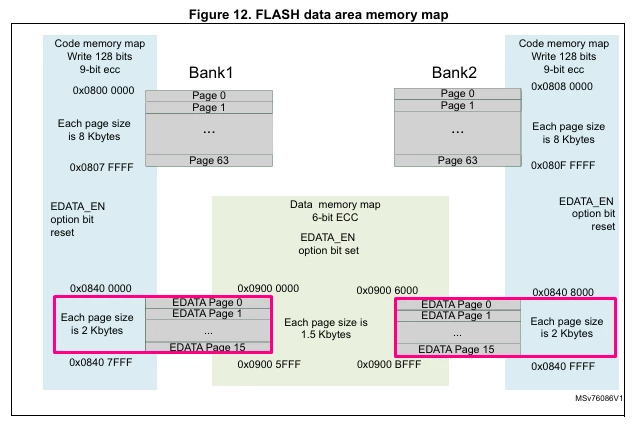
This organization provides:
- Small page size, which improves endurance and flexibility for wear leveling.
- A dedicated region, separated from the main program FLASH, simplifying memory mapping and protection.
Data granularity: 16-bit vs 128-bit mode
The EDATA region supports two write granularities, configured through an option byte:
- 16/32-bit mode
- 128-bit mode
The mode impacts how data is written and read: the access width must match the configured mode, and it also determines how ECC is managed for erased and programmed locations.
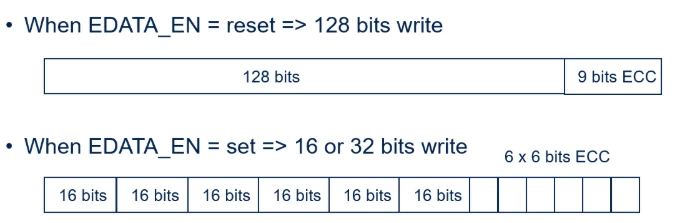
If the EDATA region is configured in 128-bit mode and is accessed as 16-bit or 32-bit, this can generate ECC errors and trigger a non-maskable interrupt (NMI).
In 16-bit mode, erased 16-bit words cannot have ECC bits all set to 1. Such a pattern also leads to ECC errors and NMI on read access to erased data or OTP.
The EEPROM emulation driver and configuration must be aligned with the chosen mode. The Visual Studio Code example is configured accordingly in its FLASH driver and should be used with a matching EDATA configuration.
Configuring EDATA via STM32CubeProgrammer
The EDATA region is enabled and configured outside the Visual Studio Code project, using STM32CubeProgrammer:
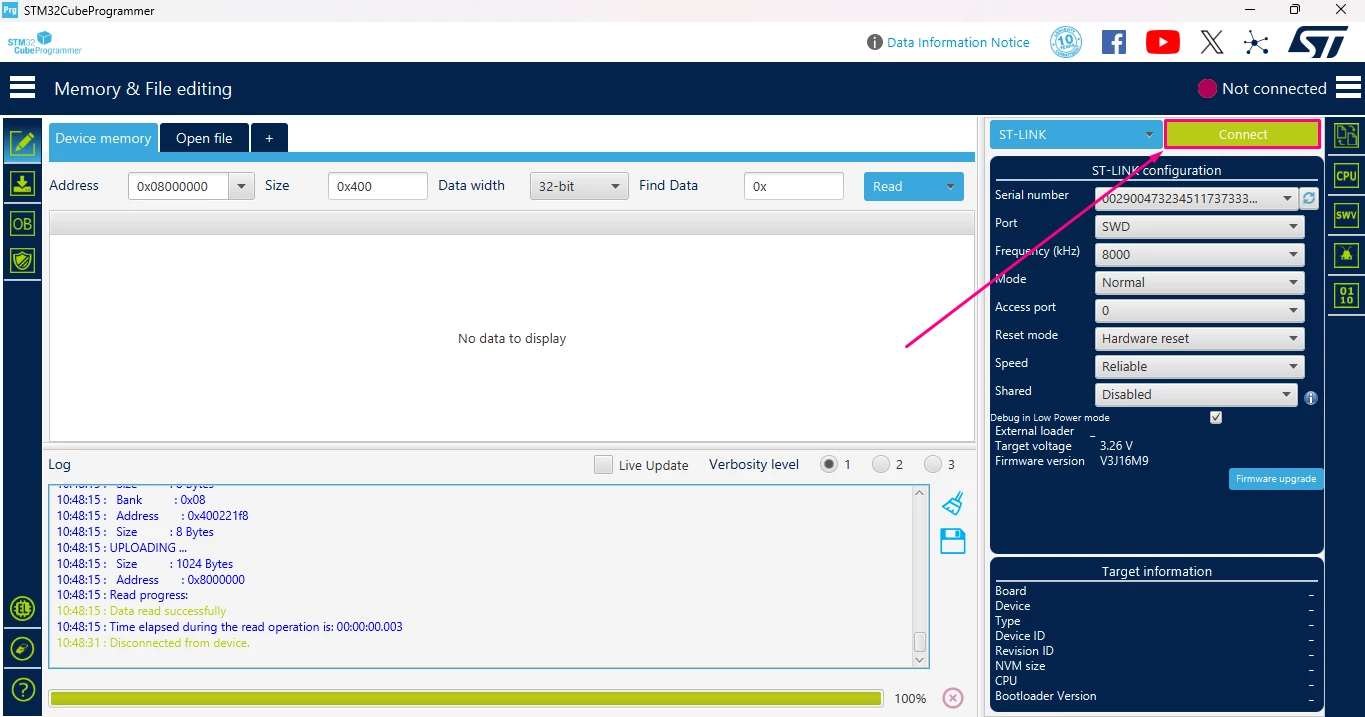
- Launch STM32CubeProgrammer and connect the NUCLEO-C562RE board to the host PC using the USB Type-C® cable.
- Select the appropriate connection interface, then click [Connect].
- Open the Option Bytes tab and enable [Compact View].
- In the User Configuration section:
- Enable the EDATA (EDATA_EN) option to activate the EDATA sector for 16‑bit or 32‑bit data granularity, consistent with the EEPROM emulation driver configuration used by the example.
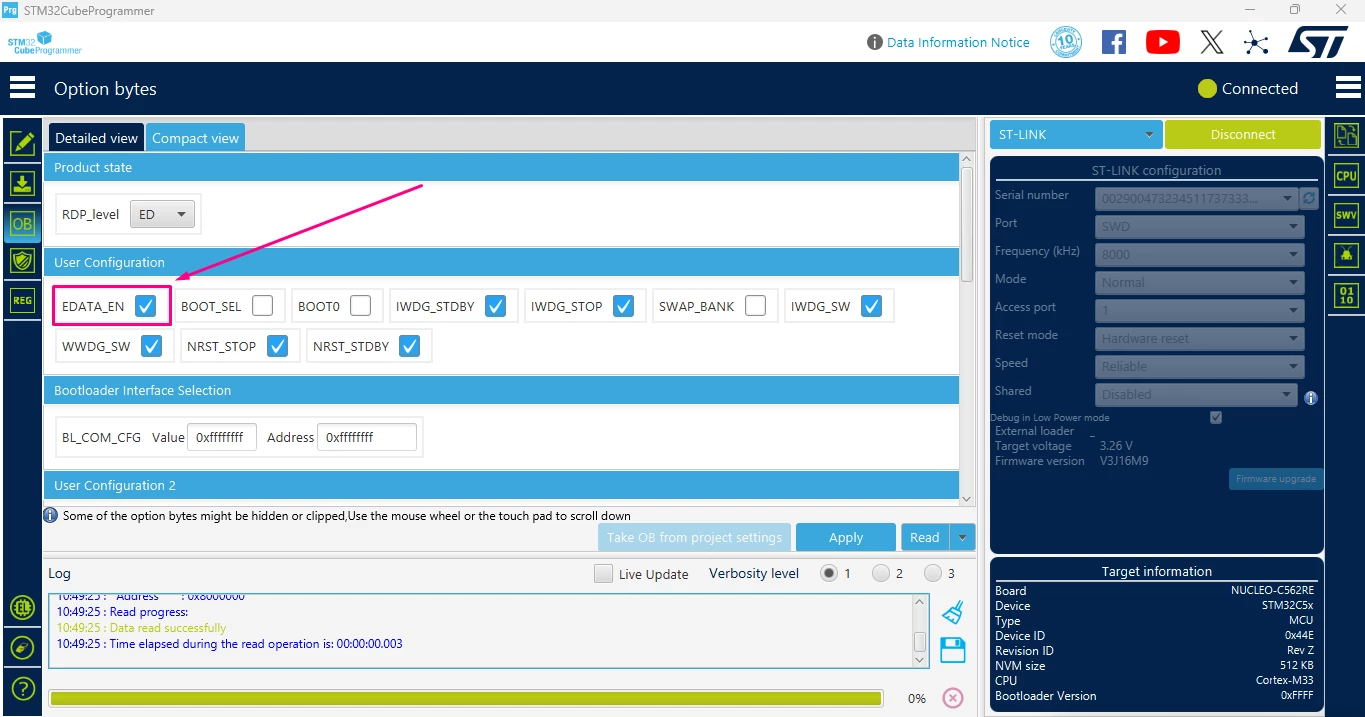
- Click [Apply] to write the option bytes and let the device reset if requested.
With EDATA correctly enabled and configured, proceed to the next section to observe the structure of the Visual Studio Code and CMake example and how it maps the EEPROM emulation driver onto this dedicated FLASH region.
4. Overview of the EEPROM emulation example
4.1 Example structure and toolchain
The example is provided as a ready-to-build Visual Studio Code, CMake, and GCC project. The layout is:
- generated/hal: System and device initialization (startup, clock configuration, HAL init, mx_system_init()).
- stm32c5xx_drivers/: STM32C5 HAL and low-level drivers.
- utilities/eeprom_emulation/: Complete EEPROM emulation driver, split into:
- Core API: eeprom_emul_core.c/.h
- Algorithms: eeprom_algo_flitf.c/.h, eeprom_algo_nvm.c/.h
- Interfaces:
- Flash: eeprom_itf_flash.h, eeprom_itfflash_flitf_edata.c, eeprom_itfflash_nvm_edata.c, templates
- CRC: eeprom_itf_crc.h, eeprom_itfcrc_crc.c, template
- ECC: eeprom_itf_ecc.h, eeprom_itfecc_bch.c, template
- eeprom_mx_config: Glue and configuration:
- eeprom_emul_conf.h – configuration of the emulation (algorithm selection, EDATA mapping, endurance, and variable count).
- mx_eeprom_emul.c/.h – glue tying the generic driver to STM32C5 HAL flash and CRC handles.
- Application:
- example.c/.h – demonstration scenario: initialization, write, cleanup, read and verify, de-initialization.
- main.c/.h – system entry point, example loop, and LED/status reporting.
- Build configuration:
- CMakeLists.txt and related CMake files to drive GCC.
- Visual Studio Code configuration files (.vscode/) to build, flash, and debug via the STM32Cube extension.
4.2 EEPROM emulation configuration (eeprom_emul_conf.h)
The file eeprom_emul_conf.h is the central configuration point for the emulation. It controls which algorithm is used, where in EDATA the emulation resides, and how many variables and endurance you target.
Algorithm and FLASH interface selection
For the STM32C5 EDATA example, the FLITF + EDATA algorithm is selected:
#define EE_ALGO_FLITF (1)This makes eeprom_emul_core.c call the FLITF algorithm (EE_FLITF_Init, EE_FLITF_ReadVariableXbits, EE_FLITF_WriteVariableXbits) and use the FLITF + EDATA FLASH interface (eeprom_itfflash_flitf_edata.c).
Memory mapping to EDATA
The configuration binds the algorithm to the STM32C5 EDATA region:
#define EE_FRAME_LINE_SIZE (8)
#define EE_START_PAGE_ADDRESS (FLASH_EDATA_BASE + FLASH_EDATA_BANK_SIZE)
#define EE_FLASH_BASE_ADDRESS (FLASH_EDATA_BASE)
#define EE_FLASH_PAGE_SIZE (FLASH_EDATA_PAGE_SIZE)
#define EE_FLASH_BANK_SIZE (FLASH_EDATA_BANK_SIZE * 2)
With this setup:
- FLASH_EDATA_BASE is the start of the EDATA region.
- FLASH_EDATA_BANK_SIZE is half of that region.
- EE_START_PAGE_ADDRESS points to the second half of EDATA (bank 1), which the example uses for EEPROM emulation.
The FLITF algorithm then computes:
- The number of pages used (EE_PAGES_NUMBER).
- The maximum number of frames per page (EE_NB_MAX_ELEMENTS_BY_PAGE).
- The effective EDATA address range used for emulation (EE_END_ADDRESS).
The application never manipulates these addresses; it works purely with virtual variable IDs. The mapping to physical EDATA pages and frames is fully handled by the driver.
Endurance, guard pages, and number of variables
Endurance and capacity are controlled by:
#define EE_CYCLES_NUMBER (1U)
#define EE_GUARD_PAGES_NUMBER (1U)
#define EE_NB_OF_VARIABLES (1000U)
For this example:
- 1000 8-bit virtual variables are supported (IDs 1 to 1000).
- The driver allocates enough EDATA pages to:
- Store all variables with log-structured records.
- Provide guard pages and extra space for wear leveling.
- With EE_CYCLES_NUMBER = 1, each page is used within its nominal ~10,000 erase cycles.
- Because data is rotated across multiple pages, the effective per-variable write endurance is much higher than a single page’s erase limit.
This configuration can be tuned to your own needs.
4.3 Glue layer: binding the driver to STM32C5 (mx_eeprom_emul.c/.h)
The core driver needs two hardware objects:
- A FLASH (or NVM) handle.
- A CRC handle.
These are grouped in ee_object_t (from eeprom_emul_core.h)
typedef struct
{
 void *f_object; /* pointer to flash handle */
 void *crc_object; /* pointer to crc handle */
} ee_object_t;
The glue layer mx_eeprom_emul.c fills this object using target‑specific accessors and then calls EE_Init:
static ee_object_t mx_ee_object_example;

system_status_t mx_eeprom_emulation_init(void)
{
 system_status_t return_status = SYSTEM_OK;

 /* get interface handle */
 mx_ee_object_example.f_object = MX_EEPROM_FLASH_HANDLE();
 mx_ee_object_example.crc_object = MX_EEPROM_CRC_HANDLE();
 /* Init of eeprom emulation */
 if (EE_Init(&mx_ee_object_example, EE_CONDITIONAL_ERASE) != EE_OK)
 {
 return_status = SYSTEM_POSTSYSTEM_ERROR;
 }

 return return_status;
}
Key points:
- MX_EEPROM_FLASH_HANDLE() returns the hal_flash_handle_t * configured to operate on EDATA (or hal_nvm_handle_t * if you switch to the NVM algorithm).
- MX_EEPROM_CRC_HANDLE() returns the hal_crc_handle_t * created and initialized as part of the system initialization.
- EE_Init():
- Initializes the FLASH, CRC (and ECC if needed) interfaces (EE_ITF_FLASH_Init, EE_ITF_CRC_Init, EE_ITF_ECC_Init).
- Scans EDATA pages, reconstructs page states (ERASED, ACTIVE, VALID, REMOVED, ERASING).
- Recovers from possible interrupted operations (erase/write) after a reset.
- Ensures that there is at least one ACTIVE page to start writing, formatting pages if necessary (depending on EE_CONDITIONAL_ERASE vs EE_FORCED_ERASE).
From the application point of view, you only need to call:
- mx_eeprom_emulation_init() once at startup.
4.4 Application scenario (example.c)
The application layer shows how to use the EEPROM emulation API in a real sequence. It is structured into four steps, exposed via three functions:
- app_init()
- app_process()
- app_deinit()
and controlled by main.c.
Overall flow
- Step 1 – Initialization (app_init): Call mx_eeprom_emulation_init() and report success or failure.
- Step 2 – Write all variables and handle cleanup (app_process, first part): Write 1000 8‑bit variables (IDs 1..1000) into the emulated EEPROM, handling EE_INFO_CLEANUP_REQUIRED.
- Step 3 – Read back and verify (app_process, second part): Read all variables back and compare with the original values.
- Step 4 – De‑initialization (app_deinit): No specific deinit is needed in the example, but the hook is provided.
Data structures and virtual addresses
Two key objects are defined:
uint32_t dataCounter = 0;
uint8_t dataWriteValue[EE_NB_OF_VARIABLES + 1] = {0};- dataWriteValue[var_id] holds the last written value for each virtual ID (1..EE_NB_OF_VARIABLES).
- dataCounter counts how many values have been written (for debug/tracking).
Virtual addresses range from 1 to EE_NB_OF_VARIABLES and are passed to EE_WriteVariable8bits() and EE_ReadVariable8bits(). The driver maps these IDs to frames inside EDATA; the application never uses raw addresses.
Write process (Step 2)
PRINTF("[INFO] Step 2: START THE WRITE PROCESS\n");
for (uint16_t var_id = 1; var_id <= EE_NB_OF_VARIABLES; var_id++)
{
 dataCounter++;
 dataWriteValue[var_id] = (uint8_t)var_id;
 ee_status ret_state = EE_WriteVariable8bits(var_id, dataWriteValue[var_id]);
 switch (ret_state)
 {
 case EE_INFO_CLEANUP_REQUIRED:
 {
 PRINTF("[INFO] Step 2: CLEAN UP REQUIRED\n");
 EE_CleanUp();
 break;
 }
 case EE_OK :
 {
 break;
 }
 default:
 {
 PRINTF("[ERROR] Step 2: ERROR RETURNED BY EE_WRITE FUNCTION\n");
 goto error;
 }
 }
}- When EE_INFO_CLEANUP_REQUIRED is returned, the application calls EE_CleanUp() to:
- Erase pages in the ERASING state.
- Restore free space for future writes.
- Any unexpected status triggers an error path.
Read and verification process (Step 3)
 PRINTF("[INFO] Step 3: START READ PROCESS\n");
 for (uint16_t var_id = 1; var_id <= EE_NB_OF_VARIABLES; var_id++)
 {
 uint8_t data_read = 0;
 /* Read the variable value from the virtual address var_id */
 if (EE_ReadVariable8bits(var_id, &data_read) != EE_OK)
 {
 PRINTF("[ERROR] Step 3: ERROR RETURNED BY EE_READ FUNCTION\n");
 goto error;
 }

 if (data_read != dataWriteValue[var_id])
 {
 PRINTF("[ERROR] Step 3: ERROR, READ and WRITTEN VARIABLES ARE DIFFERENT\n");
 goto error;
 }
 }
 return_status = EXEC_STATUS_OK;
PRINTF("[INFO] Step 3: READ and WRITTEN VARIABLES ARE EQUAL\n");- Each variable is read back with EE_ReadVariable8bits().
- The value is compared to the one stored in dataWriteValue[].
- On any mismatch or read error, the scenario reports an error and stops.
De‑initialization (Step 4)
app_status_t app_deinit(void)
{
 PRINTF("[INFO] Step 4: DE-INIT\n");
 /** No action required
 */
 return EXEC_STATUS_OK;
} /* end app_deinit */
In a real application, you could add any extra cleanup here, but the EEPROM emulation driver itself does not require a special deinit phase.
4.5 Main entry point and execution control (main.c)
main.c ties everything together and provides a simple visual status indication on the NUCLEO‑C562RE user LED.
System initialization
if (mx_system_init() != SYSTEM_OK)
{
 ExecStatus = EXEC_STATUS_ERROR; /* Record the error */
}
else
{
#if defined(USE_TRACE) && USE_TRACE != 0
 /* Initialize basic_stdio separately, after system initialization. */
 UTIL_BASIC_STDIO_Init(mx_basic_stdio_gethandle());
#endif /* defined(USE_TRACE) && USE_TRACE != 0 */

 ExecStatus = app_init();
 /* ... loop ... */
} /* end main */
mx_system_init() (generated/board‑specific code) is responsible for:
- CPU and clock configuration.
- HAL init.
- Peripheral init (including CRC and FLASH/NVM handles used by EEPROM emulation).
- GPIO config (LED on PA5, UART for logs if enabled, etc.).
Example loop
#define EXAMPLE_LOOP_COUNT 20U
#define EXAMPLE_LOOP_DELAY_MS 2U

app_status_t ExecStatus = EXEC_STATUS_UNKNOWN; /* Application status */
uint32_t ProcessLoops = EXAMPLE_LOOP_COUNT; /* Execution loop control, stops if 0 */

while ((ExecStatus != EXEC_STATUS_ERROR) && (ProcessLoops != 0U))
{
 ExecStatus = app_process();

 /* Control and report */
 ProcessLoops--;
 HAL_Delay(EXAMPLE_LOOP_DELAY_MS);
} /* end while */

if (ExecStatus == EXEC_STATUS_OK)
{
 ExecStatus = app_deinit();
}- The example calls app_process() multiple times (up to EXAMPLE_LOOP_COUNT) with a small delay between iterations.
- In this specific scenario, each call performs the full write+read+verify sequence, so you effectively stress the EEPROM emulation over multiple cycles.
- If any error is detected, ExecStatus becomes EXEC_STATUS_ERROR and the loop stops.
Status reporting and error handling
At the end of main():
if (ExecStatus == EXEC_STATUS_OK)
{
 success_handler();
}
else
{
 error_handler();
}- success_handler() keeps the user LED ON in an infinite loop.
- error_handler() blinks the LED (short ON, long OFF) in an infinite loop.
The application also redefines HardFault_Handler():
void HardFault_Handler(void)
{
 /* The example encountered an unrecoverable error */
 ExecStatus = EXEC_STATUS_ERROR;

 /* Attempt to turn the status LED off (this might fail) */
 HAL_GPIO_WritePin(PA5_PORT, PA5_PIN, HAL_GPIO_PIN_RESET);

 /* Unrecoverable error: infinite loop */
 while (1);
}
This allows:
- The main loop to detect a HardFault condition (through ExecStatus).
- You to set a breakpoint here when debugging issues such as misconfigured EDATA mode, ECC faults, or invalid accesses.
This overview describes how the provided example works out of the box: how the driver is organized, how the configuration binds it to STM32C5 EDATA, and how the application exercises the API and reports success or failure.
5. Debug and validation
Importing the EEPROM Emulation in VS Code
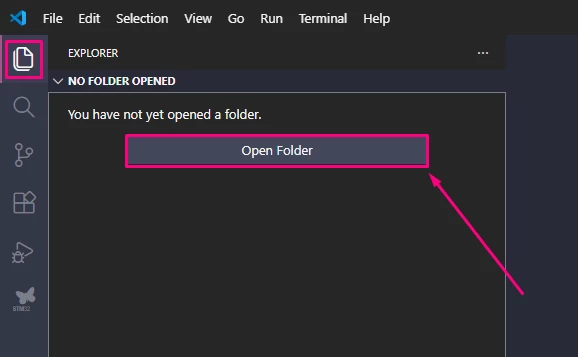
- Launch Visual Studio Code.
- Select Open Folder.
- Browse to and select the root folder of the EEPROM Emulation project.
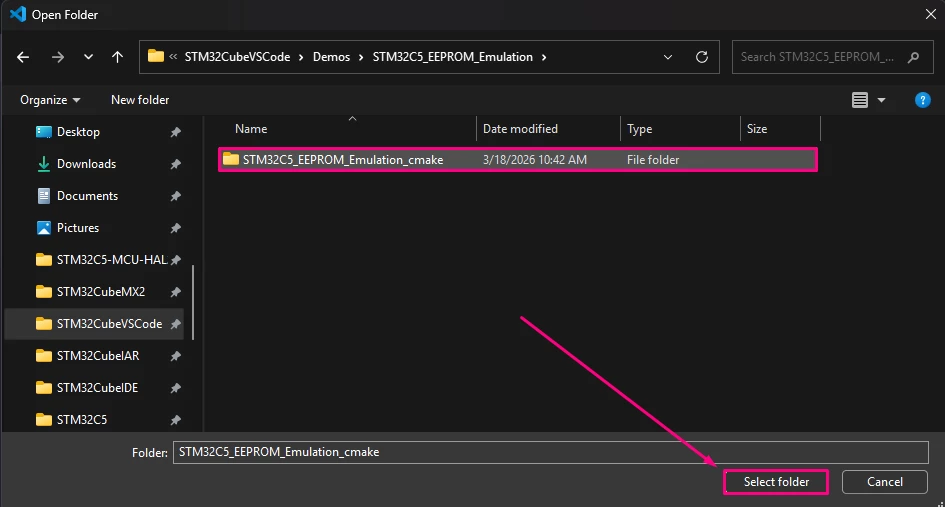
- Click Select folder to load the project into VS Code.
- Press Ctrl+Shift+P and [CMake: Select Configure Preset].
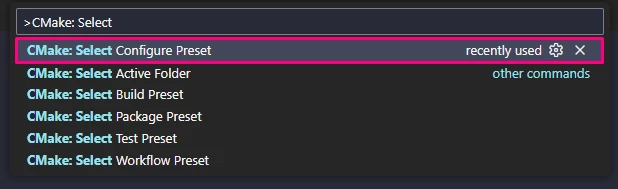
- Select [debug_GCC_NUCLEO_C562RE].

- Press Ctrl+Shift+B to trigger the [CMake: clean rebuild] task
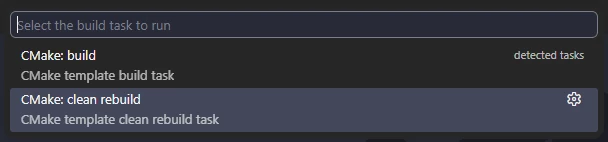
The build output appears in the terminal panel, showing compilation progress and any errors or warnings
Using the existing STM32C5_EEPROM_Emulation configuration
The project provides a launch.json file with a debug configuration named STM32C5_EEPROM_Emulation, based on the STM32Cube ST-LINK GDB server. You do not need to create or modify it; just select and use it.
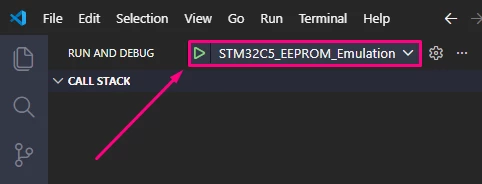
- Open the Run and Debug view
- Press Ctrl+Shift+D (Run and Debug) in VS Code.
- In the configuration drop‑down, select:
STM32C5_EEPROM_Emulation
- Start debugging
- Connect the NUCLEO‑C562RE board to your PC via USB Type-C® (ST‑LINK).
- With STM32C5_EEPROM_Emulation selected, press F5 or click Start Debugging.
- The debugger launches the ST‑LINK GDB server and start your application.
- Execution halts at main().
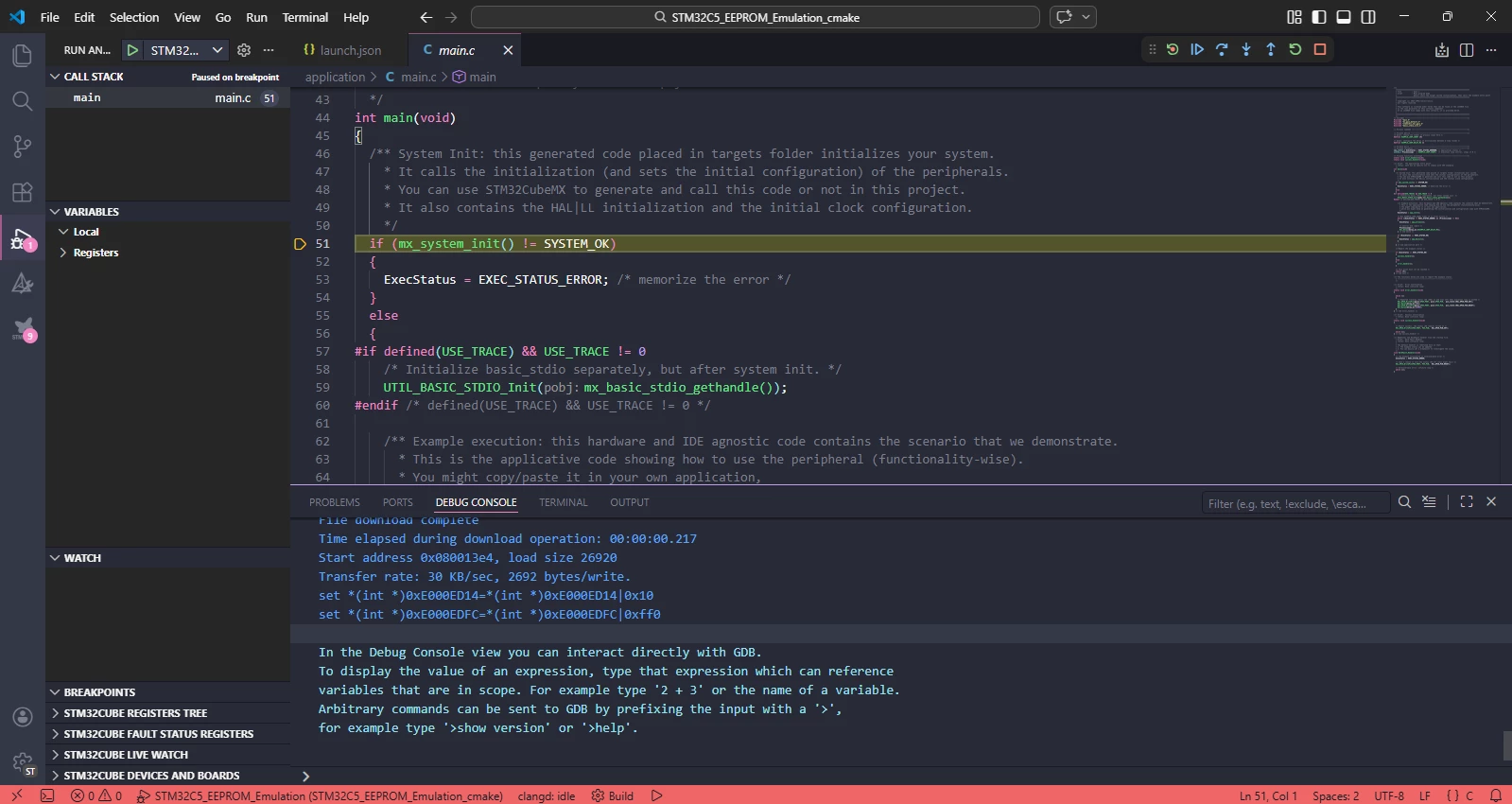
This configuration is already set up to:
- Build the project before starting the session.
- Load the correct ELF/binary produced by the CMake + GCC toolchain.
- Attach to the target via ST‑LINK with standard STM32 debug options.
Stepping through the EEPROM Emulation example
To understand and validate the EEPROM emulation flow, set breakpoints in the key functions:
- Initialization path
- main() – the overall control flow (mx_system_init(), app_init(), loop).
- app_init() – calls mx_eeprom_emulation_init() and reports init status.
- mx_eeprom_emulation_init() – calls EE_Init() and binds FLASH/CRC handles.
- Write/cleanup/read path
- app_process() – executes:
- Step 2: write loop with EE_WriteVariable8bits().
- Handling of EE_INFO_CLEANUP_REQUIRED and EE_CleanUp().
- Step 3: read/verify loop with EE_ReadVariable8bits().
- Error and fault handling
- EE_CleanUp() – to see page cleanup execution when requested.
- HardFault_Handler() – to catch unrecoverable issues (for example, EDATA mode mismatch, ECC errors).
- app_process() – executes:
Run the example, single‑step or continue, and observe:
- How often EE_INFO_CLEANUP_REQUIRED occurs.
- That EE_ReadVariable8bits() returns the same values as written.
- That ExecStatus transitions to EXEC_STATUS_OK at the end of a successful pass.
Validating behavior (logs and LED)
With the debugger running:
- Console logs (if USE_TRACE=1)
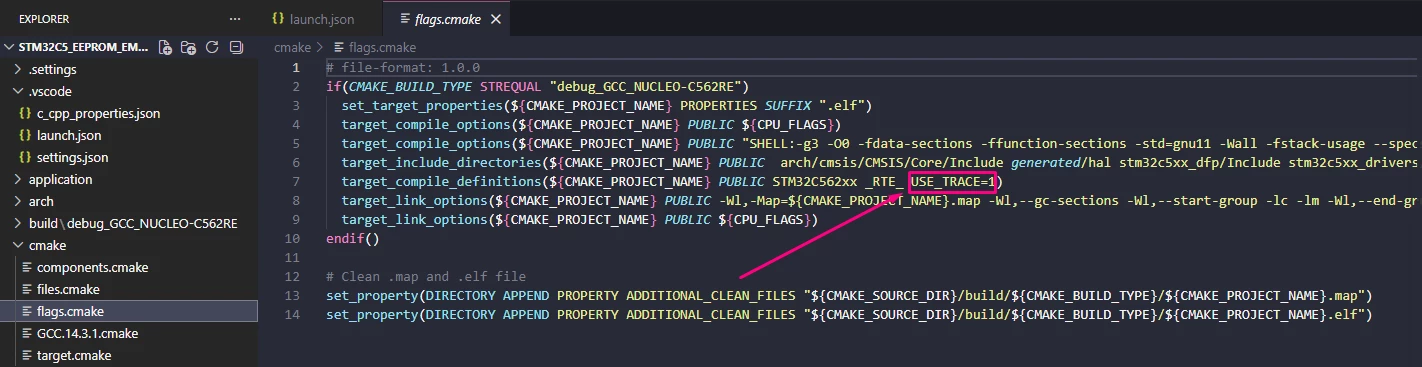
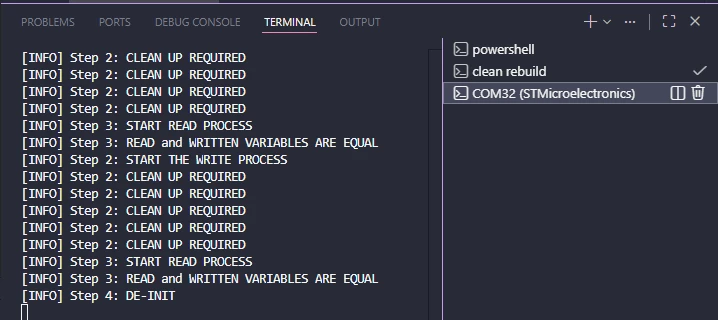
In the serial/ITM output, you should see:
- [INFO] Step 1: EEPROM INITIALIZATION COMPLETED.
- [INFO] Step 2: START THE WRITE PROCESS
- Optionally [INFO] Step 2: CLEAN UP REQUIRED when cleanup is triggered
- [INFO] Step 3: START READ PROCESS
- [INFO] Step 3: READ and WRITTEN VARIABLES ARE EQUAL
Any [ERROR] message indicates where the scenario failed (init, write, read, or comparison).
- User LED on NUCLEO‑C562RE (PA5)
At the end of main():
- On success: success_handler() turns the LED ON and keeps it on.
- On error: error_handler() blinks the LED (short ON, long OFF) in an infinite loop.
Typical issues and what to check
If the example does not behave as expected:
- Initialization errors
- Check EDATA option bytes in STM32CubeProgrammer (EDATA_EN enabled, granularity matches the driver).
- Verify that the CRC is correctly initialized in the system startup code.
- Confirm that MX_EEPROM_FLASH_HANDLE() and MX_EEPROM_CRC_HANDLE() return valid HAL handles.
- Write/read mismatches
- Look for ERROR RETURNED BY EE_WRITE FUNCTION or ERROR RETURNED BY EE_READ FUNCTION in the logs.
- If needed, perform a one‑time EE_Format(EE_FORCED_ERASE) or erase EDATA to clear previous test data.
- HardFault / ECC‑related problems
- If execution stops in HardFault_Handler(), set a breakpoint there and inspect:
- Option bytes and EDATA configuration.
- ECC callbacks in eeprom_itfflash_flitf_edata.c.
- Any unintended direct access to EDATA with the wrong width.
- If execution stops in HardFault_Handler(), set a breakpoint there and inspect:
Using the existing STM32C5_EEPROM_Emulation debug configuration helps in understanding the EEPROM emulation example. It works with breakpoints, logs, and LED indications. This setup provides a complete view of the behavior on the STM32C5. It also helps validate that the driver and EDATA setup are correct.
Conclusion
The STM32C5 EEPROM emulation Visual Studio Code example provides a complete, ready-to-run implementation of flash-based EEPROM emulation on the dedicated EDATA sector, without requiring STM32CubeMX2 project generation. It demonstrates how the core driver, flash memory, CRC, ECC interfaces, configuration, glue layer, and application code work together to offer an EEPROM-like application programming interface based on virtual variable IDs.
By enabling EDATA in the option bytes, configuring eeprom_emul_conf.h for STM32C5, and running the scenario on NUCLEO-C562RE, you can observe a full write, cleanup, read, and verify cycle over 1000 virtual variables. The driver transparently manages endurance and data integrity. This example serves as a reference implementation of the STM32 EEPROM emulation stack. Additionally, it is a practical starting point for implementing robust nonvolatile storage in STM32C5 projects using Visual Studio Code, CMake, and GCC.