


How to run code from SRAM with STM32CubeMX2 and VS Code
- 0 replies
- 522 views
Summary
This article explains how to execute selected STM32 application code from SRAM on the NUCLEO‑C562RE using STM32CubeMX2 and VS Code with a GCC toolchain. It shows how to configure the linker script, tag functions for placement in SRAM, and set up VS Code so you can run critical routines from SRAM to improve performance, flexibility, and debug efficiency.
- Summary
- Introduction
- Prerequisites
- 1. Typical use cases for running STM32 code from SRAM
- 2. Creating the STM32CubeMX2 project (NUCLEO-C562RE)
- 3. Conceptual view
- 4. Memory and linker script basics
- 5. Example: executing a function from SRAM
- 5.1 Select the linker script
- 5.2 Adjust (or verify) the linker script
- 5.3 Define the SRAM function and its data
- 6. Verifying that your code runs from SRAM
- 7. Extensions and advanced scenarios
- 7.1 Interrupt handlers in SRAM
- 7.2 Entire application in SRAM
- Conclusion
- Related links
Introduction
On STM32 microcontrollers, application code typically runs directly from embedded Flash. With prefetch, cache and accelerators, this is usually fast enough.
However, there are situations where executing code from SRAM is beneficial or even required:
- Lower interrupt latency / higher performance for critical routines.
- Lower power consumption by allowing flash to be powered down while the CPU runs from SRAM.
- In-Application Programming (IAP) where flash is erased or programmed while code continues running on the same bank.
- Faster debug cycles, loading code into SRAM instead of repeatedly reprogramming flash.
This article shows, step by step, how to:
- Create an STM32 project with STM32CubeMX2 for the NUCLEOC562RE.
- Build and debug it from VS Code using a GCC toolchain and STM32CubeIDE for Visual Studio Code extension pack.
- Place selected functions into a dedicated SRAM code section and execute them from there.
The example uses a prime-number computation function moved to SRAM on a NUCLEOC562RE board, but the method applies broadly to other STM32 boards (F0/F1/F4/L4/L5/U5/H5/C0, etc.) with only minor linker and device name adjustments.
Prerequisites
Ensure that you have installed:
- STM32CubeMX2
- The latest STM32C5 HAL2 driver
- STM32CubeIDE extension for Visual Studio Code
The hardware used in this tutorial is the NUCLEO-C562RE board.
1. Typical use cases for running STM32 code from SRAM
There are four main scenarios where executing code from SRAM is attractive.
For performance-critical routines, you may want faster access and lower interrupt latency than flash can provide. This is particularly relevant for DSP kernels, motor control loops, real-time communication stacks, or any interrupt handler where every cycle counts. Executing such code from SRAM helps to tighten timing margins and reduce jitter.
In low-power applications, you might want to keep the CPU active while putting flash into a low-power state or powering down some flash banks. Running the active compute phase from SRAM lets you reduce energy consumption during short processing bursts between longer sleep periods, assuming the SRAM is retained.
In In-Application Programming (IAP), bootloaders, or firmware update routines often need to erase or program flash while the device remains responsive. Code cannot safely execute from a flash sector that is being modified. The standard solution is to copy the flash programming routines into SRAM and jump there for the erase/program sequence. Afterwards, return to the main application once the operation completes.
Finally, during early bring up and experimentation, loading small test images into SRAM instead of reprogramming flash on every iteration can significantly speed up the debug cycle. You can quickly iterate on low level code without wearing the flash or waiting for repeated erase/program operations.
2. Creating the STM32CubeMX2 project (NUCLEO-C562RE)
Start STM32CubeMX2 and create a new project. In the Board Selector, choose: NUCLEO-C562RE.

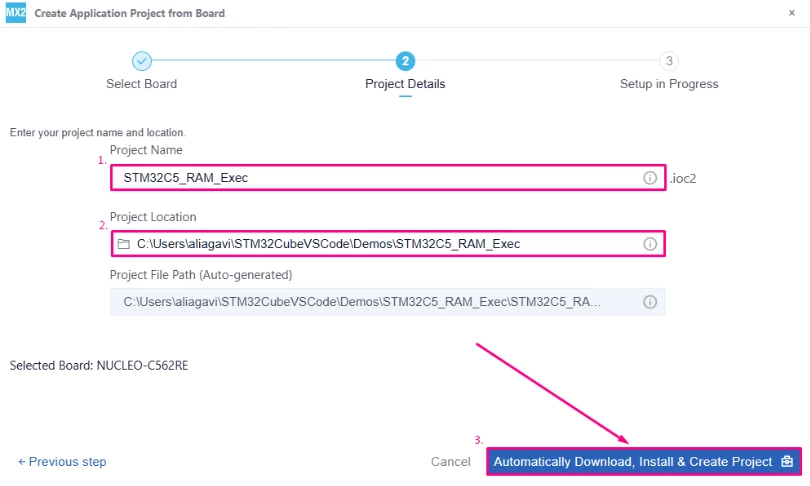
- Select CMake
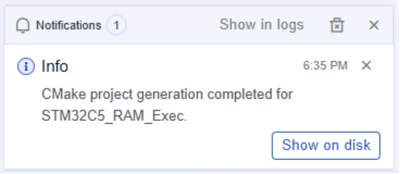
- Click Generate Code.
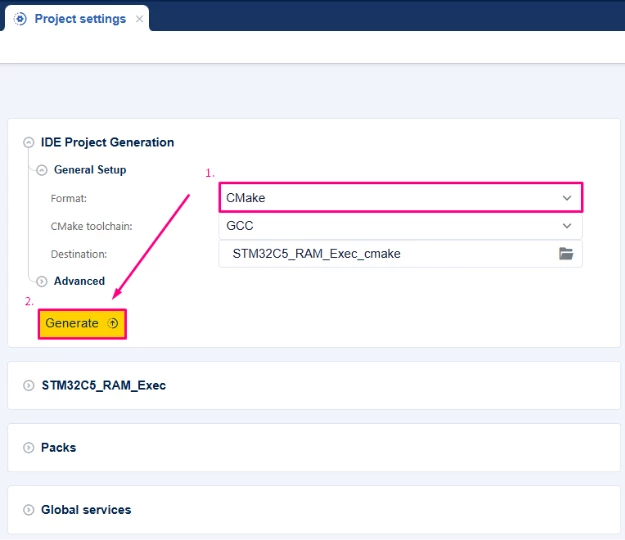
STM32CubeMX2 creates a directory containing:
- Core/ (main application, startup code, system files).
- Drivers/ (HAL, CMSIS).
- CMakeLists.txt and toolchain support files.
- A linker script, for example, stm32c562xe_flash.ld (name may vary).
- Launch Visual Studio Code.
- Select [Open Folder].
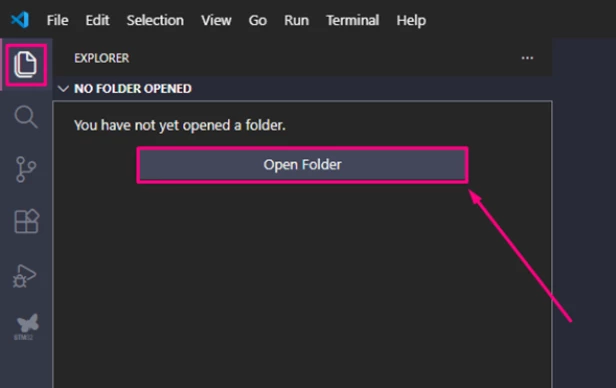
- Browse to and select the root folder of your generated STM32CubeMX2 project.
- Click Select folder to load the project into VS Code.
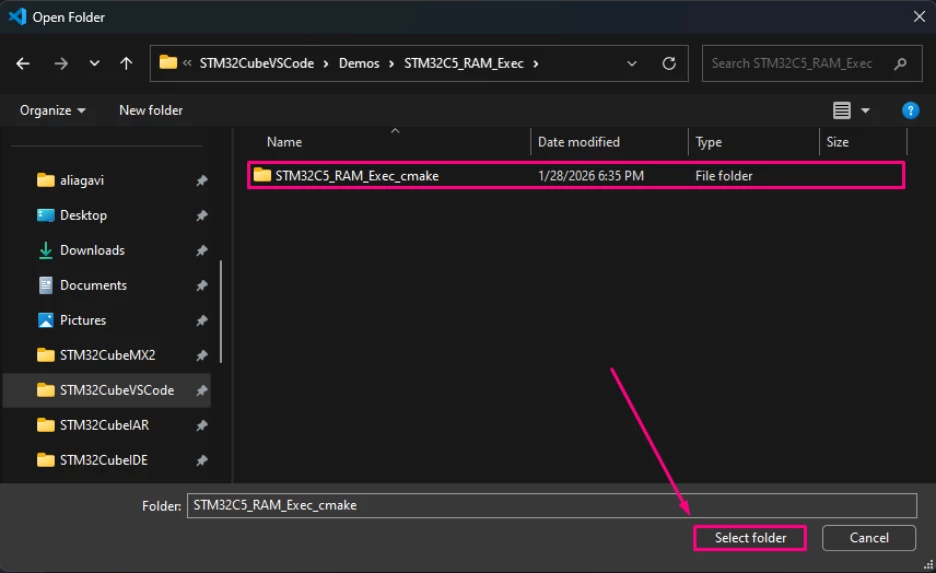
- Press Ctrl+Shift+P and [CMake: Select Configure Preset].
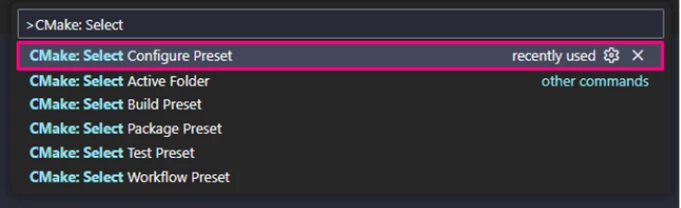
- Select [debug_GCC_NUCLEO_C562RE].

3. Conceptual view
There are two typical generations that you may encounter:
- STM32CubeMX → generates a Makefile based GCC project
- STM32CubeMX2 → generates a CMake based GCC project
The build systems are different, but from the linker’s point of view, they do the same thing.
- Both flows end up invoking arm-none-eabi-gcc with:
- the same MCU flags (-mcpu=... -mthumb ...)
- the same linker script (-Tstm32c562xe_flash.ld)
- The linker script syntax and behavior are identical
STM32CubeMX – Makefile project
In a Makefile based project (from CubeMX), the final link command typically passes the linker script like this:
# Somewhere in the Makefile
LDFLAGS += -Tstm32c562xe_flash.ld
When you run:
makeThe build system eventually calls:
arm-none-eabi-gcc ... -Tstm32c562xe_flash.ld ...STM32CubeMX2 – CMake project
With STM32CubeMX2, you get a CMakeLists.txt based project. The linker script is passed via CMake’s target_link_options:
target_link_options(${CMAKE_PROJECT_NAME} PUBLIC
 -T${CMAKE_SOURCE_DIR}/user_modifiable/Device/STM32C562RET6/stm32c562xe_flash.ld
)
When you run (for example):
cmake -S . -B build
cmake --build build
CMake generates Ninja/Make files, and they call:
arm-none-eabi-gcc ... -T/path/to/stm32c562xe_flash.ld ...- A function tagged in C as:
__attribute__((section(".RamFunc")))behaves the same in both cases, as long as .RamFunc is declared in the linker script with:
>RAM AT> FLASH /* or ROM */Regardless of whether your project came from:
- CubeMX (Makefile) or
- CubeMX2 (CMake).
You only need to:
- Adjust the linker script once to ensure that .RamFunc is placed >RAM AT> FLASH.
- Tag the functions that you want to run from SRAM with __attribute__((section(".RamFunc"))).
The result is identical: those functions are stored in flash, copied to SRAM at startup, and then executed from SRAM at runtime.
4. Memory and linker script basics
CubeMX generates linker scripts with names like:
- stm32c562xe_flash.ld (exact name depends on the MCU; check your project)
Inside, you find a MEMORY definition similar to:
MEMORY
{
 ROM (rx) : org = 0x8000000, len = 0x80000
 RAM (xrw) : org = 0x20000000, len = 0x20000
}
On STM32 devices:
- FLASH is typically at 0x08000000 (load address, nonvolatile)
- SRAM is at 0x20000000 (run address, volatile)
The crucial linker concept is this pattern:
>RAM AT>FLASH /* or ROM */This means:
- The run address of the section is in SRAM (code executes there).
- The section’s contents are loaded from FLASH at reset.
- Startup code (the Reset_Handler) copies the section from FLASH to SRAM before main().
We use this mechanism to create or reuse a .RamFunc section:
Functions linked there run from SRAM, but the binary image still resides in flash.
5. Example: executing a function from SRAM
For this example, the following is done:
- Add a function Prime_Calc_SRAM() that computes a table of prime numbers.
- Place it into a .RamFunc section so that it is copied to SRAM at startup.
- Call it from main() and verify in the debugger that the PC is in the SRAM range.
5.1 Select the linker script
Modify your CMakeLists.txt to specify explicitly the linker to be used.
- Open the CMakeLists.txt
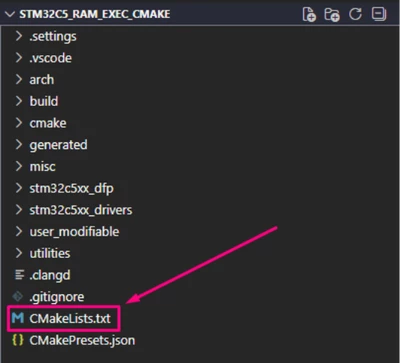
- In target_link_options add:
-T${CMAKE_SOURCE_DIR}/user_modifiable/Device/STM32C562RET6/stm32c562xe_flash.ld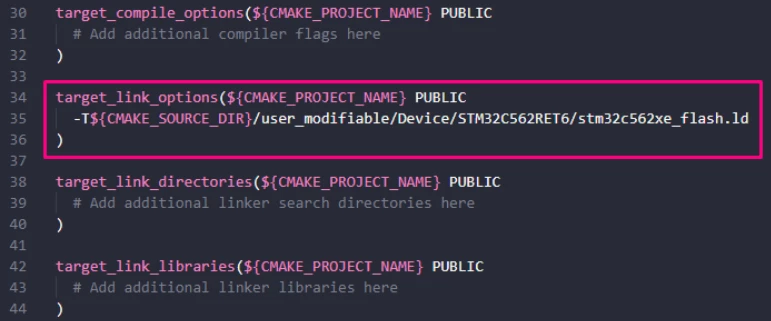
- Ctrl+S to save and configure

5.2 Adjust (or verify) the linker script
In user_modifiable\Device\STM32C562RET6 open the file stm32c562xe_flash.ld and locate the .data section.
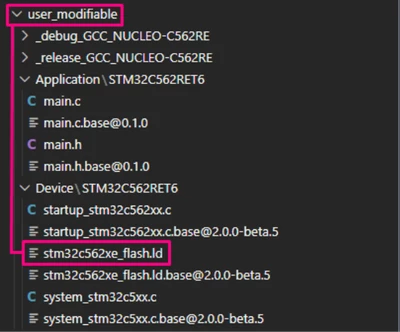
Many recent STM32Cube templates already include a .RamFunc output section, sometimes separate from .data, but verify or add it:
/* Initialized data sections into "RAM" Ram type memory */
 .data :
 {
 _sdata = .; /* .data sections */
 *(.data); /* .data* sections */
 *(.data*);
 . = ALIGN(8);

 /* Functions to be executed from SRAM */
 *(.RamFunc)
 *(.RamFunc*)

 _edata = .; /* end of .data in RAM */
 } > RAM AT> ROM
Key points:
- The entire .data (including .RamFunc) is stored in FLASH (ROM) and copied to RAM at startup.
- The default STM32 startup code already performs this copy; no additional code is needed.
5.3 Define the SRAM function and its data
Open user_modifiable/Application/STM32C62RET6/main.c.
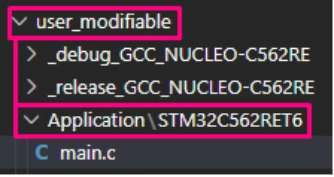
Prototype and attribute
main.c file, add:
/* Private functions prototype -----------------------------------------------*/
/* Place function in .RamFunc section so it runs from SRAM */
static void __attribute__((section(".RamFunc"))) Prime_Calc_SRAM(void);
Alternatively, define a helper macro (if not already provided by HAL):
/* Includes ------------------------------------------------------------------*/
#include "main.h"
/* Private typedef -----------------------------------------------------------*/
/* Private define ------------------------------------------------------------*/
#define RAMFUNC __attribute__((section(".RamFunc")))
/* Private macro -------------------------------------------------------------*/
/* Private variables ---------------------------------------------------------*/
/* Private functions prototype -----------------------------------------------*/
/* Place function in .RamFunc section so it runs from SRAM */
static void __attribute__((section(".RamFunc"))) Prime_Calc_SRAM(void);
/*Some HAL packages define __RAM_FUNC already; you can reuse it instead of defining your own macro.*/
#define __RAM_FUNC hal_status_t __attribute__((section(".RamFunc")))
Data buffer
In the private defines and variables sections, add a small prime table buffer:
/* Private define ------------------------------------------------------------*/
#define PRIM_NUM 64U /* Size of the prime array */
/* Private macro -------------------------------------------------------------*/
/* Private variables ---------------------------------------------------------*/
/* Align on 32 bytes in case you later enable caches or DMA */
static __attribute__((aligned(32))) uint32_t primes_ram[PRIM_NUM];
Function implementation
Before main.c create the Prime_Calc_SRAM() function declaration.
This code is in charge of computing the prime numbers from 2 to 311 (PRIM_NUM) and storing them into the primes_ram array variable.
It produces the prime numbers below and stores them in primes_ram array variable with these values: 2, 3, 5, 7, 11, 13, 17, 19, 23, 29, 31, 37, 41, 43, 47, 53, 59, 61, 67, 71, 73, 79, 83, 89, 97, 101, 103, 107, 109, 113, 127, 131,137, 139, 149, 151, 157, 163, 167, 173, 179, 181, 191, 193, 197, 199, 211, 223, 227, 229, 233, 239, 241, 251, 257, 263, 269, 271, 277, 281, 283, 293, 307, 311.
/**
 * @brief Compute prime numbers and store them in primes_ram.
 * Function body is placed in SRAM (.RamFunc).
 */
static void __attribute__((section(".RamFunc"))) Prime_Calc_SRAM(void)
{
 /* First prime number */
 primes_ram[0] = 2U;
 uint32_t count = 1U; /* number of primes found so far */
 uint32_t num = 3U; /* candidate number */

 while (count < PRIM_NUM)
 {
 uint8_t is_prime = 1U;

 for (uint32_t i = 0U; i < count; i++)
 {
 if ((num % primes_ram[i]) == 0U)
 {
 is_prime = 0U;
 break;
 }

 if ((primes_ram[i] * primes_ram[i]) > num)
 {
 break;
 }
 }

 if (is_prime != 0U)
 {
 primes_ram[count] = num;
 count++;
 }

 /* Skip even numbers */
 num += 2U;
 }
}
You now have a function that is linked into .RamFunc and thus copied to SRAM at startup.
Call the function from main()
In main() after the initialization code:
int main(void)
{
 /** System Init: this code placed in targets folder initializes your system.
 * It calls the initialization (and sets the initial configuration) of the peripherals.
 * You can use STM32CubeMX to generate and call this code or not in this project.
 * It also contains the HAL initialization and the initial clock configuration.
 */
 if (mx_system_init() != SYSTEM_OK)
 {
 return (-1);
 }
 else
 {
 /*
 * You can start your application code here
 */
 /* Example: run the RAM-resident computation once at startup */
 Prime_Calc_SRAM();

 while (1) {}
 }
} /* end main */
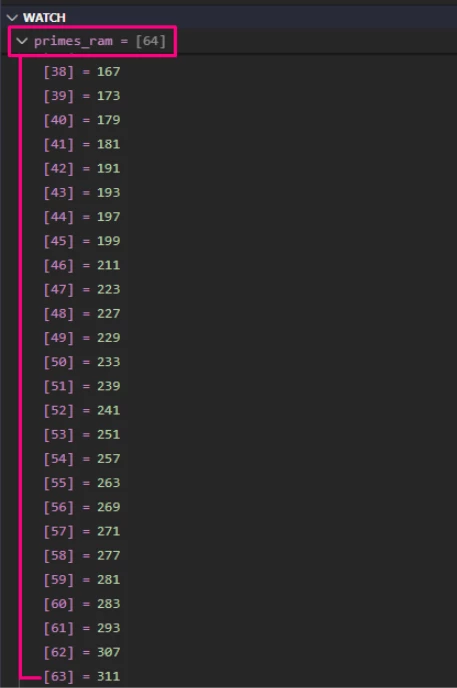
After running, you can inspect primes_ram[] in the debugger to confirm it holds prime numbers.
6. Verifying that your code runs from SRAM
Build the project:
- Press Ctrl+Shift+B to trigger the default build task, or
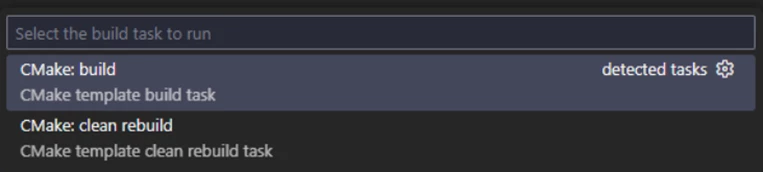
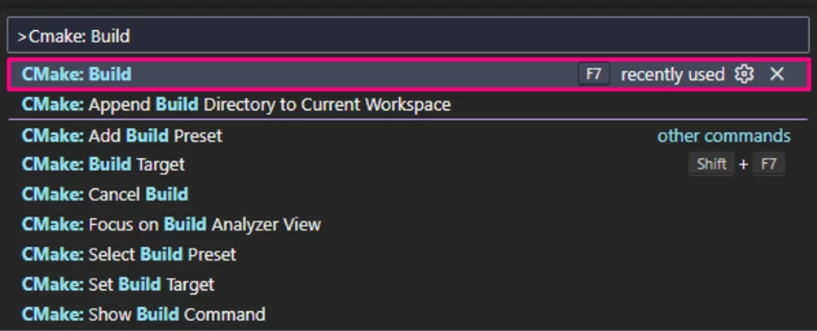
Open the Command Palette (Ctrl+Shift+P / Cmd+Shift+P) and run [CMake: Build] or press F7.
The build output appears in the terminal panel, showing compilation progress and any errors or warnings.
Debug the application:
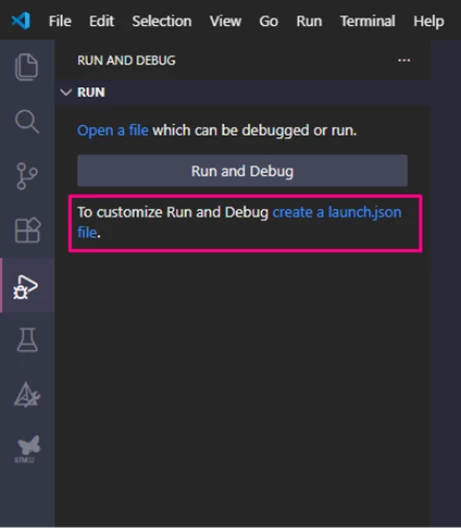
- Open the [Run and Debug] panel (Ctrl+Shift+D).
- Create a new debug configuration by clicking [create a launch.json file.]
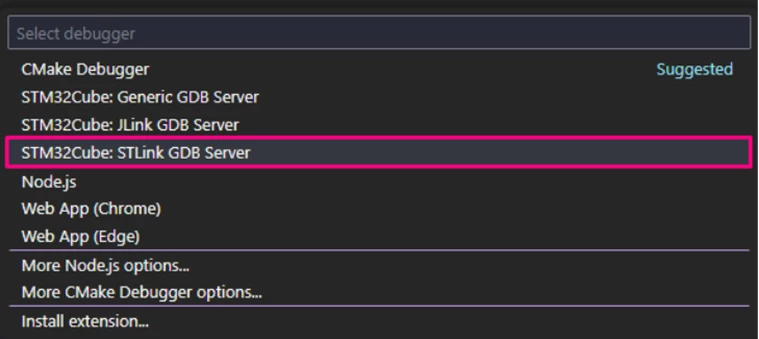
- Select [STM32Cube: STLink GDB Server].
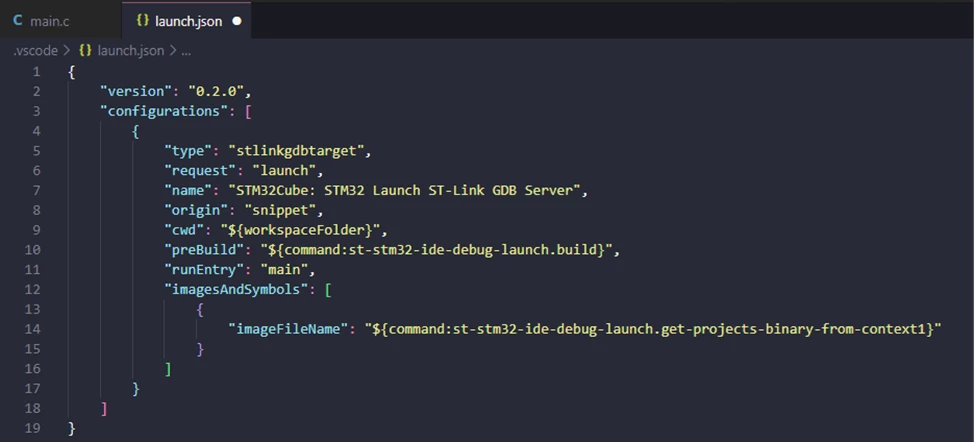
This generates a launch.json file configured for your STM32 project.
- Start the debug session by pressing F5 or clicking the green [Start Debugging] button.

- The debugger halts at the reset vector or the first breakpoint.
To confirm that Prime_Calc_SRAM() is executed from SRAM:
- Set a breakpoint on the first line of Prime_Calc_SRAM().
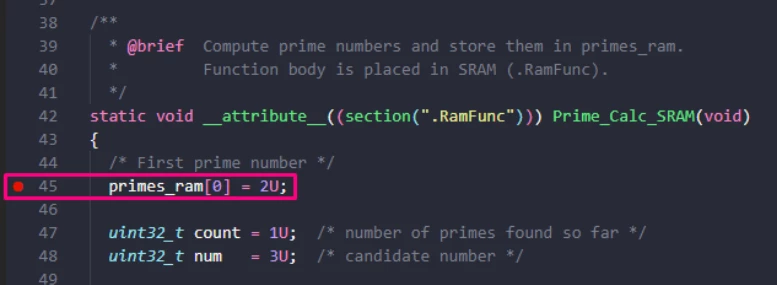
- In Variables, open the Registers view.
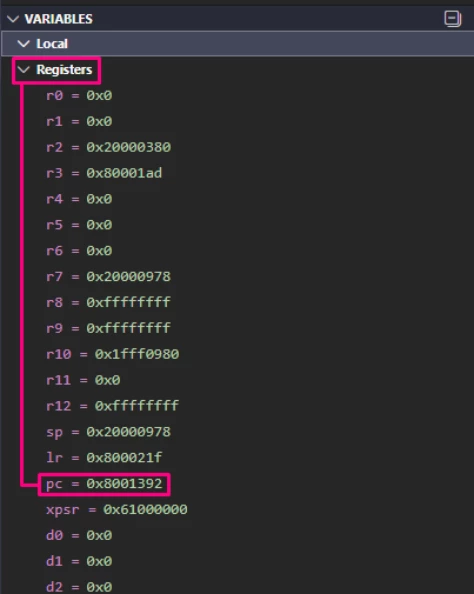
- Let the program run until it hits the breakpoint.
- Check the Program Counter (PC) value:
- On most STM32s, SRAM is at 0x2000xxxx.
- If the PC is in the 0x2000xxxx range, the function is running from SRAM.
- If it’s around 0x0800xxxx, the function is still in flash (linker/script not set correctly).
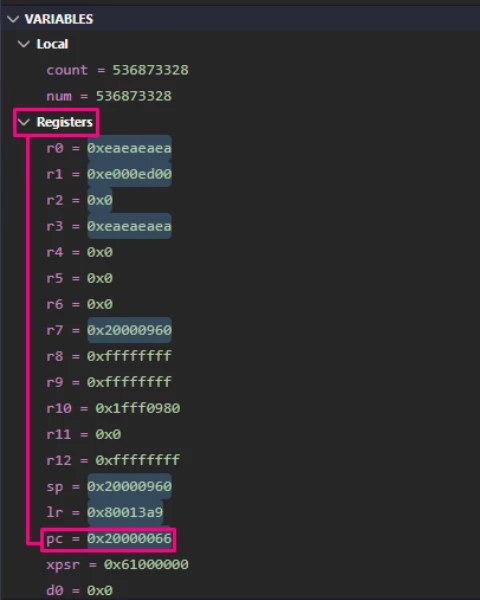
Optionally:
- Using the command palette (Ctrl+Shift+P), run the command Memory: Show Memory Inspector and inspect the Memory at:
- The FLASH (ROM) address where .RamFunc is stored (visible in the .map file).
- The SRAM address where .RamFunc is copied.
You should see identical code in both locations, with the PC pointing to the SRAM region during execution.
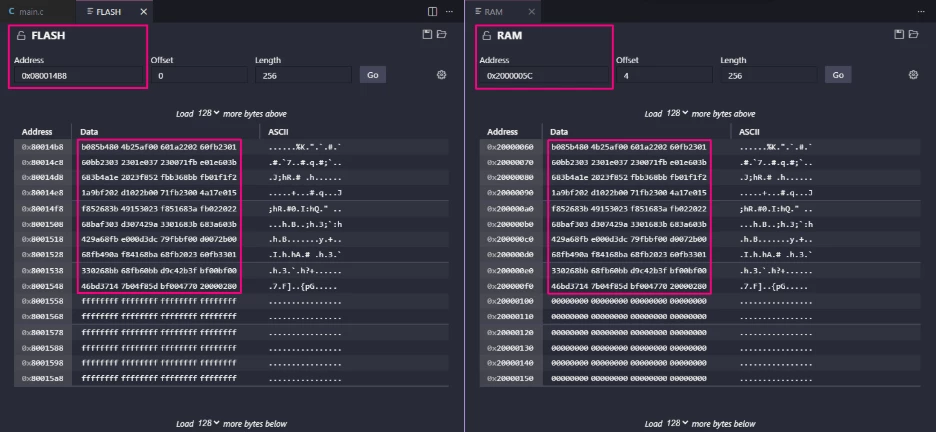
Verify the following:
- primes_ram[ ] contains prime numbers (for example, 2, 3, 5, 7, 11, ..., 311).
7. Extensions and advanced scenarios
Once the basic mechanism is understood, several extensions are natural.
7.1 Interrupt handlers in SRAM
To run specific IRQ handlers from SRAM, apply the same attribute to the interrupt function:
void __attribute__((section(".RamFunc"))) EXTI13_IRQHandler(void)
{
 /* User code before HAL handler */
 HAL_GPIO_EXTI_IRQHandler(USER_BUTTON_Pin);
}
As long as .RamFunc is mapped to RAM AT> FLASH (ROM) and the handler name matches the startup file vector table, the handler body executes from SRAM.
7.2 Entire application in SRAM
You can link most or all of your application to SRAM by:
- Using a *_RAM.ld linker script that maps .isr_vector, .text, .data, etc., to RAM only, for example:
/* The startup code into RAM */
.isr_vector :
{
 KEEP(*(.isr_vector))
} >RAM

/* Code into RAM */
.text :
{
 *(.text)
 *(.text*)
 /* ... other code sections */
} >RAM
For debugging, the debugger loads the ELF directly into SRAM; this works even if flash is blank.
For standalone boot from SRAM, you also need:
- Configure boot address option bytes to point to the SRAM base address (for example, 0x20000000).
- Ensure that SRAM contents are initialized (for example, via a bootloader in flash) if you want it to survive power cycles.
In many practical applications, a small bootloader still resides in flash and copies the main application image into SRAM at startup.
Conclusion
Running code from SRAM on STM32 is mainly a matter of configuring the linker and tagging the right functions, not of changing your whole toolchain. In this article we started from a STM32CubeMX2generated project for NUCLEOC562RE, integrated it with VS Code, and showed how to place a simple Prime_Calc_SRAM() function into a dedicated .RamFunc section.
By mapping .RamFunc as >RAM AT> FLASH in the linker script and adding __attribute__((section(".RamFunc"))) to selected functions, the startup code automatically copies those functions from flash to SRAM before main(), so they execute entirely from RAM. Using the STM32CubeIDE extension pack in VS Code, you can then confirm that the program counter is in the SRAM range while these routines run.
The same pattern scales beyond the prime example. You can move time-critical ISRs, flash programming routines, or even large parts of an application into SRAM, while keeping the overall STM32CubeMX2 + VS Code development flow unchanged.
Related links
- Knowledge article: How to place and execute STM32 code in SRAM memory with STM32CubeIDE
- Reference manual RM0522: STM32C5 Arm®-based 32-bit MCUs
- Datasheet DS14927: STM32C562xx
- STM32Cube for Visual Studio Code
- NUCLEO-C562RE
- STM32CubeMX2
- STM32 embedded software documentation
- STM32CubeMX2 software documentation