

How to implement USB mass storage device standalone on STM32
Introduction
This article provides a detailed, step-by-step guide to implementing a USB mass storage class (MSC) device using the USBX middleware in standalone mode (without an RTOS) on the STM32U5 microcontroller. The example is developed and tested on the STM32U5G9J-DK1 development board featuring embedded eMMC memory.
While this guide specifically targets the STM32U5 board, the principles and code structure can be easily adapted for other STM32 microcontrollers using USBX and USB MSC functionality. This includes but is not limited to the STM32H5 series with minor modifications. This flexibility makes the solution valuable for a wide range of USB MSC standalone applications.
Prerequisites
- EWARM v9.50.2
- STM32CubeMX v6.15.0
- STM32U5A9J-DK1
1. Project setup
You can directly clone the project from STM32-hotspot/CKB-STM32-MSC-Standalone-U5 or follow the steps below to set your project.
1.1 Create a project
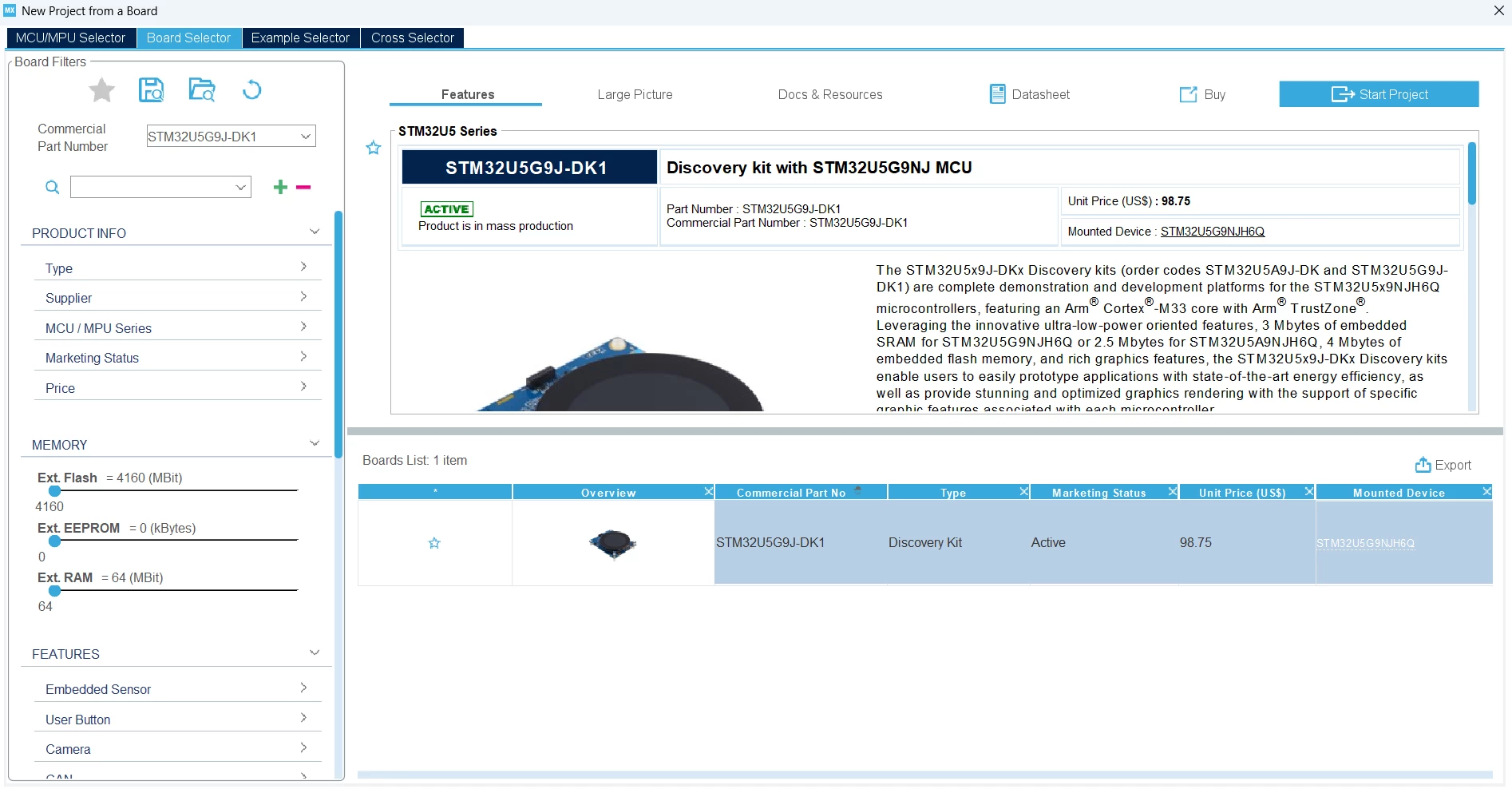
- Start by creating a new project using the STM32CubeIDE by clicking [File -> New -> STM32 Project]. Use the [Board Selector] tab and select the [STM32U5G9J-DK1].
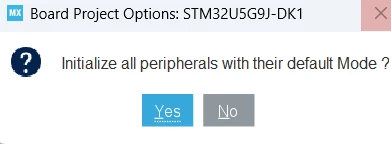
- Initialize all peripherals with their default mode.
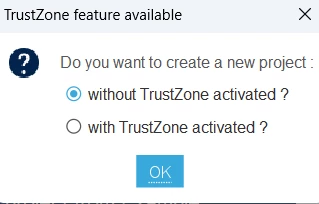
- Disable TrustZone®
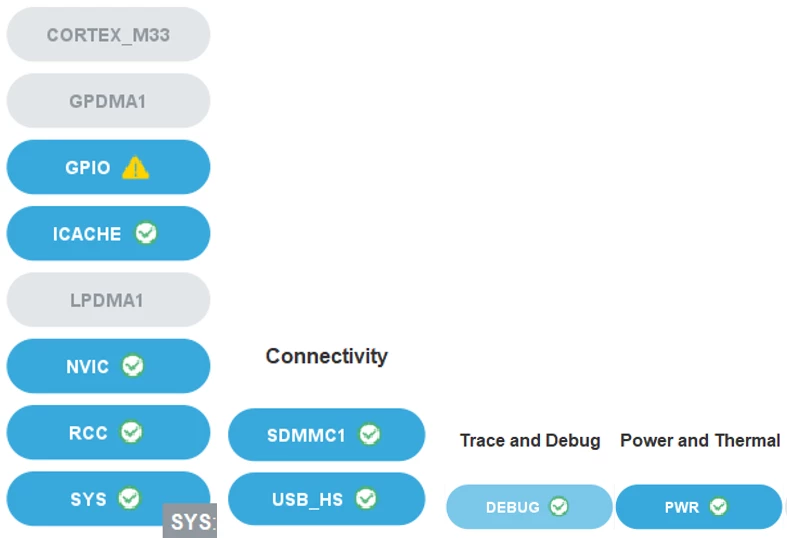
- In the System View, deconfigure any unnecessary peripherals to optimize resources.
- In the clock configuration tree viewer, set HCLK to maximum speed.
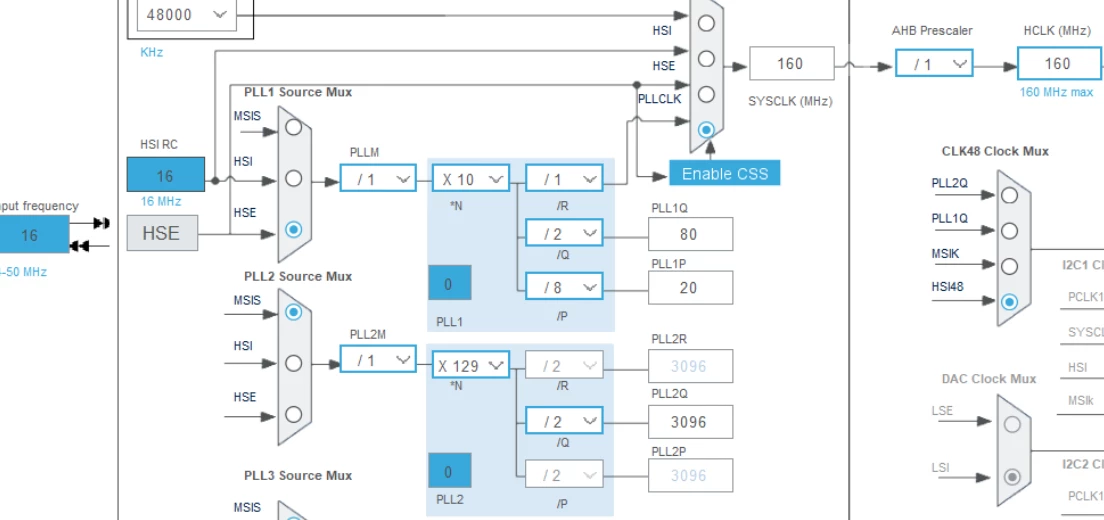
- Configure SDMMC1 clock source as CLK48 and USBHS clock source as HSE

1.2 Configure USBX middleware
-
Enable the USBX Device middleware package.
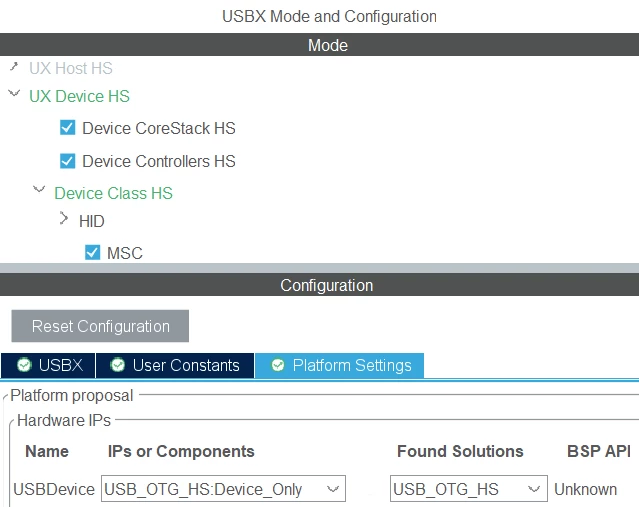
-
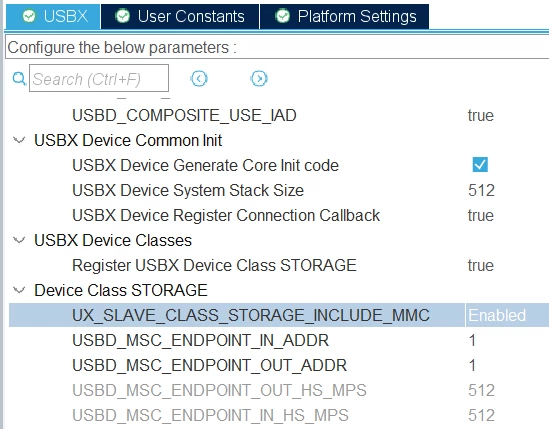
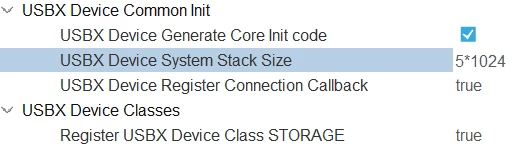
Configure the following parameters:
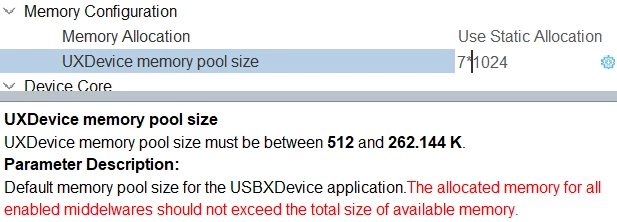
- Configure the UXDevice memory pool size and USBX Device System Stack Size appropriately:
2.3 Code generation
-
In Code Generator Settings, set all free GPIO pins to Analog mode to reduce power consumption.
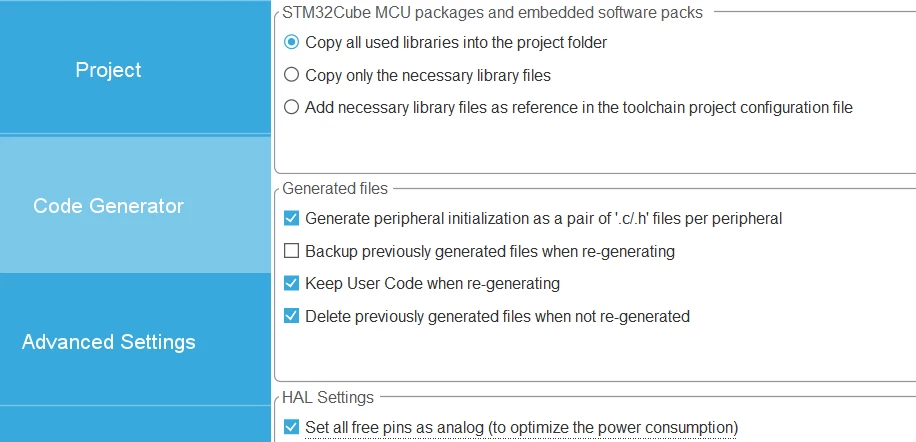
- After completing the USBX and peripheral configurations in STM32CubeMX, save your project and generate the initialization code.
2. Code editing
Once the code is generated, perform the following steps to integrate the eMMC interface and ensure proper USB operation:
-
Add BSP Driver for eMMC
Include the BSP driver source file stm32u5x9j_discovery_mmc.c and its headers into your project. This file provides the necessary board support package (BSP) functions to interface with the eMMC memory. -
Enable required HAL modules
In the stm32u5xx_hal_conf.h file, enable the following HAL modules if they are not already enabled, as they may be required by the BSP. -
Exclude SDMMC generated code
Since the eMMC interface is managed by the BSP driver, exclude or disable the SDMMC peripheral code automatically generated by CubeMX to avoid conflicts or redundant initialization.
2.1 main.c
- Declare between /* USER CODE BEGIN PV */ and /* USER CODE END PV */
/* USER CODE BEGIN PV */
#define BLOCK_START_ADDR 0 /* Block start address */
#define NUM_OF_BLOCKS 5 /* Total number of blocks */
#define BUFFER_WORDS_SIZE ((MMC_BLOCKSIZE * NUM_OF_BLOCKS) >> 2) /* Total data size in bytes */
int32_t MMC_state=0 ;
/* USER CODE END PV */- In main.c, add between /* USER CODE BEGIN SysInit */ and /* USER CODE END SysInit */
/* USER CODE BEGIN SysInit */
MMC_state = BSP_MMC_Init();
 if(MMC_state != BSP_ERROR_NONE)
 {
 printf("\r\nMMC Initialization : Failed");
 printf("\r\n");
 }
/* USER CODE END SysInit */- Add between /* USER CODE BEGIN 3 */ and /* USER CODE END 3 */
/* USER CODE BEGIN 3 */
 USBX_Device_Process(NULL);
}
/* USER CODE END 3 */
2.2 usb_otg.c
Make sure to add in usb_otg.c specifically in HAL_PCD_MspInit() between /* USER CODE BEGIN USB_OTG_HS_MspInit 0 */ and /* USER CODE END USB_OTG_HS_MspInit 0 */ if CubeMX does not generate it correctly
 /* USER CODE BEGIN USB_OTG_HS_MspInit 0 */
 __HAL_RCC_SYSCFG_CLK_ENABLE();
 /* USER CODE END USB_OTG_HS_MspInit 0 */
2.3 app_usbx_device.c
- In app_usbx_device.c, add between /* USER CODE BEGIN PV */ and /* USER CODE END PV */
 /* USER CODE BEGIN PV */
__ALIGN_BEGIN USB_MODE_STATE USB_Device_State_Msg __ALIGN_END;
extern PCD_HandleTypeDef hpcd_USB_OTG_HS;
/* USER CODE END PV */- In the same file add a new function to initialize USBX device between /* USER CODE BEGIN 1 */ and /* USER CODE END 1 */
 /**
 * @brief MX_USBX_Device_Process
 * Run USBX state machine.
 * arg: not used
 * @retval none
 */
VOID USBX_Device_Process(VOID *arg)
{
 ux_device_stack_tasks_run();
}
VOID USBX_APP_Device_Init(VOID)
{
 /* USER CODE BEGIN USB_Device_Init_PreTreatment_0 */
 /* USER CODE END USB_Device_Init_PreTreatment_0 */
 /* initialize the device controller HAL driver */
 MX_USB_OTG_HS_PCD_Init();
 /* USER CODE BEGIN USB_Device_Init_PreTreatment_1 */
 HAL_PCDEx_SetRxFiFo(&hpcd_USB_OTG_HS, 0x200);
 HAL_PCDEx_SetTxFiFo(&hpcd_USB_OTG_HS, 0, USBD_MAX_EP0_SIZE / 4);
 HAL_PCDEx_SetTxFiFo(&hpcd_USB_OTG_HS, 1, USBD_MSC_EPIN_HS_MPS / 2);
 HAL_PCDEx_SetTxFiFo(&hpcd_USB_OTG_HS, 2, USBD_MSC_EPOUT_HS_MPS / 2);
 /* USER CODE END USB_Device_Init_PreTreatment_1 */
 /* initialize and link controller HAL driver to USBx */
 if(_ux_dcd_stm32_initialize((ULONG)USB_OTG_HS, (ULONG)&hpcd_USB_OTG_HS) != UX_SUCCESS)
 {
 Error_Handler();
 }
 /* USER CODE BEGIN USB_Device_Init_PostTreatment */
 HAL_PCD_Start(&hpcd_USB_OTG_HS);
 /* USER CODE END USB_Device_Init_PostTreatment */
}- After compiling the project, a warning may appear:
Warning[Pe223]: function "MX_USB_OTG_HS_PCD_Init" declared implicitly C:\xx\CKB-STM32-MSC-Standalone-U5\USBX\App\app_usbx_device.c 357To avoid this warning, you can simply include #include "usb_otg.h" in the header file.
2.4 app_usbx_device.h
- Call the function USBX_APP_Device_Init() between /* USER CODE BEGIN MX_USBX_Device_Init1 */ and /* USER CODE END MX_USBX_Device_Init1 */
 /* USER CODE BEGIN MX_USBX_Device_Init1 */
 USBX_APP_Device_Init();
/* USER CODE END MX_USBX_Device_Init1 */- Define the prototypes in the header file between /* USER CODE BEGIN EFP */ and /* USER CODE END EFP */
/* USER CODE BEGIN EFP */
VOID USBX_APP_Device_Init(VOID);
VOID USBX_Device_Process(VOID *arg);
/* USER CODE END EFP */- In the same header file, add USB_MODE_STATE between /* USER CODE BEGIN 1 */ and /* USER CODE END 1 */
 /* USER CODE BEGIN 1 */
typedef enum
{
 STOP_USB_DEVICE = 1,
 START_USB_DEVICE,
} USB_MODE_STATE;
 /* USER CODE END 1 */
2.5 ux_device_msc.c
Now, implement the following USB MSC storage callbacks with eMMC support:
2.5.1 Get media last LBA
Add between /* USER CODE BEGIN USBD_STORAGE_GetMediaLastLba */ and /* USER CODE END USBD_STORAGE_GetMediaLastLba */
 /* USER CODE BEGIN USBD_STORAGE_GetMediaLastLba */
if(eMMC_Init == 0)
{
 eMMC_Init = 1;
 BSP_MMC_Init();
}
 HAL_MMC_CardInfoTypeDef pCardInfo = {0};
 HAL_MMC_GetCardInfo(&uSdHandle, &pCardInfo);
 LastLba = pCardInfo.BlockNbr-1;
 /* USER CODE END USBD_STORAGE_GetMediaLastLba */
2.5.2 Get media block length
Add between /* USER CODE BEGIN USBD_STORAGE_GetMediaBlocklength */ and /* USER CODE END USBD_STORAGE_GetMediaBlocklength */
 /* USER CODE BEGIN USBD_STORAGE_GetMediaBlocklength */
 if(eMMC_Init == 0)
 {
 eMMC_Init = 1;
 BSP_MMC_Init();
 }
 HAL_MMC_CardInfoTypeDef pCardInfo = {0};
 HAL_MMC_GetCardInfo(&uSdHandle, &pCardInfo);
 MediaBlockLen = pCardInfo.BlockSize;
 /* USER CODE END USBD_STORAGE_GetMediaBlocklength */
2.5.3 Read blocks
Add between /* USER CODE BEGIN USBD_STORAGE_Read */ and /* USER CODE END USBD_STORAGE_Read*/
/* USER CODE END USBD_STORAGE_Read */
 uint32_t timeout = 10000;
// UX_PARAMETER_NOT_USED(storage_instance);
// UX_PARAMETER_NOT_USED(lun);
// UX_PARAMETER_NOT_USED(media_status);
 if (BSP_MMC_ReadBlocks((uint32_t*)data_pointer, lba, number_blocks, timeout) == BSP_ERROR_NONE)
 {
 // Wait until MMC card is ready for next operation
 while (BSP_MMC_GetCardState() != MMC_TRANSFER_OK)
 {
 if (timeout-- == 0)
 {
 while(1);
 }
 }
 status = UX_STATE_NEXT;
 } else
 {
 while(1);
 }
 /* USER CODE END USBD_STORAGE_Read */
2.5.4 Write blocks
Add between /* USER CODE BEGIN USBD_STORAGE_Write */ and /* USER CODE END USBD_STORAGE_Write */
 /* USER CODE BEGIN USBD_STORAGE_Write */
 uint32_t timeout = 10000;
// UX_PARAMETER_NOT_USED(storage_instance);
// UX_PARAMETER_NOT_USED(lun);
// UX_PARAMETER_NOT_USED(media_status);
 if (BSP_MMC_WriteBlocks((uint32_t*)data_pointer, lba, number_blocks, timeout) == BSP_ERROR_NONE)
 {
 // Wait until MMC card is ready for next operation
 while (BSP_MMC_GetCardState() != MMC_TRANSFER_OK)
 {
 if (timeout-- == 0)
 {
 status= UX_ERROR; // Timeout expired
 }
 }
 status = UX_STATE_NEXT;
 }
 else
 {
 while(1);
 }
 /* USER CODE END USBD_STORAGE_Write */
Do not return status = UX_SUCCESS; in USBD_STORAGE_Read, USBD_STORAGE_Write, or similar USBX MSC callbacks. Use instead: status = UX_STATE_NEXT;
3. Build and flash the application
After building and flashing the firmware to your STM32U5G9J-DK1 board:
- Connect the board to a PC host via USB.
- The device should enumerate as a USB mass storage device.
- The PC detects a new removable drive representing the eMMC storage.
- Standard file operations (read, write, format) can be performed on this drive.
4. Expected results


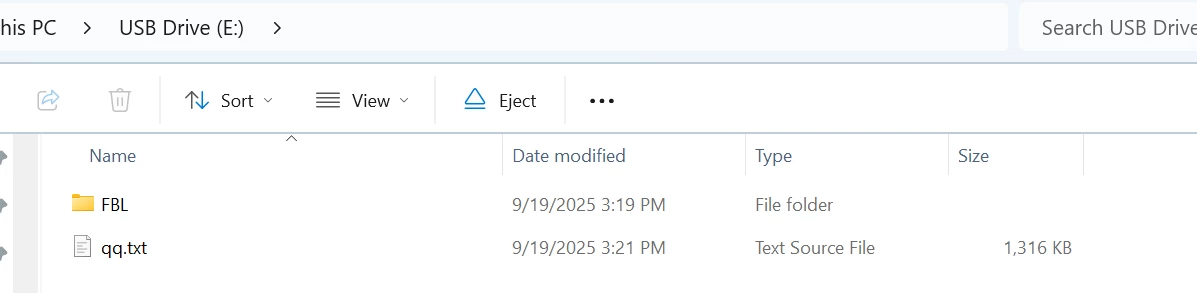
- STM32U5G9J-DK1 enumerates successfully as a USB MSC device.
- All necessary USB descriptors (device, configuration, string) are correctly provided.
- The eMMC memory (4 GB volume) is accessible as a removable drive on the host system.