


How to generate CRC for post build with STM32CubeMX2 and STM32C5
Summary
This article explains how to add a robust firmware integrity check to STM32 projects configured with STM32CubeMX2 (MX2) and developed using either IAR or VS Code with CMake and GCC. It shows how to enable the STM32 CRC peripheral, use a post-build step to compute a 32-bit CRC over the application image, inject that CRC into the final .hex file with srec_cat, and verify it at startup using both hardware and software CRC calculations, while keeping the original ELF/OUT file unchanged for debugging.
- Summary
- Introduction
- 1. Prerequisites
- 1.1 Hardware
- 1.2 Software
- 2. Concept overview
- 2.1 High-level flow
- 2.2 Why use this approach?
- 3. Base project setup
- 3.1 Create the NUCLEO-C562RE project
- 3.2 Enable and configure the CRC peripheral
- 4. Integrate the attached main.c (CRC demo)
- 5. Post-build and debug flow with VS Code + CMake (GCC)
- 5.1 CMake post-build logic
- 5.2 Programming and debugging the CRC-augmented image in VS Code
- 6. Validation
- Conclusion
- Related links
Introduction
Many STM32 applications need to ensure that the firmware image in flash has not been corrupted, especially when using bootloaders, in-field updates, or safety and security mechanisms. A common solution is to compute a CRC over the application image and store the resulting 32-bit value inside the same image so that the code can verify its own integrity at every reset.
This article describes a concrete way to implement this pattern on the NUCLEO-C562RE board, using MX2 configuration, the STM32 CRC peripheral, and an external post-build flow based on objcopy or ielftool together with srec_cat. You will see how to:
- Configure CRC and UART on NUCLEO-C562RE with STM32CubeMX2.
- Integrate a post-build script that generates a HEX file, computes a CRC over a defined flash range, and injects it into a reserved word in the image.
- Use this flow in both CMake-based GCC projects in VS Code and IAR Embedded Workbench.
- Debug using the original ELF or OUT file while the target runs the CRC-augmented HEX.
By following these steps, you can add a portable and repeatable image-integrity check to your STM32C562RE projects with minimal changes to your build and debug setup.
1. Prerequisites
1.1 Hardware
- NUCLEO-C562RE, based on the STM32C562RE microcontroller with an integrated CRC peripheral.
- On-board STLINK-V3 for SWD debug and USB virtual COM port (VCP).
For the UART output used in this article:
- Use the STM32CubeMX2 board view to locate the USART instance that is connected to the STLINK VCP (on this board it is USART2).
1.2 Software
- STM32CubeMX2
- VS Code path (GCC + CMake)
- Visual Studio Code
- STM32CubeIDE for VS Code Extension Pack to create and build a CMake-based GCC project
- arm-none-eabi-objcopy.exe (included with the extension) from the GCC toolchain used by the extension.
- Common external tools
- srec_cat.exe from the SRecord tools (Windows).
- Reference Files and Templates
- main.c for NUCLEO-C562RE board.
For the GCC/VS Code/CMake flow, you do not need a batch file or a .cat script: the post-build logic is implemented directly inside CMakeLists.txt using CMAKE_OBJCOPY and srec_cat.exe, as described later.
You only need to adapt paths (for ielftool.exe, srec_cat.exe, objcopy) and project names to match your local environment.
2. Concept overview
Many STM32 applications validate their firmware at boot using a 32-bit CRC stored inside the image. The firmware recomputes the CRC at runtime and compares it with the stored value to decide whether the image is valid.
2.1 High-level flow
- Build
- VS Code with CMake and GCC produces ProjectName.elf.
- Post-build
- Convert ELF or OUT to Intel HEX.
- srec_cat computes a CRC over a defined flash range and writes that CRC at a reserved flash memory address in the HEX file.
- Program
- Use STM32CubeProgrammer CLI, a VS Code launch, or another tool to program the CRC-patched HEX into the NUCLEO-C562RE.
- Debug
- The debugger uses the original ELF or OUT file for symbols and stepping.
- The MCU runs the CRC-augmented HEX that was programmed.
- Runtime check
- At startup, firmware:
- Reads the stored CRC from flash.
- Recomputes the CRC over the same range using:
- At startup, firmware:
- The CRC peripheral (hardware CRC).
- A software CRC implementation that mirrors the same polynomial and initial value.
- Compares the computed values with the stored value and prints the results on USART.
2.2 Why use this approach?
This approach provides:
- A self-checking firmware image that can detect image corruption at boot, suitable for bootloaders, robust FOTA, and security or safety mechanisms.
- A tool-agnostic CRC insertion flow, based on external tools (objcopy or ielftool plus srec_cat), independent of linker tricks or custom sections.
- A clean debug file that is never modified by SRecord. The injected CRC affects only the HEX image that is programmed into the microcontroller.
3. Base project setup
3.1 Create the NUCLEO-C562RE project
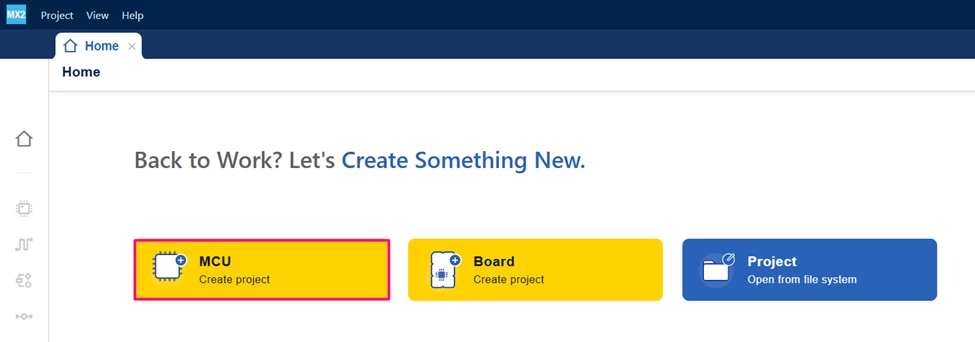
- Open STM32CubeMX2.
- Create a new STM32 project:
- In the board selector, choose [NUCLEO-C562RE] or [MCU]
- Enter your project name and location. Click [Automatically Download, Install & Create Project] to finish project creation.
- In the board selector, choose [NUCLEO-C562RE] or [MCU]
3.2 Enable and configure the CRC peripheral
- Go to "Peripherals" and [Activate] CRC under "Computing" → "CRC".
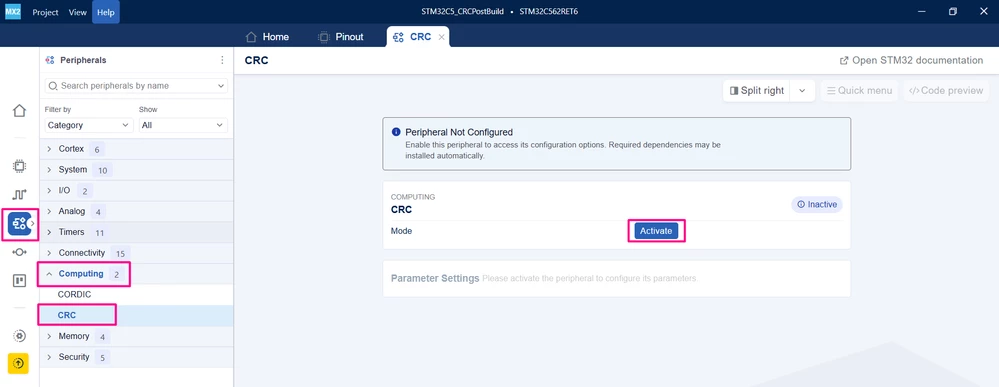
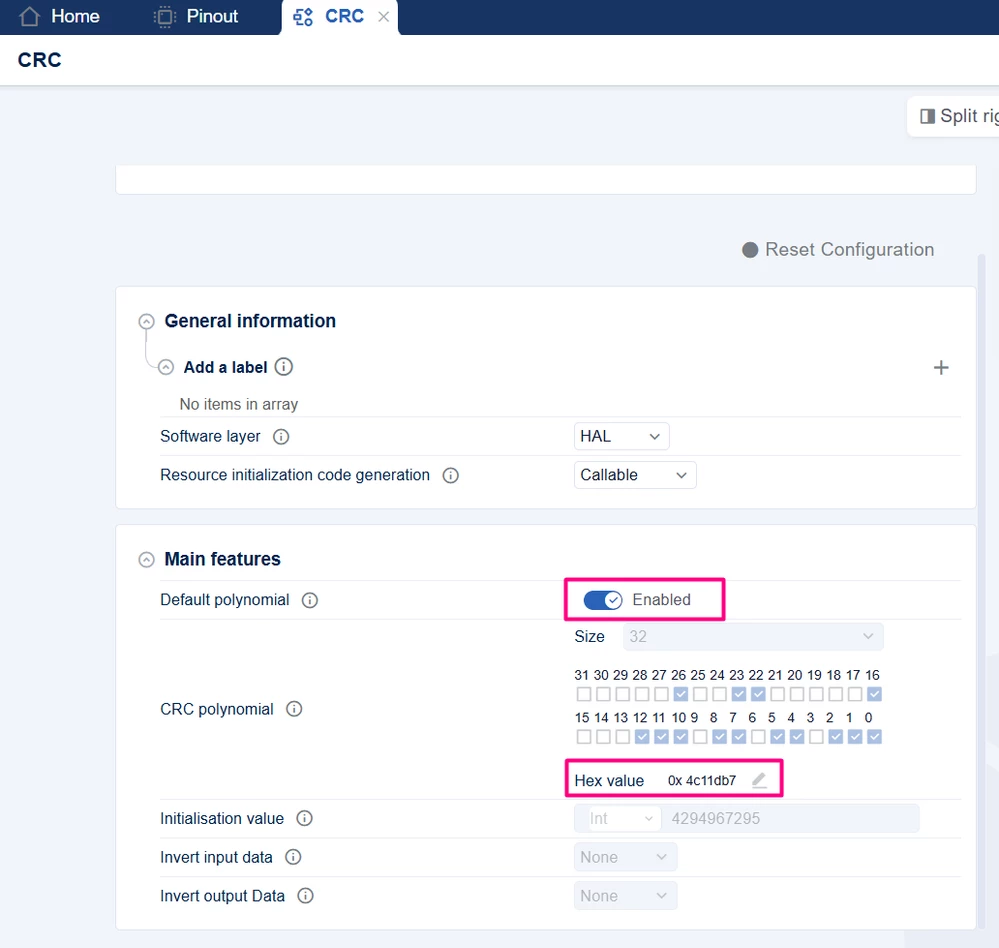
- In the CRC configuration: Keep the default polynomial and initial value unless your project requires a custom CRC.
- The typical default CRC on many STM32 devices is:
- Polynomial: 0x4c11db7
- Initial value: 0xFFFFFFFF = (4294967295)10
- The typical default CRC on many STM32 devices is:
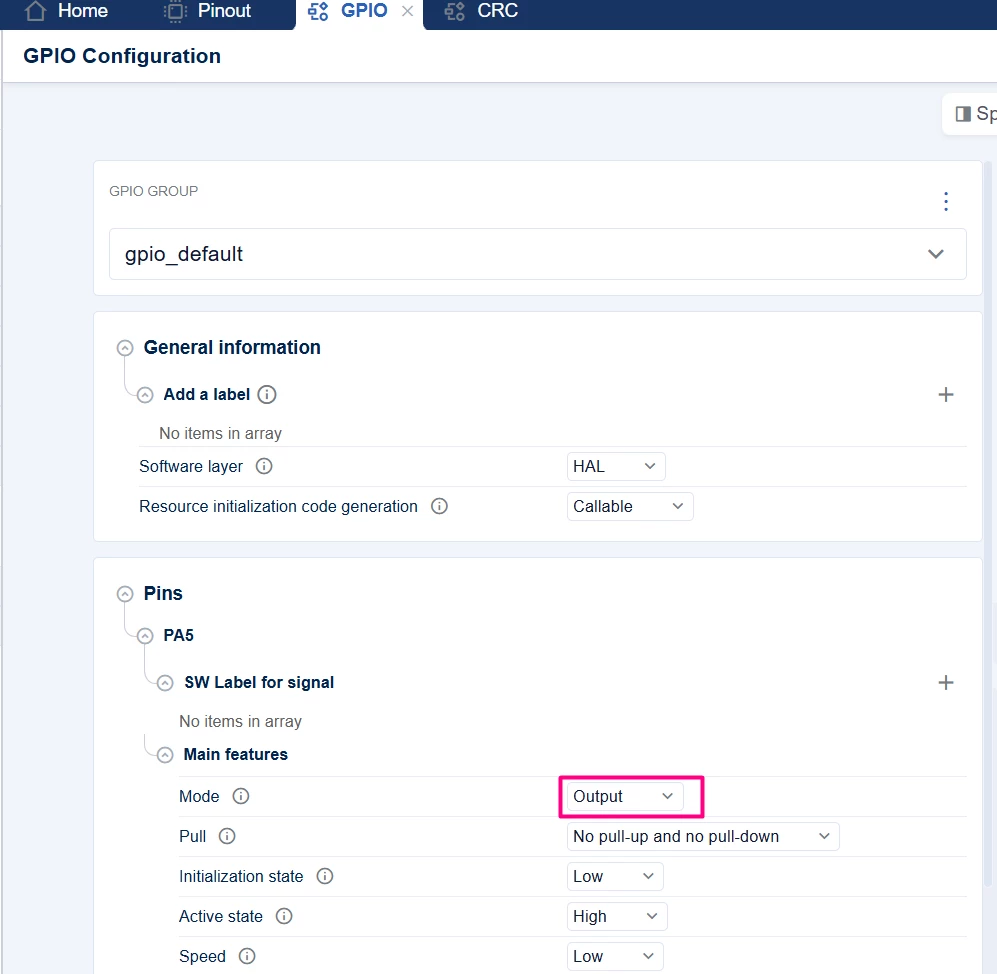
- Configure PA5 (User LED) as GPIO Output
- In the "Pinout" tab, select [Table View], and locate PA5.
- Change "GPIO mode" to [Configured] and configure.
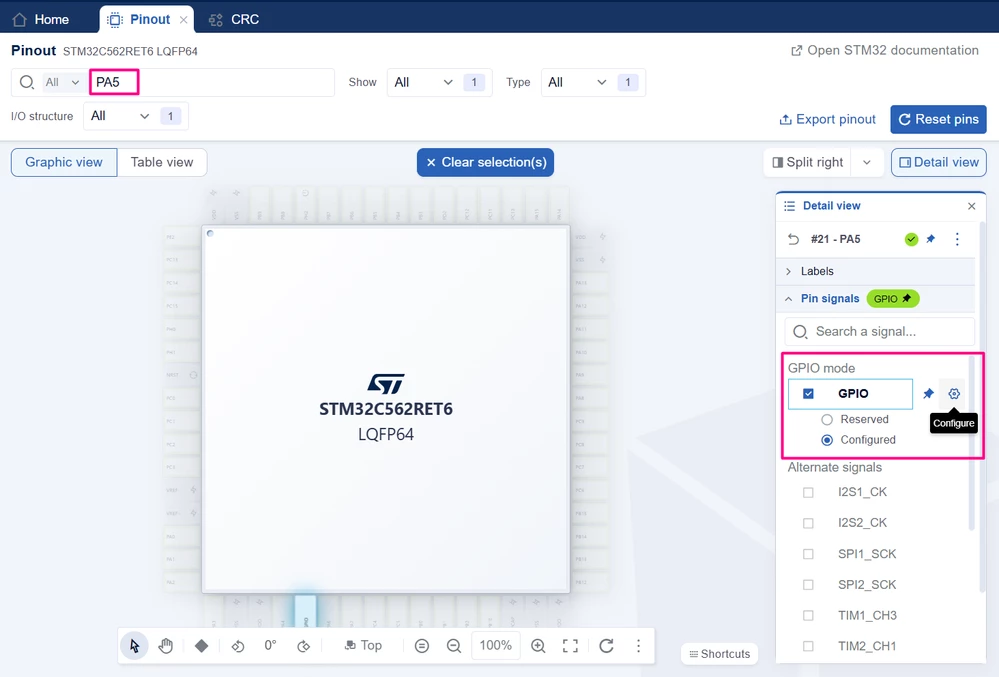
- In "Pins" → "PA5" → "Main features"l change the "Mode" to [Output]
- Configure USART Connected To STLINK VCP
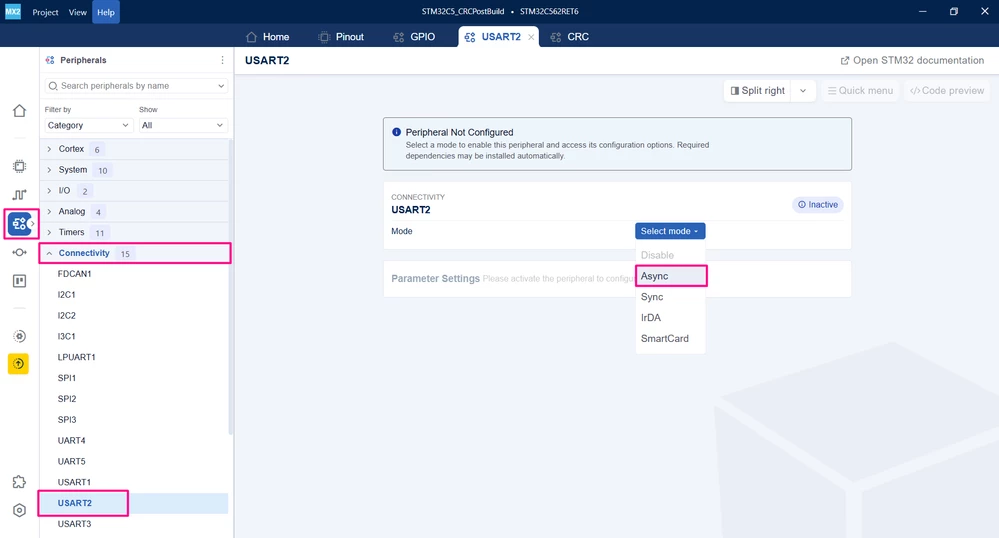
- Go to "Peripherals" → "Connectivity": Enable [USART2] in [Asynchronous] mode.
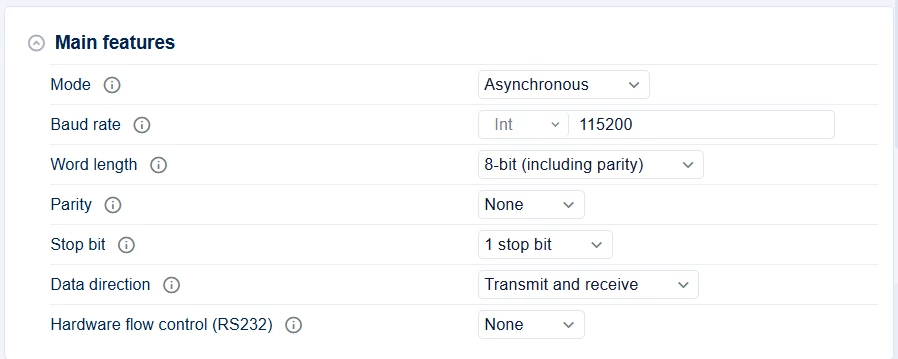
- Configure USART2 parameters (default).
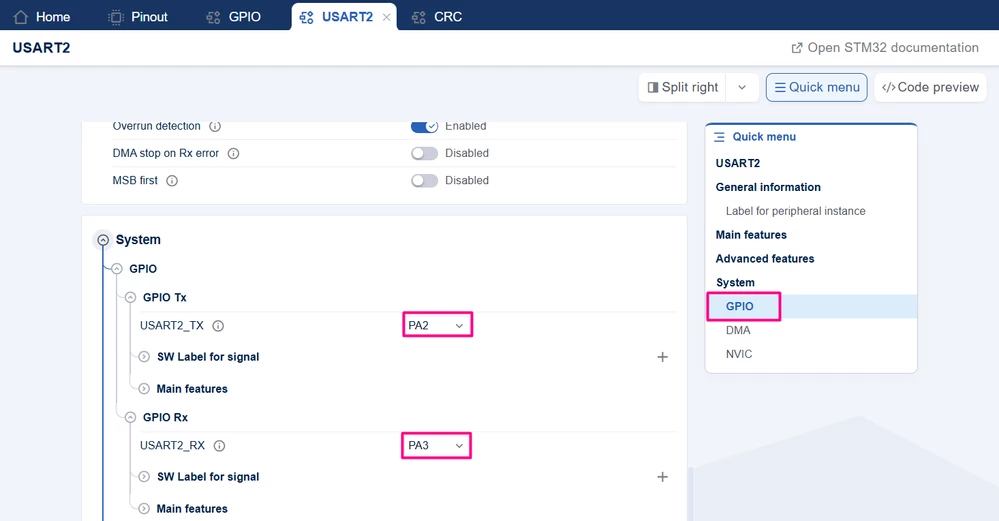
- Change the pins used to [PA2] and [PA3].
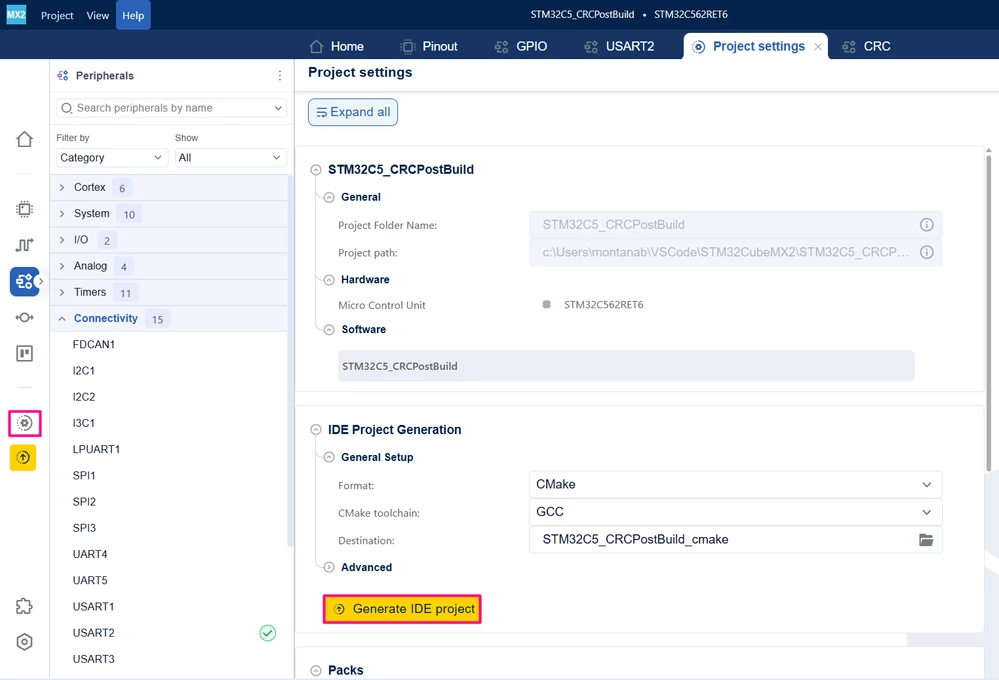
- Generate project sources for CMake and GCC if you plan to use the STM32 VS Code extension.
4. Integrate the attached main.c (CRC demo)
Replace the auto-generated main.c with the code below. This file already contains the CRC test logic and UART retargeting. The code defines the CRC calculation range and storage address as follows:
/**
 ******************************************************************************
 * file : main.c
 * brief : Main program body
 * Calls target system initialization then loop in main.
 ******************************************************************************
 *
 * Copyright (c) 2025 STMicroelectronics.
 * All rights reserved.
 *
 * This software is licensed under terms that can be found in the LICENSE file
 * in the root directory of this software component.
 * If no LICENSE file comes with this software, it is provided AS-IS.
 *
 ******************************************************************************
 */
/* Includes ------------------------------------------------------------------*/
#include "main.h"
#include "stm32c5xx_hal_gpio.h"
#include <stdio.h>
/* Private typedef -----------------------------------------------------------*/
/* Private define ------------------------------------------------------------*/
/* CRC calculation length */
#define BUFFER_SIZE (0x4FFC - 0x0000)/4 // CRC over 0x08000000..0x08004FFB
/* Address where the CRC value are stored */
#define STD_CRC_ADDR (FLASH_BASE + 0x4FFC) // 0x08004FFC

/* Private macro -------------------------------------------------------------*/
/* Private variables ---------------------------------------------------------*/
/* USER CODE BEGIN PV */
__IO uint32_t u32CRCValueHw = 0;
__IO uint32_t u32CRCValueSoft= 0xFFFFFFFF;
const uint32_t *myDataBuffer;

/* Private functions prototype -----------------------------------------------*/
uint32_t Crc32(uint32_t Crc, uint32_t Data);
void Error_Handler(void);

/**
 * brief: The application entry point.
 * retval: none but we specify int to comply with C99 standard
 */
int main(void)
{
 uint32_t crc_result = 0;
 uint16_t u16myDataBufferCount = BUFFER_SIZE;
 myDataBuffer = (uint32_t*) 0x08000000;

 if (mx_system_init() != SYSTEM_OK)
 {
 return (-1);
 }
 else
 {
 printf("\n\r================================ CRC TEST ================================\n\r");

 /* 1 - Compute the CRC by STM32 CRC Peripheral */
 /* CRC calculation by Hardware (peripheral) */
 /* BUFFER_SIZE is words; HAL expects bytes → BUFFER_SIZE * 4 */
 HAL_CRC_Accumulate(mx_crc_gethandle(), (uint32_t *)FLASH_BASE, BUFFER_SIZE * 4U, &crc_result);
 u32CRCValueHw = crc_result;

 /* CRC calculation by software */
 while (u16myDataBufferCount--)
 {
 u32CRCValueSoft= Crc32(u32CRCValueSoft, *myDataBuffer++);
 }

 /* 2 - Print the calculated checksum */
 printf("\tChecksum generated by STM32 hardware CRC Unit = 0x%08X\n\r", (unsigned int)u32CRCValueHw);
 printf("\tChecksum generated by STM32 software CRC = 0x%08X\n\r", (unsigned int)u32CRCValueSoft);

 /* 3 - Print the stored CRC */
 printf("\tChecksum stored at 0x%08X = 0x%08X\n\r", (unsigned int)STD_CRC_ADDR, *(unsigned int *)STD_CRC_ADDR);

 /* 4 - Check if the calculated CRC is equal the stored value */
 if(u32CRCValueHw == *(uint32_t *)STD_CRC_ADDR)
 {
 printf("CRC Check: OK...\n\r");
 printf("==========================================================================\n\r");
 }
 else
 {
 printf("CRC Check: Fail...\n\r");
 printf("==========================================================================\n\r");
 Error_Handler();
 }
 while (1) {
 /* Blink USER LED to indicates the running application */
 printf("Application running... \n\r");
 HAL_GPIO_TogglePin(HAL_GPIOA, HAL_GPIO_PIN_5);
 HAL_Delay(1000);
 }
 }
} /* end main */

/* CRC Calculation by software function */
uint32_t Crc32(uint32_t Crc, uint32_t Data)
{
 uint8_t index;
 Crc ^= (Data);

 for(index=0; index<32; index++)
 {
 if (Crc & 0x80000000)
 Crc = (Crc << 1) ^ 0x04C11DB7; // Polynomial used in STM32
 else
 Crc = (Crc << 1);
 }
 return(Crc);
}

int __io_putchar(int ch)
{
 HAL_UART_Transmit(mx_usart2_uart_gethandle(), (uint8_t *)&ch, 1, HAL_MAX_DELAY);
 return ch;
}

void Error_Handler(void)
{
 /* User can add his own implementation to report the HAL error return state */
 __disable_irq();
 while (1)
 {
 }
}
This means:
- The STM32C562RE flash base (FLASH_BASE) is 0x08000000.
- The device has 512 KB of flash, so the region is [0x08000000 .. 0x0807FFFF].
- CRC is computed over just part of the memory [0x08000000 .. 0x08004FFB].
- The CRC value is stored at STD_CRC_ADDR = 0x08004FFC.
- BUFFER_SIZE is the number of 32-bit words in the CRC range.
Resuming, in main.c we will:
- Compute both HW and SW CRC over flash region specified.
- Compare them with the stored CRC (generated by the SRecord tool).
- Print test results and blink the LED.
After that, build the code.
5. Post-build and debug flow with VS Code + CMake (GCC)
For the GCC toolchain, the post-build CRC insertion is handled directly in CMakeLists.txt. No extra batch file is required.
5.1 CMake post-build logic
Add the following code in the final of your main CMakeLists.txt:
add_custom_command(
 TARGET ${CMAKE_PROJECT_NAME}
 POST_BUILD
 # 1) Convert ELF to Intel HEX
 COMMAND ${CMAKE_OBJCOPY} -O ihex
 $<TARGET_FILE:${CMAKE_PROJECT_NAME}>
 ${CMAKE_PROJECT_NAME}.hex

 # 2) Compute STM32 CRC and inject it into a new HEX
 COMMAND "C:/srecord/bin/srec_cat.exe"
 ${CMAKE_PROJECT_NAME}.hex -Intel
 -fill 0xFF 0x08000000 0x08004FFC
 -STM32 0x08004FFC
 -o ${CMAKE_PROJECT_NAME}_SRECORD.hex -Intel

 # 3) Convert CRC-injected HEX back to ELF
 COMMAND ${CMAKE_OBJCOPY} -I ihex -O elf32-littlearm
 ${CMAKE_PROJECT_NAME}_SRECORD.hex
 ${CMAKE_PROJECT_NAME}_SRECORD.elf

 WORKING_DIRECTORY ${CMAKE_CURRENT_BINARY_DIR}
 COMMENT "Generating HEX and ${CMAKE_PROJECT_NAME}_SRECORD.hex with STM32 CRC at end of flash"
)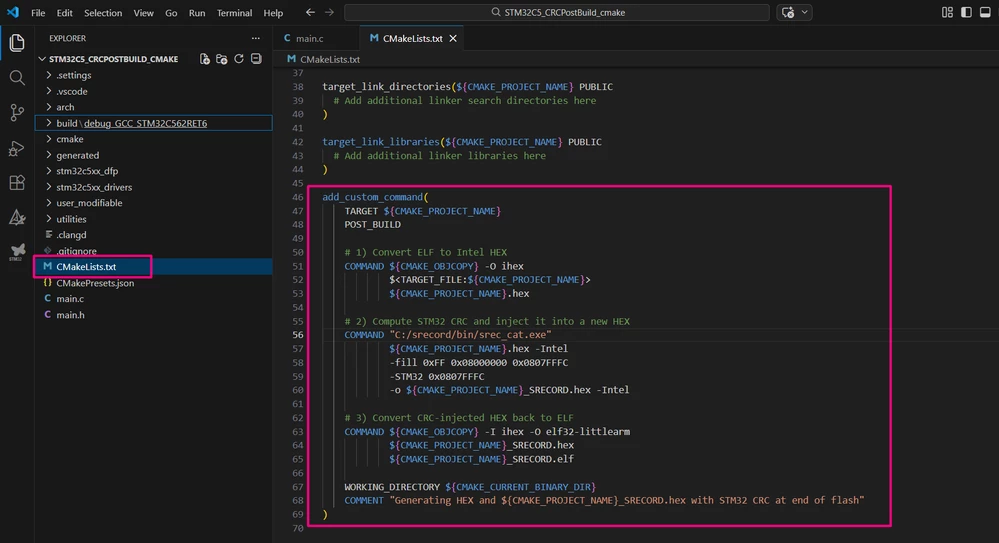
This sequence:
- Converts ${CMAKE_PROJECT_NAME}.elf to ${CMAKE_PROJECT_NAME}.hex
- Uses srec_cat.exe (default installation path) with:
- -fill 0xFF 0x08000000 0x08004FFC to fill gaps with 0xFF.
- -STM32 0x08004FFC to compute a CRC over [0x08000000, 0x08004FFC] and store it at 0x08004FFC.
- Writes ${CMAKE_PROJECT_NAME}_SRECORD.hex as the CRC-injected HEX.
- Converts the CRC-injected HEX back into ${CMAKE_PROJECT_NAME}_SRECORD.elf.
These addresses and range exactly match what main.c uses:
- Data region: [0x08000000 .. 0x08004FFB].
- CRC word: 0x08004FFC.
After each build, you have:
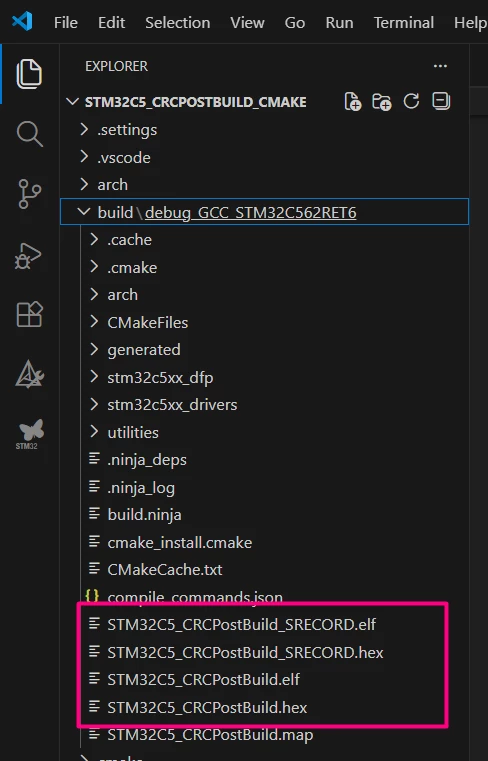
- ${CMAKE_PROJECT_NAME}.elf – original ELF.
- ${CMAKE_PROJECT_NAME}_SRECORD.hex – HEX with CRC inserted.
- ${CMAKE_PROJECT_NAME}_SRECORD.elf – ELF version of the CRC-injected image.
5.2 Programming and debugging the CRC-augmented image in VS Code
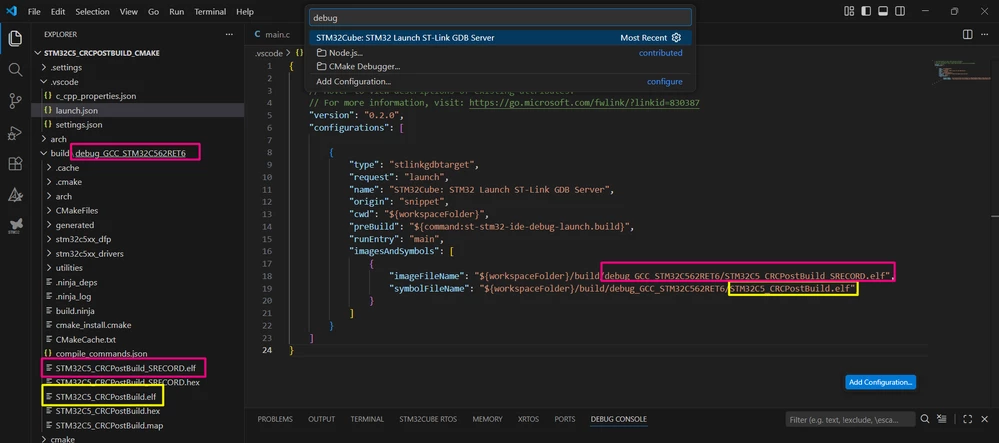
With the STM32 VS Code extension and your launch.json, the same debug configuration takes care of:
- Programming the CRC-injected image, and
- Using the original ELF for symbols.
launch.json:
Note: Make sure to adjust the *.elf name and path based on your own project.
{
 "version": "0.2.0",
 "configurations": [
 {
 "type": "stlinkgdbtarget",
 "request": "launch",
 "name": "CRC_Debug",
 "origin": "snippet",
 "cwd": "${workspaceFolder}",
 "preBuild": "${command:st-stm32-ide-debug-launch.build}",
 "runEntry": "main",
 "imagesAndSymbols": [
 {
 "imageFileName": "${workspaceFolder}/build/debug_GCC_NUCLEO-C562RE/NUCLEO-C562RE_CRC_SRECORD.elf",
 "symbolFileName": "${workspaceFolder}/build/debug_GCC_NUCLEO-C562RE/NUCLEO-C562RE_CRC.elf"
 }
 ]
 }
 ]
}
This configuration does the following:
- preBuild: calls the extension’s build command, which:
- Builds the project, and runs the CMake post-build step that:
- Generates NUCLEO-C562RE_CRC.hex.
- Runs srec_cat to produce NUCLEO-C562RE_CRC_SRECORD.hex.
- Converts _SRECORD.hex into NUCLEO-C562RE_CRC_SRECORD.elf.
- imagesAndSymbols[0].imageFileName:
- NUCLEO-C562RE_CRC_SRECORD.elf is used as the image to program into flash.
- This ELF encodes the same content as the CRC-patched HEX (CRC at 0x0807FFFC).
- imagesAndSymbols[0].symbolFileName:
- NUCLEO-C562RE_CRC.elf is used as the symbol file for debugging.
- This is the original, unmodified linker output.
- Builds the project, and runs the CMake post-build step that:
The complete programming and debug flow is:
- Press Start Debugging with configuration CRC_Debug.
- VS Code:
- Builds the project (via preBuild).
- Programs the target with NUCLEO-C562RE_CRC_SRECORD.elf (CRC-injected image).
- Starts GDB using symbols from NUCLEO-C562RE_CRC.elf.
- Execution runs to main, and you can debug while the device runs the CRC-augmented image.
6. Validation
Once the post-build CRC insertion and debug flows are in place, you can validate that the firmware correctly detects a valid and an invalid image.
Expected UART Output
- Build the project:
- In VS Code/CMake (GCC) using the CMake: Build command (which also generates the _SRECORD ELF/HEX), or
- Program the image that contains the CRC at 0x0807FFFC:
- For GCC/CMake: use NUCLEO-C562RE_CRC_SRECORD.elf (from VS Code launch). You can monitor the CRC stored via memory view.
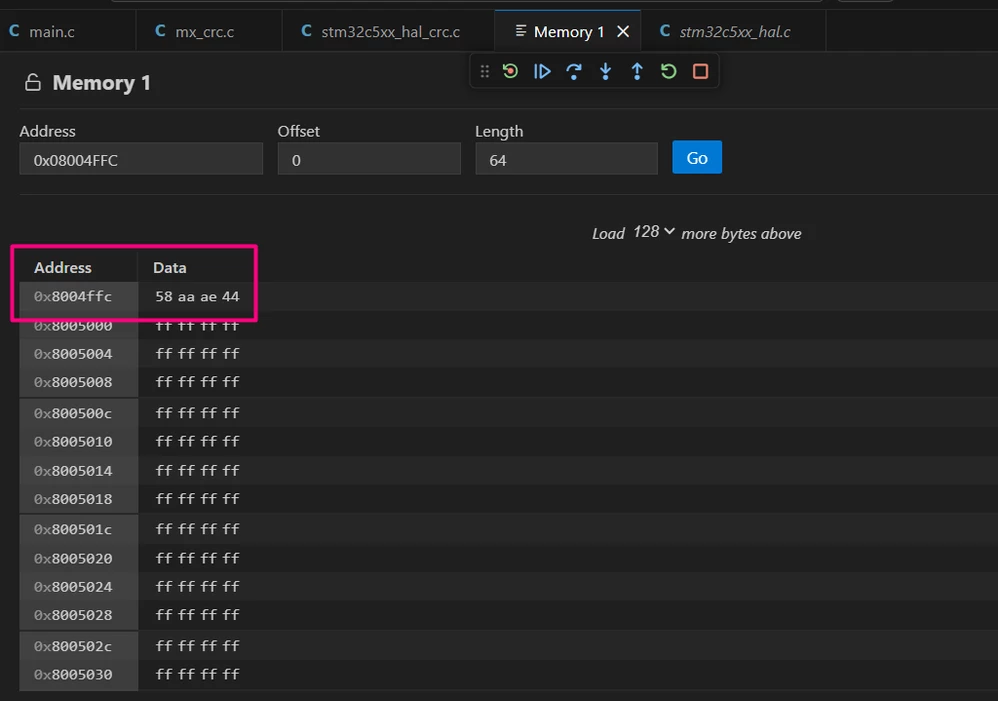
- Open a serial terminal on the STLINK VCP COM port at 115200 baud rate.
- Reset the board or start the debug session so the application runs from main().
If everything is correctly configured, you should see an output similar to:
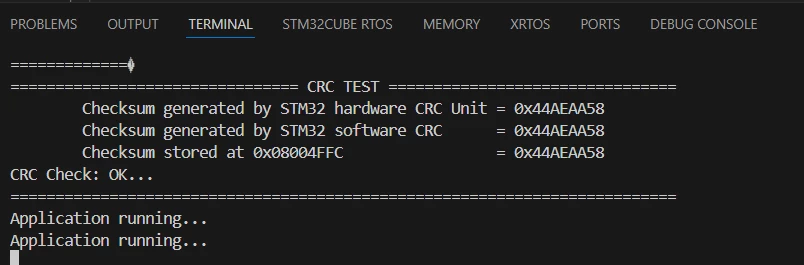
Where:
- Hardware and software CRC values are identical.
- Stored CRC at 0x08004FFC matches the computed values.
- The application enters the main loop and prints “Application running…” while blinking PA5.
This confirms:
- The build-time CRC matches the run-time computation.
- The flash range and storage address used by srec_cat or IAR checksum configuration match BUFFER_SIZE and STD_CRC_ADDR in main.c.
- CRC peripheral and UART are correctly configured.
Negative test (corrupted image)
To verify that the mechanism detects corrupted firmware:
- Take a CRC-augmented HEX file (for example, NUCLEO-C562RE_CRC_SRECORD.hex or the IAR HEX with checksum already inserted).
- Manually corrupt it, for example:
- Open the HEX file in a text editor and change one data byte (not the CRC word itself).
- Save as a new file (for example, NUCLEO-C562RE_CRC_CORRUPTED.hex).
- Program the corrupted HEX into the NUCLEO-C562RE.
- Run the application and observe the UART output. You should see that the computed CRC no longer matches the stored one. For example:

In this case:
- The application remains in Error_Handler() and does not enter the “Application running…” loop.
- This demonstrates that any unintended modification of the image (code or data) within the CRC range is detected at startup.
Conclusion
This article showed how to implement a build-time CRC mechanism for STM32 firmware on NUCLEO-C562RE using MX2, VS Code with CMake and GCC, and IAR EWARM. On the build side, you configured a post-build step that converts the ELF/OUT to HEX, computes a STM32-style CRC over the flash range, and stores the result at a given position via srec_cat in the GCC flow. On the run-time side, the attached main.c recomputes the CRC using both the STM32 CRC peripheral and a software Crc32() function and compares the result with the stored value, reporting the status over USART2.
This pattern gives you a self-checking firmware image that can detect corruption at boot, is independent of a specific toolchain, and still keeps the original ELF/OUT clean for debugging. By only adjusting the flash range and CRC placement address for each device, you can reuse the same approach across other STM32 projects and integrate robust image integrity checks into your standard development flow.
Related links
- Knowledge article: CRC computation in STM32 MCUs and post-build creation
- Knowledge article: How to calculate and generate post-build CRC
- Reference manual RM0522 - STM32C5 Arm®-based 32-bit MCUs
- Datasheet DS14927 - STM32C562xx
- STM32Cube for Visual Studio Code
- NUCLEO-C562RE
- STM32CubeMX2
- STM32 embedded software documentation
- STM32CubeMX2 software documentation