

How to build a bare metal USB Power Delivery Source application using an STM32
- June 4, 2026 at 4:19 PM
- 0 replies
- 230 views
Introduction
Following the previous article How to build a bare metal USB Power Delivery Sink application using STM32, this article shows how to build a USB Power Delivery source application on STM32. The example is demonstrated using the X-NUCLEO-SRC1M1 shield and the NUCLEO-G0B1RE board, in a bare metal cooperative superloop.
Hardware
- NUCLEO-G0B1RE (tested on rev C02)
- X-NUCLEO-SRC1M1
- A USB Power Delivery sink for testing, such as a PD-capable consumer device or a sink tester
- USB cable Type-A to Micro-B (for STLINK)
- USB Type-C® to Type-C® cable
Software
- STM32CubeMX (tested with V6.17.0).
- STM32CubeIDE for Visual Studio Code (tested with V3.9.0).
- STM32CubeMonitor-UCPD (tested with V1.4.0).
- X-CUBE-TCPP MCU firmware package (V4.2).
Configure STM32CubeMX
Configure the project as detailed in our ST wiki tutorial:
- Select X-CUBE-TCPP pack and components.
- Configure the UCPD1 in source mode.
- Set up USBPD middleware.
- Configure the number of PDO to define to 1 (fixed 5 V 0.1 A).
- Configure the Tracer and GUI.
- Configure the ADC for VBUS sensing.
- Configure the I2C for reading and writing to TCPP02 registers.
- SysTick remains system time base.
Generate the code
Generate the project from CubeMX, then add the required user code shown below.
You can use the attached ioc file in this article.
User Code section
The final project is available in our STM32 hotspot GitHub repository: CKB-STM32-USBPD-Source-Baremetal
Expected behavior
When the source application is configured correctly and a compatible USB PD sink is connected, the trace should typically show the following sequence:
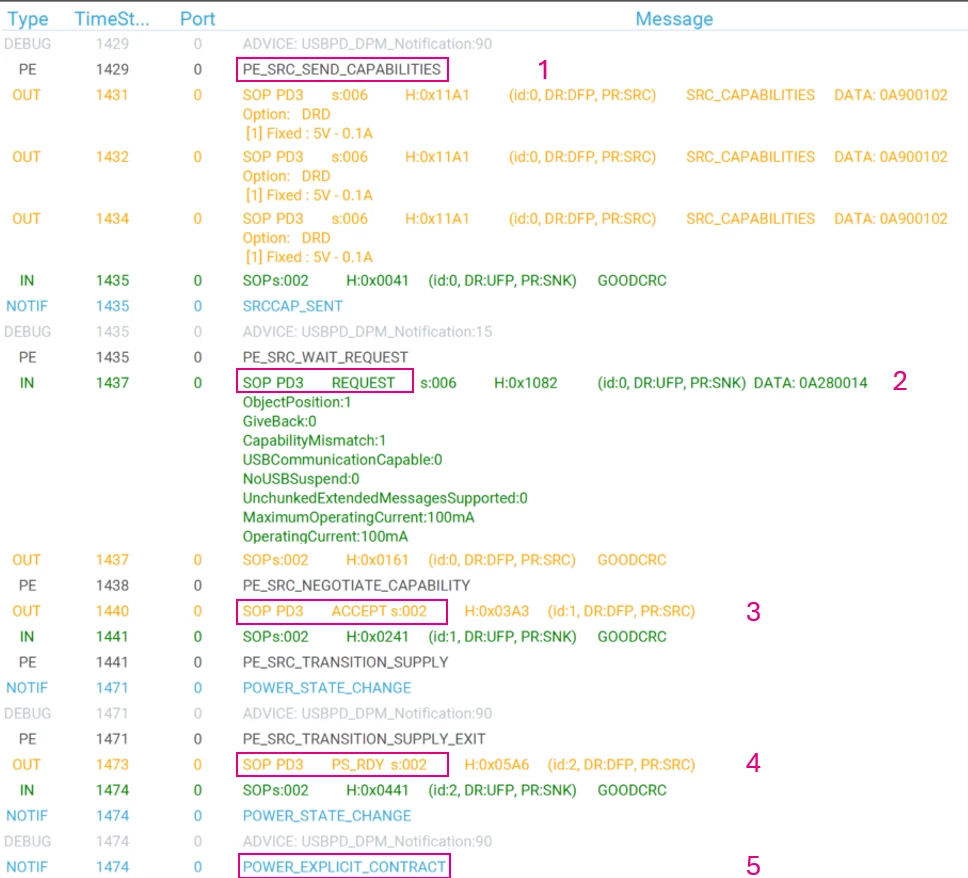
The capabilities are sent by the source (OUT message).
The request is sent by the sink (IN message).
After receiving the sink’s Request, the source validates the requested power profile and replies with ACCEPT if it can support it.
Depending on the selected power path and voltage transition type, the output voltage may start changing immediately after ACCEPT. When the output has reached the requested level and is stable, the source sends PS_RDY.
The contract negotiation ends by the POWER_EXPLICIT_CONTRACT.
Explanation
In bare metal STM32 USB PD applications, the USB PD stack runs in a cooperative superloop.
USBPD_DPM_Run() repeatedly services the Cable Detection module and the Policy Engine using SysTick.
 if ((HAL_GetTick() - DPM_Sleep_start[USBPD_PORT_COUNT]) >= DPM_Sleep_time[USBPD_PORT_COUNT])
 {
 DPM_Sleep_time[USBPD_PORT_COUNT] = USBPD_CAD_Process();
 DPM_Sleep_start[USBPD_PORT_COUNT] = HAL_GetTick();
 }

 uint32_t port = 0;

 for (port = 0; port < USBPD_PORT_COUNT; port++)
 {
 if ((HAL_GetTick() - DPM_Sleep_start[port]) >= DPM_Sleep_time[port])
 {
 DPM_Sleep_time[port] =
 USBPD_PE_StateMachine_SRC(port);
 DPM_Sleep_start[port] = HAL_GetTick();
 }
 }

 USBPD_DPM_UserExecute(NULL);
Conclusion
The application must provide correct board support functions, especially VBUS sensing, and CC attach handling, so the sink state machines can progress normally.