

How to build a bare metal USB Power Delivery Sink application using an STM32
- June 5, 2026 at 2:11 PM
- 0 replies
- 217 views
Introduction
This article shows how to build a USB Power Delivery sink application on STM32 using the X-NUCLEO-SNK1M1 shield and the NUCLEO-G0B1RE board, in a bare metal cooperative superloop.
The example uses the STM32 USB PD middleware and does not require an RTOS.
Hardware
-
- NUCLEO-G0B1RE (tested on rev C02)
- X-NUCLEO-SNK1M1
- A USB PD source device to test our USB PD Sink device
- USB cable Type A to Micro-B (for STLINK)
- USB Type-C® to Type-C® cable
Software
-
- STM32CubeMX (tested with V6.17.0)
- STM32CubeIDE for visual studio code (tested with V3.9.0)
- STM32CubeMonitor-UCPD (tested with V1.4.0)
- X-CUBE-TCPP MCU firmware package (V4.2)
Configure STM32CubeMX
Configure the project as detailed in wiki and the attached ioc file:
- Select X-CUBE-TCPP pack and components
- Configure UCPD1 in sink mode
- Set up USB PD middleware
- Configure tracer and GUI
- Configure ADC for VBUS sensing
- Configure SysTick as system time base
The USB PD middleware must be serviced regularly from the application loop. The main loop should remain responsive and must not contain long blocking delays.
Generate the code
Generate the project from CubeMX, then add the required user code shown below.
User Code Section
In stm32g0xx_it.c, add in the private variables section
extern ADC_HandleTypeDef hadc1;USBPD_DPM_UserInit
In usbpd_dpm_user.c, add the power interface initialization in dpm_user.c inside the USER CODE section:
/* USER CODE BEGIN USBPD_DPM_UserInit */
 /* PWR SET UP */
 if(USBPD_OK != USBPD_PWR_IF_Init())
 {
 return USBPD_ERROR;
 }
 return USBPD_OK;
/* USER CODE END USBPD_DPM_UserInit */
This initializes the power interface used by the USB PD stack.
Board part TCPP01 configuration
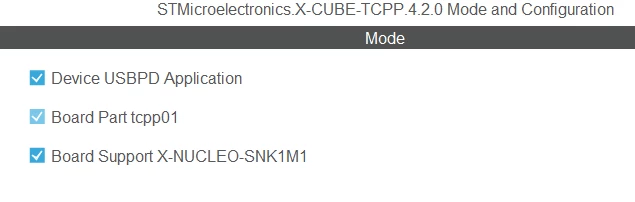
In usbpd_pwr_user.c, add the following defines to include board part TCPP01 defines
#include "main.h"
#include "snk1m1_conf.h"
BSP_USBPD_PWR_VBUSGetVoltage
In usbpd_pwr_user.c, implement the VBUS reading logic inside the USER CODE section.
 /* USER CODE BEGIN BSP_USBPD_PWR_VBUSGetVoltage */

 /* Check if instance is valid */
 int32_t ret = BSP_ERROR_NONE;
 if ((Instance >= USBPD_PWR_INSTANCES_NBR) || (NULL == pVoltage))
 {
 ret = BSP_ERROR_WRONG_PARAM;
 }
 else
 {
 uint32_t value;
	uint32_t vadc;
	uint32_t voltage;

 value = LL_ADC_REG_ReadConversionData12(ADC1);

	vadc = (value * VDDA_APPLI) / ADC_FULL_SCALE;
 voltage = vadc * (SNK1M1_VSENSE_RA + SNK1M1_VSENSE_RB ) / SNK1M1_VSENSE_RB ;
 *pVoltage = voltage;
 }
 return ret;
 /* USER CODE END BSP_USBPD_PWR_VBUSGetVoltage */
This function provides the measured VBUS voltage in millivolts to the stack.
STM32CubeMX automatically generates code at the start of USBPD_PWR_IF_GetPortPDOs, which should be removed.
// {
// *Size = USBPD_NbPDO[0];
// memcpy(Ptr,PORT0_PDO_ListSNK, sizeof(uint32_t) * USBPD_NbPDO[0]);
// }
In a bare metal USB PD application, the generated code typically runs the USB PD stack inside a superloop using HAL_GetTick() and USBPD_DPM_Run(), with no RTOS involved.
Explanation
USBPD_DPM_Run() never returns. It continuously executes the CAD and PE state machines
-
USBPD_CAD_Process(): Processes Cable attachment detection events.
-
USBPD_PE_StateMachine_SNK(port): Advances the policy engine for the sink role.
-
USBPD_DPM_UserExecute(NULL): Gives application-level code a chance to run periodically.
if ((HAL_GetTick() - DPM_Sleep_start[USBPD_PORT_COUNT]) >= DPM_Sleep_time[USBPD_PORT_COUNT])
 {
 DPM_Sleep_time[USBPD_PORT_COUNT] = USBPD_CAD_Process();
 DPM_Sleep_start[USBPD_PORT_COUNT] = HAL_GetTick();
 }

 uint32_t port = 0;
 for (port = 0; port < USBPD_PORT_COUNT; port++)
 {
 if ((HAL_GetTick() - DPM_Sleep_start[port]) >= DPM_Sleep_time[port])
 {
 DPM_Sleep_time[port] =
 USBPD_PE_StateMachine_SNK(port);
 DPM_Sleep_start[port] = HAL_GetTick();
 }
 }
The final project is available under CKB-STM32-USBPD-Sink-Baremetal
Expected behavior
When the sink application is configured correctly and a compatible USB PD source is connected, the trace should typically show the following sequence:
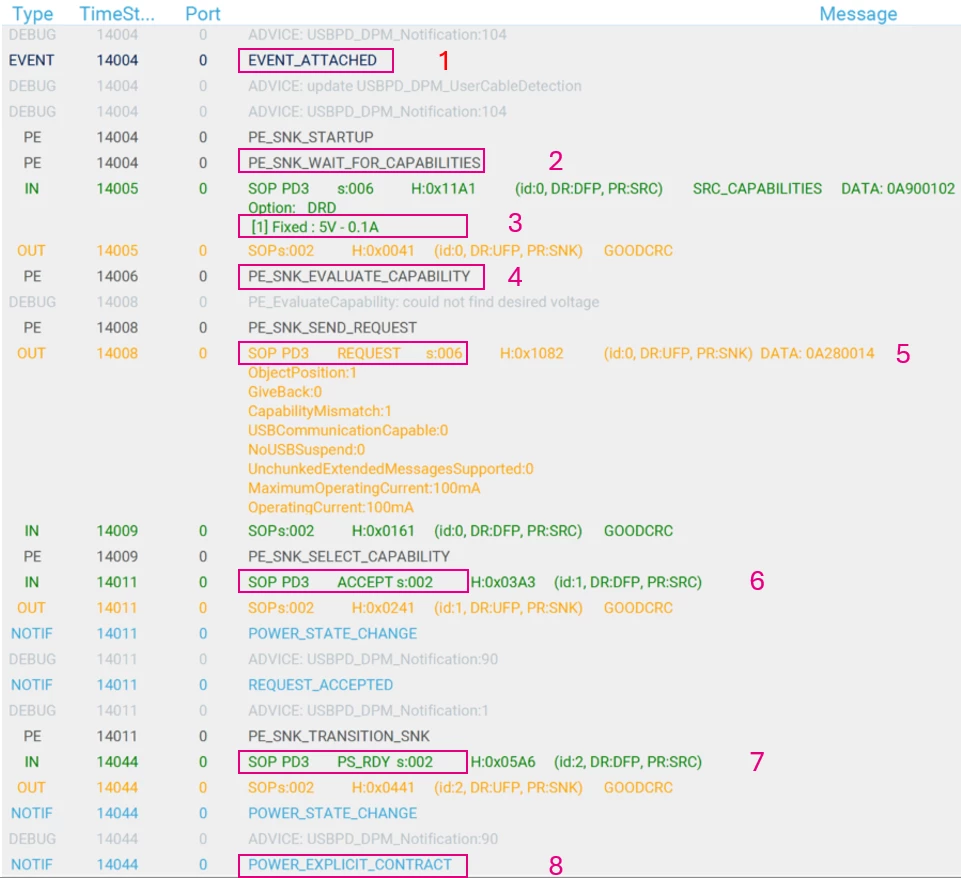
- The attachment is detected.
- The sink waits for source capabilities.
- The sink receives the source capabilities (IN message).
- The policy engine evaluates the advertised power profiles.
- The PE processes the received capabilities in
PE_SNK_EVALUATE_CAPABILITY. - A request Data Object is prepared according to the sink PDOs and the selected source PDO.
- The PE processes the received capabilities in
- The sink sends a request (OUT message).
- The source replies with
ACCEPT, meaning the power transition has started but is not yet complete. - The sink waits for
PS_RDY, to confirm that the requested power is actually ready. - The power contract is established.
Conclusion
In bare metal STM32 USB PD applications, the USB PD stack runs in a cooperative superloop.
USBPD_DPM_Run() repeatedly services the Cable Detection module and the Policy Engine using SysTick.
The application must provide correct board support functions, especially VBUS sensing, and CC attach handling, so the sink state machines can progress normally.
Next step: How to build a bare metal USB Power Delivery source application on STM32