Summary
This guide details the process of configuring the STM32H573ZIT3Q microcontroller project in STM32CubeMX to assign the TouchGFX middleware to the nonsecure TrustZone® application domain. This is crucial to leverage TrustZone® security features while running the graphical interface in the nonsecure context. This configuration is valid for the STM32H5 MCU series.
1. Step-by-step procedure
1.1 Step 1: Create a new project with STM32H573ZIT3Q
- Open STM32CubeMX.
- Click [New Project].
- In the MCU selector, enter [STM32H573ZIT3Q] and select it.
1.2 Step 2: Enable TrustZone®
- In the "Project Manager" tab, enable TrustZone®.
- Configure the TrustZone® memory partitions (secure and nonsecure) according to your application needs. This step ensures that the MCU operates with TrustZone® security enabled.

1.3 Step 3: Enable the X-CUBE-TOUCHGFX software pack
- Navigate to the "Software Packs or Middleware" section.
- Locate X-CUBE-TOUCHGFX.
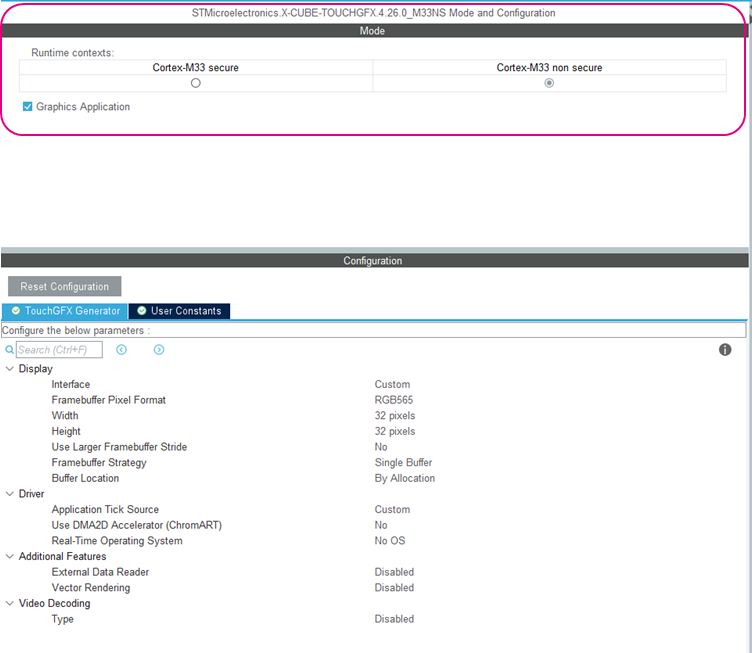
- Enable the TouchGFX package specifically in the Cortex®-M33 nonsecure context.

Note: The software pack must be enabled in the nonsecure domain to ensure the GUI runs outside the nonsecure context.
1.4 Step 4: Generate code
- After configuration, click on [Generate Code].
- STM32CubeMX creates a project with TrustZone® enabled and the TouchGFX middleware assigned to the nonsecure application.
Related links


