Join discussions in the Product Forums. Ask questions, learn from your peers, and share insights on ST solutions to accelerate your design journey.
Most recent activity
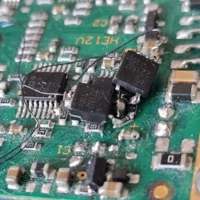
Please help finding what diode is this, picture attached, the marking looks like 6BD, Thank you for any help provided.
Hello,I have been working with a NUCLEO-WBA55CG board and the X-NUCLEO-IKS02A1 expansion board. When running my initialization code, the program execution jumps to the error handler. Using a debugger, I've pinpointed the failure to the ISM330DHCX_Set_Mem_Bank function. The function returns an error status, which triggers my error handling routine. My initial approach was to replicate the project setup described in DataLogTerminal project . This led directly to the failure at ISM330DHCX_Set_Mem_Bank. I have compared my initialization code against the reference implementation in Board Extension IKS02A1 ISM330DHCX_0_Probe function and they appear to be identical.My Questions:Is there a known compatibility issue for using ISM330DHCX with the NUCLEO-WBA55CG board?Could this failure point to a I2C communication problem or a timing issue? How can I fix it?Any recommended procedure for initializing I2C or this sensor? Here is the code that I added:/* USER CODE BEGIN Includes */ #incl
Hello colleagues.My first post here...I have seen somewhere in youtube tha it is possible to provide URL to the specific Github location and use code from there as a library or some sort of included component. It has to be special file in Github serving as a "link" or index. Unfortunately, I forgot where I hve seen that and cannot find way to do that. Any pointers ? Thanks.
[VERSION]: MCWB v6.3.2[TOOL]: STM32CubeMX v6.13.0, STM32CubeIDE v1.11.5[BOARD]: STEVAL-PTOOL1V1[PROJECT]: STEVAL-PTOOL1V1_6S_SL and STEVAL-PTOOL1V1_6S_HLWhen I run the STEVAL-PTOOL1V1_6S_SL project generated by STM32CubeMX, the program loads and runs as expected. When I run the STEVAL-PTOOL1V1_6S_HL (which is just the Hall-effect version instead of the sensorless SL version), the program loads and runs when the debugger is connected, but would not run properly after a power cycle, unless I reset the chip using NRST. Both were tested on the same PCB.I thought the program wasn't booting, but determined that it actually was, but it just wasn't getting past some of the init functions (I think the MX_MotorControl_Init call). If I add a delay (~1s) after the HAL_Init() and SystemClock_Config() calls, before the other peripheral init calls are made, the program runs normally after a reboot for the most part. I still see som
Hey there I have seen a few posts on this and tried a number of things:1 I went through the process in the user manual and get the error shown2. I tried to reboot board with the jumper moved to boot mode. I put it into UART mode but then got similar errors (Error Activating Device : KO. ...."I get the same error on the programmer and the Cube IDE. USB cable is good (it works with other ST eval kits)I'm running Windows 11, programmer is the latest v2.21.0, Cube is v2.0.0. I installed the cube expansion and built the beacon code. As a note, I can see the device using the ST BLE Toolbox and it shows as an Apple iBeacon and a peer to peer server and is unconnectable.When I put the boot mode jumper on then power goes down to 0.26V when I connect over STLink. And device does get hot but not sure if thats normal
I'm using zephyr sysbuild approach to get mcuboot along with the application (application runs in XIP mode)I see that application proceeds to some point; I presume to the point where I enable MCO LL_RCC_EnableMCO(LL_RCC_MCO1)And then it gets stuck, since I'm not able to attach gdb yet, I'm not sure where to digKindly appreciate any help hereSeems that it interferes with other clock subsystems, but don't know whichI haven't found anything in errata yetPlease advise, thank youEDIT: Although I'm able to see MCO pin (PA8) toggling with the desired frequency, which means SEL and PRE DIV were ok
I don't know what happened recently (or perhaps longer) with the ST website, but where can I find the ST products?
Hello, I may have accidently either shorted or applied voltage to my UART TX and RX pins on my MCU which is on a custom PCB and now my PCB is pulling +60 mA of current under load. I am now experiencing difficulty programming the chip and I am getting errors such as "unable to recognize device" and "check power and cable". I wonder if exposing my UART pins to ground or power caused some sort of ESD or electrical damage inside the MCU and that combined with a longer power supply cable is causing a jump in current that makes it difficult to flash now? Thank you.
Hi,After updated to STM32cubeIDE 1.18.00 I get these as errors. In 1.17.0 it was only warnings.The code still works if I ignore the errors and just press "Proceed" while debugging.Here are the logs as text (.text._close_r+0xc): warning: _close is not implemented and will always fail C:/ST/STM32CubeIDE_1.11.2/STM32CubeIDE/plugins/com.st.stm32cube.ide.mcu.externaltools.gnu-tools-for-stm32.13.3.rel1.win32_1.0.0.202411081344/tools/bin/../lib/gcc/arm-none-eabi/13.3.1/../../../../arm-none-eabi/bin/ld.exe: C:/ST/STM32CubeIDE_1.11.2/STM32CubeIDE/plugins/com.st.stm32cube.ide.mcu.externaltools.gnu-tools-for-stm32.13.3.rel1.win32_1.0.0.202411081344/tools/bin/../lib/gcc/arm-none-eabi/13.3.1/../../../../arm-none-eabi/lib/thumb/v7e-m+dp/hard\libc_nano.a(libc_a-closer.o): note: the message above does not take linker garbage collection into account C:/ST/STM32CubeIDE_1.11.2/STM32CubeIDE/plugins/com.st.stm32cube.ide.mcu.externaltools.gnu-tools-for-stm32.13.3.rel1.win32_1.0.0.202411081344/tools/bin
I want to change the selected toolchain for a project by clicking on "Setup STM32Cube project(s)" and selecting the desired toolchain and clicking save.I want to change from clang to gcc to test a few things.It keeps using the old toolchain (clang). Even if I delete the build folder.If I delete CMakePresets.json I get an error that the project requires a preset.If I modify CMakePresets.json I get the following warning message when building:[cmake] Manually-specified variables were not used by the project:[cmake] [cmake] CMAKE_TOOLCHAIN_FILE [cmake]In STM32CubeMX the toolchain option is greyed out.What's the proper way to change the tool chain?
This is a big problem for me, as I have thousands of products out there using the older BLE_OTA bootloaders, bootloaders which themselves are not updatable by OTA. I have a custom phone app for iOS and Android that interfaces with these products and provides OTA updates.I was about to release an update to the product firmware via my phone app that incorporates several important fixes, but in regression testing this firmware, I found that older units could not successfully perform OTA updates using my new firmware (though units programmed with the updated bootloader could). I tried many combinations to see what worked and what doesn't work, before narrowing the problem down: FUSBootloaderStackStack locationFirmware Git hashResult + notes01.23 plus b87d60Worked like normal the second time.1.2.0.01.20.01.20.0.20x805A000b87d60No STM_OTA when commanded1.2.0.01.20.01.22.0.20x805C000b87d60No STM_OTA when commanded1.2.0.01.23 plus1.22.0.20x805C000b87d60W
Now I've been sitting here for 2 long day's and still haven't been able to solve the BUS-error problem. I'm logging with Kvaser USB CAN card so what I want to see right now is some healthy frames coming out from it, but no, only bus-errors, so I thought it was time to ask the community about it. I'm not a newbie in CAN and I've made an earlier project with STM32F302R8 which worked fine, but with this processor I seem to be stuck. The main.c attached is only me trying to get the interfaces up and running. What is strange is also the FDCAN Protocol status which doesn't seem to give me correct info, for example the "Activity status" which seems to be 8. Are there a friendly soul somewhere that could help me out? Intention is to get the classic CAN working and then Move over to CANFD. (With a different PC CAN interface of course) Thank you in advance, Johan [FDCAN] Classic 125 kbit/s up (PCLK1=64000000 Hz) [FDCAN] LEC=7, DLE=7, ACT=8, EP=0, Warn=0, BO=0, RxESI=0, RxBRS=0, RxFD=0, PE=0, TDC
Hello,I saw that some people had a similar problem to mine. When generating the project on MC Workbench I have the following error: STM32CubeMX not found - ver. "6.0.0" or higher is requiredBut I have STM32CubeMX installed with version 6.14.0I tried to install STM32CubeMX for all users or to change the Windows language to English as I saw on other posts but without success.Does anyone have another suggestion? Here are some various screenshots that have been asked in similar posts Thanks for your help !
Hello everyone, I'm trying to do FSK and PSK modulation using HRTIM in STM32G474RE but I have what I want when I use Oscillo to display. For example, '1' = 45 kHz and '0' = 55 kHz. I want to transmit the message "1010" where each bit is 10µs long (FSK) '1' = 5 kHz and '0' = 10 kHz. Carrier frequency = 400 kHz. I want to transmit the message "1010" where each bit is 10µs long and with an phase shift of 11.5°. How can I do this ? If someone can help me or have an another solution using nucleo ST board. Do not hesitate to suggest me please. Best regards,
Hello Everyone,I designed pcb while to use STM32H723VGT6. I used an Ethernet phy called DP83848 to communicate via Ethernet.I have previously used this Ethernet phy with F4 series processors and communicated via Ethernet without any problems. I am using CubeIDE version 1.18.0. I make the settings from CubeIDE as follows.I am setting RMII mode in ETH from connectivity. I am changing MAC address and i am enabling ethernet global interrupt from NVIC.I am enabling LWIP from Middleware and software Packs. I am disabling DHCP Module and i am setting IP and Subnetmask from general settings. Then I set my phy from platform settings. Only LAN8742 appears in the list.I build the code by selecting this Phy.Then I add the dp83848.c and .h files that I generated for the F4 series to my own project. In ethernetif.c, I replace everything related to LAN8742 with DP83848 functions. All of the functions have the same name. I build the code and no problems occured during the build.I uploaded th
Hi, I wanted to ask a question about brushless and MCSDK motors. When buying a motor, inertia is often listed, but friction isn't. Can I calculate friction using inertia, or is friction a parameter that can be omitted?
We are pleased to announce that STM32CubeCLT 1.20.0 release is available. What is new in 1.20.0: Maintenance of the previous version: Updated in accordance with STM32CubeIDE v2.0.0 Update of Clang toolchain version 19.1.6 Update of GCC 13.3.rel1 Update of STM32CubeProgrammer to version 2.21.0 Update of ST-LINK GDB server to version 7.12.0 Update of JRE™ to version 21.0.8 Main fixed issues in 1.20.0: No fixed issue to report. Know problems and limitations in 1.20.0: The user must specify the path of STM32CubeProgrammer/bin as argument when executing STLINK_gdbserver as shown in the example below: ST-LINK_gdbserver.exe -cp /c/ST/STM32CubeCLT/STM32CubeCLT/STM32CubeProgrammer/bin How to get STM32CubeCLT 1.20.0: Under this link
Hello,For a lighting application, I am looking for a multiple outputs IC capable of 250 mA per output (or summing several outputs to reach that current), allowing low level dimming (12 bits dimming minimum). It has to include serial communication to be controlled by an MCU. The MCU will control many block of LEDs.Any help is appreciated, Thanks,
I use a STM32L496 and I'm implementing the SPI1 port for the communication with an external device.I have used CubeMX to set things up with SPI_NSS_HARD_OUTPUT and an external pull-up on the SPI1_NSS pin. I have connected SPI1_MOSI to SPI1_MISO to read the transmitted data back.When using HAL_SPI_TransmitReceive_DMA() or HAL_SPI_TransmitReceive_IT() the data is all send and received. The 32 bits are transferred within about 16us as SPI1_SCK is at 2MHz. SPI1_NSS goes low when __HAL_SPI_ENABLE() is used by HAL_SPI_TransmitReceive_DMA() or HAL_SPI_TransmitReceive_IT(). But after this it takes about 200us before SPI1_NSS goes high when __HAL_SPI_DISABLE() is used from within HAL_SPI_RxCpltCallback().Why this long delay?There is no difference between HAL_SPI_TransmitReceive_DMA() and HAL_SPI_TransmitReceive_IT().When using SPI_NSS_SOFT instead of SPI_NSS_HARD_OUTPUT and make SPI1_NSS low before the use of HAL_SPI_TransmitReceive_DMA() or HAL_SPI_TransmitReceive_IT(), and hig
I have installed the latest IDE in my windows 7 laptop. The installation was successful. When I open the application, I face the following error: An error has occurred. See the log file ....\configuration\.Log file:!SESSION 2025-11-22 14:02:55.630 -----------------------------------------------eclipse.buildId=Version 2.0.0java.version=21.0.8java.vendor=Eclipse AdoptiumBootLoader constants: OS=win32, ARCH=x86_64, WS=win32, NL=en_INCommand-line arguments: -os win32 -ws win32 -arch x86_64!ENTRY org.eclipse.osgi 4 0 2025-11-22 14:02:59.045!MESSAGE Application error!STACK 1java.lang.UnsatisfiedLinkError: Could not load SWT library. Reasons:C:\ST\STM32CubeIDE_2.0.0\STM32CubeIDE\configuration\org.eclipse.osgi\366\0\.cp\swt-win32-4966r5.dll: The specified procedure could not be foundno swt-win32 in java.library.path: C:\ST\STM32CubeIDE_2.0.0\STM32CubeIDE;C:\Windows\Sun\Java\bin;C:\Windows\system32;C:\Windows;C:/ST/STM32CubeIDE_2.0.0/STM32CubeIDE//plugins/com.st.stm32cube.ide.jre.win64_3.4.100.
Hello,I can not start STM32CubeIDE_2.0.0.I have the following error:D:\ProgramFiles\STMicroelectronics\STM32CubeIDE_2.0.0\STM32CubeIDE;;.C:\Users\Mich\.swt\lib\win32\x86_64\swt-win32-4966r5.dll: La procedure specifiee est introuvableCan't load library: C:\Users\Mich\.swt\lib\win32\x86_64\swt-win32.dllCan't load library: C:\Users\Mich\.swt\lib\win32\x86_64\swt.dllC:\Users\Mich\.swt\lib\win32\x86_64\swt-win32-4966r5.dll: La procedure specifiee est introuvableIn directory .swt\lib\win32\x86_64 there is only swt-win32-4966r5.dll file.Why the installer does not put these files?Do you have any correction please?Best regardsMichel
Hello ST Community,I am trying to run the ST67W6X_HTTPS_Client example project for the STM32-U575ZITX-Q Board, but with a U5A5ZJ-Q board instead (The .ioc file was changed to suit the board difference). I am getting a successfull initialization as well as a good scan and connection to the Wi-Fi network, however when trying to fetch data from the Openweather API i am getting a Socket connection error. I had suspicions that the failure was due to the GPDMA being configured differently if between the board im using and the one made for the project, however when in debug mode in never seems to go into a fault. Below is the serial output of the logs i am getting as well as the ioc file i have changed to suit the different board. Any help would be much appreciated!#### Welcome to ST67W6X Wi-Fi HTTPS Client Application ##### # build: 12:57:02 Nov 25 2025 --------------- Host info --------------- Host FW Version: 1.1.0 --------------- ST67W6X info ------------ ST67W6X MW Version: 1.1.1 AT Vers
I recently purchased some STMF303 boards for implementing a free pre-compiled HEX file.I received the boards with the STM32F303CCT6 chip, but the pre-compiled file was for the STM32F303CBT6 chip. The HEX loads but does not run on any 303CCT6.Are there significant compatibility differences between the CCT6 and CBT6 chips that would justify this?Could I have lost the purchased boards?Thank you.
Major change in SigningTool for STM32N6 in STM32CubeProgrammer v2.21.0 This release, we decided to change signing tool behavior to not automatically align the payload to 0x400 with padding bytes, since this is not necessary for other STM32 series. To sign binaries for STM32N6, please take care to add the -align or --align option to the signing tool command, example: >STM32_SigningTool_CLI.exe -bin Project.bin -nk -of 0x80000000 -t fsbl -o Project-trusted.bin -hv 2.3 -dump Project-trusted.bin -align
Hello,I have a custom STM32H533RET6 board that I can't program. Following advice found on the ST website I am trying to use CubeProgrammer to mass erase the flash, however it is failing to do so.I am using an STLINK-V3MINIE with Mode: Under reset and Reset Mode: Hardware resetNOTE: the guide says to use software reset, but upon connecting CubeProgrammer switches this to hardware reset. I don't understand why? I can connect to the the board and the mcu type is correctly identifiedHere is the initial connection log:11:47:25 : STM32CubeProgrammer API v2.21.0 | Windows-64Bits11:47:40:870 : UR connection mode is defined with the HWrst reset mode11:47:40:878 : ST-LINK SN : 003A003C323451093630353211:47:40:879 : ST-LINK FW : V3J16M811:47:40:879 : Board : STLINK-V3MINIE11:47:40:879 : Voltage : 2.39V11:47:40:879 : Connection to AP 0 requested and failed, Connection established with AP 111:47:40:880 : SWD freq : 8000 KHz11:47:40:880 : Connect mode: Under Reset11:47:40:880 : Reset mode
ST Community highlights – April to June 2026
Already have an account? Login
No account yet? Create an account
Enter your E-mail address. We'll send you an e-mail with instructions to reset your password.