cancel
Showing results for 
Search instead for 
Did you mean: 

connection via UART with STM32CubeProgrammer

Domy_ST
Senior

Hello ST Community,

I'm trying to connect via UART instead of ST_LINK to the NUCLEO-H755ZI-Q, but it just won't connect.

First, I connect the 3.3V pin to BOOT0, and it activates in bootloader mode. Then, I click "Connect" in the STM32CubeProgrammer environment, and I get this error:
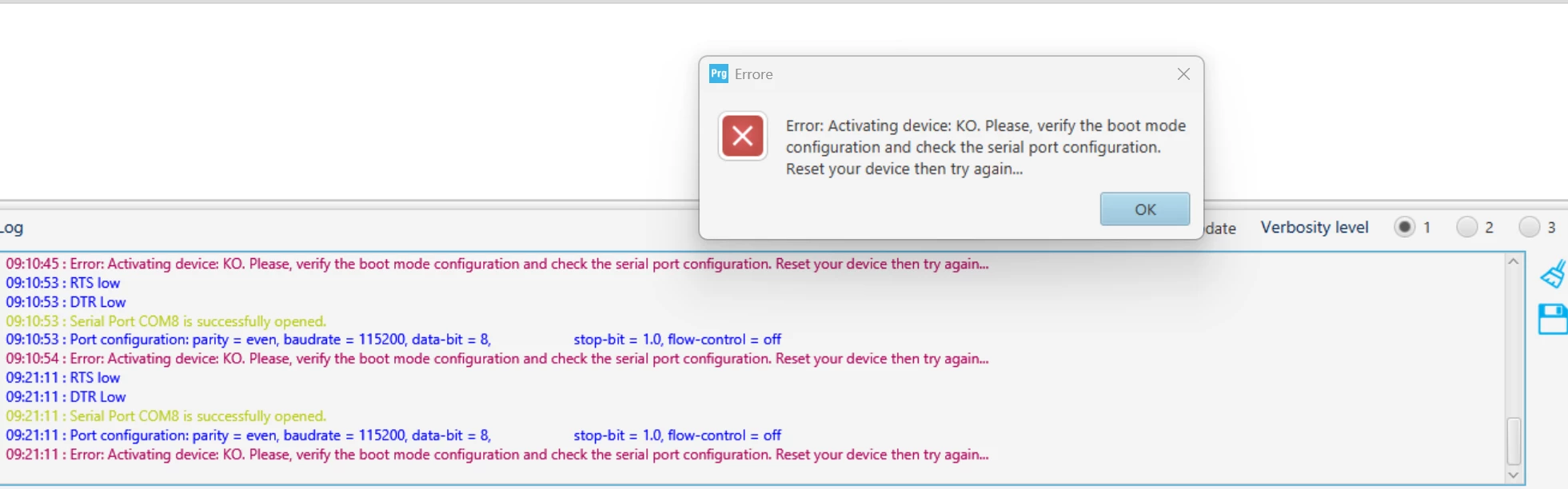
image.png

The UART's RX and TX (it's a USB SERIAL CH340) are connected to the Arduino pin PD5 and PD6 (USART2) of the NUCLEO-H755ZI-Q. Pin GND are also connected correctly. The settings on the STM32CubeProgrammer are as shown in the photo:
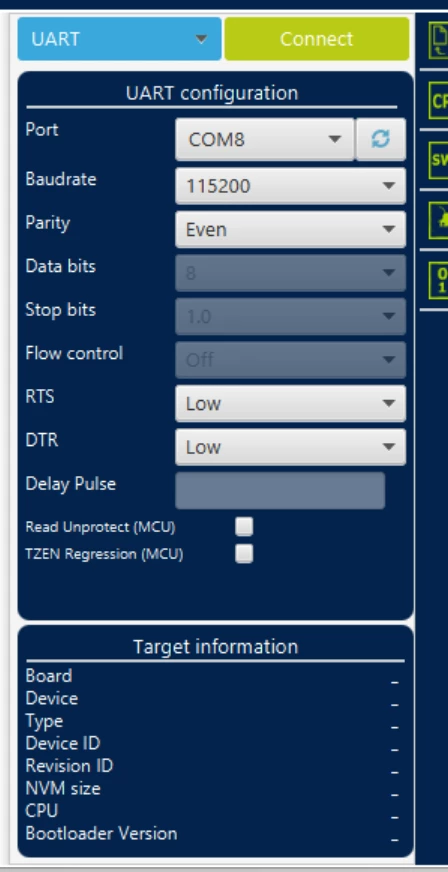
image.png

Why isn't it connecting, or is there something wrong?

thanks for supports
1 ACCEPTED SOLUTION

Accepted Solutions
mƎALLEm
ST Employee

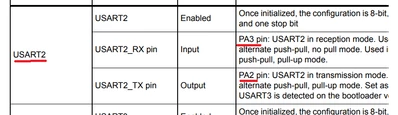
You are using the wrong GPIOs pins for USART2. AN2606 indicates the following:

mALLEm_2-1776334517326.png

And I've already posted an answer in your previous debugger via UART without ST-LINK on NUCLEO-H755ZI-Q:

@Domy_ST wrote:

Yes, using the ST Bootloader via UART, you don't want to connect to the STm32CubeProgrammer, as described in this post:

https://community.st.com/t5/stm32cubeprogrammer-mcus/connection-via-uart-with-stm32cubeprogrammer/td-p/892681 

Did you use the same resource needed by the UART that are indicated in the AN2606 "Introduction to system memory boot mode on STM32 MCUs"?

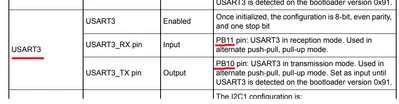
USART3 needs PB11 and PB10 for the bootloader: 

mALLEm_0-1776334259104.png

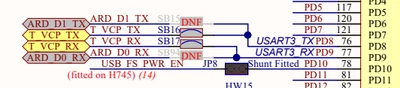
While in the NUCLEO board is connected to PD8 and PD9 as indicated by the schematic:

mALLEm_1-1776334259149.png


So you need to wire connect PB10 to PD8 and PB11 to PD9, so the STLINK-VCP will be connected to the USART3 and use the ST bootloader.

You don't need that "USB SERIAL CH340" and use STLINK VCP.

You need to follow the Boot loader process using the boot pin:

1- Put the BOOT0 pin High

2- Reset the device

3- Connect with the CubeProgrammer

That's all.

Hope that helps.

To give better visibility on the answered topics, please click on "Accept as Solution" on the reply which solved your issue or answered your question.

View solution in original post

3 REPLIES 3
Andrew Neil
Super User

Same question here: debugger via UART without ST-LINK on NUCLEO-H755ZI-Q

A complex system that works is invariably found to have evolved from a simple system that worked.
A complex system designed from scratch never works and cannot be patched up to make it work.
mƎALLEm
ST Employee

You are using the wrong GPIOs pins for USART2. AN2606 indicates the following:

mALLEm_2-1776334517326.png

And I've already posted an answer in your previous debugger via UART without ST-LINK on NUCLEO-H755ZI-Q:

@Domy_ST wrote:

Yes, using the ST Bootloader via UART, you don't want to connect to the STm32CubeProgrammer, as described in this post:

https://community.st.com/t5/stm32cubeprogrammer-mcus/connection-via-uart-with-stm32cubeprogrammer/td-p/892681 

Did you use the same resource needed by the UART that are indicated in the AN2606 "Introduction to system memory boot mode on STM32 MCUs"?

USART3 needs PB11 and PB10 for the bootloader: 

mALLEm_0-1776334259104.png

While in the NUCLEO board is connected to PD8 and PD9 as indicated by the schematic:

mALLEm_1-1776334259149.png


So you need to wire connect PB10 to PD8 and PB11 to PD9, so the STLINK-VCP will be connected to the USART3 and use the ST bootloader.

You don't need that "USB SERIAL CH340" and use STLINK VCP.

You need to follow the Boot loader process using the boot pin:

1- Put the BOOT0 pin High

2- Reset the device

3- Connect with the CubeProgrammer

That's all.

Hope that helps.

To give better visibility on the answered topics, please click on "Accept as Solution" on the reply which solved your issue or answered your question.

The ST Bootloader worked by making the connections you indicated. Thank you very much! .