

How to use UART with STM32CubeMX2
Summary
This article provides a concise guide on how to enable and configure the universal asynchronous receiver transmitter (UART) using STM32CubeMX2. The tutorial demonstrates the process with the NUCLEO-C562RE board, and covers the following UART features:
- Simple UART communication in polling mode.
- UART with interrupt.
- UART with direct memory access (DMA).
- Summary
- Introduction
- Prerequisites
- 1. STM32CubeMX2 project creation and basic setup
- 1.1 Project creation
- 1.2 Pinout and configuration
- 1.3 Code generation
- 2. Configuring the project in Visual Studio Code
- 2.1 Code editing
- 2.2 Validation
- 3. Using UART Interrupt
- 4. Using UART DMA
- Conclusion
- Related links
Introduction
The universal synchronous/asynchronous receiver transmitter (USART/UART) enables full-duplex data exchange with external equipment that requires an industry-standard non-return-to-zero (NRZ) asynchronous serial data format.
The USART supports a wide range of baud rates through a programmable baud rate generator. It also supports synchronous one-way communication, half-duplex single-wire communication, and multiprocessor communication.
Additional supported features include local interconnect network (LIN), smartcard protocol, infrared data association (IrDA) SIR ENDEC specifications, and modem operations (CTS/RTS). High-speed data communication is possible by using direct memory access (DMA) for multibuffer configuration. UART can also be used with interrupt.
Prerequisites
Install the following tools:
- STM32CubeMX2
- The latest STM32C5 HAL2 driver
- STM32CubeIDE extension for Visual Studio Code
The hardware used in this tutorial is the NUCLEO-C562RE board.
1. STM32CubeMX2 project creation and basic setup
Follow these steps to create an application project for the NUCLEO-C562RE board. This exercise creates a simple USART application.
1.1 Project creation
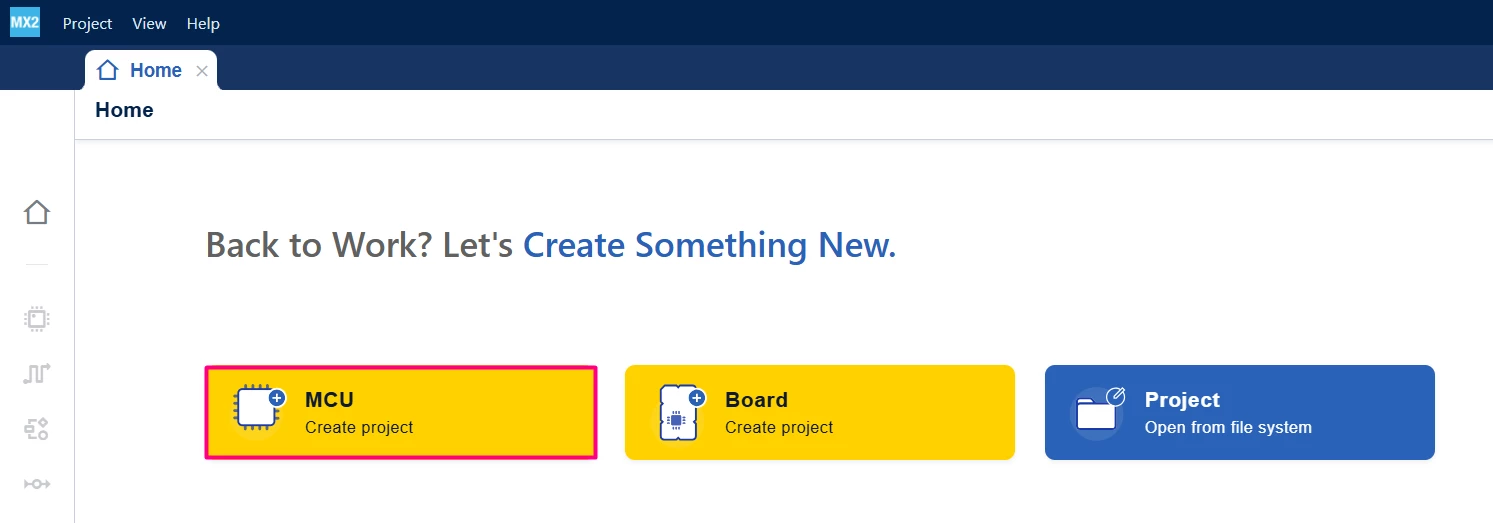
Open STM32CubeMX2. On the "Home" page, click the [MCU square] to create a new project.
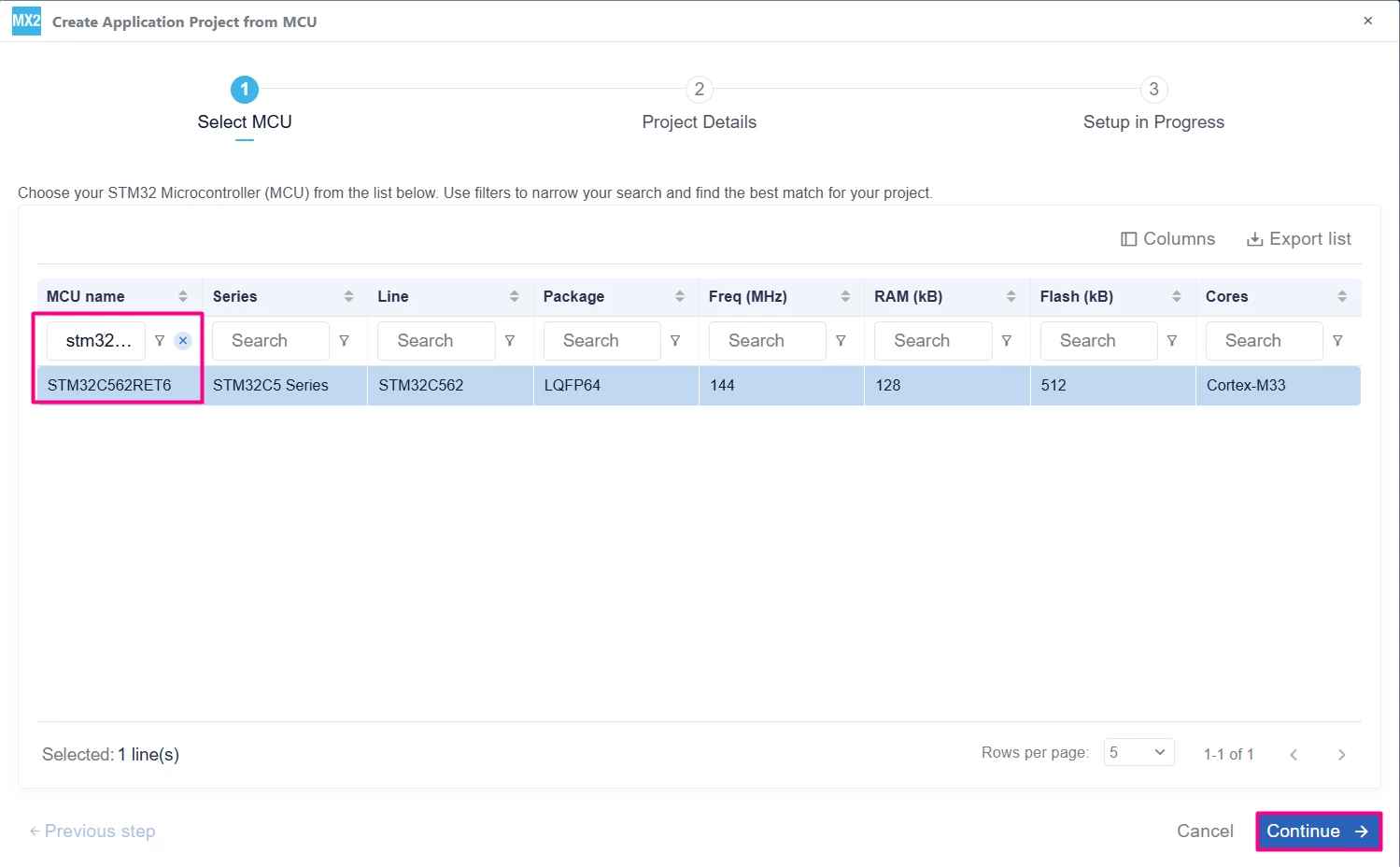
In the search field under MCU name, enter STM32C562RE and select the MCU. Click [Continue].
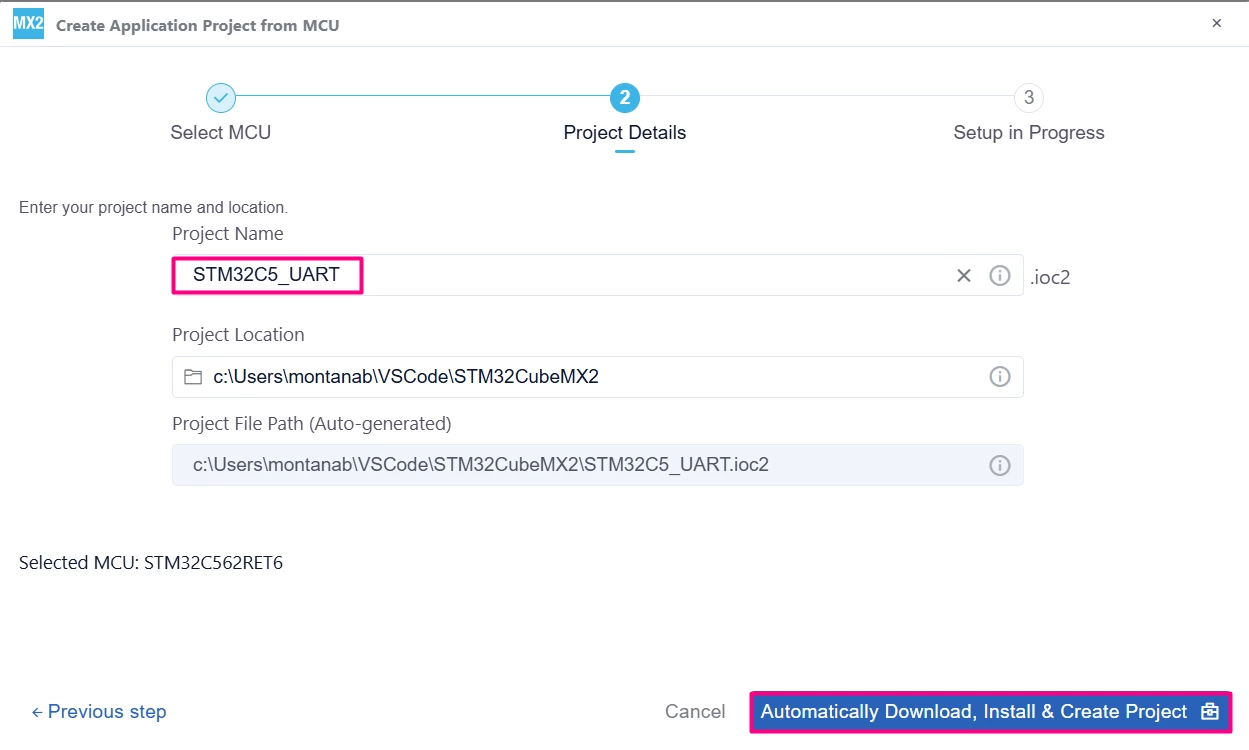
Enter the project name and location. Click [Automatically Download, Install & Create Project] to finish project creation.
Select [Launch Project] to start.

1.2 Pinout and configuration
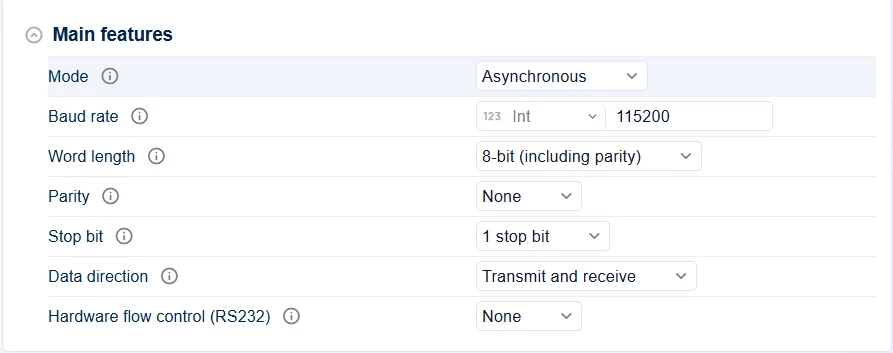
In STM32CubeMX2, go to the [Peripherals] section, then click [Connectivity]. Enable the UART by selecting the Async mode.
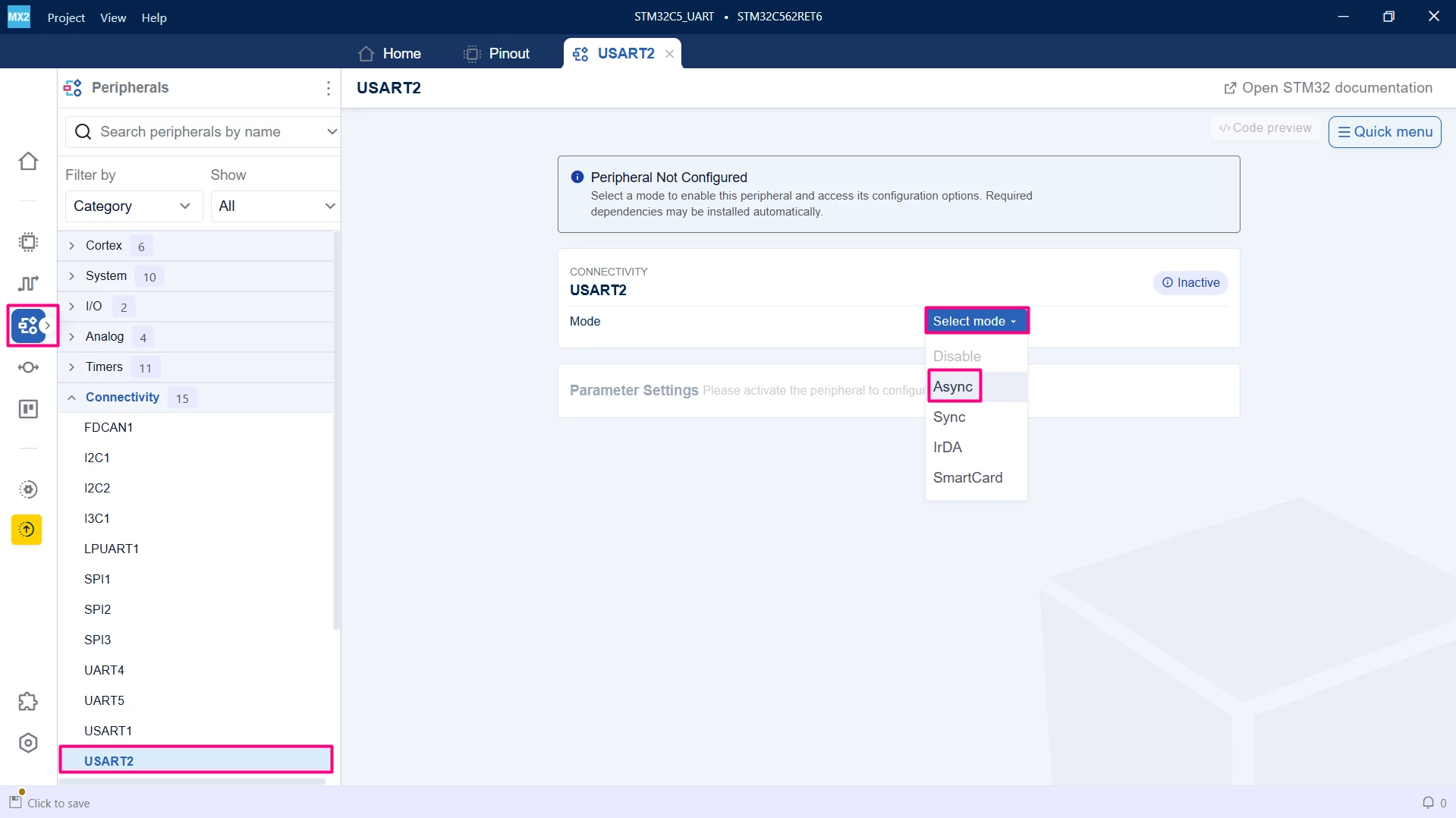
Configure the USART2 peripheral as shown in the figure:
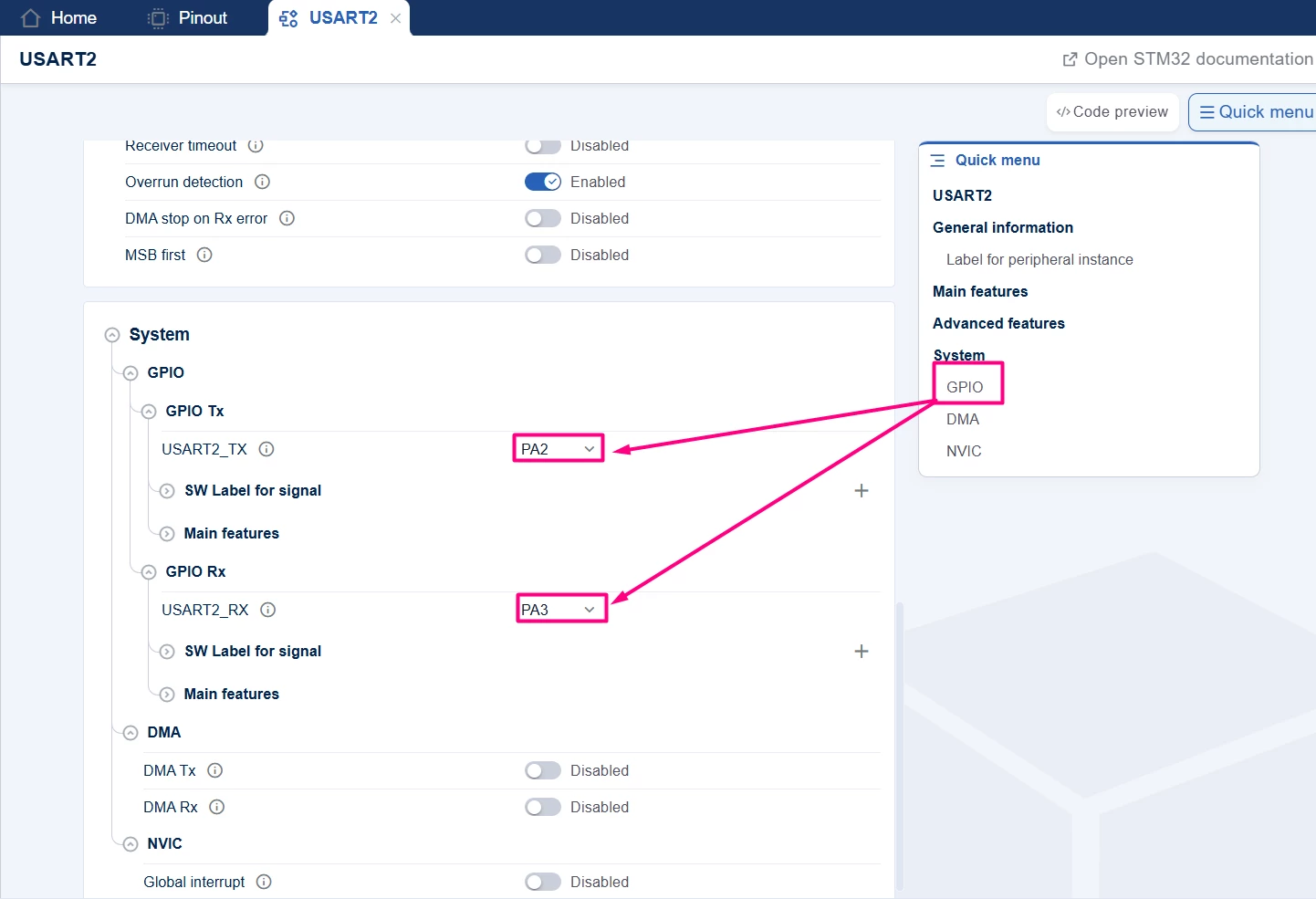
The VCOM bridge available on the NUCLEO board uses USART2_TX and USART2_RX associated with PA2 and PA3, but these might not be the default pins selected. To change the GPIOs used, scroll down and change the GPIO Tx/Rx pins.
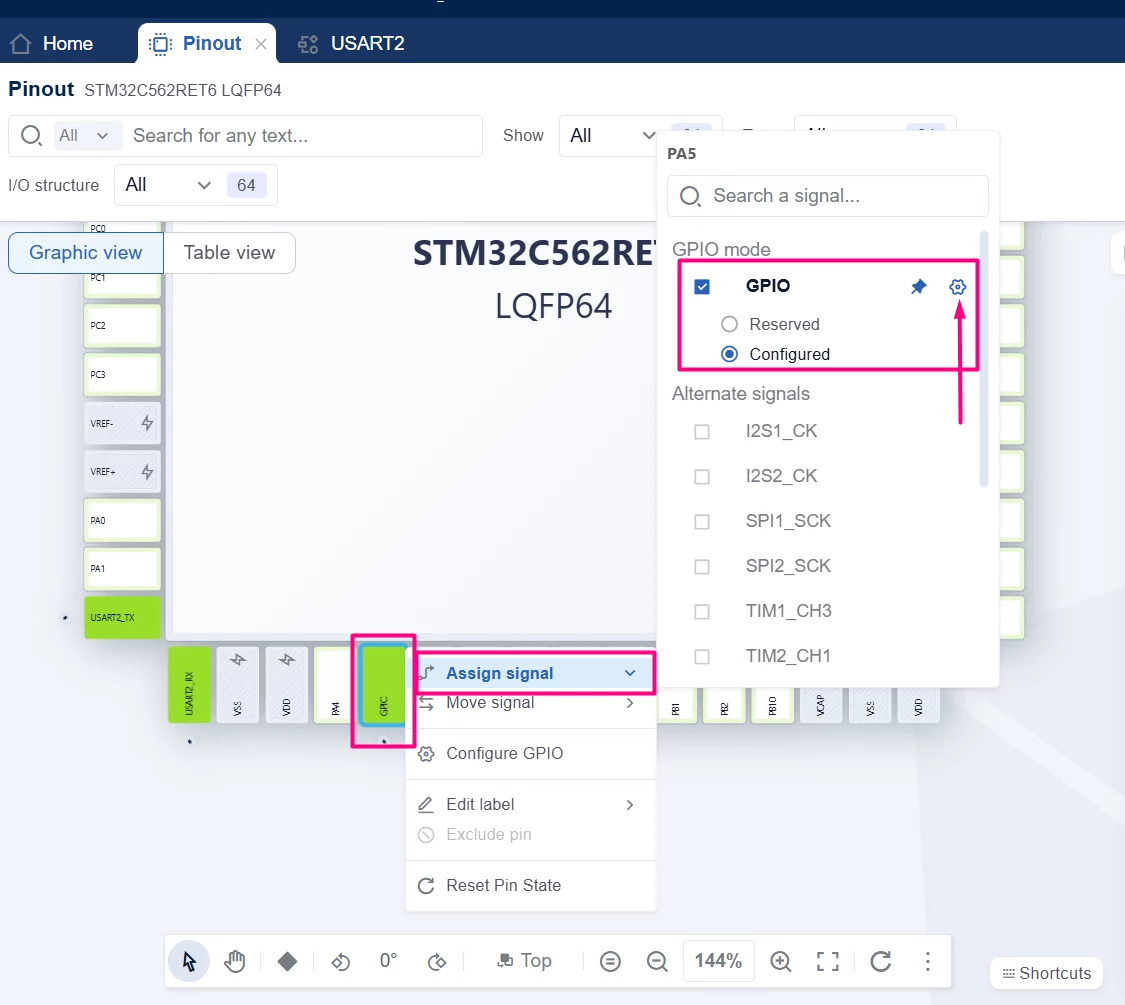
Change to the "Pinout" tab, and add the USER LED. Right-click on PA5, set it as a GPIO pin, then click the Engine icon.
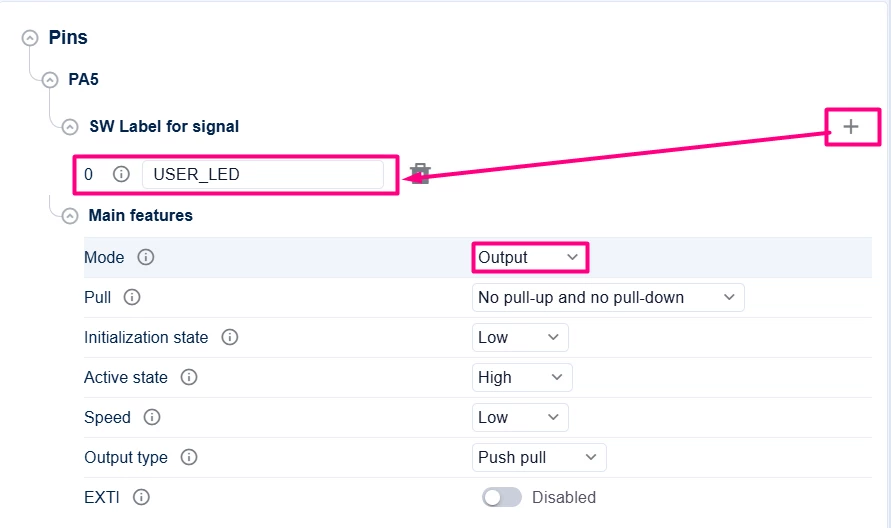
The GPIO configuration tab appears. Configure the GPIO label as USER_LED and set the pin as Output Push Pull.
1.3 Code generation
To generate the code:
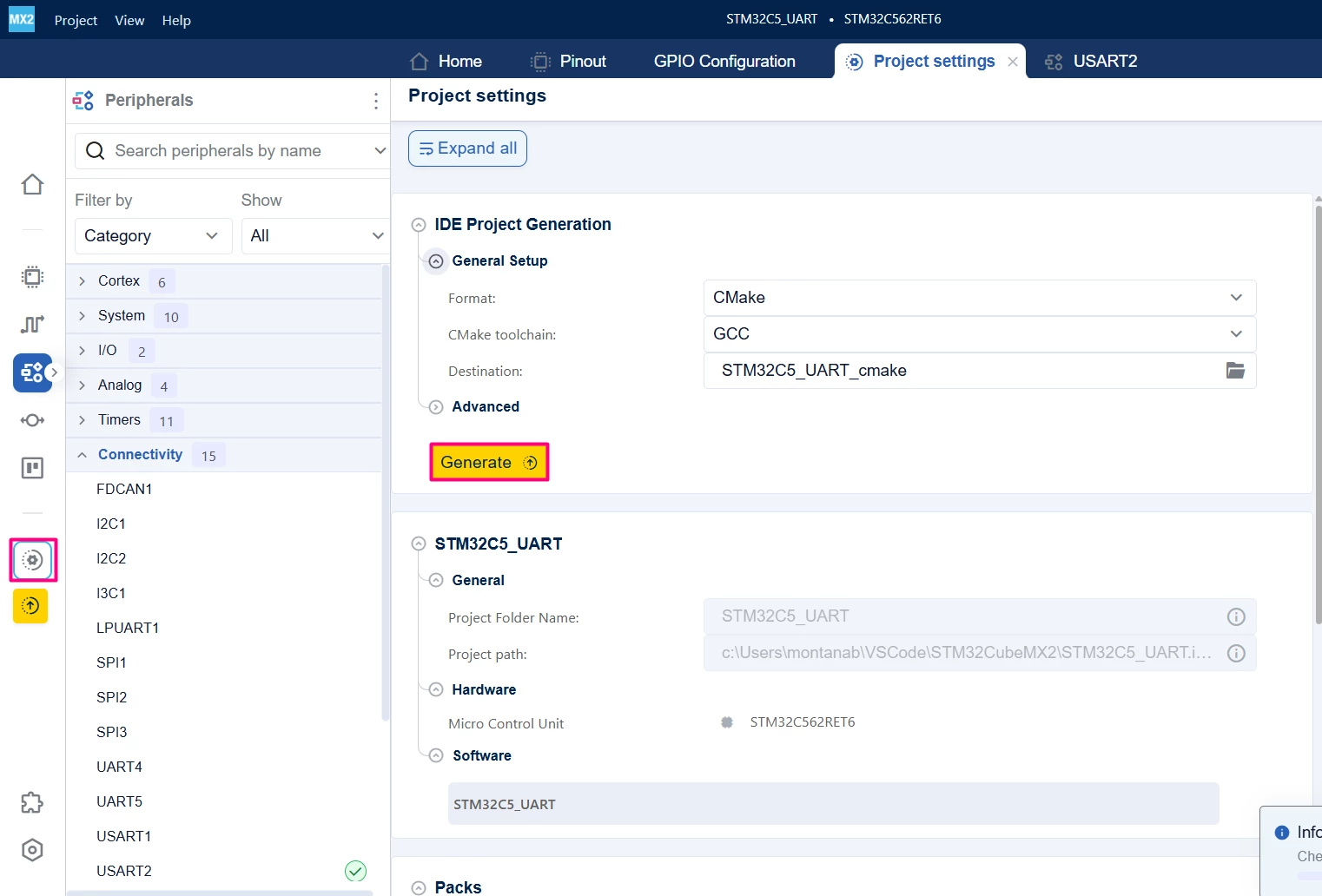
- Click the [Project settings] icon and select the desired IDE.
- Click the [Generate] button.
2. Configuring the project in Visual Studio Code
Open Visual Studio Code and open the project folder.
If prompted, select the configuration. If not prompted, press Ctrl+Shift+P, type CMake: Select Configure Preset, and choose the debug configuration.

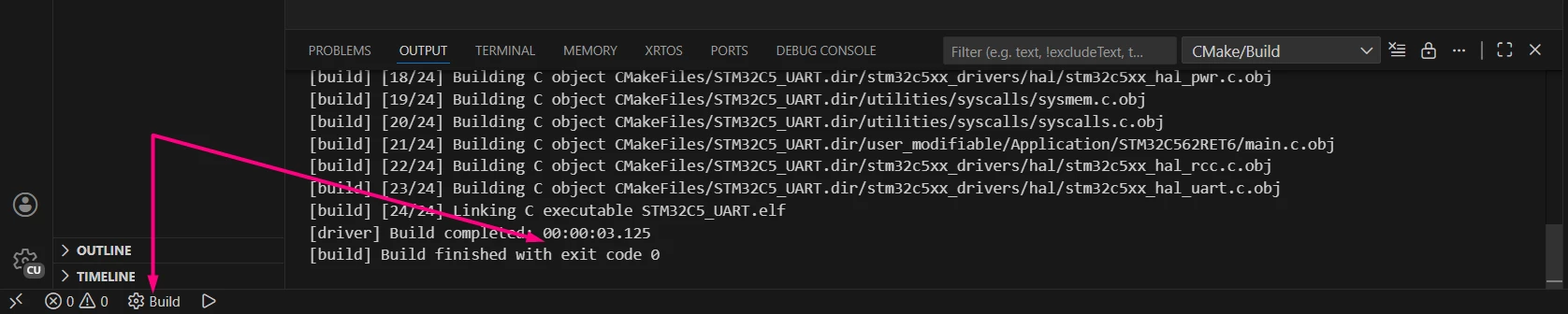
Build the project to ensure everything is set, then proceed to code implementation.
2.1 Code editing
After opening the generated project in Visual Studio Code, edit main.c. This example retargets the C library printf and getchar functions to operate on the UART peripheral. The HAL UART transmission and reception APIs are used in polling to implement an echo feature through a terminal emulator (such as Tera Term or Visual Studio Code integrated terminal).
/**
 ******************************************************************************
 * file : main.c
 * brief : Main program body
 * Calls target system initialization then loop in main.
 ******************************************************************************
 *
 * Copyright (c) 2025 STMicroelectronics.
 * All rights reserved.
 *
 * This software is licensed under terms that can be found in the LICENSE file
 * in the root directory of this software component.
 * If no LICENSE file comes with this software, it is provided AS-IS.
 *
 ******************************************************************************
 */
/* Includes ------------------------------------------------------------------*/
#include "main.h"
#include <stdio.h> /* C library input/output functions */
#include <string.h> /* importing memcmp and memset functions */

/* Private typedef -----------------------------------------------------------*/
/* Private define ------------------------------------------------------------*/
#define RX_TIMEOUT 10000U
#define TX_TIMEOUT 1000U
#define MAX_BUFFER_SIZE 26U

/* Private macro -------------------------------------------------------------*/
/* Private variables ---------------------------------------------------------*/
uint8_t RxBuffer[MAX_BUFFER_SIZE]; /* Reception buffer */

/* Private functions prototype -----------------------------------------------*/
/** -----------------------------------------------------------
 * Definitions of C library functions re-targeted to the UART.
 * -----------------------------------------------------------
 */

int __io_getchar(void) {
 uint8_t ch = 0;
 HAL_UART_Receive(mx_usart2_uart_gethandle(), (uint8_t *)&ch, 1, 10000);
 return ch;
}

int __io_putchar(int ch) {
 HAL_UART_Transmit(mx_usart2_uart_gethandle(), (uint8_t *)&ch, 1, 100);
 return ch;
}

/**
 * brief: The application entry point.
 * retval: none but we specify int to comply with C99 standard
 */
int main(void) {
 /** System Init: this code placed in targets folder initializes your system.
 * It calls the initialization (and sets the initial configuration) of the
 * peripherals. You can use STM32CubeMX to generate and call this code or not
 * in this project. It also contains the HAL initialization and the initial
 * clock configuration.
 */
 if (mx_system_init() != SYSTEM_OK) {
 return (-1);
 } else {
 /*
 * You can start your application code here
 */
 printf("USART2 echo example\r\n");
 /** System Init: this generated code placed in targets folder initializes
 * your system. It calls the initialization (and sets the initial
 * configuration) of the peripherals. You can use STM32CubeMX to generate
 * and call this code or not in this project. It also contains the HAL
 * initialization and the initial clock configuration.
 */
 setvbuf(stdin, NULL, _IONBF, 0);
 while (1) {
 int idx = 0;
 int ch;
 printf("Input: "); // prompt before typing
 // Receive chars until '\n', '\r' or '\b'
 while (1) {
 ch = getchar(); // uses HAL_UART_Receive in polling
 if (ch == '\n' || ch == '\r' || ch == '\b') {
 break;
 }
 if (idx < (MAX_BUFFER_SIZE - 1)) {
 RxBuffer[idx++] = (char)ch;
 }
 }
 RxBuffer[idx] = '\0';
 // Echo received data
 printf("\n Echo: %s\r\n", RxBuffer);
 for (idx = 0; idx < MAX_BUFFER_SIZE; idx++) {
 RxBuffer[idx] = 0;
 }
 }
 }
} /* end main */
2.2 Validation
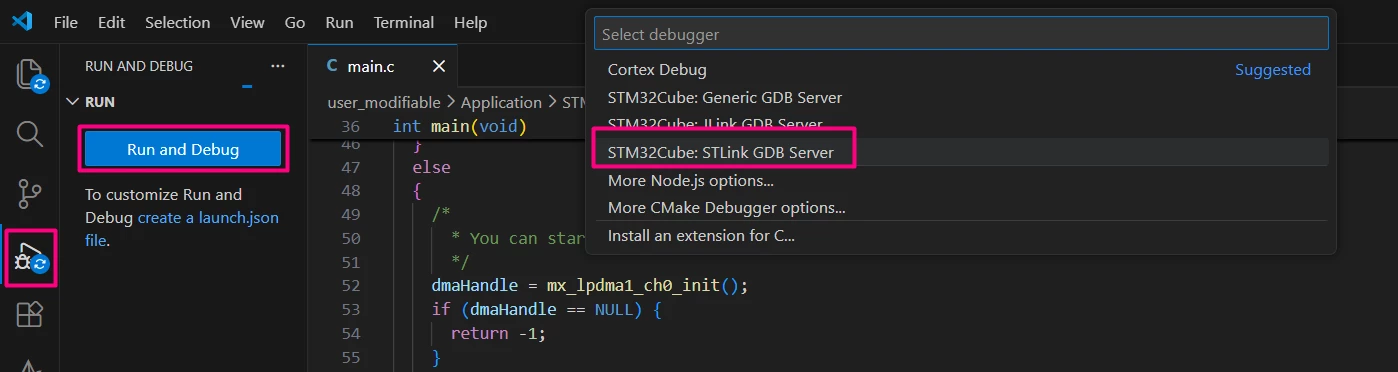
After building the application, select the [Run and Debug] icon. Create a debug session by selecting the STM32Cube: STLINK GDB Server option.
Press Ctrl+Shift+P and type [Open Serial] > COMXY (STMicroelectronics) > 115200.
3. Using UART Interrupt
This firmware replaces getchar and implements a responsive echo system using hardware interrupts, allowing the main processor to remain idle when no data is being processed. After initializing the system and printing a welcome message, the code enters an empty infinite loop. Communication is event-driven: whenever a character arrives, the hardware triggers a callback function that echoes the received character back to the terminal and adds a newline character if the Enter key is detected. Before finishing, it reactivates the interrupt listener.
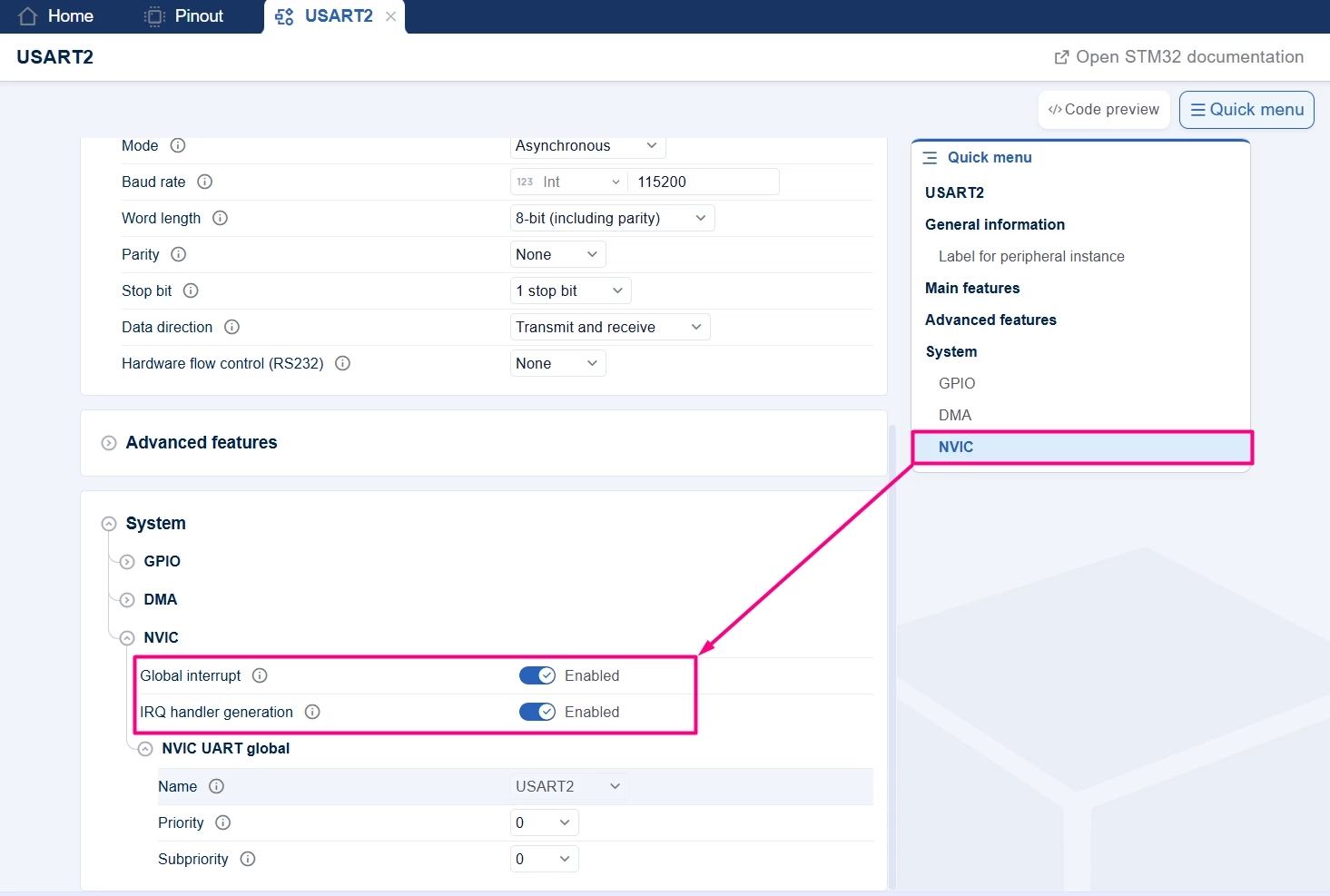
Go to the "USART2" tab in STM32CubeMX2 and scroll down to the "System" option or click [NVIC] in the Quick menu.
Regenerate your project.
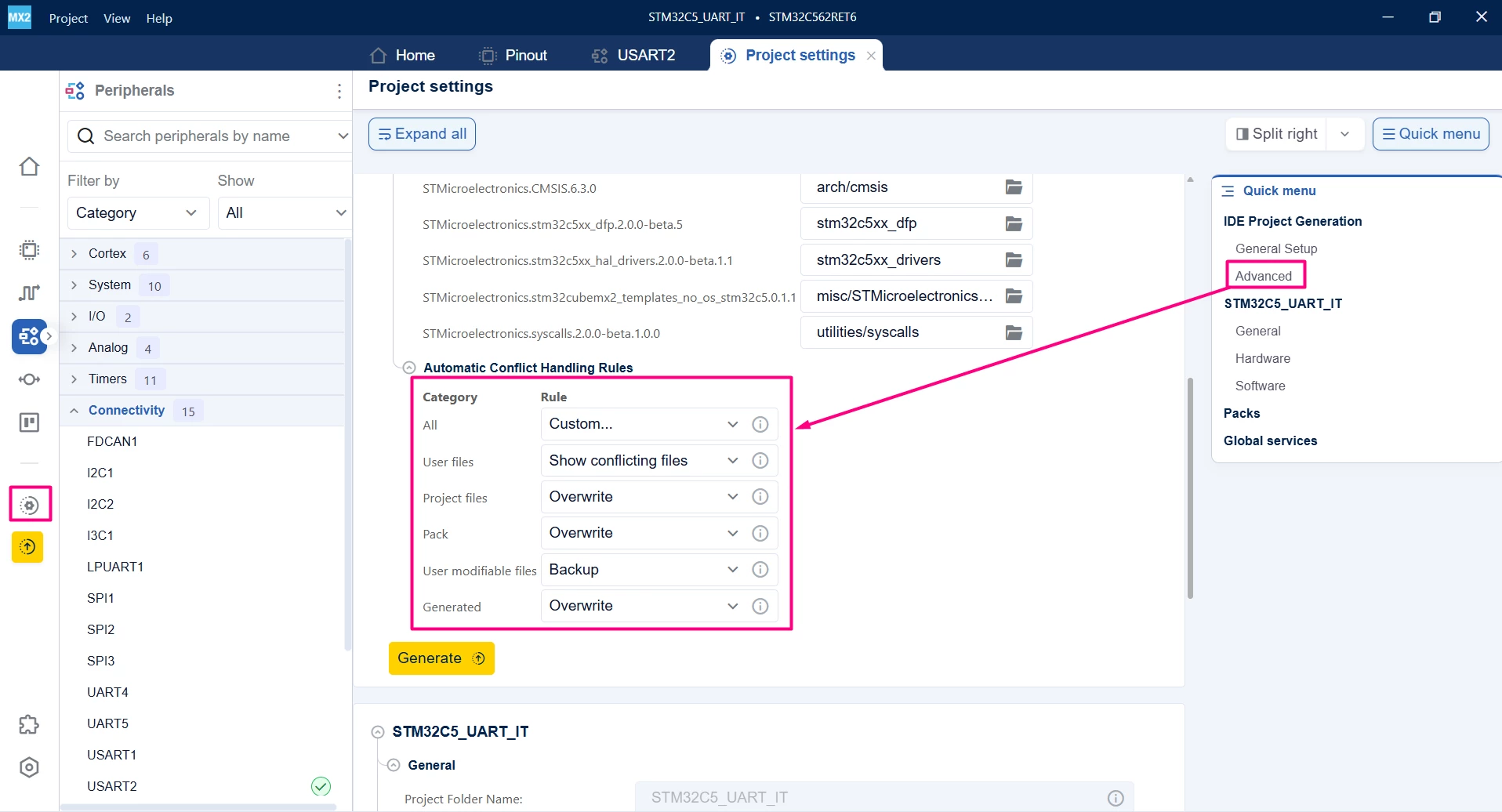
Pro-tip: You can use the advanced settings to specify how to re-generate your project. For example, it is possible to create a backup of the previous example.
Here is the entire main.c for the interrupt example.
/**
 ******************************************************************************
 * file : main.c
 * brief : Main program body
 * Calls target system initialization then loop in main.
 ******************************************************************************
 *
 * Copyright (c) 2025 STMicroelectronics.
 * All rights reserved.
 *
 * This software is licensed under terms that can be found in the LICENSE file
 * in the root directory of this software component.
 * If no LICENSE file comes with this software, it is provided AS-IS.
 *
 ******************************************************************************
 */
/* Includes ------------------------------------------------------------------*/
#include "main.h"
#include <stdio.h> /* C library input/output functions */
#include <string.h> /* importing memcmp and memset functions */

/* Private typedef -----------------------------------------------------------*/
/* Private define ------------------------------------------------------------*/
#define RX_TIMEOUT 10000U
#define TX_TIMEOUT 1000U
#define MAX_BUFFER_SIZE 2U

/* Private macro -------------------------------------------------------------*/
/* Private variables ---------------------------------------------------------*/
uint8_t RxBuffer[MAX_BUFFER_SIZE]; /* Reception buffer */

/* Private functions prototype -----------------------------------------------*/
/** -----------------------------------------------------------
 * Definitions of C library functions re-targeted to the UART.
 * -----------------------------------------------------------
 */
int __io_putchar(int ch) {
 HAL_UART_Transmit(mx_usart2_uart_gethandle(), (uint8_t *)&ch, 1, 100);
 return ch;
}

void HAL_UART_RxCpltCallback(hal_uart_handle_t *huart, uint32_t size_byte,
 hal_uart_rx_event_types_t rx_event) {
 HAL_UART_Transmit(mx_usart2_uart_gethandle(), RxBuffer, 1, 10);
 if (RxBuffer[0] == '\r') {
 uint8_t newline = '\n';
 HAL_UART_Transmit(mx_usart2_uart_gethandle(), &newline, 1, 10);
 }
 HAL_UART_Receive_IT(mx_usart2_uart_gethandle(), RxBuffer, 1);
}

/**
 * brief: The application entry point.
 * retval: none but we specify int to comply with C99 standard
 */
int main(void) {
 /** System Init: this code placed in targets folder initializes your system.
 * It calls the initialization (and sets the initial configuration) of the
 * peripherals. You can use STM32CubeMX to generate and call this code or not
 * in this project. It also contains the HAL initialization and the initial
 * clock configuration.
 */
 if (mx_system_init() != SYSTEM_OK) {
 return (-1);
 } else {
 /*
 * You can start your application code here
 */
 printf("USART2 RX IT echo example\r\n");
 HAL_UART_Receive_IT(mx_usart2_uart_gethandle(), RxBuffer, 1);
 while (1) {
 }
 }
} /* end main */
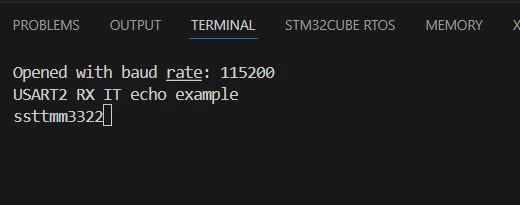
Build your project. After following the debug steps, press Ctrl+Shift+P and type [Open Serial] > COM40 (STMicroelectronics) > 115200.
You can see your application working as intended, the local echo was kept on the terminal:
4. Using UART DMA
This firmware replaces the interrupts previously used and implements a DMA transfer of predefined content and waits for blocks of 10 bytes to trigger the receive callback, allowing the main processor to remain idle when no data is being processed.
Go to the USART2 tab in STM32CubeMX2 and scroll down to the [System] option or click DMA in the Quick menu.
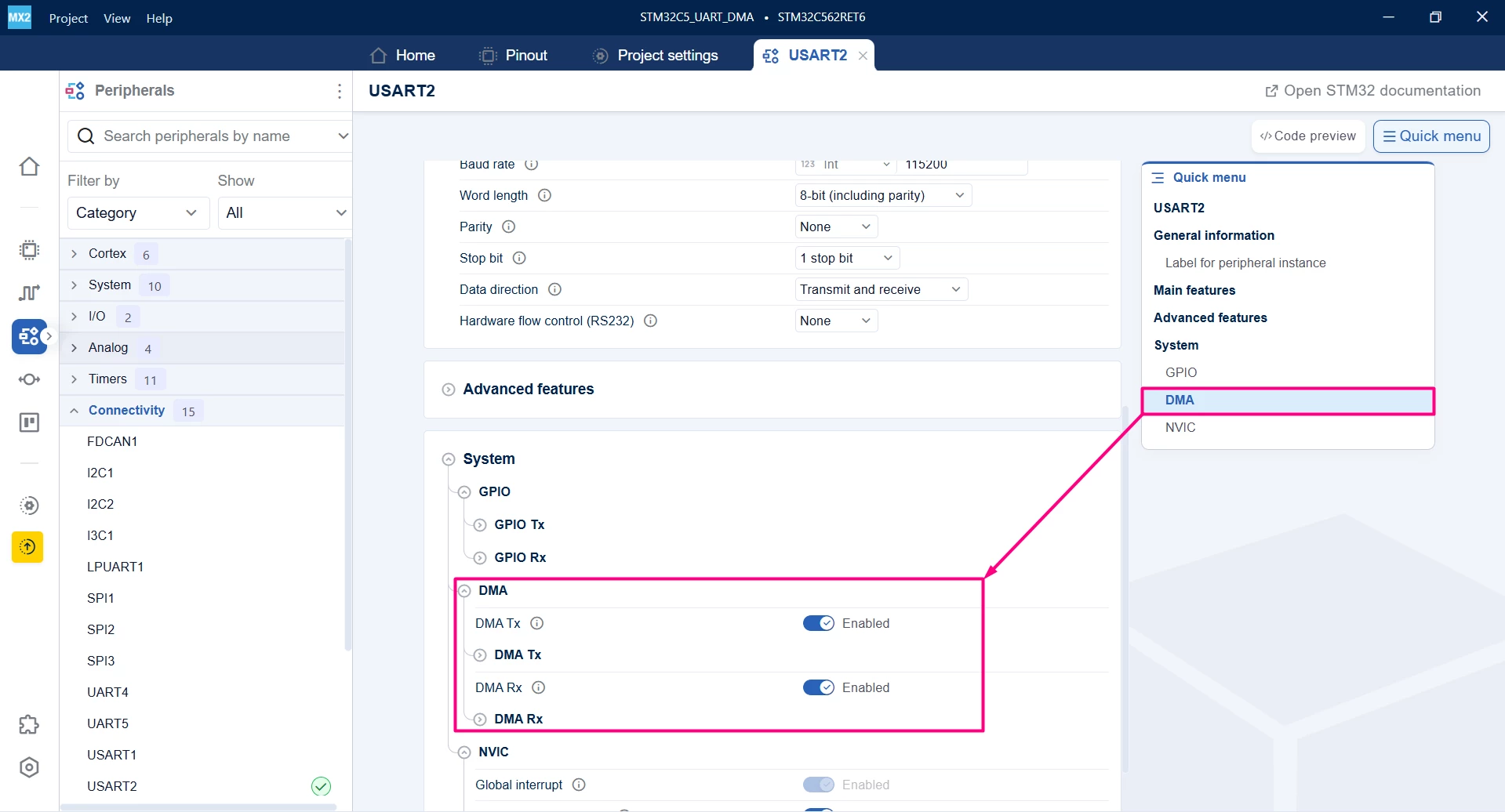
Enable DMA Tx and Rx and open their drop-down menus.
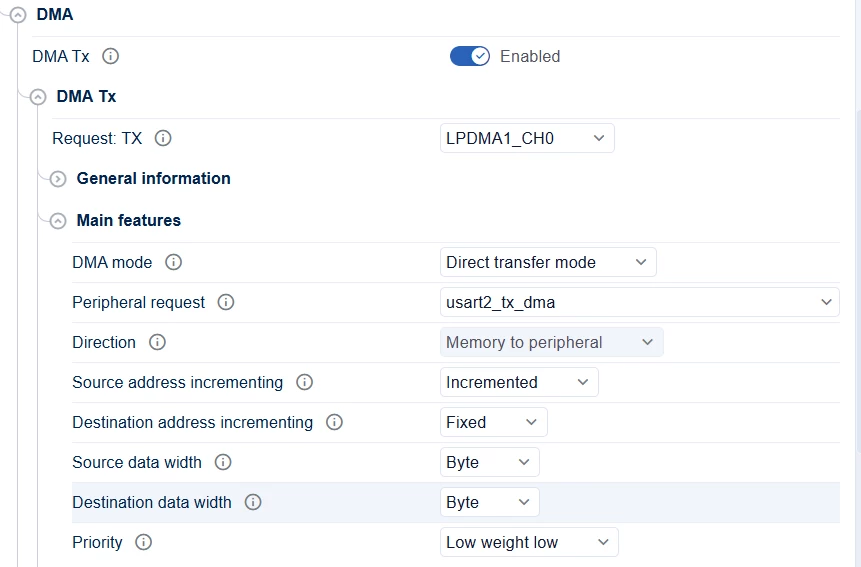
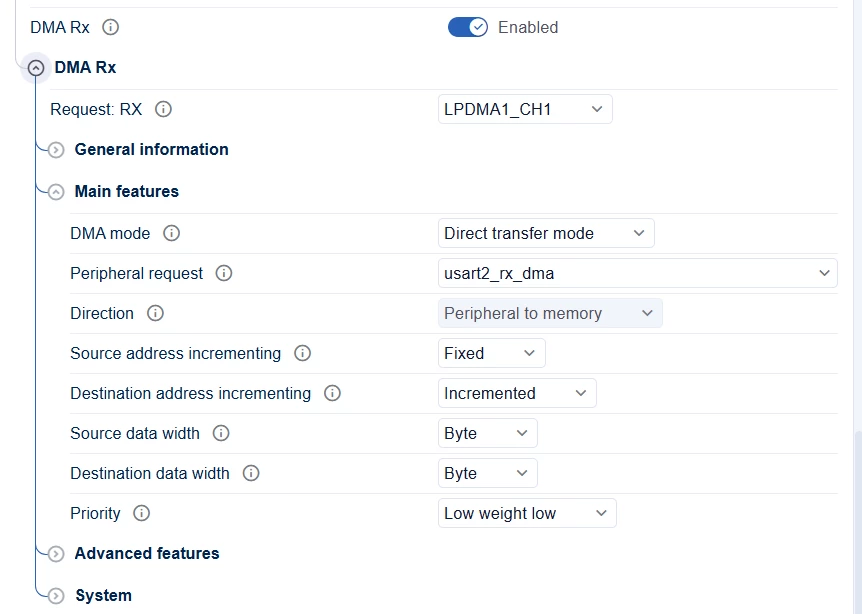
Regenerate your project and open it in your desired IDE.
This firmware sets up STM32 to handle UART communication asynchronously using DMA, allowing the processor to multitask. Upon startup, the system immediately activates the receiver to listen for incoming data in the background.
The main execution loop transmits the ASCII string "ABCDEFGHIJ" once every 10 seconds. When the system receives exactly 10 bytes, it triggers a callback function. This function automatically re-enables the receiver, ensuring the board is ready to capture the next chunk of data without interrupting the periodic transmission.
main.c:
/**
 ******************************************************************************
 * file : main.c
 * brief : Main program body
 * Calls target system initialization then loop in main.
 ******************************************************************************
 *
 * Copyright (c) 2025 STMicroelectronics.
 * All rights reserved.
 *
 * This software is licensed under terms that can be found in the LICENSE file
 * in the root directory of this software component.
 * If no LICENSE file comes with this software, it is provided AS-IS.
 *
 ******************************************************************************
 */
/* Includes ------------------------------------------------------------------*/
#include "main.h"
#include <stdio.h> /* C library input/output functions */
#include <string.h> /* importing memcmp and memset functions */

/* Private typedef -----------------------------------------------------------*/
/* Private define ------------------------------------------------------------*/
#define RX_TIMEOUT 10000U
#define TX_TIMEOUT 1000U
#define MAX_BUFFER_SIZE 10U

/* Private macro -------------------------------------------------------------*/
/* Private variables ---------------------------------------------------------*/
uint8_t RxBuffer[MAX_BUFFER_SIZE]; /* Reception buffer */
/* Buffer used for transmission */
uint8_t TxBuffer[]={65,66,67,68,69,70,71,72,73,74}; //ABCDEFGHIJ in ASCII code

/* Private functions prototype -----------------------------------------------*/
/** -----------------------------------------------------------
 * Definitions of C library functions re-targeted to the UART.
 * -----------------------------------------------------------
 */

int __io_putchar(int ch) {
 HAL_UART_Transmit(mx_usart2_uart_gethandle(), (uint8_t *)&ch, 1, 100);
 return ch;
}

void HAL_UART_RxCpltCallback(hal_uart_handle_t *huart, uint32_t size_byte,
 hal_uart_rx_event_types_t rx_event) {
 HAL_UART_Transmit_DMA(mx_usart2_uart_gethandle(), RxBuffer, MAX_BUFFER_SIZE);
 HAL_UART_Receive_DMA(mx_usart2_uart_gethandle(), RxBuffer, MAX_BUFFER_SIZE);
}

/**
 * brief: The application entry point.
 * retval: none but we specify int to comply with C99 standard
 */
int main(void) {
 /** System Init: this code placed in targets folder initializes your system.
 * It calls the initialization (and sets the initial configuration) of the
 * peripherals. You can use STM32CubeMX to generate and call this code or not
 * in this project. It also contains the HAL initialization and the initial
 * clock configuration.
 */
 if (mx_system_init() != SYSTEM_OK) {
 return (-1);
 } else {
 /*
 * You can start your application code here
 */
 printf("USART2 RX IT echo example\r\n");
 HAL_UART_Receive_DMA(mx_usart2_uart_gethandle(), RxBuffer, MAX_BUFFER_SIZE);
 while (1) {
 HAL_UART_Transmit_DMA(mx_usart2_uart_gethandle(), TxBuffer, MAX_BUFFER_SIZE);
 HAL_Delay(10000);
 }
 }
} /* end main */
Build your project. After following the debug steps, press Ctrl+Shift+P and type [Open Serial] > COM40 (STMicroelectronics) > 115200.
You can see your application working as intended. Underlined in pink is the DMA transfer, the blue portion is the local echo when typing and the green is the received data being sent back over DMA:

Conclusion
This guide describes how to establish UART communication on the NUCLEO-C562RE using STM32CubeMX2 and Visual Studio Code. It details the configuration process and integration with the hardware abstraction layer (HAL2) and project structure. The three communication strategies: polling, interrupt, and DMA, to demonstrate the flexibility of the STM32C5 UART peripheral. Users can scale their implementation from simple, blocking debug consoles to high-efficiency, nonblocking data transfer systems.
Related links
- STM32Cube for Visual Studio Code
- NUCLEO-C562RE
- STM32CubeMX2
- STM32 Embedded software documentation
- STM32CubeMX2 software documentation
