

How to use SPI with STM32CubeMX2
Summary
This tutorial provides a concise guide on how to enable and configure the serial peripheral interface (SPI) using STM32CubeMX2. The demonstration uses the NUCLEO-C562RE board. The following SPI features are covered:
-
Simple SPI communication in polling mode
-
SPI communication with interrupts
-
SPI communication with direct memory access (DMA)
- Summary
- Introduction
- Prerequisites
- 1. STM32CubeMX2 project creation and basic setup
- 1.1 Project creation
- 1.2 Pinout and Configuration
- 1.3 Code generation
- 2. Configuring the project in Visual Studio Code
- 3. Code examples
- 3.1 Code snippets (polling mode)
- 3.1.1 Validation
- 3.2 Code snippets (interrupt mode)
- 3.2.1 STM32CubeMX2 configuration
- 3.3 Code Snippets (DMA Mode)
- 3.3.1 STM32CubeMX2 Configuration
- Conclusion
- Related links
Introduction
The serial peripheral interface (SPI) is a synchronous serial communication protocol used for short-distance communication, primarily in embedded systems. It supports full-duplex data exchange between a master and one or more slave devices.
The SPI peripheral in STM32 microcontrollers support various modes, including different clock polarities and phases, data frame sizes, and software/hardware NSS management. It can be used in polling, interrupt, or DMA modes to optimize CPU utilization and communication efficiency.
Prerequisites
Install the following tools:
- STM32CubeMX2
- The latest STM32C5 HAL2 driver
- STM32CubeIDE extension for Visual Studio Code
The hardware used in this tutorial is the NUCLEO-C562RE board.
1. STM32CubeMX2 project creation and basic setup
Follow these steps to create a simple application that implements a simple SPI communication, based on the NUCLEO-C562RE board.
1.1 Project creation
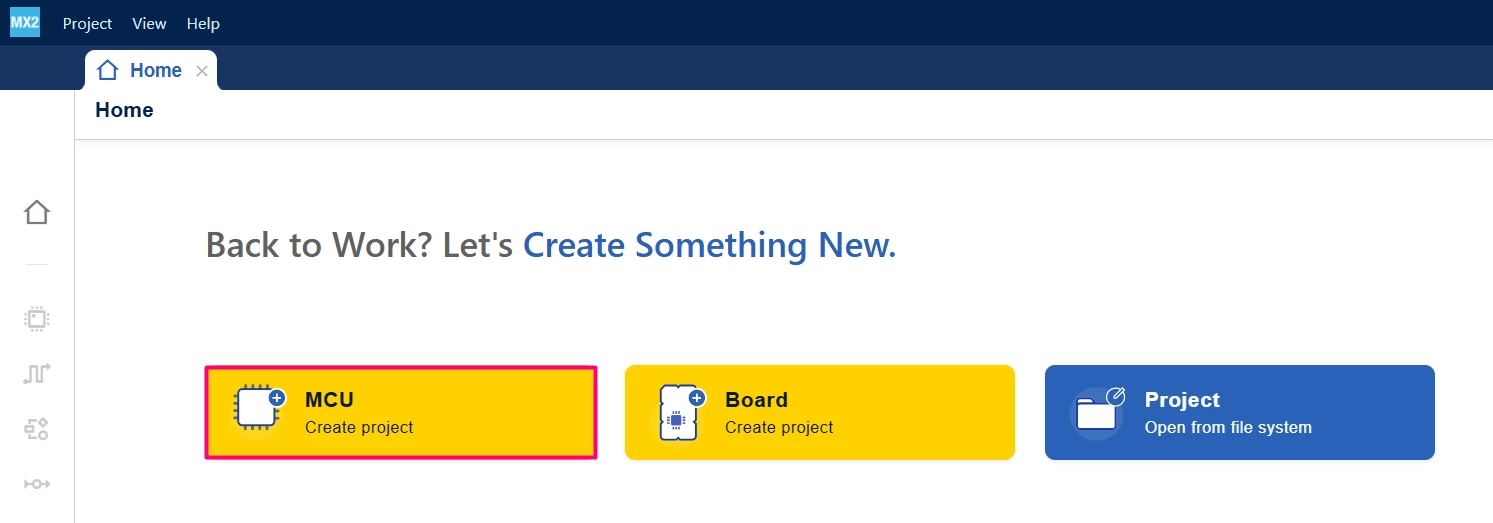
Open STM32CubeMX2. On the "Home" page, click the [MCU square] to create a new project.
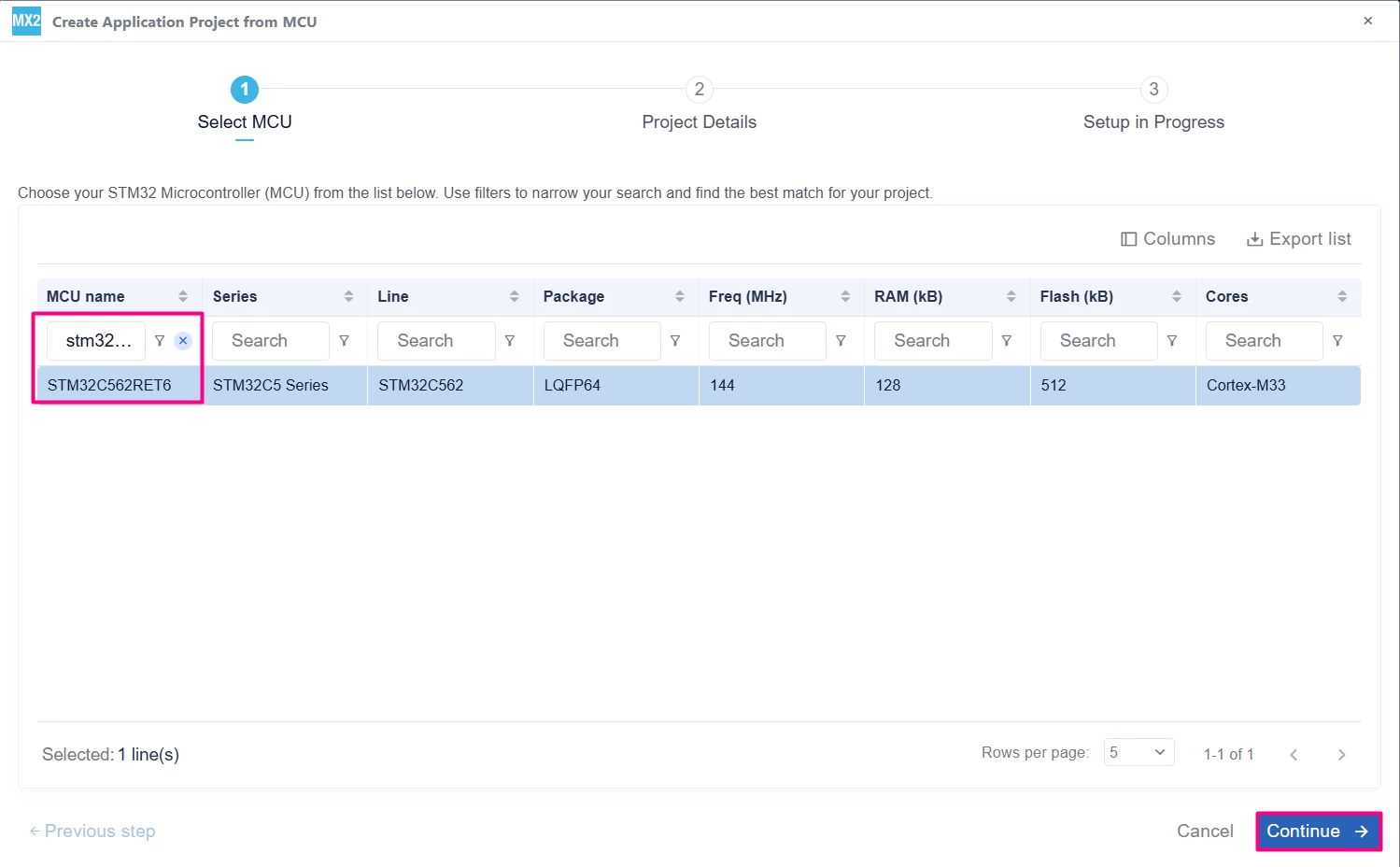
In the search field under MCU name, enter STM32C562RE and select the MCU. Click [Continue].
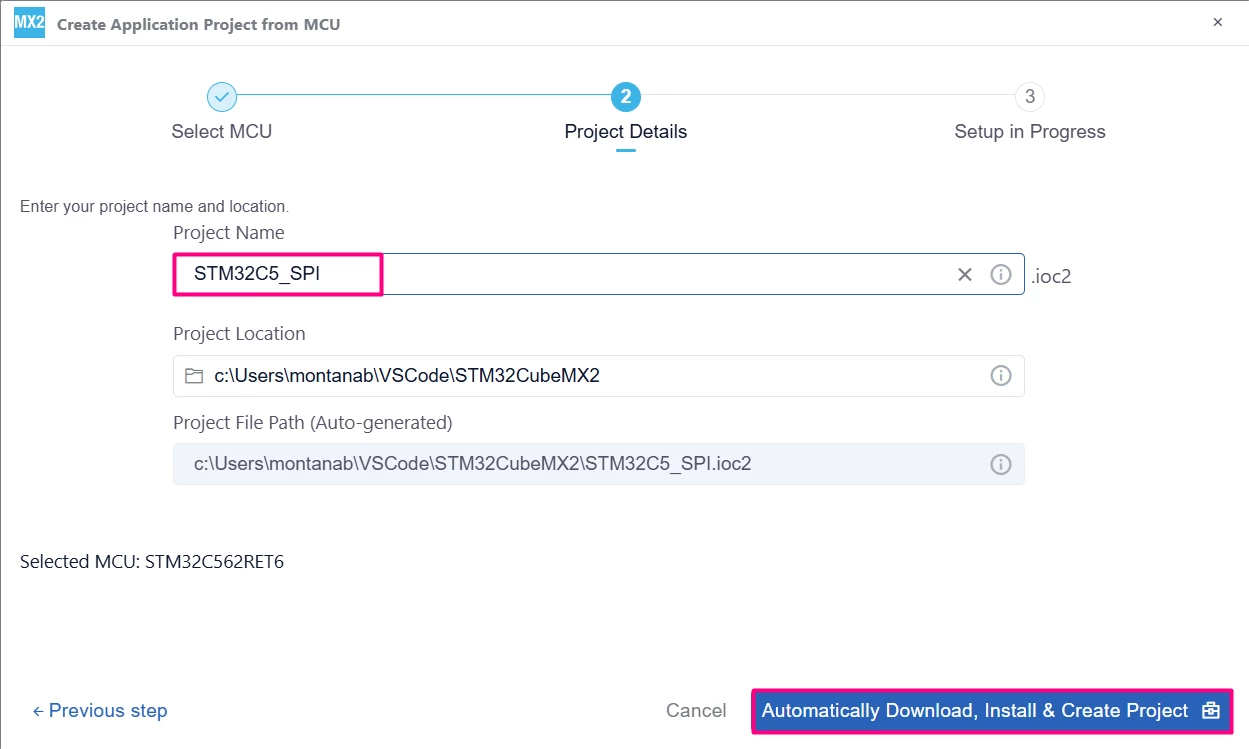
Enter the project name and location. Click [Automatically Download, Install & Create Project] to finish project creation.
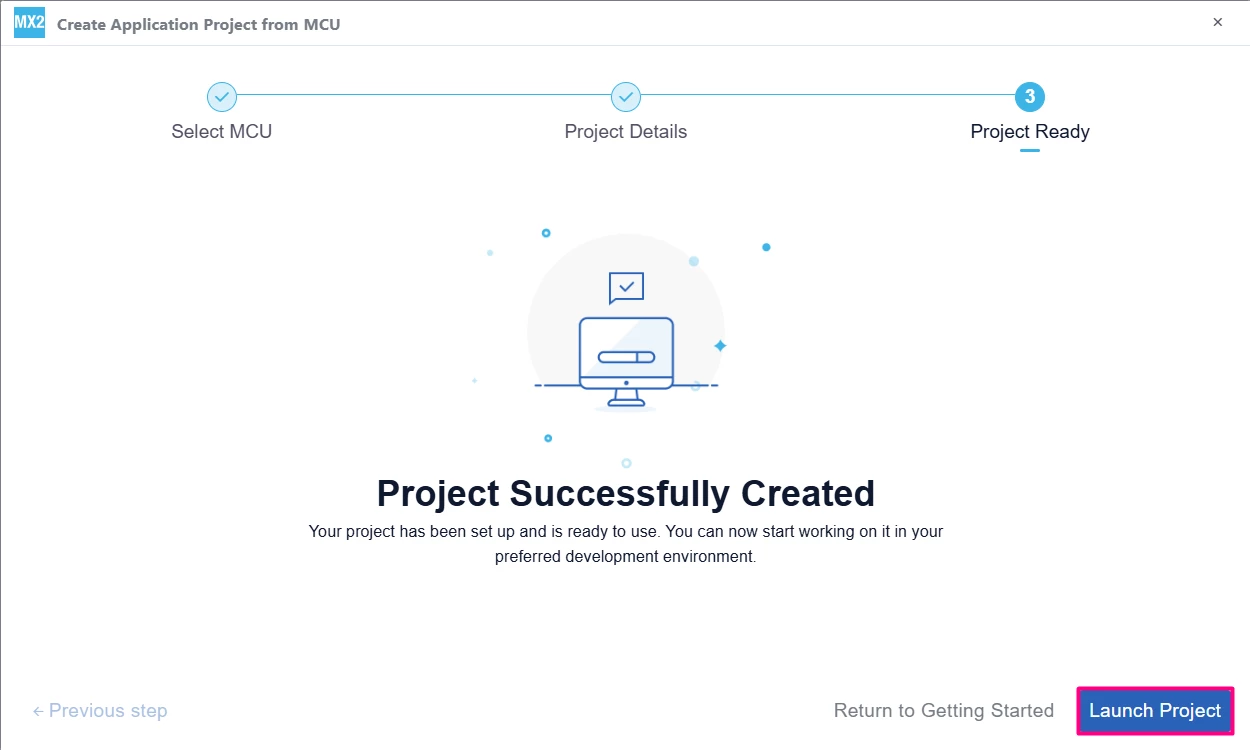
Select [Launch Project] to start.
1.2 Pinout and Configuration
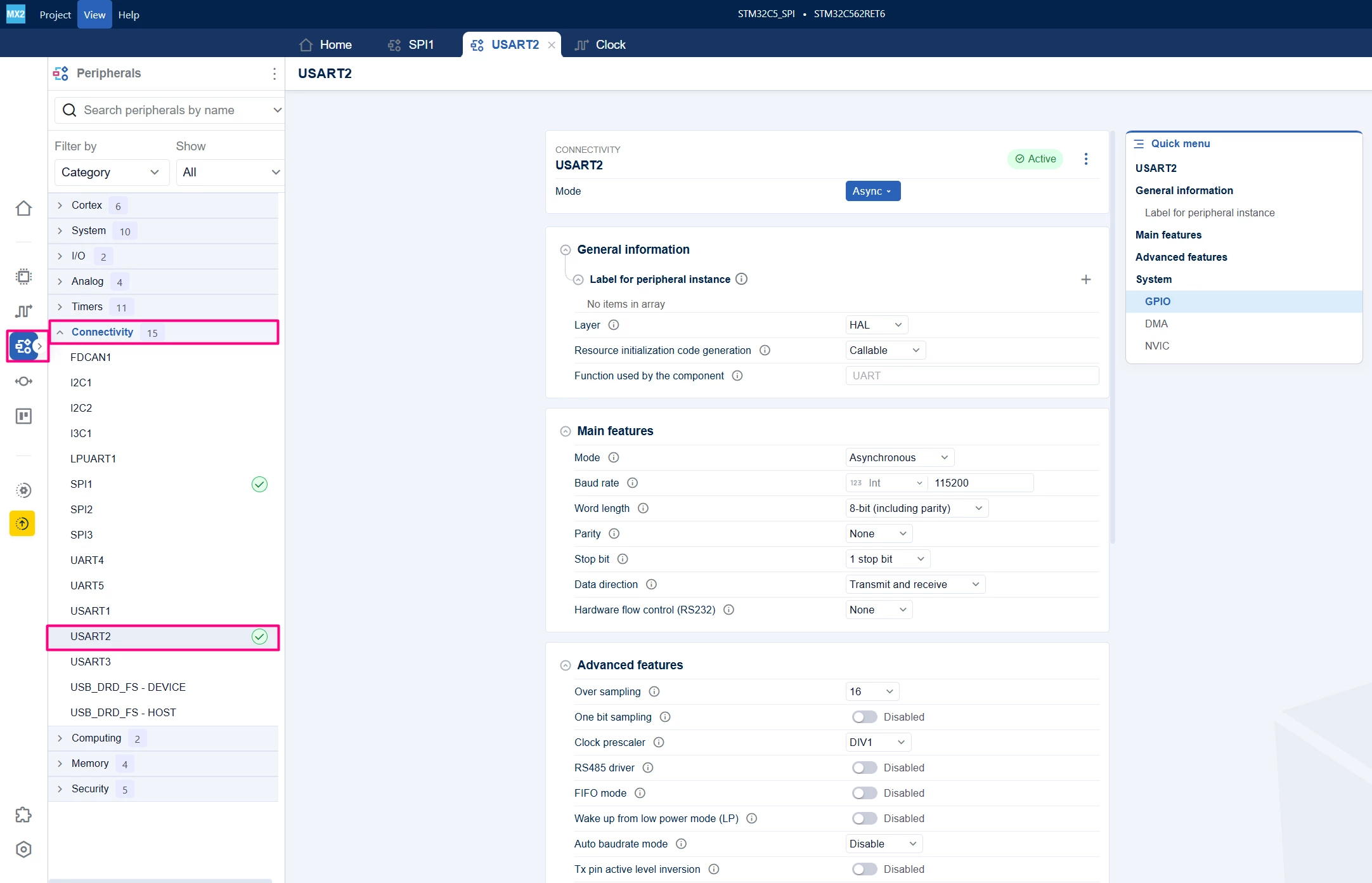
Navigate to the "Peripherals" section, then "Connectivity".
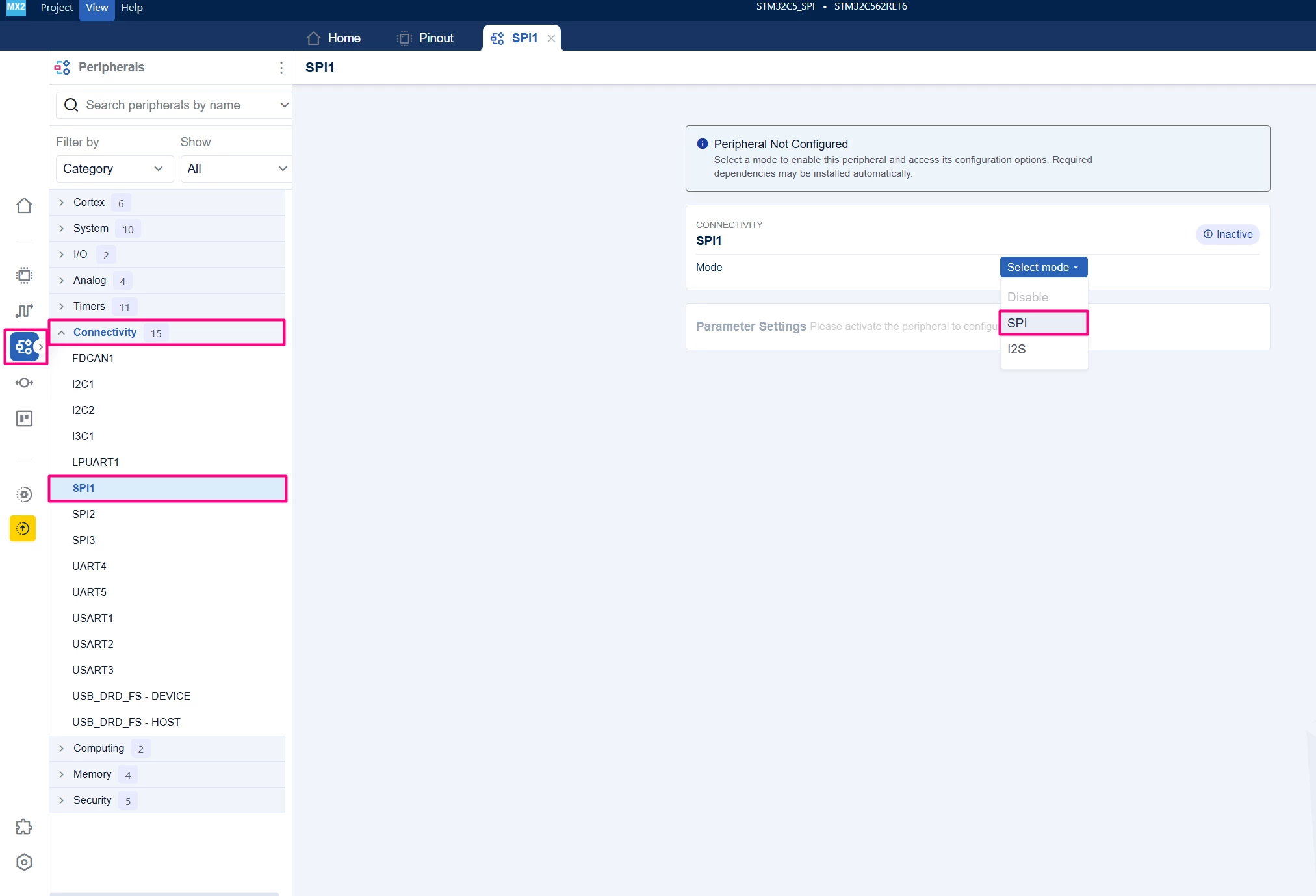
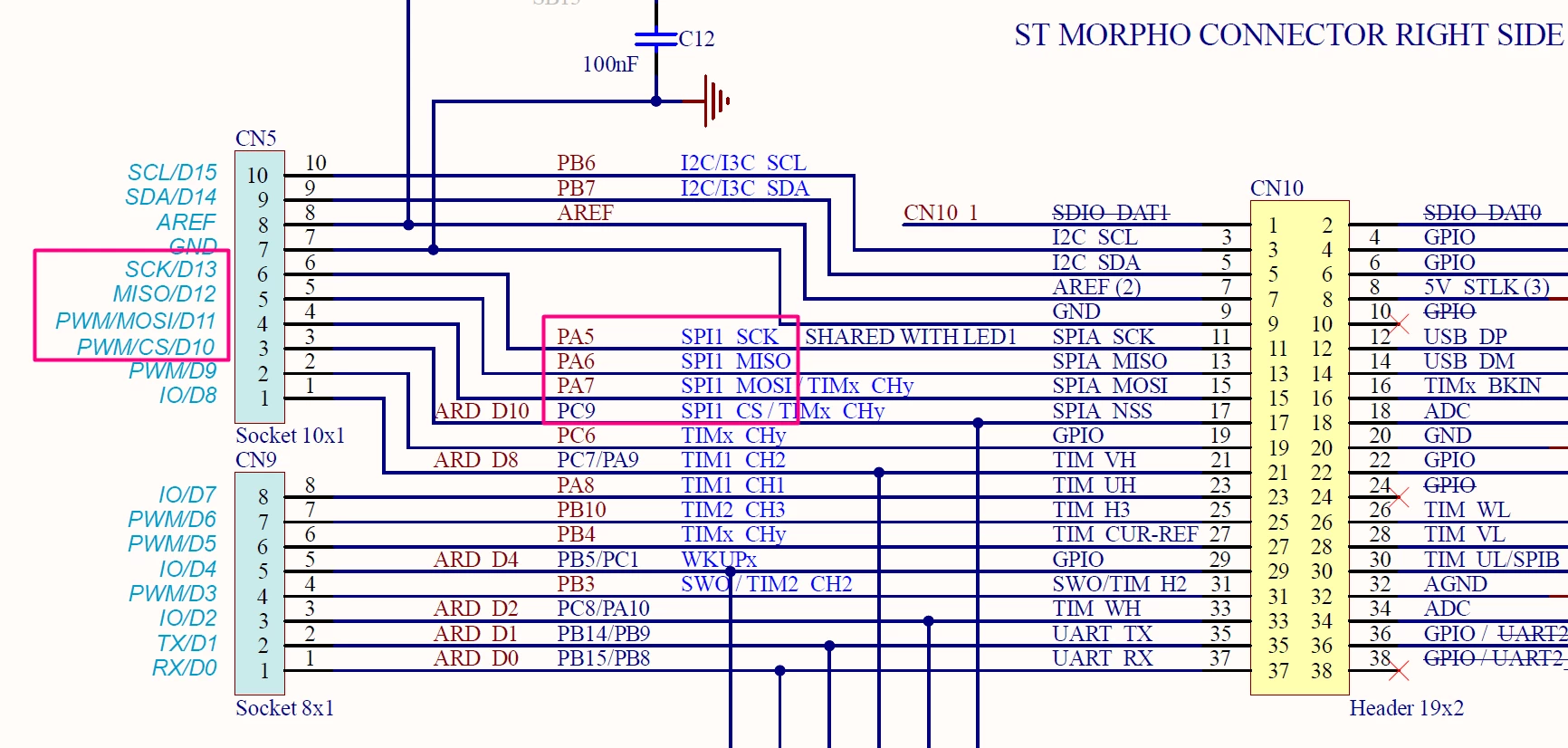
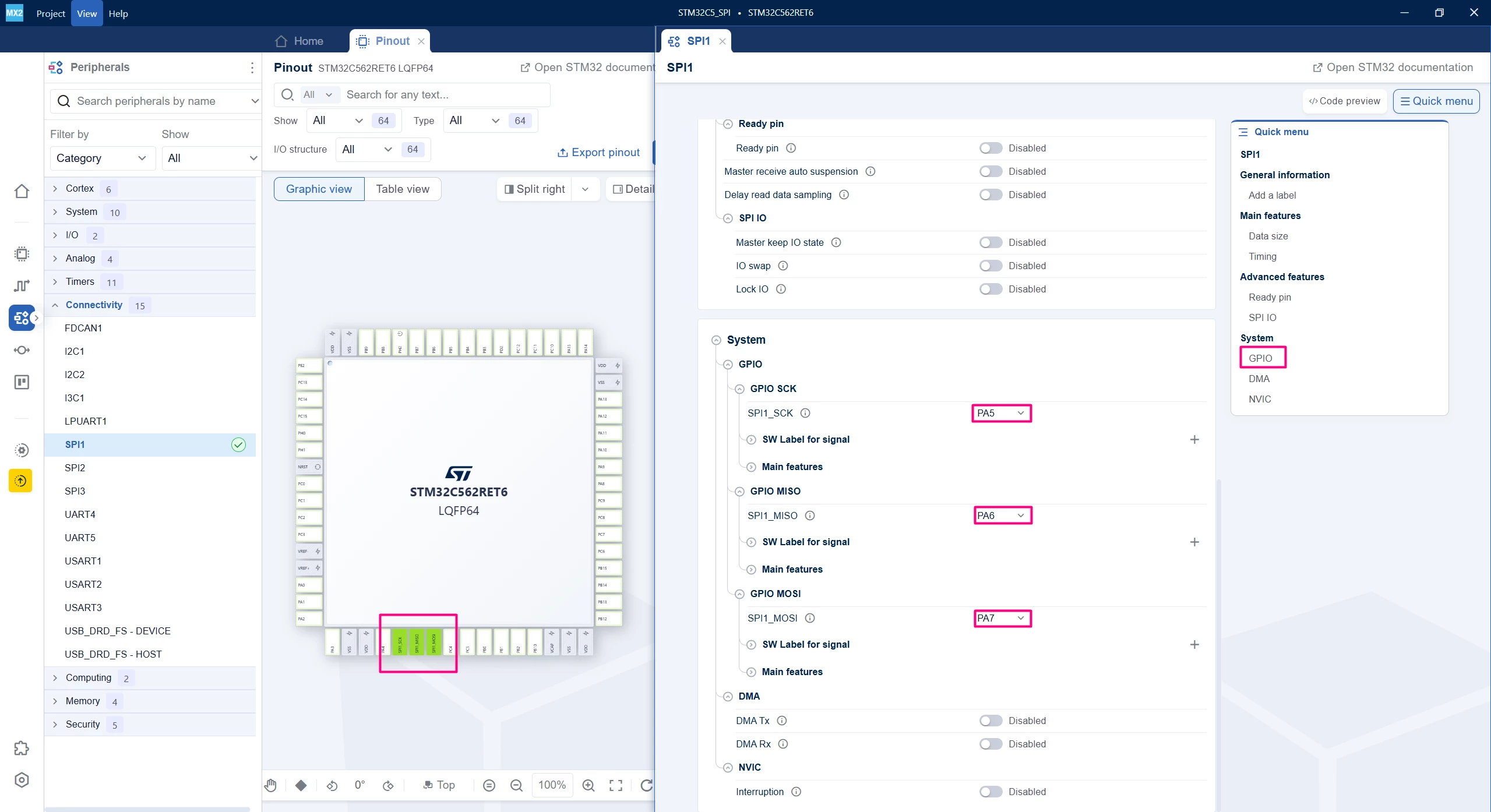
Enable the desired SPI peripheral, for example, SPI1 in SPI protocol and ensure the pins used. This tutorial uses SPI1, since it’s readily available in the connectors CN5 or CN10 via PA5 [SPI1_SCK], PA6 [SPI11_MISO] and PA7 [SPI1_MOSI]:
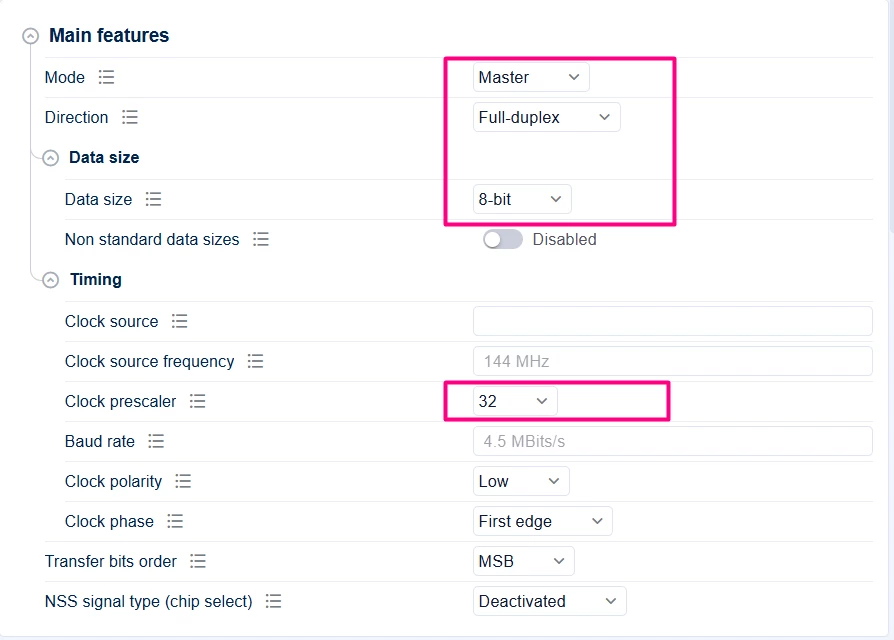
This demo will not reconfigure the clock, so the core and IPs run at 144 MHz. Configure SPI in Full-Duplex Master mode and set the clock polarity (CPOL), clock phase (CPHA), data size, and baud rate prescaler according to your application requirements. In this case, it is as shown below:
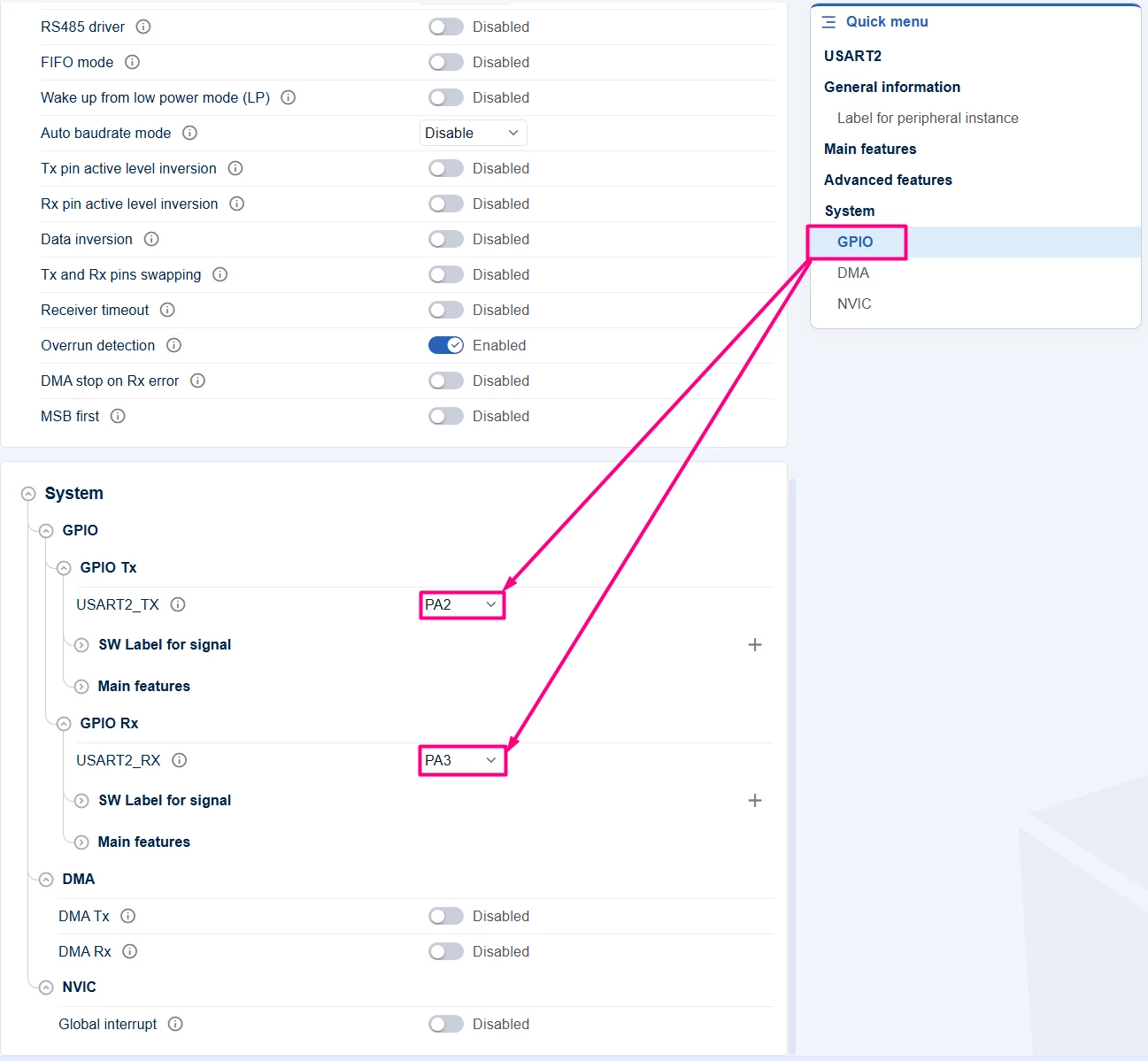
In the "Pinout" tab, SPI pins (SCK, MISO, MOSI, NSS) are already assigned. Optionally, configure an additional GPIO like LED or UART for status indication. In this case, a simple printf is used, so UART2 with PA2/PA3 is added.
1.3 Code generation
To generate the code:
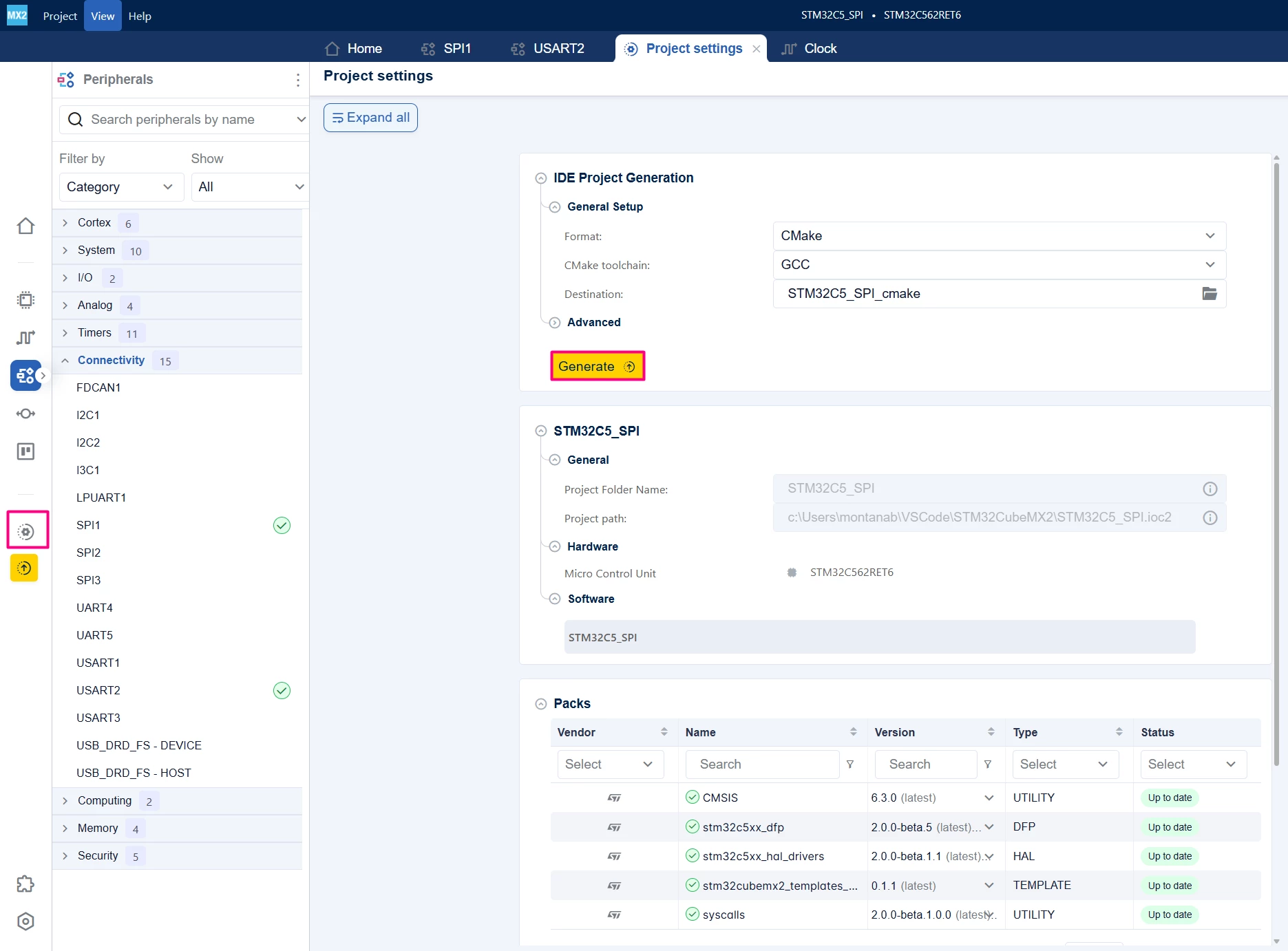
- Click the [Project settings] icon and select the desired IDE.
- Click the [Generate] button.
2. Configuring the project in Visual Studio Code
Open Visual Studio Code and open the project folder.
If prompted, select the configuration. If not prompted, press Ctrl+Shift+P, type CMake: Select Configure Preset, and choose the debug configuration.

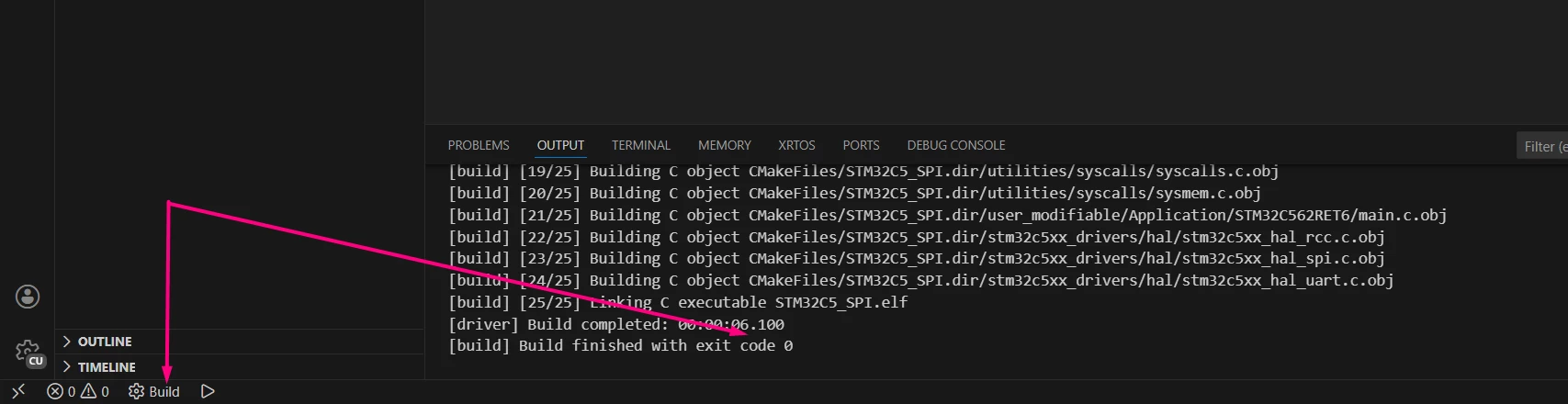
Build the project to ensure everything is set, then proceed to code implementation.
3. Code examples
3.1 Code snippets (polling mode)
This example demonstrates SPI communication using polling mode. It sends and receives data byte-by-byte by polling the SPI status flags. To facilitate, we short-circuit the MISO and MOSI and use the full-duplex transfer.
In main.c:
/* Includes ------------------------------------------------------------------*/
#include "main.h"
#include <stdio.h>
#include <string.h>
/* Private typedef -----------------------------------------------------------*/
/* Private define ------------------------------------------------------------*/
#define MAX_BUFFER_SIZE 32
#define SPI_TIMEOUT 1000
/* Private macro -------------------------------------------------------------*/
/* Private variables ---------------------------------------------------------*/
uint8_t txBuffer[MAX_BUFFER_SIZE] = "Hello SPI Polling Mode!";
uint8_t rxBuffer[MAX_BUFFER_SIZE] = {0};

/* Private functions prototype -----------------------------------------------*/
int __io_putchar(int ch) {
 HAL_UART_Transmit(mx_usart2_uart_gethandle(), (uint8_t *)&ch, 1, 100);
 return ch;
}

/**
 * brief: The application entry point.
 * retval: none but we specify int to comply with C99 standard
 */
int main(void) {
 /** System Init: this code placed in targets folder initializes your system.
 * It calls the initialization (and sets the initial configuration) of the
 * peripherals. You can use STM32CubeMX to generate and call this code or not
 * in this project. It also contains the HAL initialization and the initial
 * clock configuration.
 */
 if (mx_system_init() != SYSTEM_OK) {
 return (-1);
 } else {
 /*
 * You can start your application code here
 */
 printf("SPI Polling Mode Example\r\n");

 while (1) {
 // Transmit data
 if (HAL_SPI_TransmitReceive(mx_spi1_gethandle(), txBuffer, rxBuffer,
 strlen((char *)txBuffer),
 SPI_TIMEOUT) == HAL_OK) {
 printf("Received: %s\r\n", rxBuffer);
 }
 HAL_Delay(1000); // Delay 1 second
 }
 }
} /* end main */
3.1.1 Validation
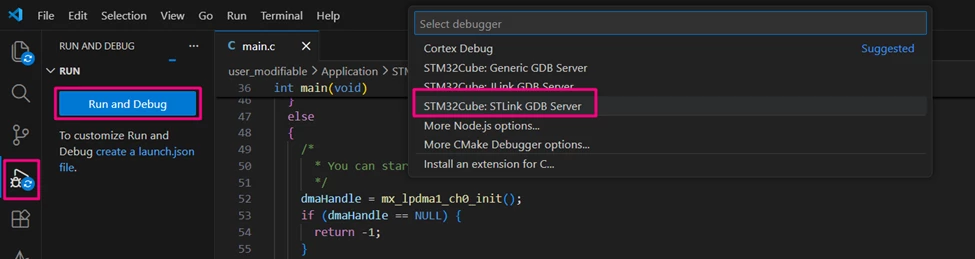
After building the application, locate the [Run and Debug] icon, create your debug session by selecting the STM32Cube: STLINK GDB Server option:
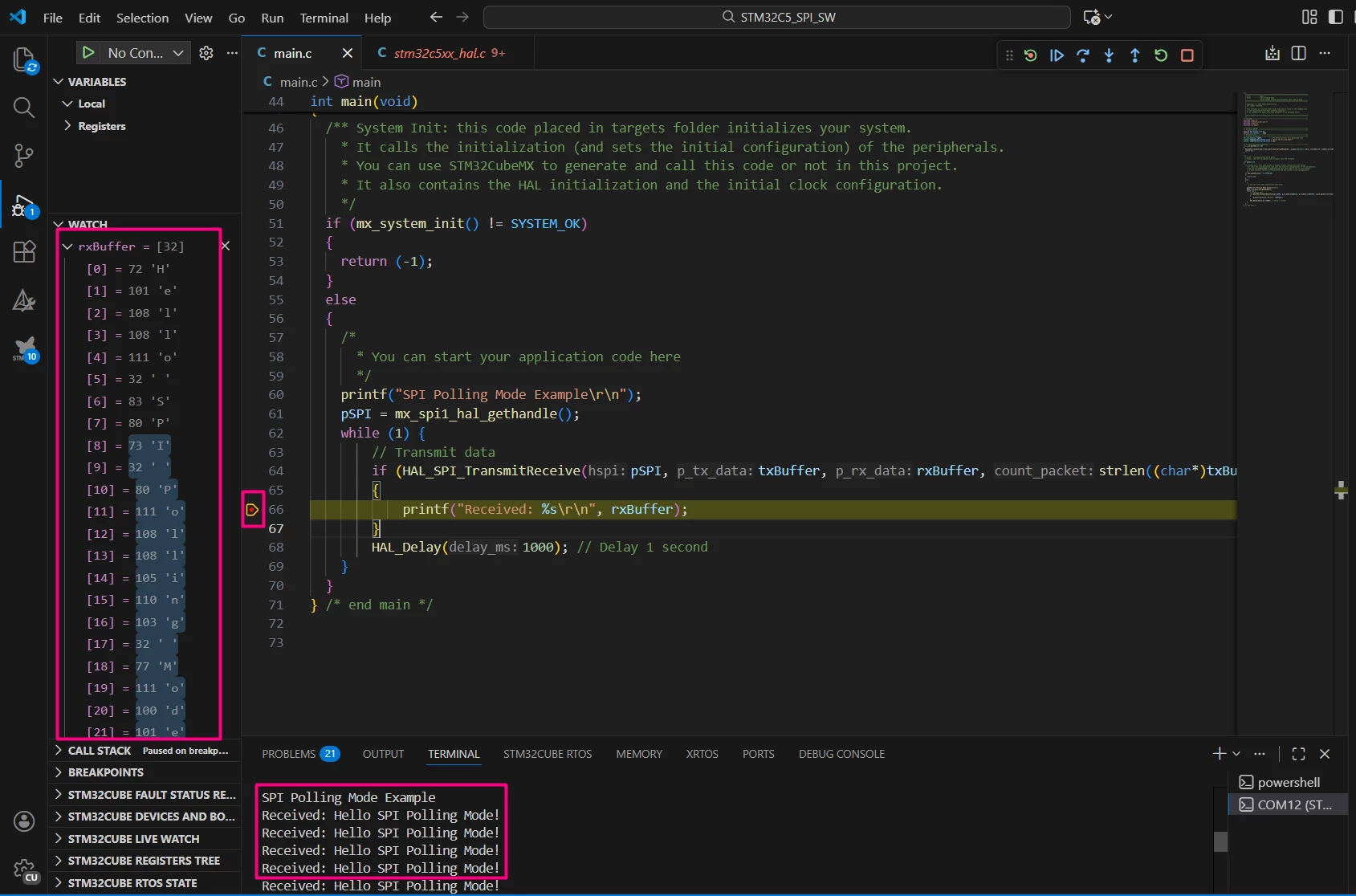
Once in debug mode and before running the code, press Ctrl+Shift+P and type [Open Serial] > COM40 (STMicroelectronics) > 115200.
3.2 Code snippets (interrupt mode)
SPI can be used with interrupts to avoid blocking the CPU during data transfer. This is a simple example with a printf within the IRQ Handler, not ideal for real applications, but poses as a simple way to demonstrate the callback and interrupt functionality.
3.2.1 STM32CubeMX2 configuration
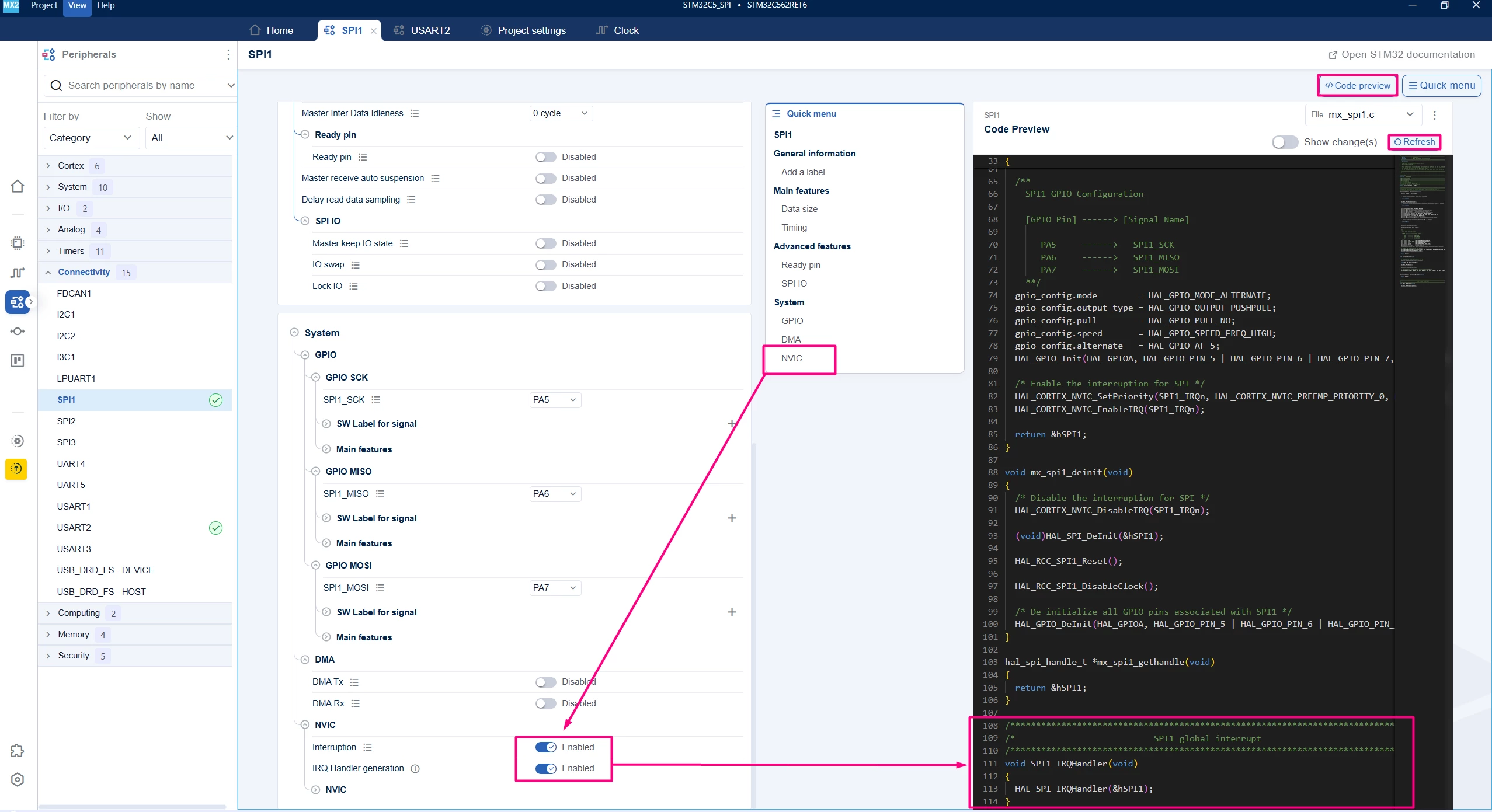
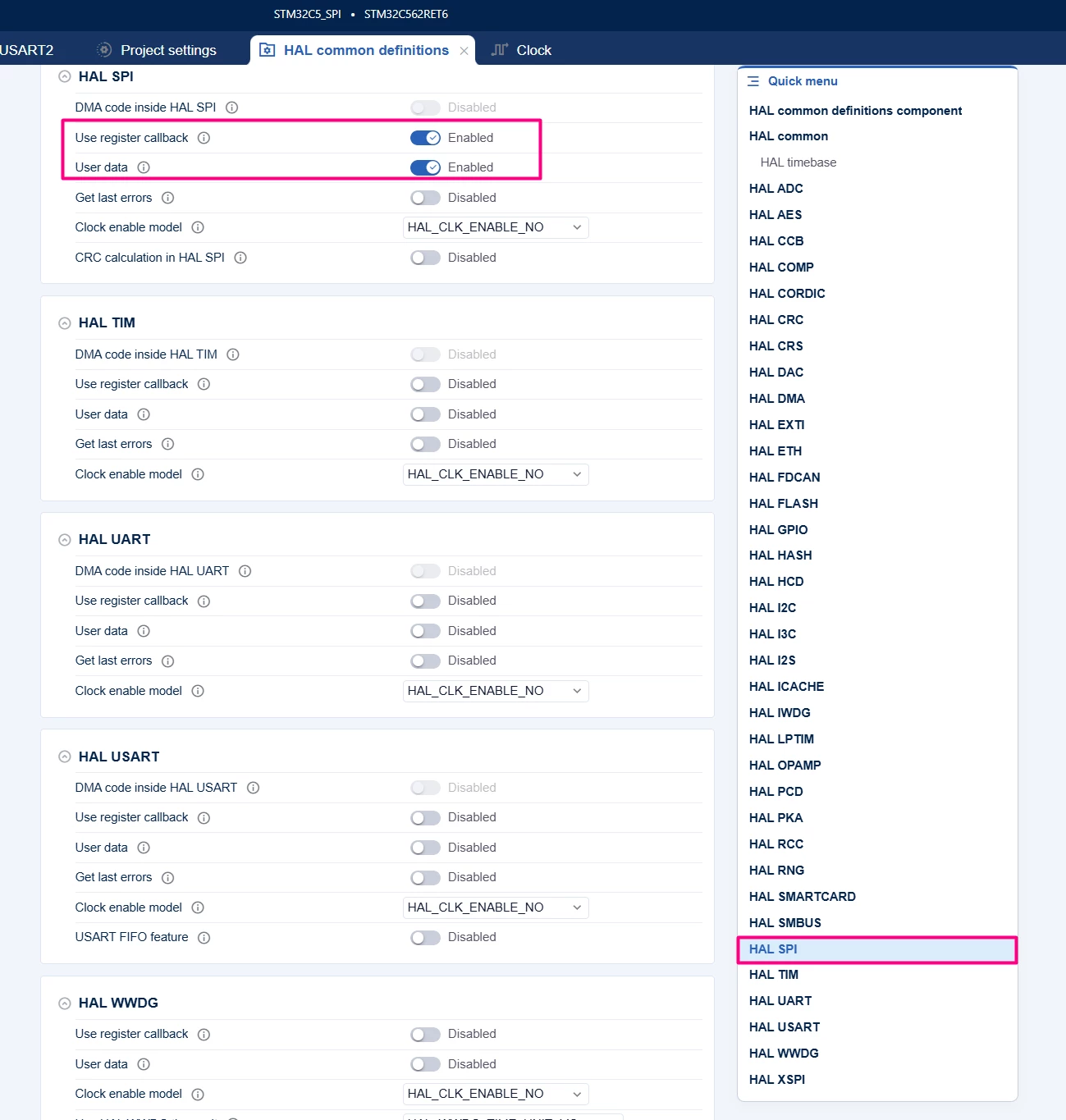
Enable [Global Interrupt] and [IRQ handler generation] under the "System" tab.
Assigning the interrupt callback.
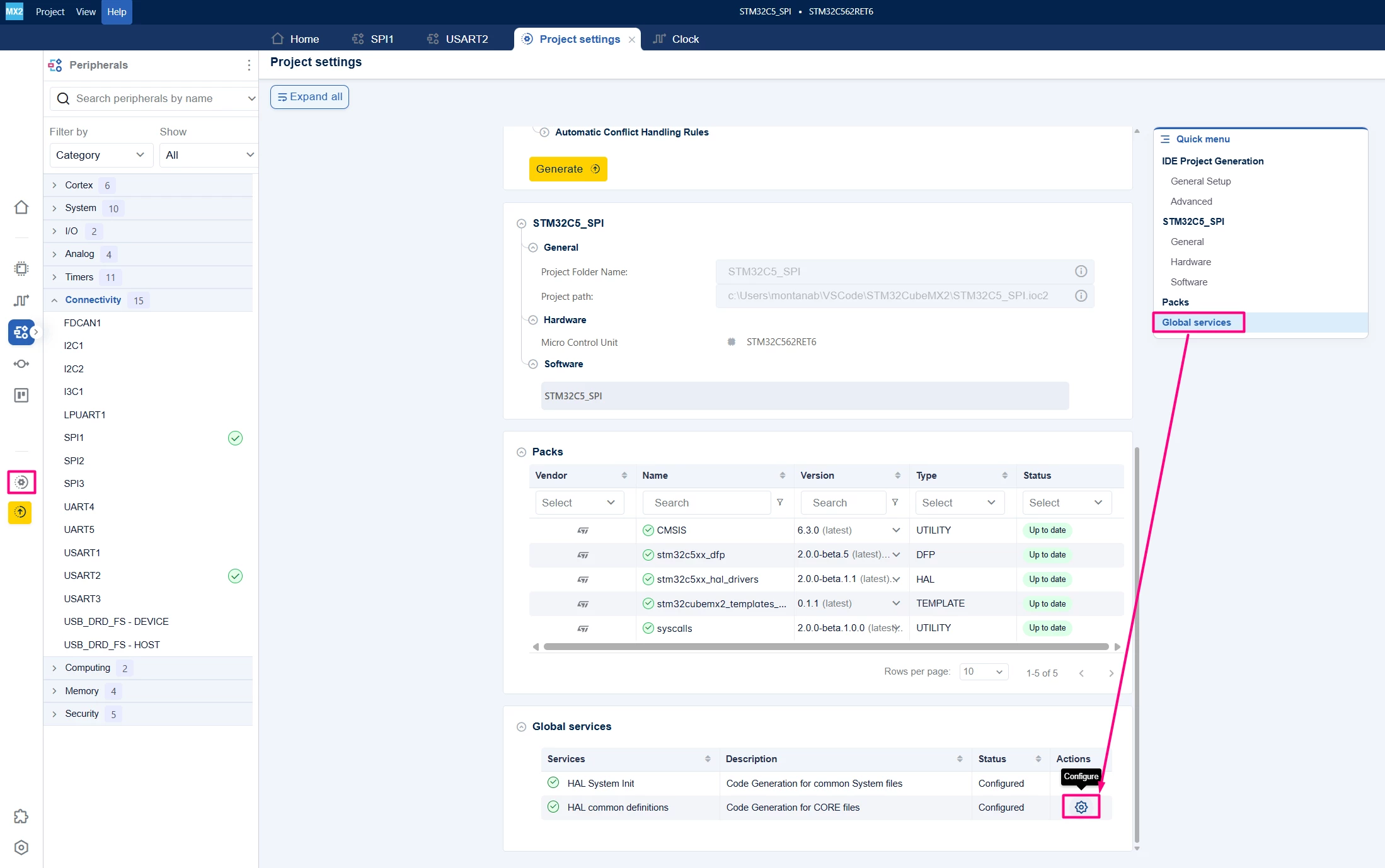
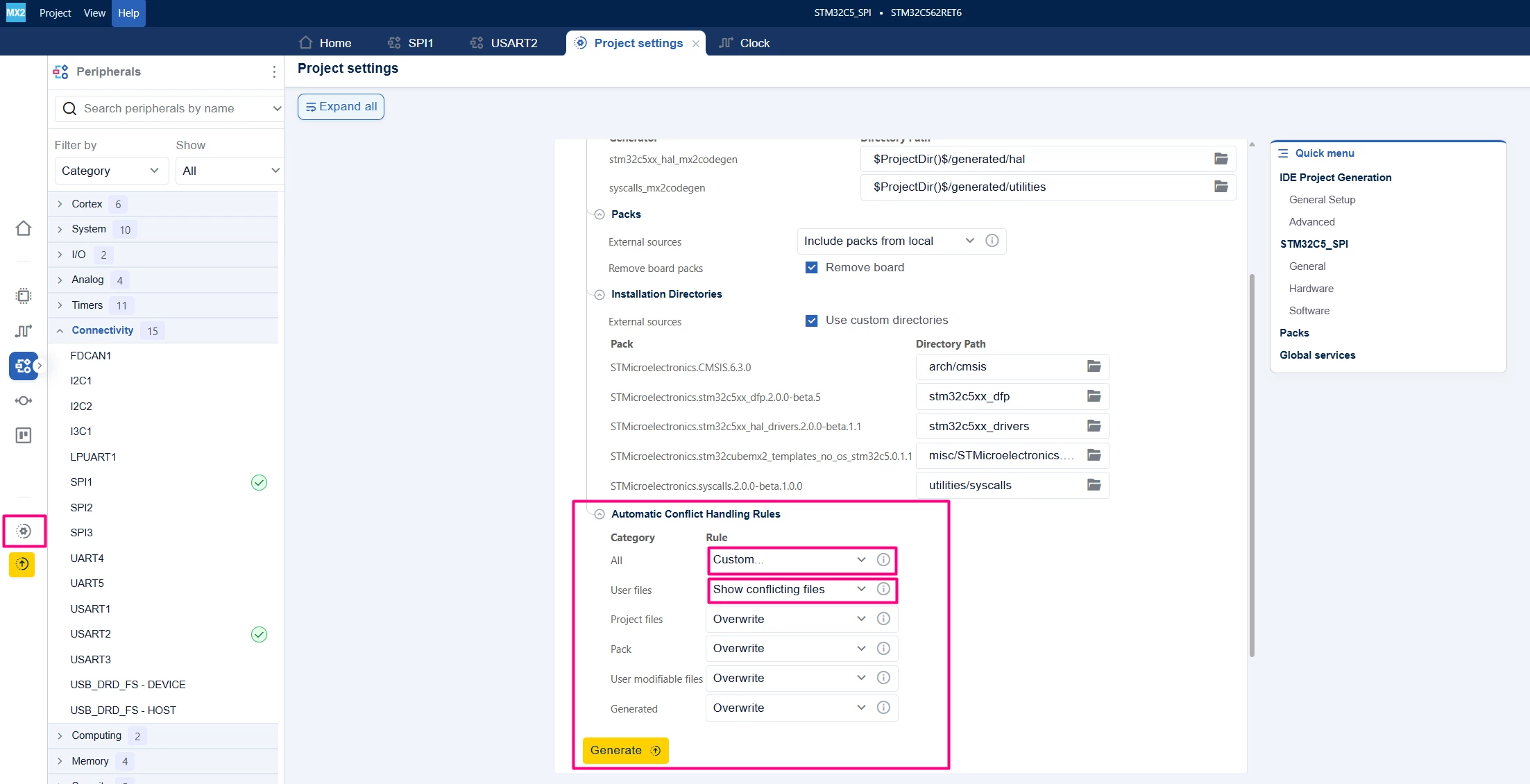
Generate the code with the updates. It is possible to keep the current main.c content by editing the Conflicting Handling Rules.
In main.c:
/**
 ******************************************************************************
 * file : main.c
 * brief : Main program body
 * Calls target system initialization then loop in main.
 ******************************************************************************
 *
 * Copyright (c) 2025 STMicroelectronics.
 * All rights reserved.
 *
 * This software is licensed under terms that can be found in the LICENSE file
 * in the root directory of this software component.
 * If no LICENSE file comes with this software, it is provided AS-IS.
 *
 ******************************************************************************
 */
/* Includes ------------------------------------------------------------------*/
#include "main.h"
#include "stm32c5xx_hal_spi.h"
#include <stdio.h>
#include <string.h>
/* Private typedef -----------------------------------------------------------*/
/* Private define ------------------------------------------------------------*/
#define MAX_BUFFER_SIZE 32
#define SPI_TIMEOUT 1000
#define USE_INT
/* Private macro -------------------------------------------------------------*/
/* Private variables ---------------------------------------------------------*/
#ifdef USE_POLLING
uint8_t txBuffer[MAX_BUFFER_SIZE] = "Hello SPI Polling Mode!";
#else
uint8_t txBuffer[MAX_BUFFER_SIZE] = "Hi";
#endif
uint8_t rxBuffer[MAX_BUFFER_SIZE] = {0};
hal_spi_handle_t *pSPI;
/* Private functions prototype -----------------------------------------------*/
int __io_putchar(int ch) {
 HAL_UART_Transmit(mx_usart2_uart_gethandle(), (uint8_t *)&ch, 1, 100);
 return ch;
}
#ifdef USE_INT
/* SPI receive complete callback */
void HAL_SPI_TxRxCpltCallback(hal_spi_handle_t *hspi)
{
 printf("Received: %s\r\n", rxBuffer);
}
#endif
/**
 * brief: The application entry point.
 * retval: none but we specify int to comply with C99 standard
 */
int main(void) {
 /** System Init: this code placed in targets folder initializes your system.
 * It calls the initialization (and sets the initial configuration) of the
 * peripherals. You can use STM32CubeMX to generate and call this code or not
 * in this project. It also contains the HAL initialization and the initial
 * clock configuration.
 */
 if (mx_system_init() != SYSTEM_OK) {
 return (-1);
 } else {
 /*
 * You can start your application code here
 */
#ifdef USE_POLLING
 printf("SPI Polling Mode Example\r\n");
#else
 printf("SPI Interrupt Mode Example\r\n");
 pSPI = mx_spi1_gethandle();
 //Register the Rx only callback
 HAL_SPI_ HAL_SPI_RegisterTxRxCpltCallback(pSPI,HAL_SPI_RxCpltCallback);
#endif
 while (1) {
 HAL_Delay(1000); // Delay 1 second
#ifdef USE_POLLING
 // Transmit data
 if (HAL_SPI_TransmitReceive(mx_spi1_gethandle(), txBuffer, rxBuffer,
 strlen((char *)txBuffer),
 SPI_TIMEOUT) == HAL_OK) {
 printf("Received: %s\r\n", rxBuffer);
 }
 #else
 // Send 2 Bytes
 HAL_SPI_TransmitReceive_IT(pSPI, txBuffer, rxBuffer, 2);
#endif

 }
 }
} /* end main */
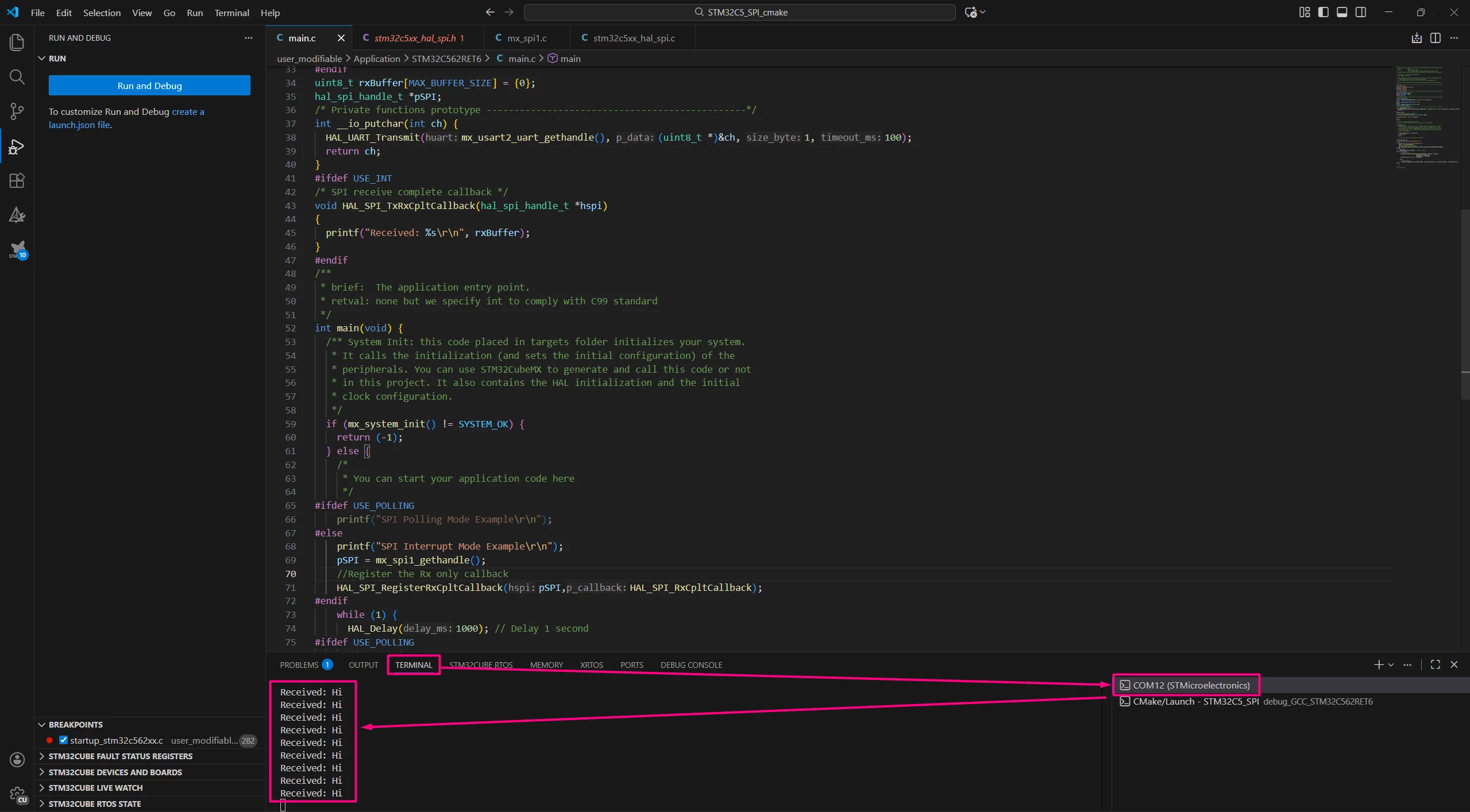
To validate the example, compile and enter in debug mode. The terminal should already be opened. Make sure to select it on the right side of the Terminal tab.
3.3 Code Snippets (DMA Mode)
Using DMA with SPI allows large data transfers with minimal CPU intervention and the overall process is similar to adding an interrupt.
3.3.1 STM32CubeMX2 Configuration
Enable DMA for SPI Tx and Rx in the System → DMA section. Enable [Global Interrupt] and [IRQ handler generation] for DMA.
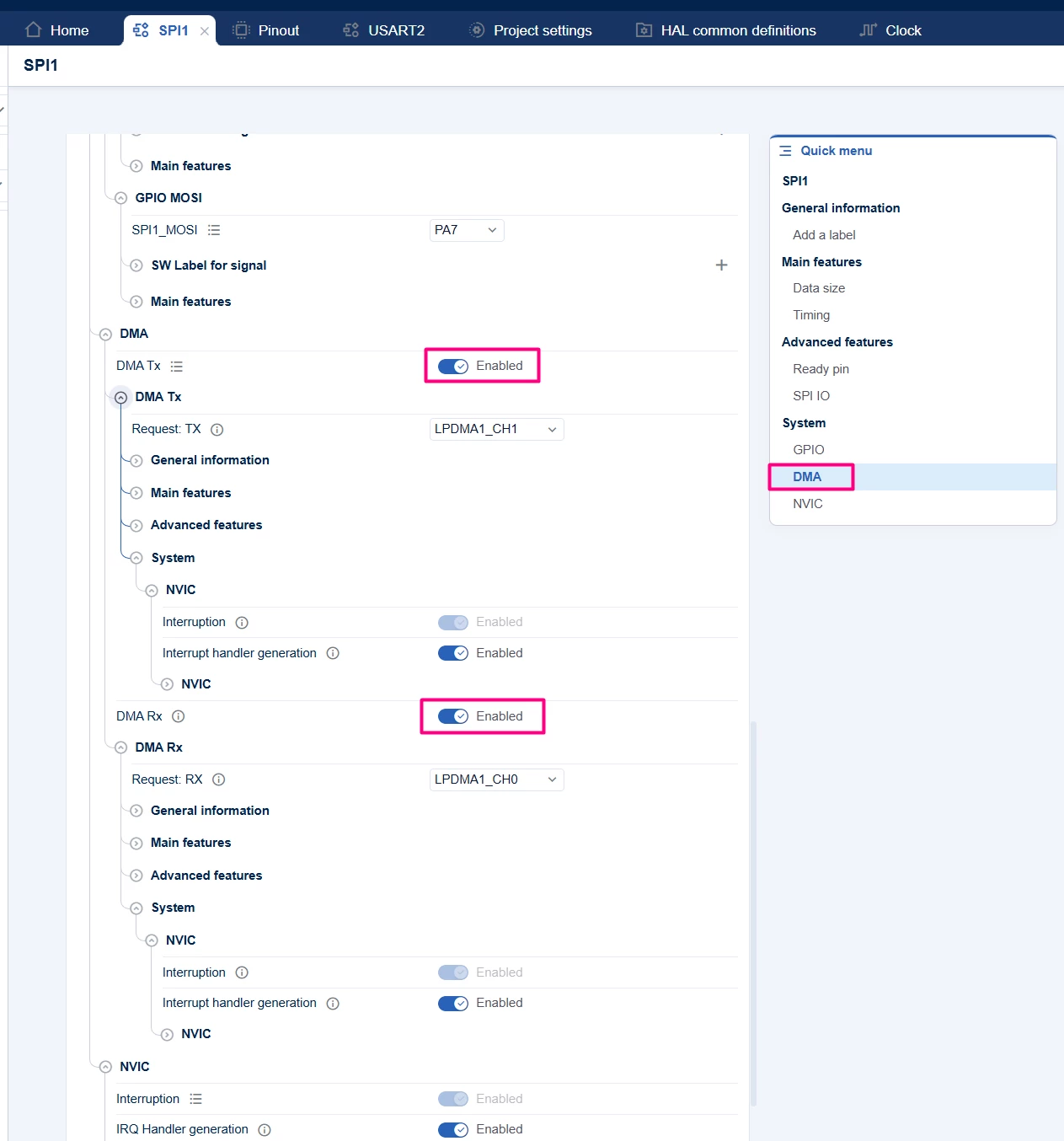
The main features should be properly populated, such as the direction, address incrementing, and data width.
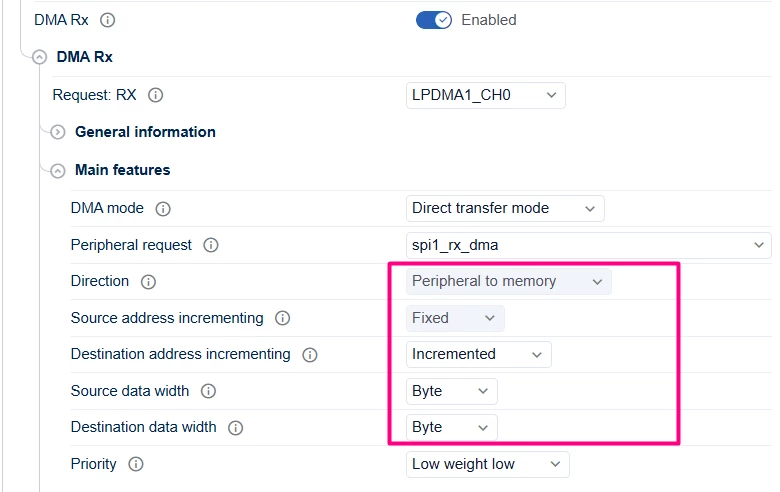
Upon making the changes, regenerate the project.
/**
 ******************************************************************************
 * file : main.c
 * brief : Main program body
 * Calls target system initialization then loop in main.
 ******************************************************************************
 *
 * Copyright (c) 2025 STMicroelectronics.
 * All rights reserved.
 *
 * This software is licensed under terms that can be found in the LICENSE file
 * in the root directory of this software component.
 * If no LICENSE file comes with this software, it is provided AS-IS.
 *
 ******************************************************************************
 */
/* Includes ------------------------------------------------------------------*/
#include "main.h"
#include "stm32c5xx_hal_spi.h"
#include <stdio.h>
#include <string.h>
/* Private typedef -----------------------------------------------------------*/
/* Private define ------------------------------------------------------------*/
#define MAX_BUFFER_SIZE 32
#define SPI_TIMEOUT 1000
//#define USE_POLLING
//#define USE_INT
#define USE_DMA
/* Private macro -------------------------------------------------------------*/
/* Private variables ---------------------------------------------------------*/
#ifdef USE_POLLING
uint8_t txBuffer[MAX_BUFFER_SIZE] = "Hello SPI Polling Mode!";
#else
uint8_t txBuffer[MAX_BUFFER_SIZE] = "Hi";
#endif
uint8_t rxBuffer[MAX_BUFFER_SIZE] = {0};
hal_spi_handle_t *pSPI;
/* Private functions prototype -----------------------------------------------*/
int __io_putchar(int ch) {
 HAL_UART_Transmit(mx_usart2_uart_gethandle(), (uint8_t *)&ch, 1, 100);
 return ch;
}
#ifdef USE_INT
/* SPI receive complete callback */
void HAL_SPI_TxRxCpltCallback(hal_spi_handle_t *hspi)
{
 printf("Received: %s\r\n", rxBuffer);
}
#endif
#ifdef USE_DMA
void HAL_SPI_DMA_RxCpltCallback(hal_spi_handle_t *hspi)
{
 printf("Received via DMA: %s\r\n", rxBuffer);
}
#endif
/**
 * brief: The application entry point.
 * retval: none but we specify int to comply with C99 standard
 */
int main(void) {
 /** System Init: this code placed in targets folder initializes your system.
 * It calls the initialization (and sets the initial configuration) of the
 * peripherals. You can use STM32CubeMX to generate and call this code or not
 * in this project. It also contains the HAL initialization and the initial
 * clock configuration.
 */
 if (mx_system_init() != SYSTEM_OK) {
 return (-1);
 } else {
 /*
 * You can start your application code here
 */
#ifdef USE_POLLING
 printf("SPI Polling Mode Example\r\n");
#else
 #if USE_INT
 printf("SPI Interrupt Mode Example\r\n");
 pSPI = mx_spi1_gethandle();
 //Register the Rx only callback
 HAL_SPI_RegisterTxRxCpltCallback(pSPI,HAL_SPI_RxCpltCallback);
 #else
 printf("SPI DMA Mode Example\r\n");
 pSPI = mx_spi1_gethandle();
 //Register the Rx only callback
 HAL_SPI_RegisterTxRxCpltCallback(pSPI,HAL_SPI_DMA_RxCpltCallback);
 #endif
#endif
 while (1) {
 HAL_Delay(1000); // Delay 1 second
#ifdef USE_POLLING
 // Transmit data
 if (HAL_SPI_TransmitReceive(mx_spi1_gethandle(), txBuffer, rxBuffer,
 strlen((char *)txBuffer),
 SPI_TIMEOUT) == HAL_OK) {
 printf("Received: %s\r\n", rxBuffer);
 }
 #else
 #if USE_INT
 // Send 2 Bytes
 HAL_SPI_TransmitReceive_IT(pSPI, txBuffer, rxBuffer, 2);
 #else
 // Send 2 Bytes via DMA
 HAL_SPI_TransmitReceive_DMA(pSPI, txBuffer, rxBuffer, 2);
 #endif
#endif
 }
 }
} /* end main */
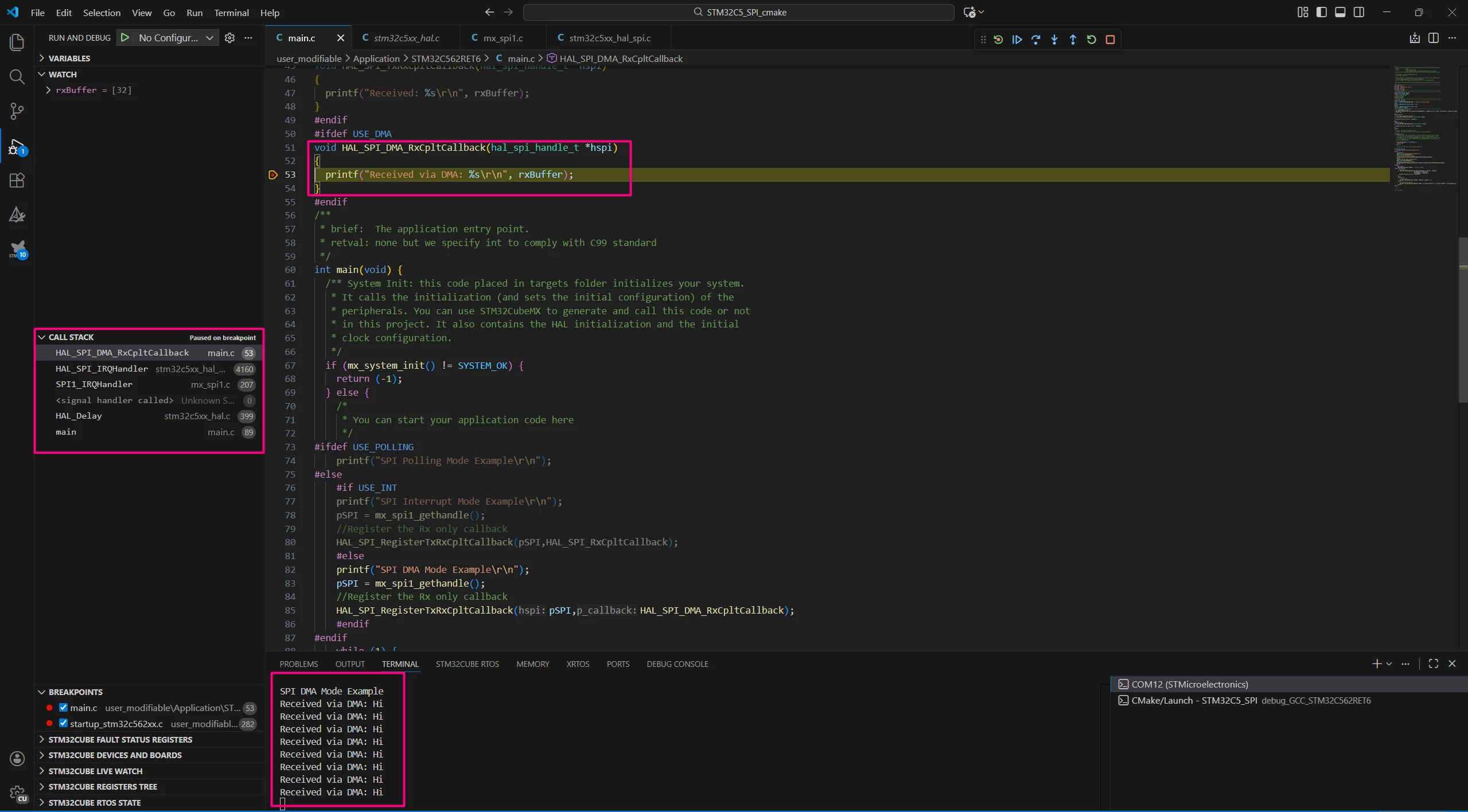
Once built, enter in debug mode, open the terminal, and check the message. A breakpoint can be added in the custom callback.
Conclusion
This tutorial provides a comprehensive guide to setting up SPI communication on the NUCLEO-C562RE board using STM32CubeMX2 and STM32Cube for Visual Studio Code. It covers three communication strategies: Polling, Interrupt, and DMA, allowing users to select the most appropriate method for their application.
With this knowledge, users can implement efficient SPI data transfers, from simple blocking operations to advanced nonblocking DMA techniques, optimizing CPU usage, and system performance.
