


How to use RAM ECC on STM32C5
- June 4, 2026 at 4:13 PM
- 0 replies
- 360 views
Introduction
STM32C5 devices integrate a RAM configuration controller (RAMCFG) that provides error code correction (ECC) on internal SRAM. On STM32C5, ECC is available only on SRAM2. ECC allows the following:
- Detect and correct single-bit errors with interrupt generation.
- Detect double-bit errors with interrupt or NMI generation.
- Report the failing address.
This document explains how to enable and use RAM ECC on STM32C5, based on RM0522 (RAMCFG chapter), and provides:
- A summary of the ECC hardware.
- A typical use case.
- A code-level configuration proposal.
- An example, including ECC self-test (error injection).
- Introduction
- Prerequisites
- 1. Summary of STM32C5 RAM ECC
- 1.1 Supported SRAM for ECC
- 1.2 SRAM2 ECC coverage and memory mapping
- 1.3 ECC mechanism
- 1.4 Error types and status
- 1.5 RAMCFG control overview (SRAM2)
- 2. Typical use case
- 3. Code-level configuration proposal
- 3.1 STM32CubeMX2 project creation and basic setup
- 3.1.1 Project creation
- 3.1.2 Configuration
- 3.2 Code generation
- 4. Configuring the project in Visual Studio Code
- 5. Code editing
- 5.1 ECC interrupt handler (RAMCFG IRQ)
- 5.2 SRAM2 software erase
- 5.3 Example: ECC self-test (single and double error injection)
- 6. Test code configuration
- 6.1 Validation
- Conclusion
- Related links
Prerequisites
Install the following tools:
- STM32CubeMX2
- The latest STM32C5 HAL2 driver
- STM32CubeIDE extension for Visual Studio Code
The hardware used in this tutorial is the NUCLEO-C562RE board.
1. Summary of STM32C5 RAM ECC
1.1 Supported SRAM for ECC
ECC is supported only by SRAM2 when the SRAM2_ECC user option bits are enabled.
1.2 SRAM2 ECC coverage and memory mapping
When ECC is enabled for SRAM2, the entire SRAM2 is protected by ECC.
|
Product |
SRAM2 S bus address range |
SRAM2 size |
ECC |
|
STM32C53x/54 |
0x20008000 – 0x2000FFFF |
32 KB |
Yes |
|
STM32C55x/56 |
0x20010000 – 0x2001FFFF |
64 KB |
Yes |
|
STM32C59x/5A |
0x20020000 – 0x2003FFFF |
128 KB |
Yes |
CMSIS defines this as SRAM2_BASE.
1.3 ECC mechanism
- For every 32-bit data word, 7 ECC bits are stored. Each protected word has 39 bits.
- ECC is computed on every write and checked on every read.
- For byte and half-word writes, the interface performs a read–modify–write of the full word. This adds two AHB cycles of latency.
- The read–modify–write occurs through a buffer and is committed two AHB cycles after SRAM AHB is released. Plan timing accordingly if you perform tightly coupled accesses.
1.4 Error types and status
Single error:
- Automatically corrected in hardware.
- SEDC flag in RAMCFG_M2ISR.
- Clear the flag by writing 1 to CSEDC in RAMCFG_M2ICR.
- Optional interrupt if SEIE in RAMCFG_M2IER is set.
- Failing address latched in RAMCFG_M2SEAR if ALE in RAMCFG_M2CR is set.
- Single errors cannot be detected while SEDC remains set. Always clear it in the handler.
Double error:
- Detected but not corrected.
- DED flag in RAMCFG_M2ISR.
- Clear the flag by writing 1 to CDED in RAMCFG_M2ICR.
- Optional maskable interrupt if DEIE in RAMCFG_M2IER is set and ECCNMI = 0.
- Optional NMI if ECCNMI in RAMCFG_M2IER is set.
- Failing address latched in RAMCFG_M2DEAR if ALE is set.
- Double errors cannot be detected while DED remains set.
1.5 RAMCFG control overview (SRAM2)
Key registers for ECC (SRAM2 = memory 2):
- RAMCFG_M2CR: ECC enable (ECCE), address latch enable (ALE), start SRAM erase (SRAMER).
- RAMCFG_M2ISR: single error detected and corrected (SEDC), double error detected (DED), erase in progress (SRAMBUSY).
- RAMCFG_M2IER: single-error interrupt enable (SEIE), double-error interrupt enable (DEIE), use NMI for double errors (ECCNMI).
- RAMCFG_M2SEAR / RAMCFG_M2DEAR: single/double error address.
- RAMCFG_M2ICR: clear SEDC (CSEDC), clear DED (CDED).
- RAMCFG_M2ECCKEYR: ECC key (unlock ECCE). Write 0xAE, then 0x75 to unlock the ECC enable bit.
- RAMCFG_M2ERKEYR: erase key (unlock SRAMER). Write 0xCA, then 0x53 to unlock the erase bit.
2. Typical use case
Use case: Robust state memory in an industrial controller
Consider an STM32C5 controlling an industrial process:
- Store critical state (setpoints, safety variables, last known safe outputs) in SRAM2.
- ECC on SRAM2 provides:
- Automatic correction of single-bit flips with a loggable event.
- Immediate detection of multi-bit errors, allowing transition to a safe state, logging of failing address, and condition-based maintenance.
Typical pattern:
- Enable ECC for SRAM2 via option bytes (once per product).
- At run time:
- Configure RAMCFG (address latch and interrupt/NMI).
- Store critical data in SRAM2.
- Implement a RAMCFG interrupt/NMI handler to log single errors and optionally refresh the affected word, and handle double errors (for example, degrade mode, system reset, fail-safe).
3. Code-level configuration proposal
3.1 STM32CubeMX2 project creation and basic setup
Follow these steps to create an application project for the NUCLEO-C562RE board. This exercise creates a simple SRAM2 ECC application.
3.1.1 Project creation
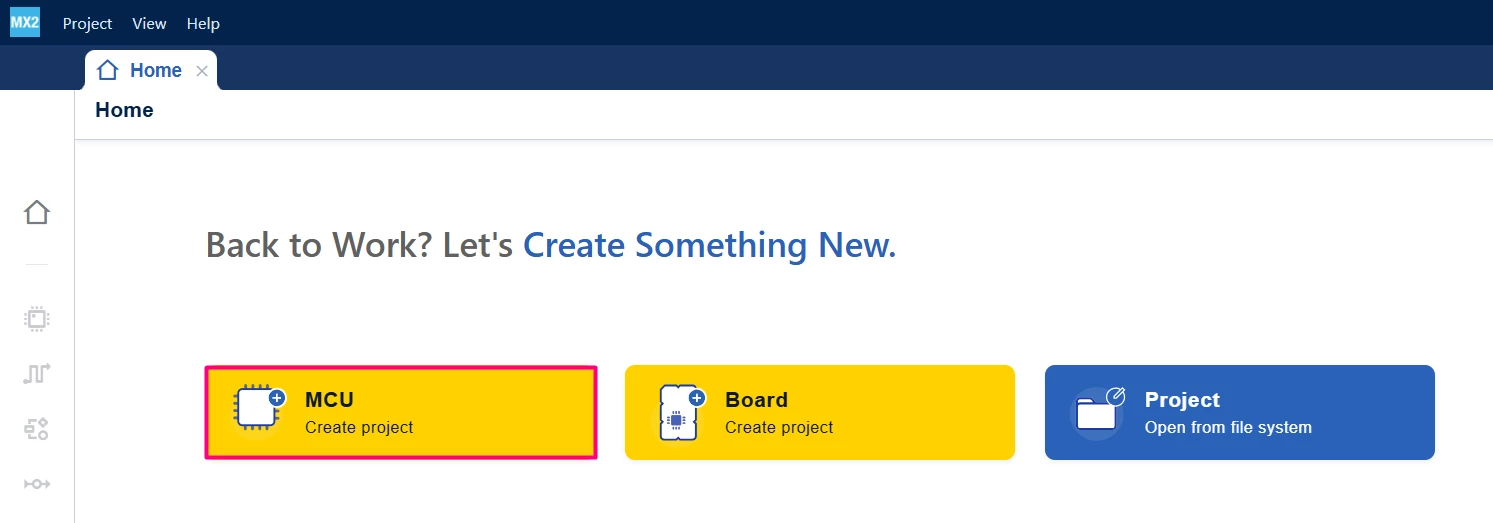
Open STM32CubeMX2. On the "Home" page, click the MCU square to create a new project.
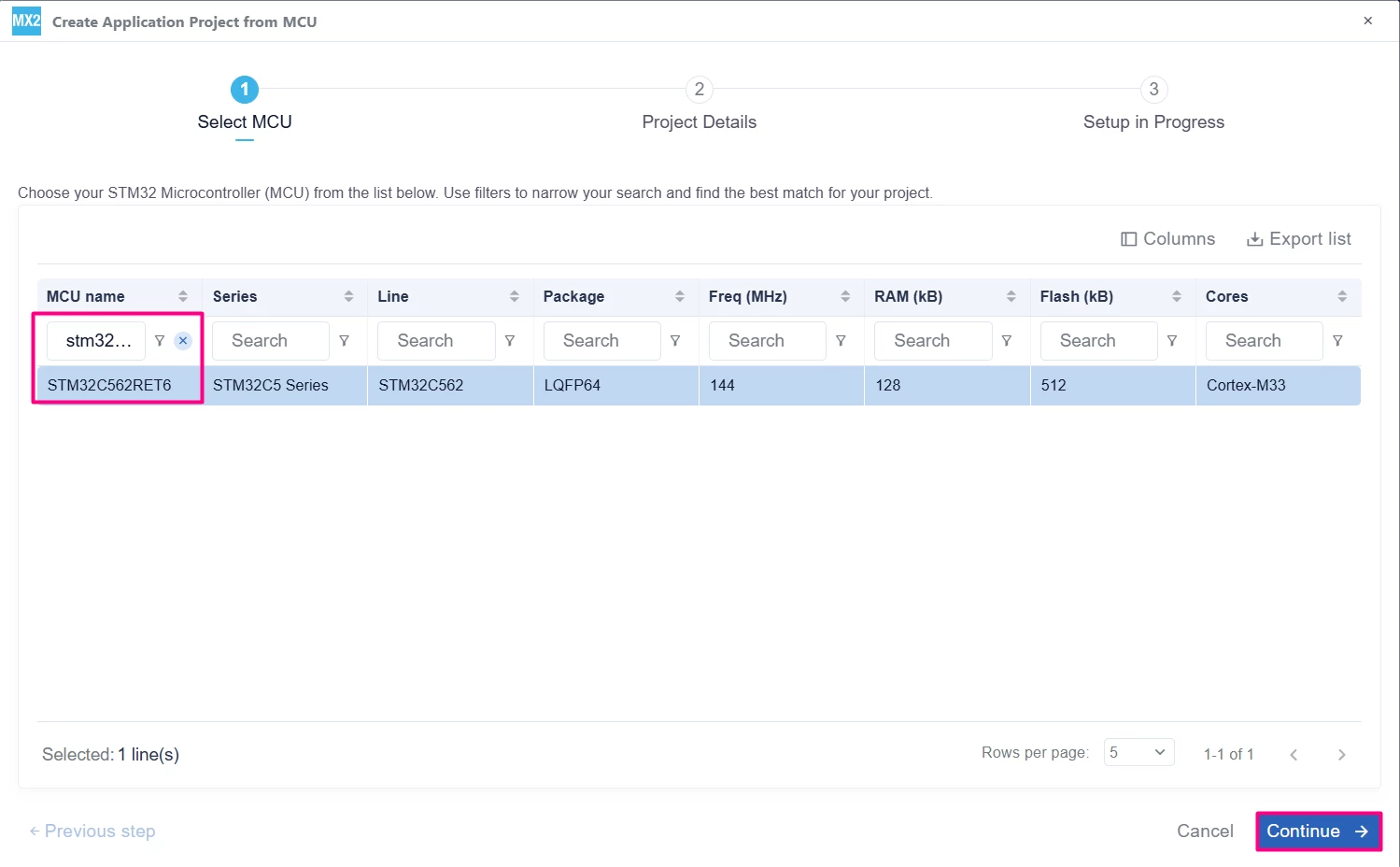
In the search field under MCU name, enter STM32C562RE and select the MCU. Click [Continue].
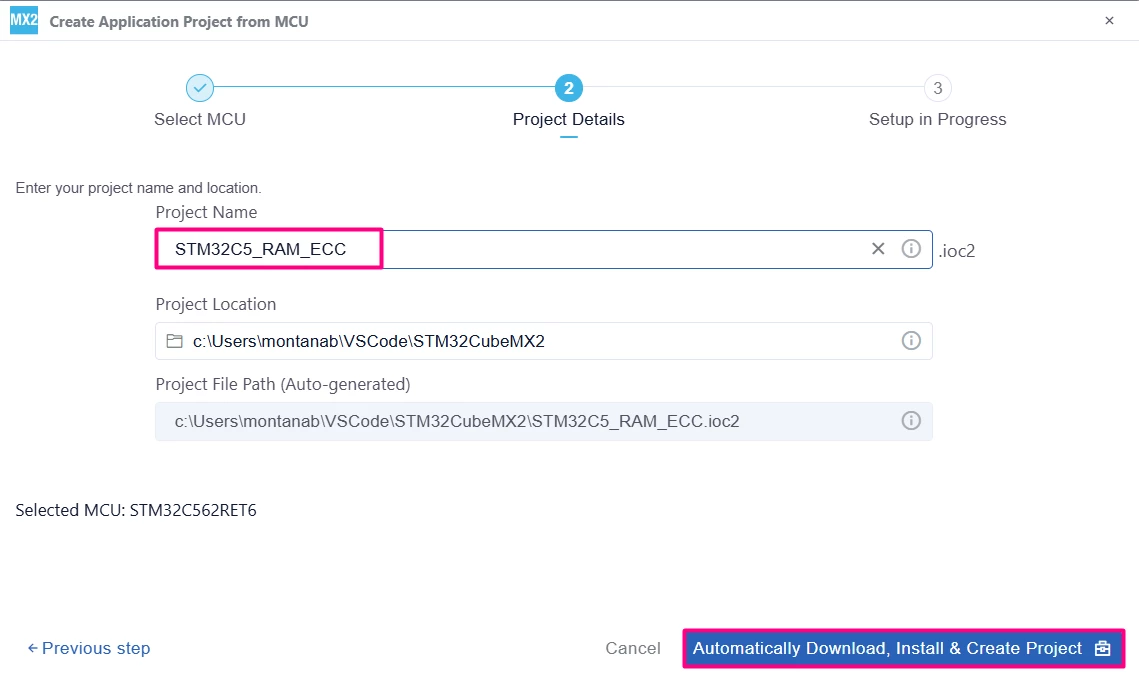
Enter the project name and location. Click [Automatically Download, Install & Create Project] to finish project creation.
Click [Launch Project] to start.

3.1.2 Configuration
In STM32CubeMX2, go to the [Peripherals] section, then click [Memory]. Enable the RAMCFG-SRAM2 with the ECC.
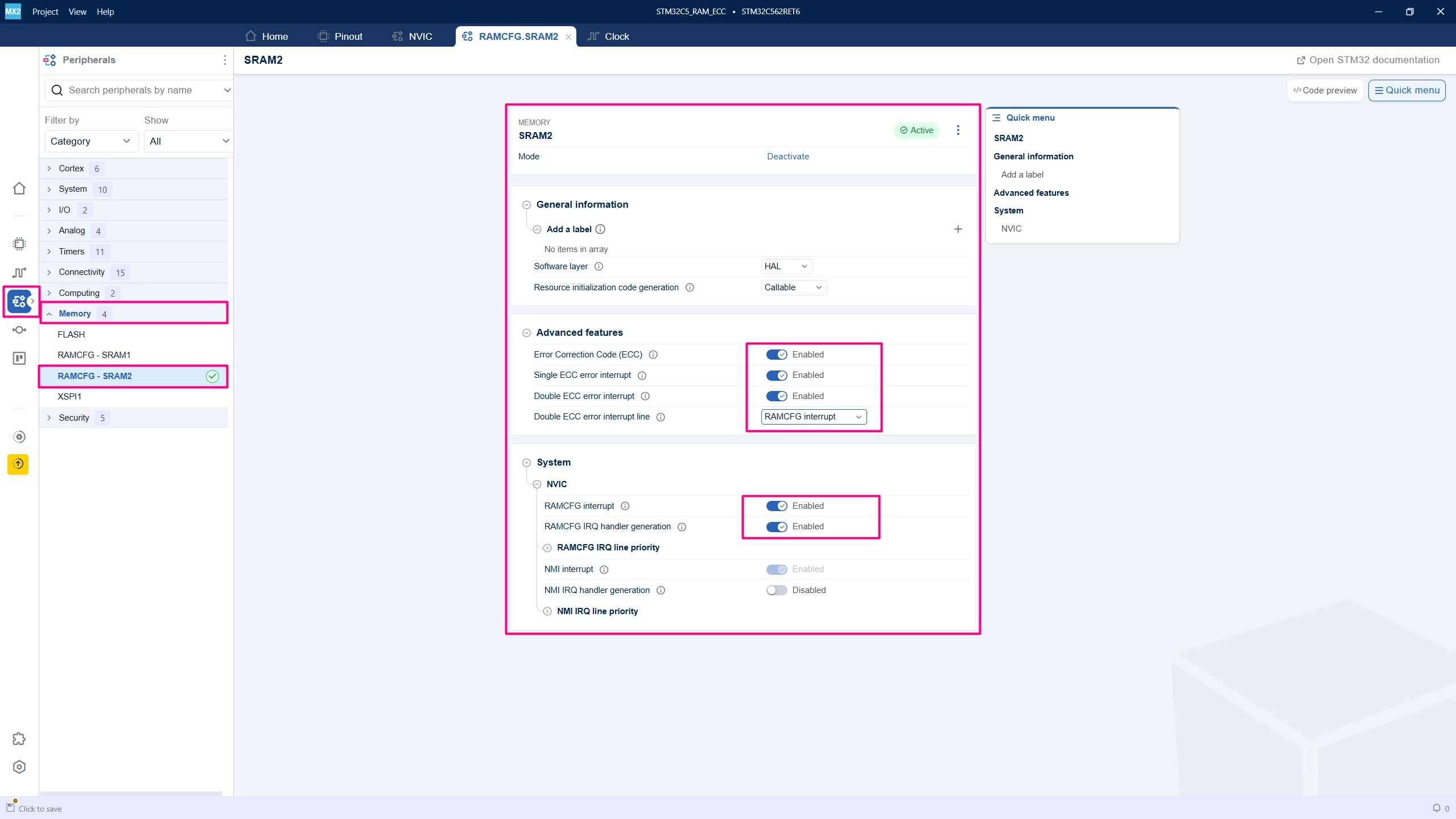
3.2 Code generation
To generate the code:
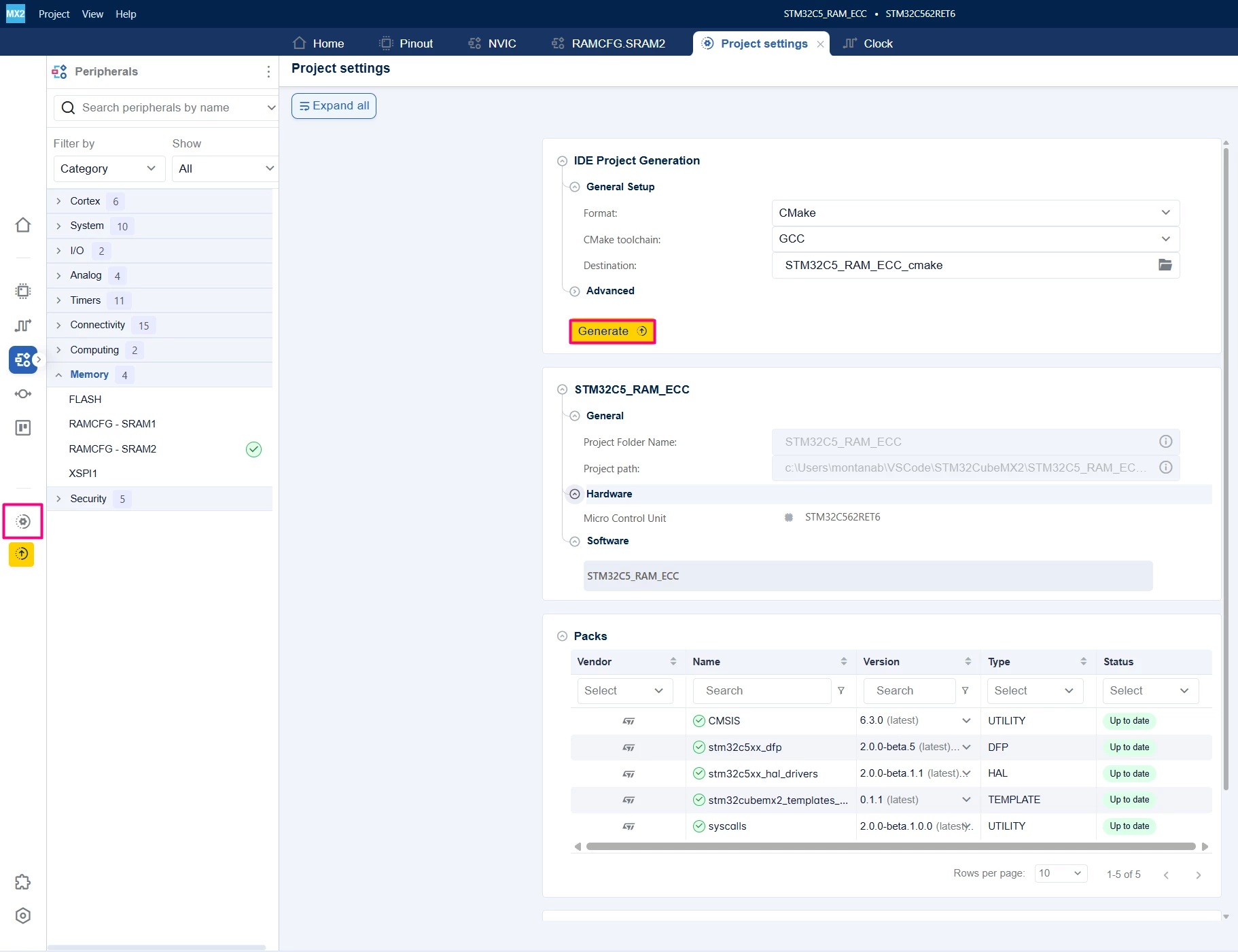
- Click on the [Project settings] icon and select the desired IDE.
- Click the [Generate] button.
4. Configuring the project in Visual Studio Code
Open Visual Studio Code and open the project folder.
If prompted, select the configuration. If not prompted, press Ctrl+Shift+P, type CMake: Select Configure Preset, and choose the debug configuration.

Build the project to ensure everything is set, then proceed to code implementation.
5. Code editing
The code aims to create two user functions, the first function to trigger the single bit error and the second function to trigger the double bit error. Both use the first position of SRAM2 0x2001 0000 as base.
5.1 ECC interrupt handler (RAMCFG IRQ)
This handler is called after checking for single or double errors, reads and logs the failing address, and clears the corresponding flags.
__WEAK hal_status_t HAL_RAMCFG_ECC_ErrorCallback(hal_ramcfg_t instance)5.2 SRAM2 software erase
RAMCFG can erase the entire SRAM2 by writing zero to all locations.
hal_status_t HAL_RAMCFG_MassErase(hal_ramcfg_t instance, uint32_t timeout)5.3 Example: ECC self-test (single and double error injection)
RM0522 proposes a software sequence to test the ECC mechanism:
- On erased memory, write data with ECC enabled.
- Disable ECC.
- Write the same data with one or two-bit modifications.
- Enable ECC again.
- Read the data. ECC logic detects and (for single error) corrects the word and sets the corresponding flags or interrupts.
6. Test code configuration
main.c
/**
 ******************************************************************************
 * file : main.c
 * brief : Main program body
 * Calls target system initialization then loop in main.
 ******************************************************************************
 *
 * Copyright (c) 2025 STMicroelectronics.
 * All rights reserved.
 *
 * This software is licensed under terms that can be found in the LICENSE file
 * in the root directory of this software component.
 * If no LICENSE file comes with this software, it is provided AS-IS.
 *
 ******************************************************************************
 */
/* Includes ------------------------------------------------------------------*/
#include "main.h"

/* Private typedef -----------------------------------------------------------*/
/* Private define ------------------------------------------------------------*/
#define TEST_WORD_ADDR ((volatile uint32_t *)SRAM2_BASE)
/* Private macro -------------------------------------------------------------*/
/* Private variables ---------------------------------------------------------*/
/* Private functions prototype -----------------------------------------------*/
hal_status_t HAL_RAMCFG_ECC_ErrorCallback(hal_ramcfg_t instance)
{
 /* Prevent unused argument(s) compilation warning */
 STM32_UNUSED(instance);

 return HAL_ERROR;
}

void RAM_ECC_Test_SingleError(void)
{
 uint32_t pattern = 0x12345678;
 uint32_t tmp;

 HAL_RAMCFG_MassErase(HAL_RAMCFG_SRAM2,1000);
 HAL_RAMCFG_ECC_Enable_IT(HAL_RAMCFG_SRAM2, HAL_RAMCFG_IT_ECC_SINGLE | HAL_RAMCFG_IT_ECC_DOUBLE);
 *TEST_WORD_ADDR = pattern;

 HAL_RAMCFG_ECC_Disable(HAL_RAMCFG_SRAM2);
 tmp = *TEST_WORD_ADDR;
 tmp ^= (1UL << 3);
 *TEST_WORD_ADDR = tmp;

 HAL_RAMCFG_ECC_Enable_IT(HAL_RAMCFG_SRAM2, HAL_RAMCFG_IT_ECC_SINGLE | HAL_RAMCFG_IT_ECC_DOUBLE);
 volatile uint32_t read_back = *TEST_WORD_ADDR;
 (void)read_back;
}

void RAM_ECC_Test_DoubleError(void)
{
 uint32_t pattern = 0xA5A5A5A5;
 uint32_t tmp;

 HAL_RAMCFG_MassErase(HAL_RAMCFG_SRAM2,1000);
 HAL_RAMCFG_ECC_Enable_IT(HAL_RAMCFG_SRAM2, HAL_RAMCFG_IT_ECC_SINGLE | HAL_RAMCFG_IT_ECC_DOUBLE);
 *TEST_WORD_ADDR = pattern;

 HAL_RAMCFG_ECC_Disable(HAL_RAMCFG_SRAM2);
 tmp = *TEST_WORD_ADDR;
 tmp ^= (1UL << 1);
 tmp ^= (1UL << 5);
 *TEST_WORD_ADDR = tmp;

 HAL_RAMCFG_ECC_Enable_IT(HAL_RAMCFG_SRAM2, HAL_RAMCFG_IT_ECC_SINGLE | HAL_RAMCFG_IT_ECC_DOUBLE);
 volatile uint32_t read_back = *TEST_WORD_ADDR;
 (void)read_back;
}

/**
 * brief: The application entry point.
 * retval: none but we specify int to comply with C99 standard
 */
int main(void)
{
 /** System Init: this code placed in targets folder initializes your system.
 * It calls the initialization (and sets the initial configuration) of the peripherals.
 * You can use STM32CubeMX to generate and call this code or not in this project.
 * It also contains the HAL initialization and the initial clock configuration.
 */
 if (mx_system_init() != SYSTEM_OK)
 {
 return (-1);
 }
 else
 {
 /*
 * You can start your application code here
 */
 RAM_ECC_Test_SingleError();
 RAM_ECC_Test_DoubleError();
 while (1) {}
 }
} /* end main */
6.1 Validation
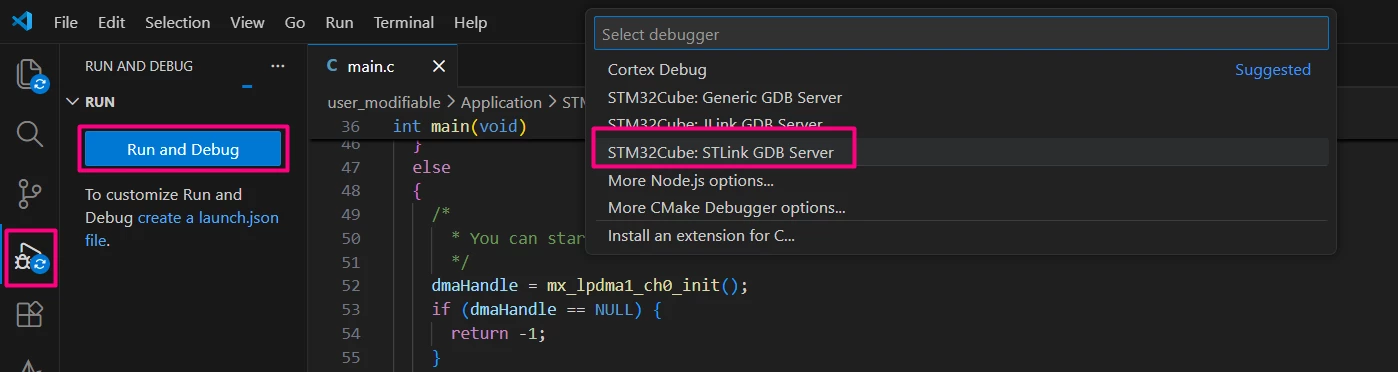
After building the application, click the [Run and Debug] icon. Create a debug session by selecting the STLINK GDB Server option.
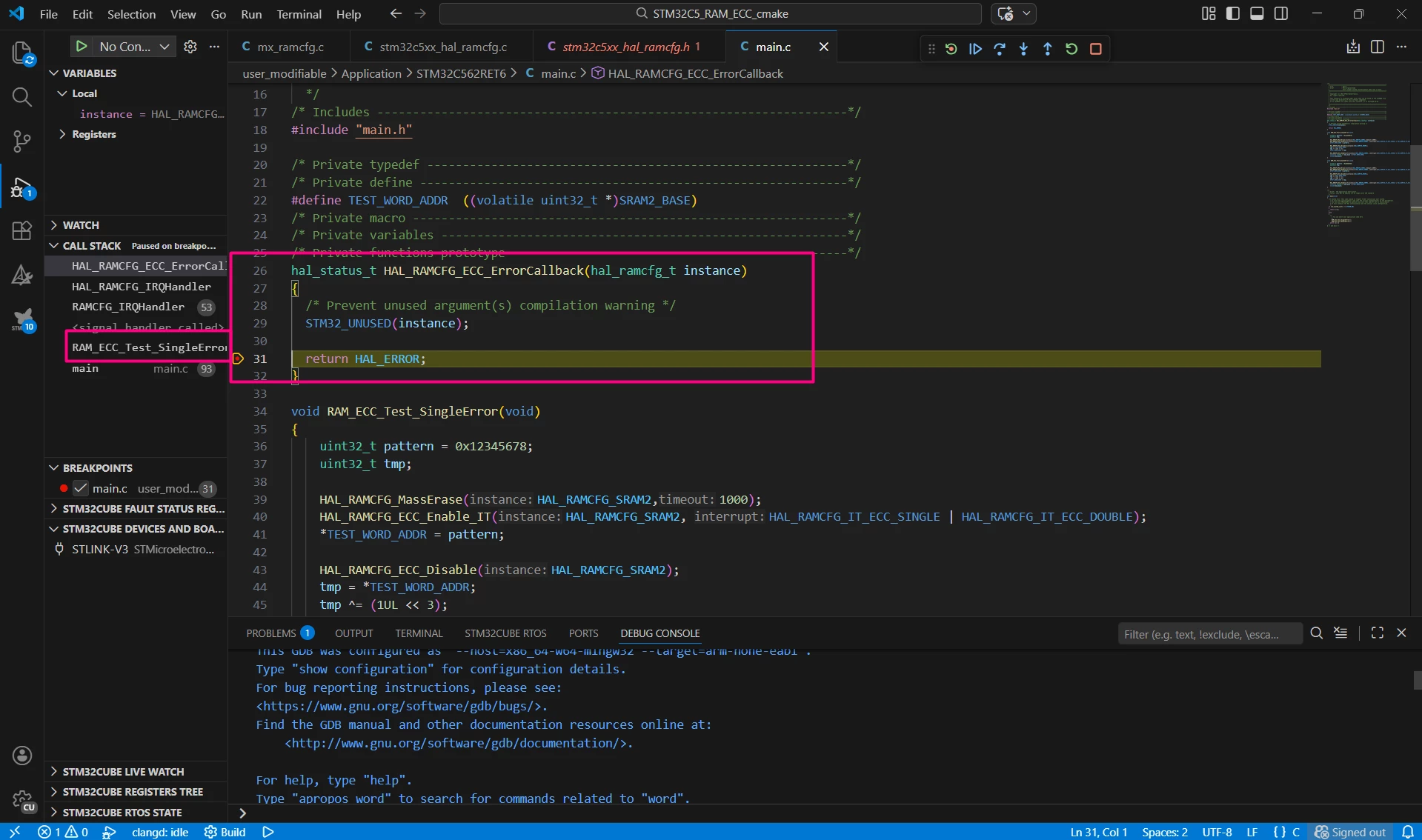
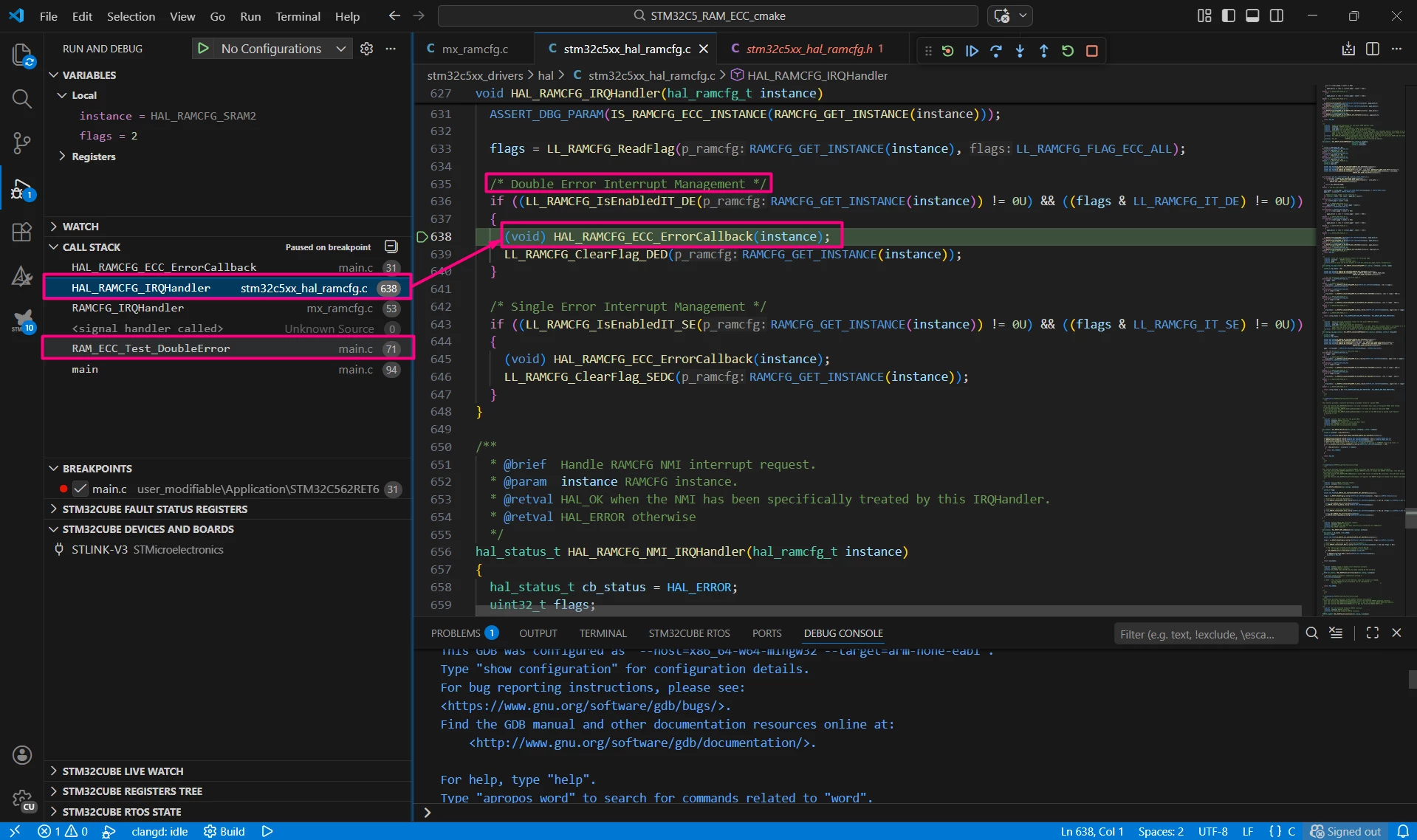
Add a breakpoint in the callback and monitor the CALL STACK.
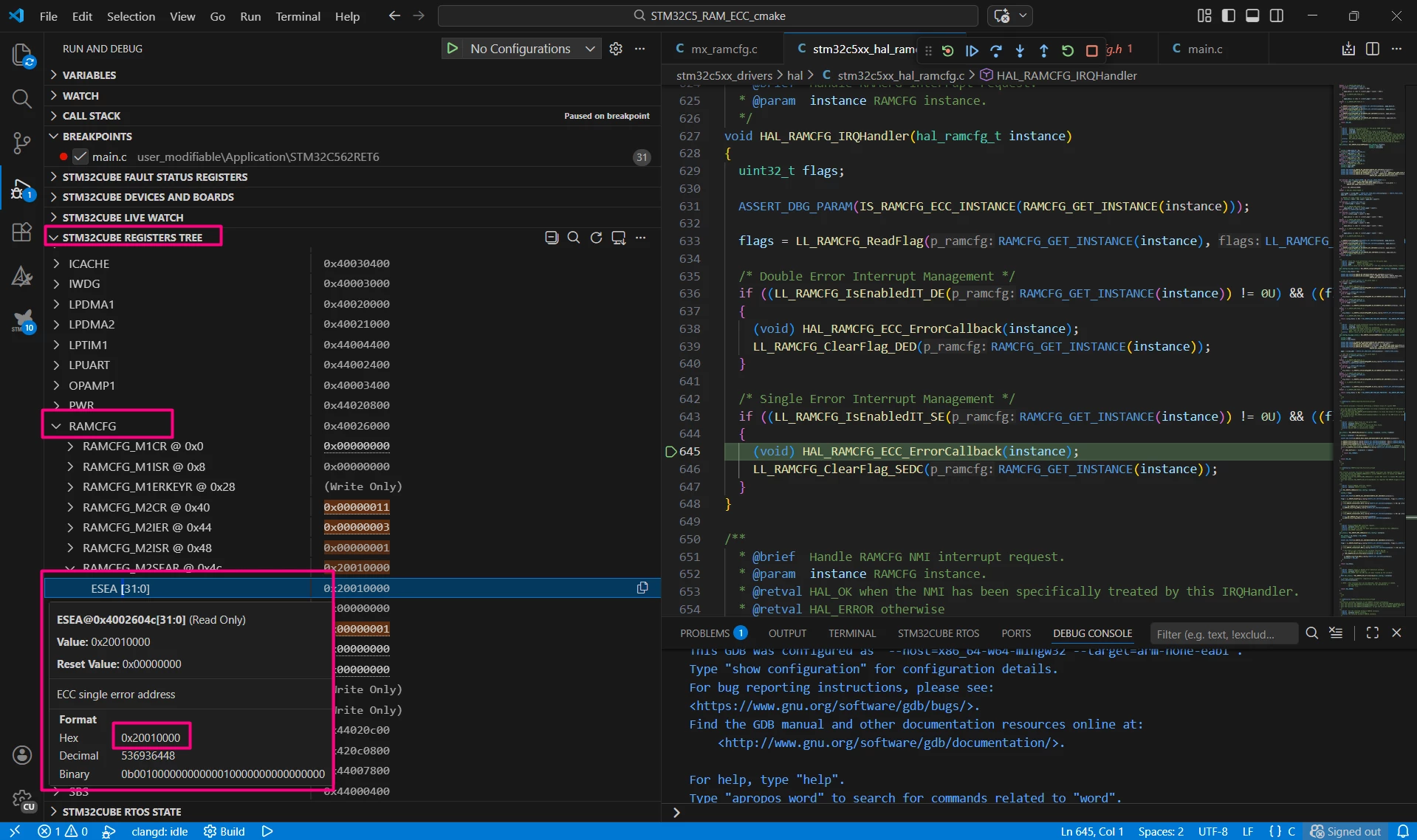
To monitor the address caused by the ECC, access the register tree. Given the used define TEST_WORD_ADDR is the first address of SRAM2 (0x2001 0000) we can observe it in the register.
When tracking the CALL STACK, it is possible to identify the error, either single or double error. The image below shows the check for double error.
Conclusion
- On STM32C5, ECC is available on SRAM2 only, managed by RAMCFG.
- ECC uses 7 parity bits per 32-bit word to correct single-bit errors and flag them (SEDC), and detect double-bit errors and flag them (DED).
- At run time, use RAMCFG_M2CR to control ECC (ECCE) and address latching (ALE).
- Use RAMCFG_M2IER, RAMCFG_M2ISR, RAMCFG_M2ICR, RAMCFG_M2SEAR, and RAMCFG_M2DEAR to configure and handle ECC interrupts and error reporting.
- Use software erase and ECC enable/disable sequences to perform ECC self-tests.
- This setup provides STM32C5 designs with a robust mechanism to maintain and monitor RAM integrity, especially for safety-critical or high-reliability applications.